
1. ആമുഖം
The Vgate vLinker MC Bluetooth 3.0 OBD2 Scanner is an advanced diagnostic tool designed for use with Android and Windows operating systems. This device transforms your mobile or desktop device into a sophisticated vehicle diagnostics and performance monitoring system. It is an upgraded version of the Vgate iCar Pro, specifically engineered for coding applications that require substantial data transmission.
The vLinker MC supports both standard OBD2 protocols and proprietary vehicle networks, including SW-CAN and MS-CAN for General Motors and Ford vehicles, respectively. This broad compatibility allows access to a wider range of vehicle data and diagnostic functions.
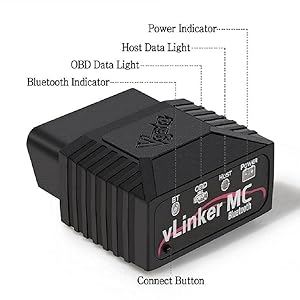
Image 1.1: Vgate vLinker MC device showing Power, Host, OBD, and Bluetooth indicators, along with the Connect Button.
2. ഉൽപ്പന്ന സവിശേഷതകൾ
- Enhanced Protocol Support: In addition to the 5 standard OBD2 protocols, it supports SW-CAN and MS-CAN protocols, enabling access to proprietary GM and Ford networks.
- ഉയർന്ന പ്രകടനം: Features a USART data buffer up to 2K bytes and a baud rate increased to 500Kbps for faster and more reliable data transmission.
- വിപുലമായ ഡയഗ്നോസ്റ്റിക്സ്: Capable of reading and clearing check engine lights and may offer advanced diagnostic functions for modules like ABS, SRS (airbags), driveline, and air conditioning, depending on the application and vehicle support.
- Battery Saver Technology: Incorporates auto sleep and wake-up modes, over-voltage, and battery drain protection. Operates at 51mA and enters a low-power sleep mode (3mA) when idle to prevent vehicle battery drain.
- വിശാലമായ അനുയോജ്യത: Fully compatible with ELM's AT command set (ELM327, ELM329) and STN's ST command set.
- ഫേംവെയർ അപ്ഡേറ്റുകൾ: Supports free firmware updates to ensure ongoing compatibility and performance improvements.
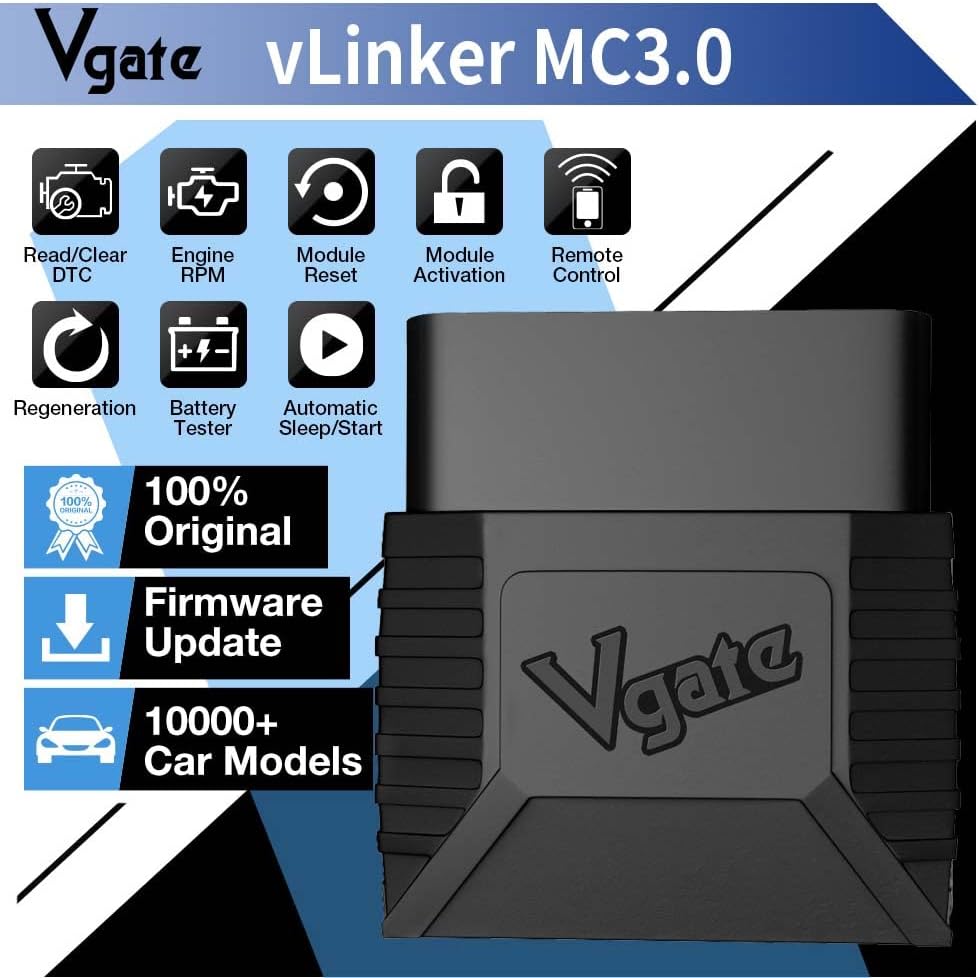
ചിത്രം 2.1: കഴിഞ്ഞുview of Vgate vLinker MC3.0 key features and capabilities.
3. Setup Instructions (Android & Windows)
Follow these steps to connect your Vgate vLinker MC Bluetooth 3.0 to your Android or Windows device. Please note that this device is not compatible with Apple iOS products.
3.1. ഹാർഡ്വെയർ കണക്ഷൻ
- Insert Device: Locate your vehicle's OBD-II port (typically under the dashboard on the driver's side) and firmly insert the Vgate vLinker MC into the port.
- ഇഗ്നിഷൻ ഓണാണ്: Turn your vehicle's ignition to the 'Key On Engine Off' (KOEO) position. Do not start the engine.
3.2. Bluetooth Pairing (Android)
- ബ്ലൂടൂത്ത് പ്രവർത്തനക്ഷമമാക്കുക: On your Android phone or tablet, go to your device settings and ensure Bluetooth is turned on.
- ഉപകരണം സജീവമാക്കുക: Press the black 'Connect' button located on the Vgate vLinker MC device. This makes the device discoverable.
- ഉപകരണം ജോടിയാക്കുക: In your phone's Bluetooth settings, search for available devices. You should find a device named "vLinker MC". Tap on it to initiate pairing.
- പിൻ നൽകുക: When prompted, enter the pairing code: 1234.
- കണക്ഷൻ സ്ഥിരീകരിക്കുക: Once pairing is successful, you can open your preferred OBD2 application to complete the connection setup within the app.
3.3. Bluetooth Pairing (Windows)
For Windows devices, the pairing process is similar to Android. Ensure Bluetooth is enabled on your Windows laptop or PC, then search for "vLinker MC" and use the PIN "1234" to pair. After pairing, configure your chosen OBD2 software to connect to the vLinker MC via Bluetooth.
കുറിപ്പ്: Application-specific connection steps may vary. Refer to the official website or documentation of your chosen OBD2 application for detailed instructions on how to establish a connection after Bluetooth pairing.
4. പ്രവർത്തന നിർദ്ദേശങ്ങൾ
Once the Vgate vLinker MC is successfully paired with your device, you can begin using it with a compatible OBD2 diagnostic application. The functionality will largely depend on the capabilities of the chosen application.
4.1. Recommended Applications
The Vgate vLinker MC is compatible with a variety of popular OBD2 applications for Android and Windows. Some recommended applications include:
- ഫോർസ്കാൻ (for Ford/Mazda specific diagnostics)
- കാരിസ്റ്റ
- ടോർക്ക് (ആൻഡ്രോയിഡ്)
- ഡാഷ് കമാൻഡ്
- JScan
- ബിമ്മർകോഡ് (for BMW specific coding)
പ്രധാനപ്പെട്ടത്: While the vLinker MC adapter is compatible with these software applications, some features or the applications themselves may require an additional purchase or subscription fee directly from the software developer.

Image 4.1: The Vgate vLinker MC Bluetooth 3.0 and examples of compatible diagnostic applications.
4.2. Basic Diagnostic Functions
With a compatible application, you can perform the following basic functions:
- ഡയഗ്നോസ്റ്റിക് ട്രബിൾ കോഡുകൾ (DTC-കൾ) വായിക്കുക: Retrieve current, pending, and permanent diagnostic trouble codes from the vehicle's Engine Control Unit (ECU).
- DTC-കൾ മായ്ക്കുക: Erase diagnostic trouble codes and turn off the Check Engine Light (MIL).
- View ഫ്രീസ് ഫ്രെയിം ഡാറ്റ: Access a snapshot of vehicle operating conditions at the time a fault code was set.
- Monitor Live Data: View real-time sensor data, such as engine RPM, vehicle speed, coolant temperature, fuel system status, and more.
- ഐ/എം സന്നദ്ധത നില: Check the status of emission-related monitors to determine if the vehicle is ready for an emissions test.

Image 4.2: List of communication protocols supported by the Vgate vLinker MC Bluetooth 3.0.
5 അനുയോജ്യത
5.1. ഓപ്പറേറ്റിംഗ് സിസ്റ്റം അനുയോജ്യത
- ആൻഡ്രോയിഡ്: Compatible with Android smartphones and tablets.
- വിൻഡോസ്: Compatible with Windows laptops and PCs.
- അനുയോജ്യമല്ല: This specific model (vLinker MC Bluetooth 3.0) is not compatible with Apple iOS devices.
5.2. വാഹന അനുയോജ്യത
The Vgate vLinker MC Bluetooth 3.0 is suitable for:
- All 12V gasoline vehicles manufactured in 1996 and later that support the OBD2 protocol.
- 12V small diesel vehicles (with a load capacity of 6.5 tons or below) manufactured in 1996 and later that support the OBD2 protocol.
- Vehicles utilizing SW-CAN and MS-CAN protocols (e.g., certain GM and Ford models).
മുന്നറിയിപ്പ്: Do not use this device on 24V power diesel vehicles.

Image 5.1: Comparison of vLinker MC Bluetooth 3.0 and vLinker MC+ models, highlighting system and app compatibility.
6. പരിപാലനം
The Vgate vLinker MC is designed for durability and minimal maintenance. Follow these guidelines to ensure optimal performance and longevity:
- സംഭരണം: ഉപയോഗത്തിലില്ലാത്തപ്പോൾ നേരിട്ടുള്ള സൂര്യപ്രകാശത്തിൽ നിന്നും കടുത്ത താപനിലയിൽ നിന്നും മാറി തണുത്തതും വരണ്ടതുമായ സ്ഥലത്ത് ഉപകരണം സൂക്ഷിക്കുക.
- വൃത്തിയാക്കൽ: Use a soft, dry cloth to clean the exterior of the device. Avoid using harsh chemicals or abrasive cleaners.
- ഫേംവെയർ അപ്ഡേറ്റുകൾ: Regularly check for and install available firmware updates to ensure the device has the latest features and bug fixes. Information on updates can typically be found on the Vgate official website or through compatible applications.
- ബാറ്ററി സംരക്ഷണം: The device features automatic sleep mode (drawing only 3mA) to prevent vehicle battery drain during prolonged connection when the vehicle is off. However, for very long periods of inactivity (e.g., weeks or months), it is advisable to disconnect the device from the OBD-II port.
7. പ്രശ്നപരിഹാരം
If you encounter issues with your Vgate vLinker MC, consider the following troubleshooting steps:
- ഉപകരണം പവർ ചെയ്യുന്നില്ല: Ensure the device is fully inserted into the vehicle's OBD-II port and the vehicle's ignition is in the 'Key On Engine Off' position. Check for any vehicle-specific issues with the OBD-II port.
- ബ്ലൂടൂത്ത് ജോടിയാക്കൽ പരാജയം:
- Confirm Bluetooth is enabled on your Android or Windows device.
- Press the 'Connect' button on the vLinker MC to make it discoverable.
- Ensure you are searching for "vLinker MC" and using the correct PIN "1234".
- Try restarting both the vLinker MC (by unplugging and re-plugging) and your smart device.
- നിങ്ങളുടെ ബ്ലൂടൂത്ത് ക്രമീകരണങ്ങളിൽ ഉപകരണം മറന്ന് വീണ്ടും ജോടിയാക്കാൻ ശ്രമിക്കുക.
- Application Connection Issues:
- Verify that the vLinker MC is successfully paired via Bluetooth with your device.
- Check the settings within your chosen OBD2 application to ensure it is configured to connect to the correct Bluetooth device.
- Ensure the application is up-to-date.
- Some applications may require specific permissions (e.g., location services) to be enabled.
- ഡാറ്റ ഇല്ല അല്ലെങ്കിൽ തെറ്റായ വായനകൾ:
- Confirm your vehicle is OBD2 compliant (1996 or newer for gasoline, 12V small diesel).
- Ensure the application is correctly configured for your vehicle's make and model, if applicable.
- Try a different compatible OBD2 application to rule out software-specific issues.
For persistent issues, refer to the support section of your chosen OBD2 application or contact Vgate customer support.
8 സ്പെസിഫിക്കേഷനുകൾ
| ഫീച്ചർ | വിശദാംശങ്ങൾ |
|---|---|
| ബ്രാൻഡ് | വിഗേറ്റ് |
| മോഡൽ നമ്പർ | vLinker MC3.0 |
| കണക്റ്റിവിറ്റി | ബ്ലൂടൂത്ത് 3.0 |
| ഓപ്പറേറ്റിംഗ് സിസ്റ്റം അനുയോജ്യത | Android, Windows (Not iOS) |
| പിന്തുണയ്ക്കുന്ന പ്രോട്ടോക്കോളുകൾ | All 5 standard OBD2 protocols, SW-CAN, MS-CAN |
| USART Data Buffer | 2K ബൈറ്റുകൾ വരെ |
| ബൗഡ് നിരക്ക് | 500Kbps വരെ |
| OBD Request Byte | 1024 ബൈറ്റുകൾ വരെ |
| ഓപ്പറേറ്റിംഗ് കറൻ്റ് | 51mA |
| സ്ലീപ്പ് കറന്റ് | 3mA |
| പവർ ഉറവിടം | Vehicle Battery Powered |
| ഇനത്തിൻ്റെ ഭാരം | 3.2 ഔൺസ് |
| ഉൽപ്പന്ന അളവുകൾ | 4.72 x 2.76 x 1.38 ഇഞ്ച് |
| ആദ്യ തീയതി ലഭ്യമാണ് | ഏപ്രിൽ 14, 2023 |

Image 8.1: Physical dimensions of the Vgate vLinker MC3.0 device.
9. വാറൻ്റിയും പിന്തുണയും
The Vgate vLinker MC Bluetooth 3.0 OBD2 Scanner comes with a one-year warranty from the date of purchase. This warranty covers manufacturing defects and ensures product satisfaction.
For any questions, technical assistance, or warranty claims, please contact the VgateDirect after-sales service team directly. They are available to provide support and resolve any issues you may encounter.
Contact information for VgateDirect can typically be found on the product packaging, the Vgate official webസൈറ്റ്, അല്ലെങ്കിൽ നിങ്ങളുടെ വാങ്ങൽ പ്ലാറ്റ്ഫോം വഴി.

Image 9.1: Contents included in the Vgate vLinker MC Bluetooth 3.0 product package.


