
Nolan BNCOM00000045
Nolan N-com B101 R Intercom User Manual
Model: BNCOM00000045
1. ആമുഖം
The Nolan N-com B101 R Intercom is a communication system designed for integration with Nolan helmets, providing enhanced audio capabilities for riders. This manual provides comprehensive instructions for the installation, operation, maintenance, and troubleshooting of your N-com B101 R system.
2 സുരക്ഷാ വിവരങ്ങൾ
Please read all safety warnings and instructions carefully before using the N-com B101 R Intercom. Failure to follow these instructions may result in injury or damage to the device.
- Do not attempt to disassemble or modify the intercom unit.
- Ensure the unit is securely installed in the helmet before riding.
- ഉപകരണത്തെ തീവ്രമായ താപനിലയിലോ നേരിട്ടുള്ള സൂര്യപ്രകാശത്തിലോ ദീർഘനേരം തുറന്നുകാട്ടുന്നത് ഒഴിവാക്കുക.
- ജലത്തിൽ നിന്നും ഈർപ്പത്തിൽ നിന്നും ഉപകരണം അകറ്റി നിർത്തുക.
- Always prioritize road safety. Do not operate the intercom in a way that distracts you from riding.
3. പാക്കേജ് ഉള്ളടക്കം
പാക്കേജിൽ എല്ലാ ഘടകങ്ങളും ഉണ്ടെന്ന് ഉറപ്പാക്കുക:
- Nolan N-com B101 R Intercom Unit
- മൈക്രോഫോൺ
- Speakers (2x)
- മൌണ്ടിംഗ് ഹാർഡ്വെയർ
- യുഎസ്ബി ചാർജിംഗ് കേബിൾ
- ഉപയോക്തൃ മാനുവൽ (ഈ പ്രമാണം)

Figure 3.1: The Nolan N-com B101 R Intercom packaging, showing the product and key features.
4. ഉൽപ്പന്നം കഴിഞ്ഞുview
The N-com B101 R system is designed for seamless integration into compatible Nolan helmets. It features a compact main unit, high-quality speakers, and a microphone for clear communication.

ചിത്രം 4.1: മുൻഭാഗം view of the Nolan N-com B101 R Intercom system integrated into a helmet, showing the main unit and microphone placement.
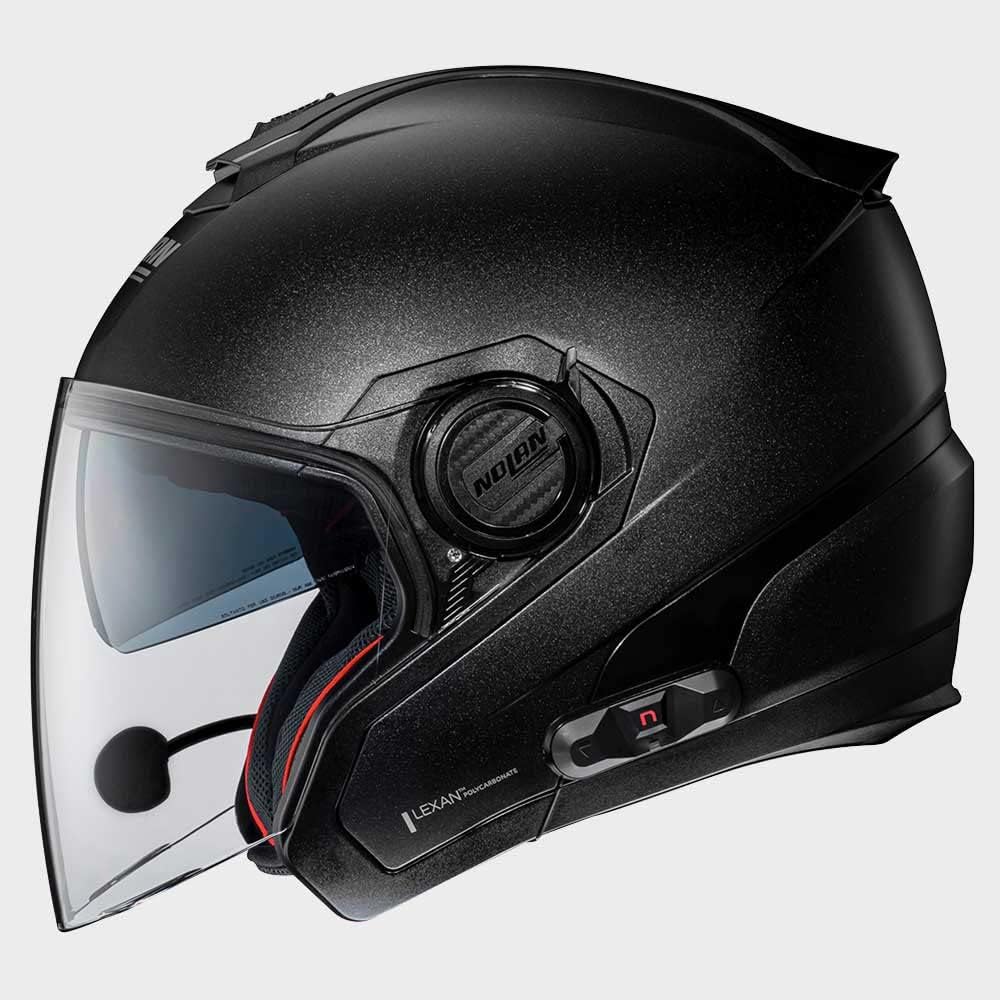
ചിത്രം 4.2: വശം view of the Nolan N-com B101 R Intercom system integrated into a helmet, highlighting the sleek profile of the communication unit.

ചിത്രം 4.3: പിൻഭാഗം view of the Nolan N-com B101 R Intercom system integrated into a helmet, showing the discreet placement of the unit.
5. സജ്ജീകരണവും ഇൻസ്റ്റാളേഷനും
Follow these steps to install the N-com B101 R Intercom into your compatible Nolan helmet:
- ഹെൽമെറ്റ് തയ്യാറാക്കുക: Remove the helmet's internal padding as per your helmet's specific instructions to access the speaker and microphone recesses.
- സ്പീക്കറുകൾ ഇൻസ്റ്റാൾ ചെയ്യുക: Place the speakers into the designated ear recesses inside the helmet. Ensure they are positioned comfortably and securely.
- മൈക്രോഫോൺ ഇൻസ്റ്റാൾ ചെയ്യുക: Attach the microphone to the helmet's chin bar or cheek pad area, ensuring it is close to your mouth for optimal voice pickup. Route the cable discreetly along the helmet's interior.
- മൗണ്ട് മെയിൻ യൂണിറ്റ്: Secure the main intercom unit to the exterior of the helmet using the provided mounting hardware. Typically, this involves a clip or adhesive mount on the side of the helmet.
- കേബിളുകൾ ബന്ധിപ്പിക്കുക: Connect the speaker and microphone cables to the main intercom unit. Ensure all connections are firm.
- Reassemble Helmet: Carefully reinsert the helmet's internal padding, ensuring no cables are pinched or exposed.
- പ്രാരംഭ ചാർജ്: Before first use, fully charge the intercom unit using the supplied USB cable. The charging indicator will change when charging is complete.
6. പ്രവർത്തന നിർദ്ദേശങ്ങൾ
6.1 പവർ ഓൺ/ഓഫ്
- പവർ ഓണാക്കാൻ: Press and hold the Power button for approximately 3 seconds until you hear an audible tone or see the indicator light illuminate.
- പവർ ഓഫ് ചെയ്യാൻ: കേൾക്കാവുന്ന ഒരു ടോൺ കേൾക്കുകയും ഇൻഡിക്കേറ്റർ ലൈറ്റ് ഓഫാകുകയും ചെയ്യുന്നതുവരെ പവർ ബട്ടൺ ഏകദേശം 3 സെക്കൻഡ് അമർത്തിപ്പിടിക്കുക.
6.2 ബ്ലൂടൂത്ത് ജോടിയാക്കൽ
To pair your N-com B101 R with a mobile phone or other Bluetooth device:
- Ensure the intercom is powered off.
- ഇൻഡിക്കേറ്റർ ലൈറ്റ് വേഗത്തിൽ മിന്നുന്നതുവരെ ഏകദേശം 5-7 സെക്കൻഡ് നേരത്തേക്ക് പവർ ബട്ടൺ അമർത്തിപ്പിടിക്കുക, ഇത് ജോടിയാക്കൽ മോഡിനെ സൂചിപ്പിക്കുന്നു.
- നിങ്ങളുടെ മൊബൈൽ ഉപകരണത്തിൽ, ബ്ലൂടൂത്ത് പ്രവർത്തനക്ഷമമാക്കി ലഭ്യമായ ഉപകരണങ്ങൾക്കായി തിരയുക.
- Select "N-com B101 R" from the list of found devices.
- ഒരു പാസ്കോഡ് ആവശ്യപ്പെടുകയാണെങ്കിൽ, "0000" എന്ന് നൽകുക.
- Once paired, the indicator light on the intercom will change to a slow flash or solid blue.
6.3 അടിസ്ഥാന പ്രവർത്തനങ്ങൾ
- ഉത്തരം/അവസാന കോൾ: മൾട്ടി-ഫംഗ്ഷൻ ബട്ടൺ ഒരിക്കൽ അമർത്തുക.
- കോൾ നിരസിക്കുക: മൾട്ടി-ഫംഗ്ഷൻ ബട്ടൺ 2 സെക്കൻഡ് അമർത്തിപ്പിടിക്കുക.
- സംഗീതം പ്ലേ ചെയ്യുക/താൽക്കാലികമായി നിർത്തുക: മൾട്ടി-ഫംഗ്ഷൻ ബട്ടൺ ഒരിക്കൽ അമർത്തുക.
- വോളിയം കൂട്ടുക: വോളിയം അപ്പ് ബട്ടൺ അമർത്തുക.
- വോളിയം താഴേക്ക്: വോളിയം ഡൗൺ ബട്ടൺ അമർത്തുക.
7. പരിപാലനം
Proper maintenance ensures the longevity and optimal performance of your N-com B101 R Intercom.
- വൃത്തിയാക്കൽ: ഒരു സോഫ്റ്റ് ഉപയോഗിക്കുക, ഡിamp cloth to clean the exterior of the intercom unit. Do not use abrasive cleaners or solvents.
- സംഭരണം: When not in use for extended periods, store the intercom in a cool, dry place.
- ബാറ്ററി കെയർ: To maintain battery health, charge the unit regularly, even if not in frequent use. Avoid fully discharging the battery before recharging.
8. പ്രശ്നപരിഹാരം
| പ്രശ്നം | സാധ്യമായ കാരണം | പരിഹാരം |
|---|---|---|
| Intercom does not power on. | കുറഞ്ഞ ബാറ്ററി. | Charge the intercom unit fully. |
| ഫോണുമായി ജോടിയാക്കാൻ കഴിയില്ല. | Intercom not in pairing mode; Bluetooth off on phone; previously paired device interfering. | Ensure intercom is in pairing mode (rapid flashing light). Turn phone's Bluetooth off and on. Forget previous pairings on phone. |
| സ്പീക്കറുകളിൽ നിന്ന് ഓഡിയോ ഇല്ല. | സ്പീക്കറുകൾ കണക്റ്റ് ചെയ്തിട്ടില്ല; ശബ്ദം വളരെ കുറവാണ്; കണക്ഷൻ തകരാറിലാണ്. | Check speaker connections. Increase volume. Re-seat speaker cables. |
| മൈക്രോഫോൺ ശബ്ദം കേൾക്കുന്നില്ല. | Microphone not connected; microphone positioned incorrectly. | Check microphone connection. Ensure microphone is close to your mouth and not obstructed. |
9 സ്പെസിഫിക്കേഷനുകൾ
| ഫീച്ചർ | വിശദാംശങ്ങൾ |
|---|---|
| മോഡലിൻ്റെ പേര് | BNCOM00000045 |
| ബ്രാൻഡ് | നോളൻ |
| ഉൽപ്പന്ന അളവുകൾ | 10 x 10 x 10 സെ.മീ |
| ഇനത്തിൻ്റെ ഭാരം | 280 ഗ്രാം |
| നിറം | കറുപ്പ് |
| മെറ്റീരിയൽ | പോളിസ്റ്റർ |
| നിർമ്മാതാവ് | എൻ-കോം |
| സർട്ടിഫിക്കറ്റ് തരം | ECE |
| അടയ്ക്കൽ തരം | റാറ്റ്ചെറ്റ് |
10. വാറൻ്റിയും പിന്തുണയും
For warranty information and technical support, please refer to the official Nolan N-com webസൈറ്റിൽ ബന്ധപ്പെടുക അല്ലെങ്കിൽ നിങ്ങളുടെ അംഗീകൃത ഡീലറെ ബന്ധപ്പെടുക. വാറന്റി ക്ലെയിമുകൾക്കായി നിങ്ങളുടെ വാങ്ങലിന്റെ തെളിവ് സൂക്ഷിക്കുക.
കൂടുതൽ സഹായത്തിന്, സന്ദർശിക്കുക: www.n-com.it
Ask a question about this manual
Ask about setup, troubleshooting, compatibility, parts, safety, or missing instructions. Manuals+ will review the question and use this page’s manual context to help answer it.