ആമുഖം
The CICRE Y60 TWS Bluetooth Earbuds are designed for high-quality audio enjoyment and active lifestyles. Featuring advanced Bluetooth 5.1 technology, AI Voice Assistant, and noise reduction capabilities, these earbuds provide a seamless and immersive listening experience. Their compact and comfortable design makes them ideal for everyday use, sports, and travel.
This manual provides detailed instructions on how to set up, operate, and maintain your Y60 TWS earbuds to ensure optimal performance and longevity.
പ്രധാന സവിശേഷതകൾ
- ഉയർന്ന നിലവാരമുള്ള ഓഡിയോ: Clear, crisp audio with noise reduction technology, suitable for music, calls, and various activities.
- ബ്ലൂടൂത്ത് 5.1 കണക്റ്റിവിറ്റി: Ensures easy pairing and stable wireless connection with smartphones and other devices.
- AI വോയ്സ് അസിസ്റ്റന്റ്: Hands-free control for managing calls, music, and other tasks.
- Multicolor Breathing Light: A unique visual feature that adds style to your listening experience.
- ഒതുക്കമുള്ളതും കൊണ്ടുപോകാവുന്നതും: Small and lightweight design for easy transport and comfortable wear.
- Sweatproof Construction (IPX4): Durable design resistant to sweat and light rain, ideal for sports and gym use.
ബോക്സിൽ എന്താണുള്ളത്
Upon opening your Y60 TWS Earbuds package, you should find the following items:
- CICRE Y60 TWS Earbuds
- ചാർജിംഗ് സ്റ്റേഷൻ (ചാർജിംഗ് കേസ്)
- ചാർജിംഗ് കേബിൾ
- സംരക്ഷണ കേസ്
- ഉപയോക്തൃ മാനുവൽ (ഈ പ്രമാണം)

Image: The CICRE Y60 TWS Earbuds nestled in their open charging case, showcasing the distinctive green breathing light around the base.
സജ്ജീകരണ ഗൈഡ്
1. ഇയർബഡുകളും കേസും ചാർജ് ചെയ്യുന്നു
ആദ്യമായി ഉപയോഗിക്കുന്നതിന് മുമ്പ്, ഇയർബഡുകളും ചാർജിംഗ് കേസും പൂർണ്ണമായും ചാർജ് ചെയ്തിട്ടുണ്ടെന്ന് ഉറപ്പാക്കുക.
- ഇയർബഡുകൾ ചാർജിംഗ് കേസിൽ വയ്ക്കുക, അവ ശരിയായി ഇട്ടിട്ടുണ്ടെന്ന് ഉറപ്പാക്കുക.
- Connect the charging cable to the charging port on the case and plug the other end into a USB power source (e.g., computer, wall adapter).
- The indicator lights on the case and earbuds will show charging status. Once fully charged, the lights may change color or turn off.
2. നിങ്ങളുടെ ഉപകരണവുമായി ജോടിയാക്കുന്നു
The Y60 TWS earbuds support both binaural (both earbuds) and monaural (single earbud) modes.
- Initial Pairing (Binaural Mode):
- ചാർജിംഗ് കേസ് തുറക്കുക. ഇയർബഡുകൾ സ്വയമേവ ഓണാകുകയും ജോടിയാക്കൽ മോഡിലേക്ക് പ്രവേശിക്കുകയും ചെയ്യും.
- On your smartphone or Bluetooth-enabled device, go to Bluetooth settings and turn Bluetooth on.
- ഇതിനായി തിരയുക "Y60 TWS" (or similar) in the list of available devices and select it to connect.
- Once connected, you will hear a confirmation sound, and the earbuds' indicator lights may change.
- മോണോറൽ മോഡ്:
- Simply take out one earbud from the charging case. It will automatically power on and attempt to connect to the last paired device.
- If not connected, follow the initial pairing steps for that single earbud.
The earbuds will automatically reconnect to the last paired device when taken out of the case, provided Bluetooth is enabled on your device.

Image: An illustration detailing the "Single or Double Share Good Sound Quality" feature, showing how to use the earbuds in both binaural (stereo) and monaural (single earbud) modes with accompanying diagrams.
പ്രവർത്തന നിർദ്ദേശങ്ങൾ
ടച്ച് നിയന്ത്രണങ്ങൾ
The Y60 TWS earbuds feature touch-sensitive controls for easy management of audio and calls.
| ആക്ഷൻ | ഫംഗ്ഷൻ |
|---|---|
| ഒറ്റ ടാപ്പ് (ഇടത്/വലത് ഇയർബഡ്) | സംഗീതം പ്ലേ ചെയ്യുക/താൽക്കാലികമായി നിർത്തുക, കോൾ സ്വീകരിക്കുക/അവസാനിപ്പിക്കുക |
| ഡബിൾ ടാപ്പ് (ഇടത് ഇയർബഡ്) | മുമ്പത്തെ ട്രാക്ക് |
| ഡബിൾ ടാപ്പ് (വലത് ഇയർബഡ്) | അടുത്ത ട്രാക്ക് |
| ട്രിപ്പിൾ ടാപ്പ് (ഇടത്/വലത് ഇയർബഡ്) | വോയ്സ് അസിസ്റ്റൻ്റ് സജീവമാക്കുക |
| ദീർഘനേരം അമർത്തുക (ഇടത്/വലത് ഇയർബഡ്) | കോൾ നിരസിക്കുക |
AI വോയ്സ് അസിസ്റ്റന്റ്
Your Y60 TWS earbuds are equipped with an AI Voice Assistant for convenient hands-free control. Triple tap either earbud to activate your device's voice assistant (e.g., Siri, Google Assistant). You can then use voice commands to make calls, send messages, check weather, and more.
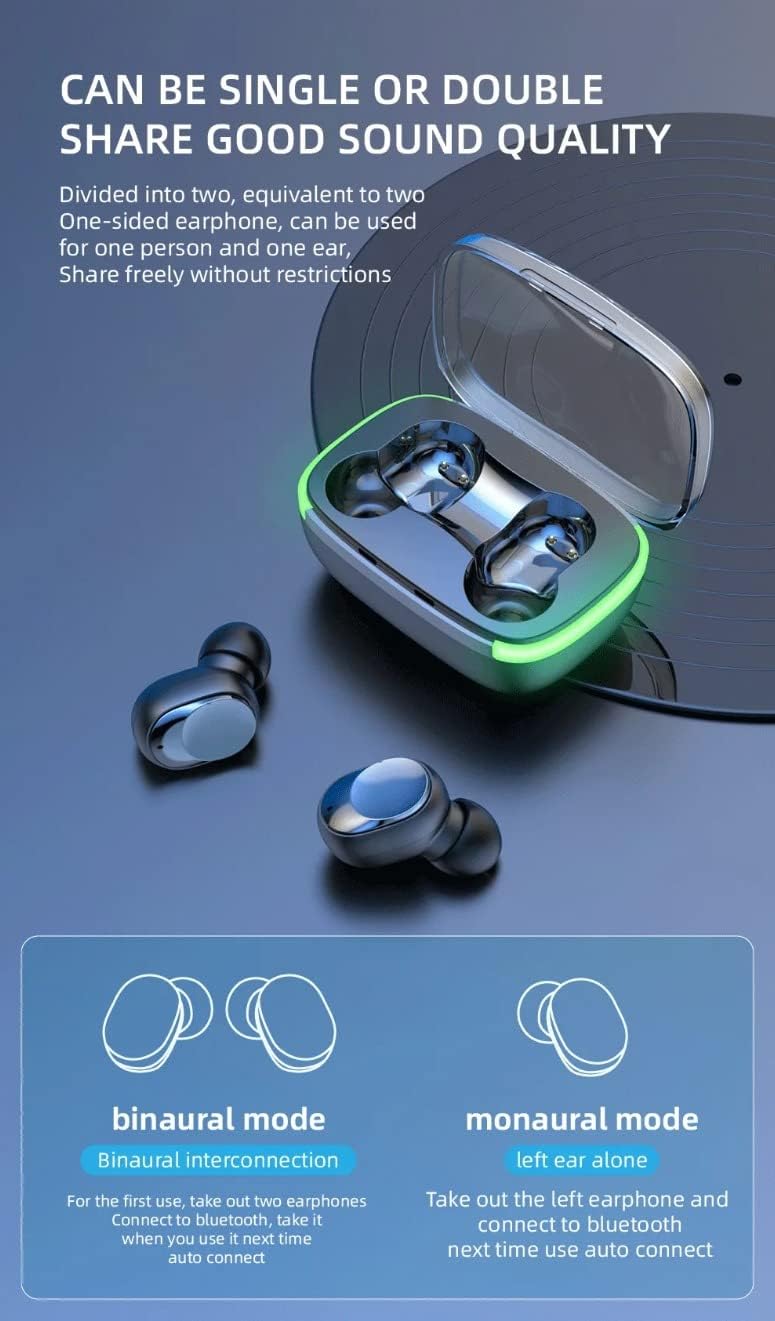
Image: A man wearing the Y60 TWS earbuds, demonstrating their comfortable and secure fit, with text emphasizing "Comfortable to Wear Without Falling."
പരിപാലനവും പരിചരണവും
ശരിയായ അറ്റകുറ്റപ്പണി നിങ്ങളുടെ ഇയർബഡുകളുടെ ദീർഘായുസ്സും മികച്ച പ്രകടനവും ഉറപ്പാക്കുന്നു.
- വൃത്തിയാക്കൽ: ഇയർബഡുകളും ചാർജിംഗ് കെയ്സും മൃദുവായതും ഉണങ്ങിയതും ലിന്റ് രഹിതവുമായ തുണി ഉപയോഗിച്ച് പതിവായി വൃത്തിയാക്കുക. അബ്രാസീവ് ക്ലീനറുകളോ ലായകങ്ങളോ ഉപയോഗിക്കരുത്.
- സംഭരണം: ഉപയോഗത്തിലില്ലാത്തപ്പോൾ, പൊടി, അഴുക്ക്, കേടുപാടുകൾ എന്നിവയിൽ നിന്ന് സംരക്ഷിക്കുന്നതിന് ഇയർബഡുകൾ എല്ലായ്പ്പോഴും അവയുടെ ചാർജിംഗ് കേസിൽ സൂക്ഷിക്കുക.
- ജല പ്രതിരോധം: The earbuds are IPX4 sweatproof. Avoid submerging them in water or exposing them to heavy rain. Dry them thoroughly if they get wet from sweat or light splashes.
- താപനില: ഇയർബഡുകൾ കടുത്ത താപനിലയിലോ (ചൂടോ തണുപ്പോ) ഉയർന്ന ആർദ്രതയിലോ തുറന്നുകാട്ടുന്നത് ഒഴിവാക്കുക.

Image: The Y60 TWS earbuds and their charging case are shown with water droplets, emphasizing their IPX4 deep waterproof rating, which protects against sweat and rain.
ട്രബിൾഷൂട്ടിംഗ്
If you encounter any issues with your Y60 TWS earbuds, try the following troubleshooting steps:
- ഇയർബഡുകൾ ജോടിയാക്കുന്നില്ല/കണക്റ്റ് ചെയ്യുന്നില്ല:
- രണ്ട് ഇയർബഡുകളും ചാർജ്ജ് ചെയ്തിട്ടുണ്ടെന്ന് ഉറപ്പാക്കുക.
- നിങ്ങളുടെ ഉപകരണത്തിൽ ബ്ലൂടൂത്ത് ഓഫാക്കി ഓണാക്കുക.
- Forget "Y60 TWS" from your device's Bluetooth list and try pairing again.
- ഇയർബഡുകൾ വീണ്ടും കെയ്സിൽ വയ്ക്കുക, ലിഡ് അടയ്ക്കുക, കുറച്ച് സെക്കൻഡ് കാത്തിരിക്കുക, തുടർന്ന് റീസെറ്റ് ചെയ്യാൻ തുറക്കുക.
- ഒരു ഇയർബഡ് മാത്രമേ പ്രവർത്തിക്കുന്നുള്ളൂ:
- രണ്ട് ഇയർബഡുകളും ചാർജ്ജ് ചെയ്തിട്ടുണ്ടെന്ന് ഉറപ്പാക്കുക.
- Place both earbuds back into the charging case, close the lid, and then open it again. This often forces them to re-sync.
- If the issue persists, try resetting the earbuds and re-pairing.
- ശബ്ദമില്ല അല്ലെങ്കിൽ കുറഞ്ഞ ശബ്ദം:
- നിങ്ങളുടെ ഉപകരണത്തിലെയും ഇയർബഡുകളിലെയും വോളിയം ലെവൽ പരിശോധിക്കുക.
- ഇയർബഡുകൾ നിങ്ങളുടെ ഉപകരണവുമായി ശരിയായി ബന്ധിപ്പിച്ചിട്ടുണ്ടെന്ന് ഉറപ്പാക്കുക.
- ഇയർബഡ് സ്പീക്കറുകളിൽ നിന്ന് അവശിഷ്ടങ്ങൾ വൃത്തിയാക്കുക.
- ചാർജിംഗ് പ്രശ്നങ്ങൾ:
- ചാർജിംഗ് കേബിൾ കേസിലേക്കും പവർ സ്രോതസ്സിലേക്കും സുരക്ഷിതമായി ബന്ധിപ്പിച്ചിട്ടുണ്ടെന്ന് ഉറപ്പാക്കുക.
- മറ്റൊരു ചാർജിംഗ് കേബിളോ പവർ അഡാപ്റ്ററോ പരീക്ഷിച്ചുനോക്കൂ.
- ഇയർബഡുകളിലെയും കെയ്സിലെയും ചാർജിംഗ് കോൺടാക്റ്റുകൾ വൃത്തിയാക്കുക.
സ്പെസിഫിക്കേഷനുകൾ
| ഫീച്ചർ | വിശദാംശങ്ങൾ |
|---|---|
| മോഡലിൻ്റെ പേര് | Y60 TWS Bluetooth 5.1 Noise Cancelling Earbuds |
| കണക്റ്റിവിറ്റി ടെക്നോളജി | വയർലെസ്സ് (ബ്ലൂടൂത്ത് 5.1) |
| ശബ്ദ നിയന്ത്രണം | സജീവ നോയ്സ് റദ്ദാക്കൽ |
| നിയന്ത്രണ തരം | വോയ്സ് കൺട്രോൾ, ടച്ച് കൺട്രോൾ |
| ചെവി പ്ലേസ്മെൻ്റ് | ചെവിയിൽ |
| ഫോം ഫാക്ടർ | ചെവിയിൽ |
| മെറ്റീരിയൽ | പ്ലാസ്റ്റിക്, റബ്ബർ |
| ഫ്രീക്വൻസി റേഞ്ച് | 20 ഹെർട്സ് - 20,000 ഹെർട്സ് |
| ഇനത്തിൻ്റെ ഭാരം | 2.39 ഔൺസ് |
| പാക്കേജ് അളവുകൾ | 5.5 x 3 x 1.25 ഇഞ്ച് |
| ബാറ്ററികൾ | 1 ലിഥിയം പോളിമർ ബാറ്ററി (ഉൾപ്പെടുത്തിയിരിക്കുന്നു) |
| നിർമ്മാതാവ് | Shenzhen Lanxingxin Technology Co,. Ltd. |
| യു.പി.സി | 197644093021 |

Image: A detailed graphic highlighting the "Custom Gaming Bluetooth 5.1" chip, emphasizing stable transmission and easier connection for an enhanced audio experience.
ഔദ്യോഗിക ഉൽപ്പന്ന വീഡിയോ
വീഡിയോ: ഒരു ഔദ്യോഗിക ഉൽപ്പന്ന വീഡിയോ പ്രദർശനംasing the key features and design of the CICRE Y60 TWS Bluetooth Earbuds, including AI Voice Assistant, noise cancellation, and multicolor breathing light.
വാറൻ്റിയും പിന്തുണയും
For information regarding warranty coverage, technical support, or service inquiries, please refer to the product packaging or contact the manufacturer directly. Contact details are typically provided on the product box or the manufacturer's official webസൈറ്റ്.


