
Pro N61
ANYSECU 4G-W2 Pro N61 Network Radio
ഉപയോക്തൃ മാനുവൽ
ആമുഖം
This manual provides essential information for the setup, operation, and maintenance of your ANYSECU 4G-W2 Pro N61 4G Network Radio. Please read it carefully to ensure proper use and to maximize the performance of your device.
The 4G-W2 Pro N61 is an advanced network radio that utilizes 4G LTE connectivity for communication, offering global reach without distance limitations. It functions as an Android-based smart terminal, allowing for versatile application use.

ചിത്രം: കഴിഞ്ഞുview of the ANYSECU W2 Pro Car Radio highlighting key features such as 4G/3G/2G connectivity, WLAN, Touch Screen, GPS, SOS Buttons, Single/Group/All Talk, Bluetooth, Clear Audio, Distance Limitless, Zello PTT, Android OS, and Google Playstore compatibility.
പാക്കേജ് ഉള്ളടക്കം
Before proceeding with setup, verify that all components are present in your package:
- ANYSECU 4G-W2 Pro N61 Network Radio Unit
- മൈക്രോഫോൺ
- 4 ജി ആന്റിന
- മൈക്രോഫോൺ ഹോൾഡർ
- ജിപിഎസ് ആൻ്റിന
- പവർ കേബിൾ
- കാർ ചാർജർ
- AC Adapter (Wall Charger)
- മൌണ്ടിംഗ് ബ്രാക്കറ്റ്

ചിത്രം: ഒരു സമഗ്രമായ view of all items included in the product package, displaying the main radio unit, microphone, antennas, power cables, and charging accessories.
സജ്ജമാക്കുക
1. പവർ കണക്ഷൻ
Connect the power cable to the radio unit. Use either the provided car charger for in-vehicle use or the AC adapter (wall charger) for stationary use. Ensure the connection is secure to prevent accidental disconnection.

ചിത്രം: ക്ലോസ്-അപ്പ് view demonstrating the secure, loose-proof plug-in and screw power connector design on the back of the radio unit, ensuring stable power supply.
2. ആൻ്റിന ഇൻസ്റ്റലേഷൻ
Attach the 4G antenna and GPS antenna to their respective ports on the radio unit. Hand-tighten them until secure.
3. SIM Card and Wi-Fi Setup
The radio requires data connectivity via a SIM card or Wi-Fi. Insert a compatible SIM card into the designated slot. Alternatively, connect to a Wi-Fi network through the device's settings. Data usage is approximately 2.88MB/hour for continuous talk and 0.06MB/day in standby mode.
പ്രവർത്തന നിർദ്ദേശങ്ങൾ
1. പവർ ഓൺ/ഓഫ്
Press and hold the power button located on the unit to turn the device on or off.
2. നെറ്റ്വർക്ക് കണക്റ്റിവിറ്റി
Once powered on, the device will attempt to connect to the inserted SIM card's network or a configured Wi-Fi network. Ensure a stable connection for optimal performance.
3. പുഷ്-ടു-ടോക്ക് (PTT) പ്രവർത്തനം
The radio supports ZELLO and Real PTT platforms. Launch your preferred PTT application. To transmit, press and hold the PTT button on the microphone. Release the button to listen.
4. Android System and Applications
The 4G-W2 Pro N61 runs on an Android operating system, allowing you to download and install compatible applications from the Google Play Store. Ensure that key values are adjusted to fit PTT and other functions for optimal performance with third-party apps.

Image: The radio's screen displaying the Google Play Store logo, indicating its Android operating system and ability to download applications.
5. GPS and SOS Functions
The device features GPS for real-time location tracking and an SOS button for emergency situations. Refer to the on-screen interface for GPS map display and SOS activation.

Image: The ANYSECU 4G-W2 Pro N61 radio unit with its display showing a real-time location map, alongside the included car charger, wall charger, and microphone.
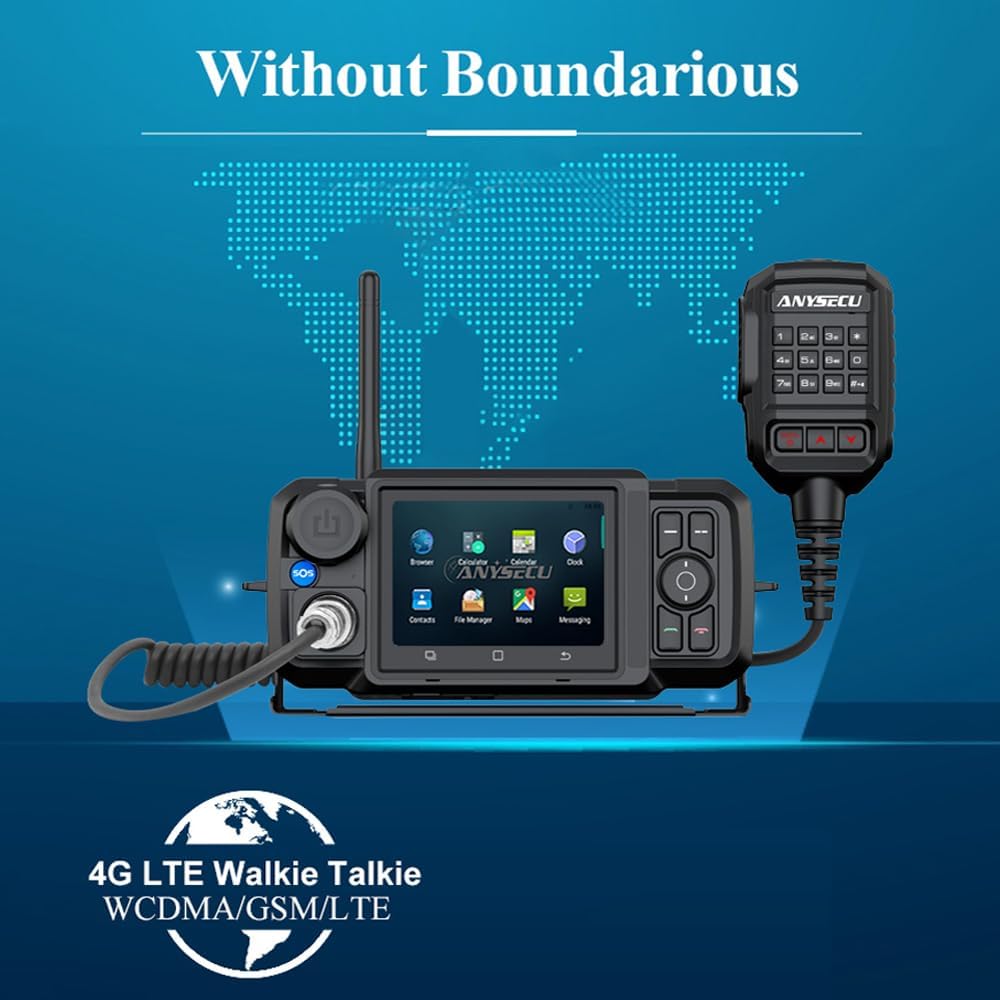
Image: The ANYSECU 4G-W2 Pro N61 radio unit with a global map in the background, emphasizing its capability for communication without geographical boundaries.
6. ടച്ച് സ്ക്രീൻ ഇന്റർഫേസ്
The device features a 3.5-inch touch screen with 480x320mm resolution, providing a clear and convenient visual operation experience.

ചിത്രം: വിശദമായ ഒരു ചിത്രം view of the 3.5-inch touch screen, showcasing its display quality and user interface with various application icons.
മെയിൻ്റനൻസ്
To ensure the longevity and optimal performance of your ANYSECU 4G-W2 Pro N61, follow these maintenance guidelines:
- വൃത്തിയാക്കൽ: Use a soft, dry cloth to clean the device's exterior. Avoid abrasive cleaners or solvents that could damage the surface.
- ജല പ്രതിരോധം: The device has an IP67 international protection rating, indicating it is waterproof. However, avoid prolonged submersion or exposure to high-pressure water jets. Ensure all ports are securely covered when exposed to water.
- സംഭരണം: ഉപയോഗത്തിലില്ലാത്തപ്പോൾ നേരിട്ടുള്ള സൂര്യപ്രകാശത്തിൽ നിന്നും കടുത്ത താപനിലയിൽ നിന്നും മാറി തണുത്തതും വരണ്ടതുമായ സ്ഥലത്ത് റേഡിയോ സൂക്ഷിക്കുക.
- ബാറ്ററി കെയർ: If the device has an internal battery, avoid fully discharging it frequently to prolong its lifespan.
ട്രബിൾഷൂട്ടിംഗ്
- നെറ്റ്വർക്ക് കണക്ഷൻ ഇല്ല:
- സിം കാർഡ് ശരിയായി ഇട്ടിട്ടുണ്ടെന്നും സജീവമാക്കിയിട്ടുണ്ടെന്നും ഉറപ്പാക്കുക.
- Check Wi-Fi settings and ensure you are connected to a stable network.
- Verify that your cellular plan supports data usage for the device.
- PTT Application Issues:
- Ensure the PTT application (e.g., ZELLO, Real PTT) is installed and updated.
- Check application settings for proper PTT button mapping.
- Verify your account status with the PTT service provider.
- ഉപകരണം പവർ ചെയ്യുന്നില്ല:
- Ensure the power cable is securely connected to both the device and the power source (car charger or AC adapter).
- പ്രവർത്തനക്ഷമതയ്ക്കായി പവർ ഉറവിടം പരിശോധിക്കുക.
- ഓഡിയോ ഗുണനിലവാര പ്രശ്നങ്ങൾ:
- Ensure the microphone is securely connected.
- Check network signal strength; weak signals can affect audio.
- Adjust volume settings on the device.
സ്പെസിഫിക്കേഷനുകൾ
| ഫീച്ചർ | വിശദാംശങ്ങൾ |
|---|---|
| മോഡൽ നമ്പർ | Pro N61 |
| ബ്രാൻഡ് | ജനറിക് |
| ഇനത്തിൻ്റെ ഭാരം | 3.34 പൗണ്ട് |
| പാക്കേജ് അളവുകൾ | 14.41 x 9.41 x 3.86 ഇഞ്ച് |
| ഓപ്പറേറ്റിംഗ് സിസ്റ്റം | ആൻഡ്രോയിഡ് 7.0 |
| കണക്റ്റിവിറ്റി പ്രോട്ടോക്കോൾ | 4G Network Radio, Wi-Fi |
| Frequency Band (US version) | FDD-LTE: Band 1/2/4/5/7/12/13/17/28a/28b, WCDMA: Band 1/2/4/5, GSM/GPRS/EDGE: Band 2/5 |
| ചാനലുകളുടെ എണ്ണം | 1 |
| ജല പ്രതിരോധ നില | വാട്ടർപ്രൂഫ് (IP67) |
| അനുയോജ്യമായ ഉപകരണങ്ങൾ | സ്മാർട്ട്ഫോൺ |
| യു.പി.സി | 735280076482 |

Image: A detailed comparison table outlining specifications for the W2plus and W2 Pro models, including RAM-ROM, OS, Mic Connector, and Frequency bands for both EU and US versions.
വാറൻ്റി
This product comes with a 1-year warranty. Please retain your proof of purchase for any warranty claims. For specific details regarding warranty coverage and procedures, refer to the documentation provided with your purchase or contact the manufacturer.
പിന്തുണ
For technical assistance, troubleshooting, or further inquiries regarding your ANYSECU 4G-W2 Pro N61 Network Radio, please refer to the manufacturer's official support channels. Ensure you have your model number (Pro N61) and any relevant purchase information ready when seeking support.
Ask a question about this manual
Ask about setup, troubleshooting, compatibility, parts, safety, or missing instructions. Manuals+ will review the question and use this page’s manual context to help answer it.