
1. ആമുഖം
Thank you for choosing the ALLIMITY QYSY-RC1546-WP-QYSY Replacement Remote Control. This remote is designed to function as a direct replacement for your original remote, covering all essential functions without requiring any complex programming. Simply insert batteries, and it is ready for immediate use with compatible television models.
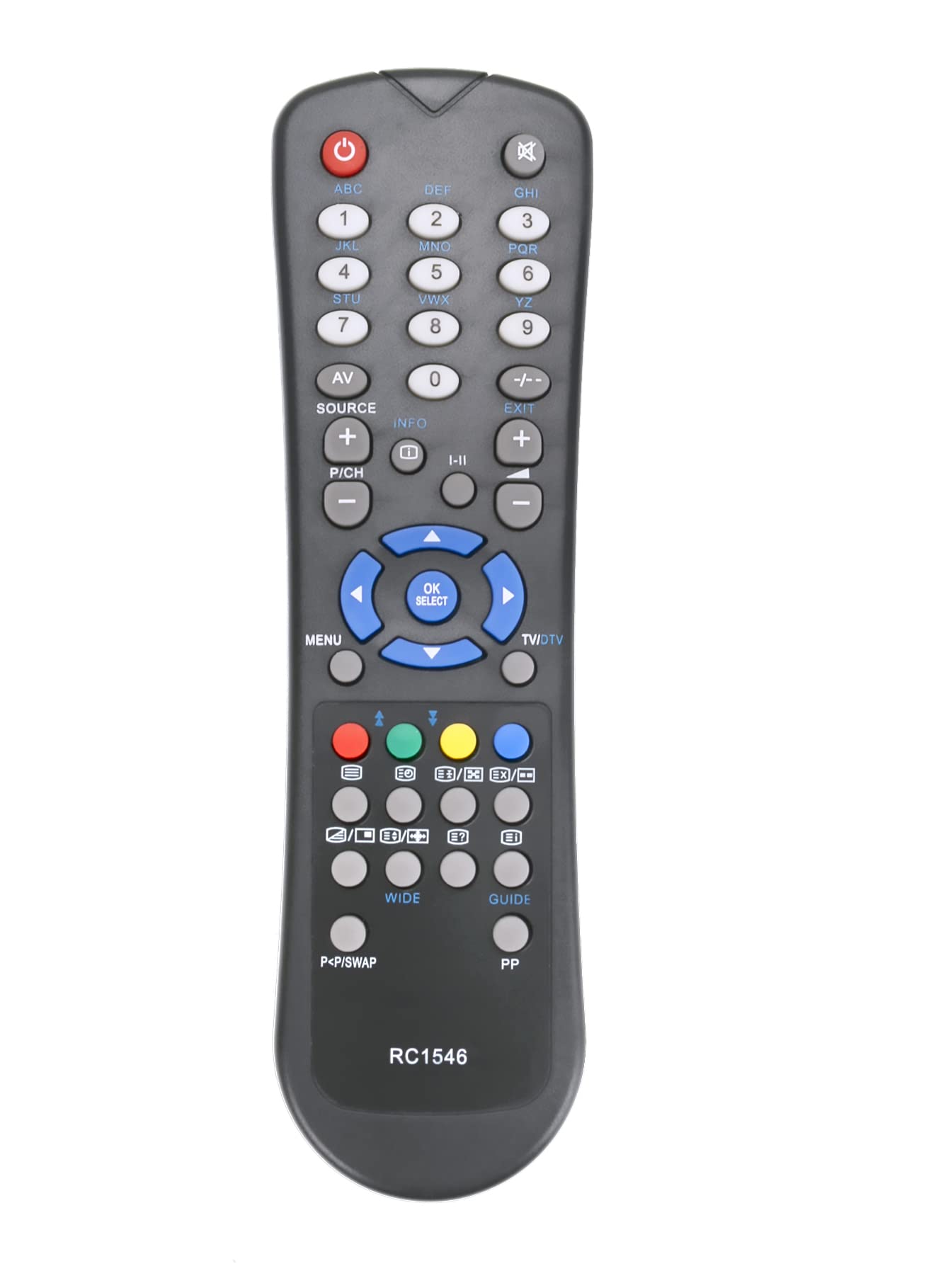
Image: The ALLIMITY QYSY-RC1546-WP-QYSY Replacement Remote Control, silver in color, featuring 25 buttons for various functions.
2. പാക്കേജ് ഉള്ളടക്കം
- 1 x ALLIMITY QYSY-RC1546-WP-QYSY Replacement Remote Control
3. സജ്ജീകരണം
3.1 ബാറ്ററി ഇൻസ്റ്റാളേഷൻ
- റിമോട്ട് കൺട്രോളിന്റെ പിൻഭാഗത്ത് ബാറ്ററി കമ്പാർട്ട്മെന്റ് കണ്ടെത്തുക.
- സ്ലൈഡ് ബാറ്ററി കമ്പാർട്ട്മെന്റ് കവർ തുറക്കുക.
- Insert two new AAA alkaline batteries, ensuring the positive (+) and negative (-) terminals match the diagrams inside the compartment.
- ബാറ്ററി കമ്പാർട്ട്മെൻ്റ് കവർ സുരക്ഷിതമായി അടയ്ക്കുക.
കുറിപ്പ്: This remote control requires no programming. Once batteries are correctly installed, it is ready for immediate use with compatible models.
4. പ്രവർത്തന നിർദ്ദേശങ്ങൾ
Point the remote control directly at the infrared receiver on your television. Ensure there are no obstructions between the remote and the TV.
4.1 പ്രധാന പ്രവർത്തനങ്ങൾ
- പവർ ബട്ടൺ: ടിവി ഓണാക്കുകയോ ഓഫാക്കുകയോ ചെയ്യുന്നു.
- നമ്പർ ബട്ടണുകൾ (0-9): ചാനലുകൾ നേരിട്ട് തിരഞ്ഞെടുക്കുന്നു.
- വോളിയം കൂട്ടുക/താഴ്ത്തുക: ശബ്ദ നില ക്രമീകരിക്കുന്നു.
- ചാനൽ മുകളിലേക്കും താഴേക്കും: ചാനലുകൾ ക്രമത്തിൽ മാറ്റുന്നു.
- നിശബ്ദ ബട്ടൺ: ടിവി ശബ്ദം മ്യൂട്ട് ചെയ്യുകയോ അൺമ്യൂട്ട് ചെയ്യുകയോ ചെയ്യുന്നു.
- മെനു ബട്ടൺ: ടിവിയുടെ പ്രധാന മെനു ആക്സസ് ചെയ്യുന്നു.
- നാവിഗേഷൻ ബട്ടണുകൾ (മുകളിലേക്ക്/താഴേക്ക്/ഇടത്/വലത്): മെനുകളിലൂടെയും ഓപ്ഷനുകളിലൂടെയും നാവിഗേറ്റ് ചെയ്യുന്നു.
- ശരി/നൽകുക ബട്ടൺ: മെനുകളിലെ തിരഞ്ഞെടുപ്പുകൾ സ്ഥിരീകരിക്കുന്നു.
- Exit/Back Button: Exits menus or returns to the previous screen.
- മറ്റ് ബട്ടണുകൾ: Specific functions may vary slightly depending on your TV model but generally correspond to standard remote control layouts.
4.2 അനുയോജ്യമായ ടിവി മോഡലുകൾ
This remote control is compatible with, but not limited to, the following TV models:
- വെസ്റ്റ്വുഡ്
- പ്രോലൈൻ
- ശരി
- നോക്കിയ
- അളവ്
- LSTO
- അക്കോസ്റ്റിക് പരിഹാരങ്ങൾ
- INNO-Hit
- HOHER H19LX900D
- H32855T
- LCD-32761HDE
- 2PNT752086
- MD30158
- GR4205GRAEIZ
- V19D-PH
- LD2262D2
- W22T45
5. പരിപാലനം
- വൃത്തിയാക്കൽ: മൃദുവായതും ഉണങ്ങിയതുമായ തുണി ഉപയോഗിച്ച് റിമോട്ട് കൺട്രോൾ തുടയ്ക്കുക. ലിക്വിഡ് ക്ലീനറുകളോ ഉരച്ചിലുകളുള്ള വസ്തുക്കളോ ഉപയോഗിക്കരുത്.
- ബാറ്ററി മാറ്റിസ്ഥാപിക്കൽ: Replace batteries when the remote's response becomes sluggish or stops working. Always replace both batteries at the same time with new alkaline batteries.
- സംഭരണം: റിമോട്ട് ദീർഘനേരം ഉപയോഗിക്കുന്നില്ലെങ്കിൽ, ചോർച്ചയും കേടുപാടുകളും തടയാൻ ബാറ്ററികൾ നീക്കം ചെയ്യുക.
6. പ്രശ്നപരിഹാരം
- റിമോട്ട് പ്രതികരിക്കുന്നില്ല:
- ശരിയായ പോളാരിറ്റിയോടെ ബാറ്ററികൾ ശരിയായി ചേർത്തിട്ടുണ്ടോയെന്ന് പരിശോധിക്കുക.
- പഴയ ബാറ്ററികൾ പുതിയവ ഉപയോഗിച്ച് മാറ്റിസ്ഥാപിക്കുക.
- റിമോട്ടിനും ടിവിയുടെ ഇൻഫ്രാറെഡ് സെൻസറിനും ഇടയിൽ തടസ്സങ്ങളൊന്നുമില്ലെന്ന് ഉറപ്പാക്കുക.
- Verify that the remote is pointed directly at the TV's sensor.
- ഹ്രസ്വ പ്രവർത്തന ശ്രേണി:
- ബാറ്ററികൾ പുതിയവ ഉപയോഗിച്ച് മാറ്റിസ്ഥാപിക്കുക.
- ശക്തമായ പ്രകാശ സ്രോതസ്സുകൾ (നേരിട്ടുള്ള സൂര്യപ്രകാശം അല്ലെങ്കിൽ തിളക്കമുള്ള ഫ്ലൂറസെന്റ് ലൈറ്റുകൾ പോലുള്ളവ) ഇൻഫ്രാറെഡ് സിഗ്നലിനെ തടസ്സപ്പെടുത്തുന്നില്ലെന്ന് ഉറപ്പാക്കുക.
- ചില ബട്ടണുകൾ പ്രവർത്തിക്കുന്നില്ല:
- This remote is a replacement and may not support all advanced functions of your original TV remote if those functions are proprietary.
- നിങ്ങളുടെ ടിവി മോഡൽ അനുയോജ്യമാണെന്ന് ലിസ്റ്റ് ചെയ്തിട്ടുണ്ടെന്ന് ഉറപ്പാക്കുക.
7 സ്പെസിഫിക്കേഷനുകൾ
| ബ്രാൻഡ് | അലിമിറ്റി |
| മോഡലിൻ്റെ പേര് | QYSY-RC1546-WP-QYSY |
| പ്രത്യേക ഫീച്ചർ | എർഗണോമിക് |
| നിറം | വെള്ളി |
| പരമാവധി പിന്തുണയ്ക്കുന്ന ഉപകരണങ്ങൾ | 1 |
| കണക്റ്റിവിറ്റി ടെക്നോളജി | ഇൻഫ്രാറെഡ് |
| ബട്ടണുകളുടെ എണ്ണം | 25 |
| പരമാവധി ശ്രേണി | 10 മീറ്റർ |
| ബാറ്ററി വിവരണം | ആൽക്കലൈൻ |
| സ്മാർട്ട് ഹോം അനുയോജ്യത | Not Smart Home Compatible |
8. വാറൻ്റിയും പിന്തുണയും
This product is covered by a standard manufacturer's warranty. Please refer to your purchase documentation for specific warranty terms and conditions.
For technical support or further assistance, please contact your retailer or the ALLIMITY customer service department. Contact details can typically be found on the product packaging or the official ALLIMITY webസൈറ്റ്.