
ആമുഖം
This manual provides comprehensive instructions for the Dpofirs 1080P 30FPS Vlogging Camera Recorder. Please read this manual carefully before using the device to ensure proper operation and to maximize its performance. Keep this manual for future reference.
ഉൽപ്പന്നം കഴിഞ്ഞുview
The Dpofirs Vlogging Camera Recorder is designed for capturing high-definition videos and photos. It features a 2.7-inch TFT rotatable screen, 16x digital zoom, and 16MP image resolution.
പ്രധാന സവിശേഷതകൾ:
- HD ക്യാമറ: 2.7-inch TFT rotatable screen, 1080P video resolution, 16x digital zoom, 16MP pixels.
- Selfie Support: Front fill light for photos, 2 or 10-second self-timer.
- സംഭരണം: Supports up to 32GB memory card (not included). A Class10 U3 chip memory card is recommended for optimal performance.
- USB കണക്റ്റിവിറ്റി: Connects to a computer for file transfer and can function as a PC camera.
- ഇന്റഗ്രേറ്റഡ് സ്പീക്കർ: Built-in speaker for audio playback.
- Recording while Charging: Supports continuous recording while connected to a power source.
ക്യാമറ ഘടകങ്ങൾ:

ചിത്രം 1: ക്ലോസ് അപ്പ് view of the camera's video lens, showing the focal length and aperture details.

ചിത്രം 2: പിൻഭാഗം view of the camcorder, highlighting the control buttons, menu button, mode button, and speaker grille.
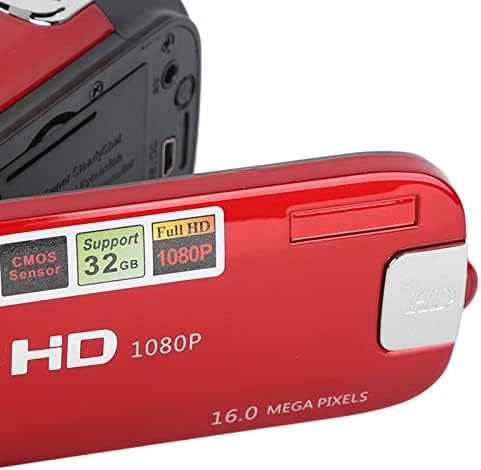
ചിത്രം 3: വിശദമായി view of the camera's flip-out screen, showing resolution and megapixel information.

ചിത്രം 4: The Dpofirs camcorder displayed with its standard accessories, including the battery, USB cable, and wrist strap.
സജ്ജമാക്കുക
- ബാറ്ററി ചാർജ് ചെയ്യുക: Insert the included lithium battery into the camera. Connect the camera to a power source using the USB cable to fully charge the battery before first use.
- മെമ്മറി കാർഡ് ചേർക്കുക: Open the memory card slot cover. Insert a compatible SDHC memory card (up to 32GB, Class10 U3 recommended) into the slot until it clicks into place. Ensure the card is inserted in the correct orientation.
- പവർ ഓൺ: ക്യാമറ ഓണാക്കാൻ പവർ ബട്ടൺ അമർത്തിപ്പിടിക്കുക.
പ്രവർത്തന നിർദ്ദേശങ്ങൾ
അടിസ്ഥാന പ്രവർത്തനം:
- പവർ ഓൺ/ഓഫ്: Press and hold the power button to turn the camera on or off.
- മോഡ് തിരഞ്ഞെടുക്കൽ: അമർത്തുക മോഡ് button to switch between Photo mode and Video recording mode.
- വീഡിയോ റെക്കോർഡിംഗ്:
- വീഡിയോ മോഡിൽ, അമർത്തുക രേഖപ്പെടുത്തുക button (usually marked with a red dot or camera icon) to start recording.
- അമർത്തുക രേഖപ്പെടുത്തുക റെക്കോർഡിംഗ് നിർത്താൻ വീണ്ടും ബട്ടൺ.
- ഫോട്ടോ എടുക്കുന്നു:
- ഫോട്ടോ മോഡിൽ, അമർത്തുക ഷട്ടർ button (usually a larger button on top) to capture a photo.
- സൂം പ്രവർത്തനം: Use the zoom lever/buttons (often marked with 'W' for Wide and 'T' for Telephoto) to adjust the 16x digital zoom.
- Reviewഉള്ളടക്കം: അമർത്തുക പ്ലേബാക്ക് button (often marked with a play icon) to view recorded videos and photos. Use navigation buttons to browse.
വിപുലമായ പ്രവർത്തനങ്ങൾ:
- സ്വയം-ടൈമർ: Access the menu settings to select a 2-second or 10-second self-timer for photos.
- വെളിച്ചം നിറയ്ക്കുക: The camera features a front fill light. Activate it through the menu settings for improved lighting in low-light conditions, especially for selfies.

ചിത്രം 5: The camcorder in use for a selfie, demonstrating the rotatable screen and front fill light feature.
- PC-യിലേക്ക് കണക്റ്റുചെയ്യുന്നു: Use the provided USB cable to connect the camera to a computer. The camera can be used to transfer files or as a PC camera.
- HD putട്ട്പുട്ട്: The camera supports HD output for viewing content on compatible displays.
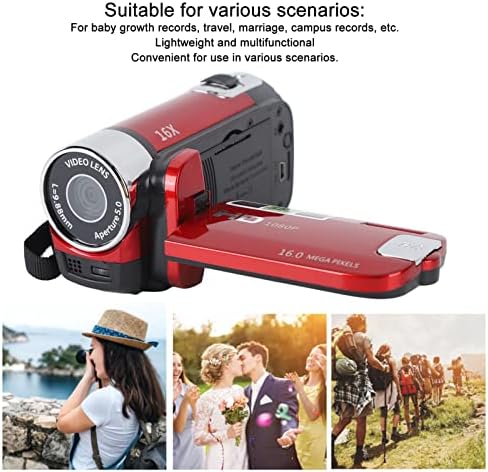
ചിത്രം 6: Illustrates various applicable scenarios for the camcorder, such as travel, weddings, and personal recordings.
മെയിൻ്റനൻസ്
- വൃത്തിയാക്കൽ: Use a soft, dry cloth to clean the camera body. For the lens and screen, use a specialized lens cleaning cloth and solution. Avoid abrasive materials.
- സംഭരണം: നേരിട്ടുള്ള സൂര്യപ്രകാശത്തിൽ നിന്നും കടുത്ത താപനിലയിൽ നിന്നും അകന്ന് തണുത്തതും വരണ്ടതുമായ സ്ഥലത്ത് ക്യാമറ സൂക്ഷിക്കുക. ക്യാമറ കൂടുതൽ നേരം ഉപയോഗിക്കുന്നില്ലെങ്കിൽ ബാറ്ററി നീക്കം ചെയ്യുക.
- ബാറ്ററി കെയർ: Fully charge the battery before storage and recharge it every few months to maintain its lifespan.
- മെമ്മറി കാർഡ്: Regularly back up your data from the memory card to a computer or external storage device. Format the memory card periodically to maintain performance.
ട്രബിൾഷൂട്ടിംഗ്
| പ്രശ്നം | സാധ്യമായ കാരണം | പരിഹാരം |
|---|---|---|
| ക്യാമറ പവർ ഓൺ ചെയ്യുന്നില്ല. | ബാറ്ററി തീർന്നു അല്ലെങ്കിൽ ശരിയായി ചേർത്തിട്ടില്ല. | ബാറ്ററി പൂർണ്ണമായും ചാർജ്ജ് ചെയ്തിട്ടുണ്ടെന്നും ശരിയായി ചേർത്തിട്ടുണ്ടെന്നും ഉറപ്പാക്കുക. |
| വീഡിയോ റെക്കോർഡ് ചെയ്യാനോ ഫോട്ടോകൾ എടുക്കാനോ കഴിയില്ല. | മെമ്മറി കാർഡ് നിറഞ്ഞിരിക്കുന്നു, ചേർത്തിട്ടില്ല, അല്ലെങ്കിൽ പൊരുത്തപ്പെടുന്നില്ല. | Check memory card status. Ensure it is inserted, has free space, and is a Class10 U3 card. |
| മോശം ഇമേജ്/വീഡിയോ നിലവാരം. | Insufficient lighting, dirty lens, or incorrect settings. | Ensure adequate lighting. Clean the lens. Check resolution settings in the menu. |
| കമ്പ്യൂട്ടർ ക്യാമറ തിരിച്ചറിഞ്ഞില്ല. | Faulty USB cable or incorrect connection mode. | Try a different USB cable. Ensure the camera is in PC camera or mass storage mode if applicable. |
സ്പെസിഫിക്കേഷനുകൾ
| ഫീച്ചർ | വിശദാംശങ്ങൾ |
|---|---|
| മോഡൽ നമ്പർ | Dpofirsgn9zt6aq2u-12 |
| ചിത്ര മിഴിവ് | 16 Megapixels (effective), supports VGA, 1M, 5M, 12M, 16M |
| ഇമേജ് ഫോർമാറ്റ് | ജെ.പി.ജി |
| വീഡിയോ റെസല്യൂഷൻ | 1080 Pixels (effective), supports FHD (1920x1080), HD (1280x720), 640x480 |
| വീഡിയോ ഫോർമാറ്റ് | എ.വി.ഐ |
| സ്ക്രീൻ വലിപ്പം | 2.7 ഇഞ്ച് TFT |
| ഡിജിറ്റൽ സൂം | 16x |
| ഒപ്റ്റിക്കൽ സൂം | 16x |
| ഷട്ടർ തരം | ഇലക്ട്രോണിക് |
| സ്വയം-ടൈമർ | 2 സെക്കൻഡ്, 10 സെക്കൻഡ് |
| ടിവി putട്ട്പുട്ട് | NTSC 30fps, PAL 25fps |
| സ്റ്റോറേജ് മീഡിയ | SDHC memory card (up to 32GB, Class10 U3 recommended) |
| ബാറ്ററി | 1 x 10²⁰mAh Lithium Battery (built-in) |
| കണക്റ്റിവിറ്റി | USB |
| സെൻസർ ടെക്നോളജി | CMOS |
| ഭാരം | 216 ഗ്രാം |
| പാക്കേജ് അളവുകൾ | 14 x 11 x 7 സെ.മീ |
| ഇമേജ് വീക്ഷണ അനുപാതം | 16:9 |
| വൈറ്റ് ബാലൻസ് ക്രമീകരണങ്ങൾ | ഓട്ടോ |
| എക്സ്പോഷർ നിയന്ത്രണ തരം | ഓട്ടോമാറ്റിക് |
| സ്പീക്കറുകളുടെ എണ്ണം | 1 |
| അനുയോജ്യമായ ഉപകരണങ്ങൾ | പേഴ്സണൽ കമ്പ്യൂട്ടർ |
| കാംകോർഡർ തരം | വീഡിയോ ക്യാമറ |
| ശുപാർശ ചെയ്യുന്ന ഉപയോഗങ്ങൾ | Personal recordings, baby growth records, travel, campus activities |
| ജല പ്രതിരോധ നില | വാട്ടർപ്രൂഫ് അല്ല |
| ഇമേജ് സ്റ്റെബിലൈസേഷൻ | Digital (Not Assured) |
| ഫോം ഫാക്ടർ | ഹാൻഡ്ഹെൽഡ് |
| ലെൻസ് തരം | സൂം ചെയ്യുക |
| ഫോക്കസ് തരം | ഓട്ടോ ഫോക്കസ് |
| ഷൂട്ടിംഗ് മോഡുകൾ | ഓട്ടോമാറ്റിക് |
വാറൻ്റിയും പിന്തുണയും
For warranty information and technical support, please refer to the documentation included with your purchase or contact Dpofirs customer service.
തിരികെ നൽകൽ നയം: This product has a 30-day return policy for refund or replacement.