
RTD36AC
Rotary Tool 200W Variable Speed with 170 Accessories - RTD36AC User Manual
Model: RTD36AC | Brand: Generic
ആമുഖം
This manual provides comprehensive instructions for the safe and effective operation, maintenance, and troubleshooting of your Generic RTD36AC Rotary Tool. Please read this manual thoroughly before using the tool to ensure optimal performance and user safety.
The RTD36AC Rotary Tool is a versatile 200W power tool designed for various applications such as cutting, engraving, sanding, drilling, and polishing. It features a variable speed control ranging from 10,000 to 40,000 RPM and comes with 170 accessories and 4 attachments, including a MultiPro Keyless Chuck and a Flex Shaft.
പാക്കേജ് ഉള്ളടക്കം
പാക്കേജ് തുറക്കുമ്പോൾ, താഴെ പട്ടികപ്പെടുത്തിയിരിക്കുന്ന എല്ലാ ഘടകങ്ങളും ഉണ്ടെന്നും കേടുപാടുകൾ സംഭവിച്ചിട്ടില്ലെന്നും ദയവായി പരിശോധിക്കുക:
- RTD36AC Rotary Tool
- 170 Accessories (various types for cutting, grinding, sanding, drilling, polishing, carving, engraving)
- 4 Attachments (Shield, Flex Shaft, Cutting Guide, Universal Chuck)
- ചുമക്കുന്ന കേസ്
- ആക്സസറി കേസ്
- ഉപയോക്തൃ മാനുവൽ (ഈ പ്രമാണം)

Image: The RTD36AC Rotary Tool, its carrying case, and a wide array of 170 accessories including various bits, sanding drums, cutting wheels, and polishing pads, along with the flexible shaft and shield attachment.

Image: A detailed visual breakdown of the 183 total pieces, including the rotary tool, kit box, and various accessories categorized for grinding/sharpening, cutting, sanding, cleaning/polishing, carving/engraving, and general accessories.
സജ്ജീകരണവും അസംബ്ലിയും
1. Attaching Accessories with the MultiPro Keyless Chuck
The MultiPro Keyless Chuck allows for quick and easy accessory changes without the need for a wrench. It accommodates shanks from 1/32'' to 1/8''.
- Ensure the rotary tool is unplugged from the power source.
- Unscrew the existing collet nut if present.
- Insert the desired accessory shank into the keyless chuck.
- Tighten the chuck by hand until the accessory is securely held. Do not overtighten.
2. Attaching the Flex Shaft
The Flex Shaft provides enhanced comfort and precision for detailed work, reducing hand fatigue during prolonged use.
- Ensure the rotary tool is unplugged.
- Remove the collet nut and collet from the rotary tool.
- Insert the inner drive cable of the flex shaft into the collet of the rotary tool.
- Secure the flex shaft's coupling nut onto the rotary tool's threaded collar.
- Insert the desired accessory into the flex shaft's chuck and tighten.

Image: Close-up of the user-friendly flex shaft in action, demonstrating its ergonomic design and aluminum alloy construction for durability, as it is used for engraving.
3. Attaching the Shield Attachment
The Shield attachment provides protection from debris during cutting and grinding operations.
- Ensure the rotary tool is unplugged.
- Slide the shield attachment over the threaded collar of the rotary tool.
- Rotate the shield to the desired position for optimal protection.
4. Attaching the Cutting Guide
The Cutting Guide assists in making precise cuts at various depths and maintains stability.
- Ensure the rotary tool is unplugged.
- Thread the cutting guide onto the rotary tool's threaded collar.
- Adjust the depth by rotating the guide until the desired cutting depth is achieved.
പ്രവർത്തന നിർദ്ദേശങ്ങൾ
1. പവർ ചെയ്യലും ഓഫും
To turn the tool ON, slide the power switch to the 'ON' position. To turn it OFF, slide the switch to the 'OFF' position. Always ensure the tool is OFF before plugging or unplugging it from the power source or changing accessories.
2. വേരിയബിൾ സ്പീഡ് കൺട്രോൾ
The RTD36AC features a 6-level variable speed control, allowing you to adjust the RPM from 10,000 to 40,000 RPM to suit different materials and applications. Higher speeds are generally used for harder materials and finer work, while lower speeds are suitable for softer materials and polishing.

Image: The variable speed control mechanism on the rotary tool, illustrating the 6-speed settings and the range from 10,000 to 40,000 RPM, highlighting the 200W strong power.
3. ആപ്ലിക്കേഷൻ സാഹചര്യങ്ങൾ
The 170 accessories and powerful 200W motor enable a wide range of applications:
- മുറിക്കൽ: Use appropriate cutting wheels for materials like metal, plastic, or wood. Always use the shield attachment for safety.
- കൊത്തുപണി: Utilize engraving cutters or diamond grinding needles for detailed work on various surfaces. The flex shaft is ideal for precision engraving.
- സാൻഡിംഗ്: Attach sanding bands or discs for smoothing surfaces, removing rust, or shaping materials.
- ഡ്രില്ലിംഗ്: Use drill bits for creating small holes in wood, plastic, or soft metals.
- മിനുക്കുപണികൾ: Apply felt wheels with polishing compound to achieve a high-gloss finish on metals, plastics, or ceramics.
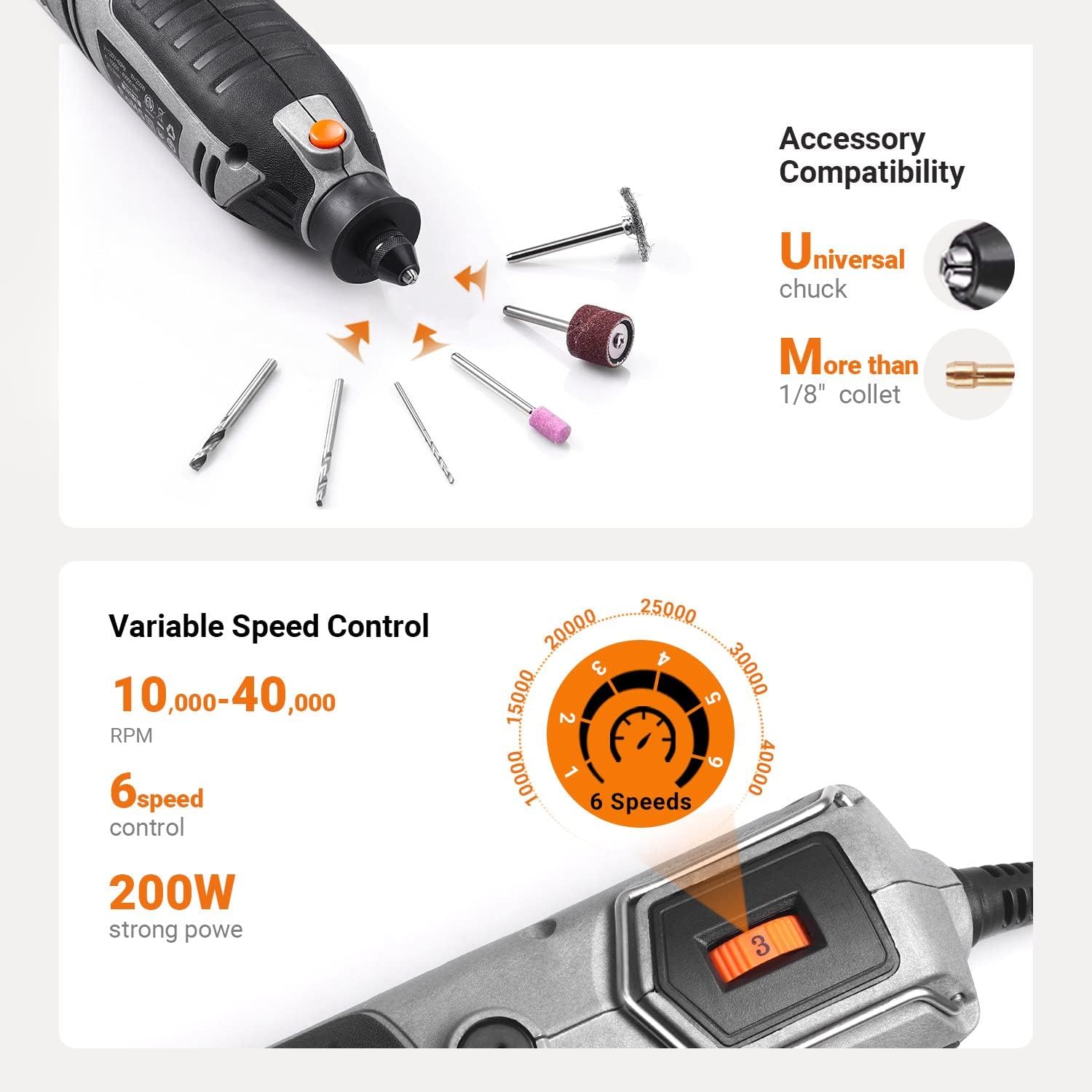
Image: The rotary tool equipped with a clear shield attachment, actively cutting through a metal surface, demonstrating the protection provided during operation.
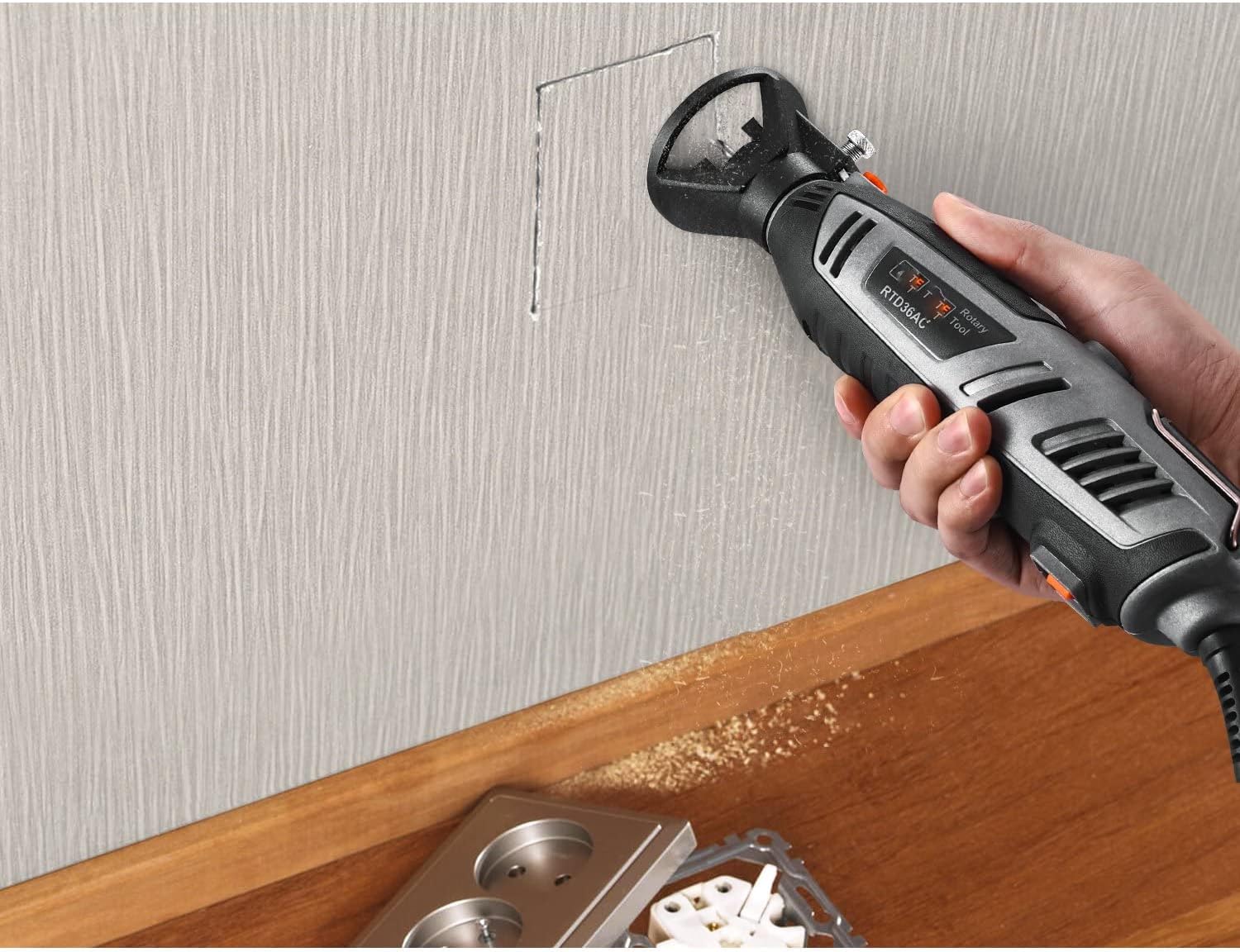
Image: The rotary tool with the cutting guide attachment in use, precisely cutting a rectangular opening in a wall, demonstrating its utility for controlled cuts.
മെയിൻ്റനൻസ്
Regular maintenance ensures the longevity and optimal performance of your rotary tool.
1. വൃത്തിയാക്കൽ
- After each use, unplug the tool and use a soft brush or compressed air to remove dust and debris from the ventilation openings and around the chuck area.
- Wipe the tool's body with a clean, damp തുണി. കഠിനമായ രാസവസ്തുക്കളോ ഉരച്ചിലുകളുള്ള ക്ലീനറുകളോ ഉപയോഗിക്കരുത്.
2. Accessory Care
- Store accessories in the provided accessory case to prevent damage and loss.
- ഓരോ ഉപയോഗത്തിനും മുമ്പ് ആക്സസറികൾക്ക് തേയ്മാനം അല്ലെങ്കിൽ കേടുപാടുകൾ ഉണ്ടോ എന്ന് പരിശോധിക്കുക. തേയ്ച്ചതോ കേടായതോ ആയ ആക്സസറികൾ ഉടൻ മാറ്റിസ്ഥാപിക്കുക.
3. സംഭരണം
Store the rotary tool and its accessories in the original carrying case in a dry, clean, and secure location, out of reach of children.
ട്രബിൾഷൂട്ടിംഗ്
If you encounter issues with your rotary tool, refer to the following common problems and solutions:
| പ്രശ്നം | സാധ്യമായ കാരണം | പരിഹാരം |
|---|---|---|
| ഉപകരണം ആരംഭിക്കുന്നില്ല. | വൈദ്യുതി വിതരണം ഇല്ല. പവർ സ്വിച്ച് ഓഫ് ആണ്. | പവർ ഔട്ട്ലെറ്റും കേബിളും പരിശോധിക്കുക. Ensure power switch is in the 'ON' position. |
| Loss of power or reduced speed during operation. | ഓവർലോഡ്. Worn carbon brushes (if applicable). | Reduce pressure on the tool. Contact customer support for brush replacement. |
| അമിതമായ വൈബ്രേഷൻ. | Bent or damaged accessory. Accessory not properly seated in chuck. | ആക്സസറി മാറ്റിസ്ഥാപിക്കുക. Re-seat and tighten accessory in the chuck. |
| ഉപകരണം ചൂടാകുന്നു. | നീണ്ടുനിൽക്കുന്ന കനത്ത ഉപയോഗം. തടഞ്ഞ വെന്റിലേഷൻ തുറസ്സുകൾ. | ഉപകരണം തണുപ്പിക്കാൻ അനുവദിക്കുക. വെന്റിലേഷൻ ദ്വാരങ്ങൾ വൃത്തിയാക്കുക. |
ഈ പരിഹാരങ്ങൾ പരീക്ഷിച്ചതിനുശേഷവും പ്രശ്നം നിലനിൽക്കുകയാണെങ്കിൽ, കൂടുതൽ സഹായത്തിനായി ഉപഭോക്തൃ പിന്തുണയുമായി ബന്ധപ്പെടുക.
സ്പെസിഫിക്കേഷനുകൾ
| ഫീച്ചർ | വിശദാംശങ്ങൾ |
|---|---|
| മോഡൽ നമ്പർ | RTD36AC |
| പവർ ഉറവിടം | കോർഡഡ് ഇലക്ട്രിക് |
| വാല്യംtage | 240 വോൾട്ട് |
| ശക്തി | 200W (1.8 Amp) |
| വേരിയബിൾ സ്പീഡ് റേഞ്ച് | 10,000 - 40,000 ആർപിഎം |
| Chuck Compatibility | 1/32'' to 1/8'' shanks (MultiPro Keyless Chuck) |
| ആക്സസറികൾ ഉൾപ്പെടുത്തിയിട്ടുണ്ട് | 170 കഷണങ്ങൾ |
| അറ്റാച്ചുമെന്റുകൾ ഉൾപ്പെടുത്തിയിട്ടുണ്ട് | Shield, Flex Shaft, Cutting Guide, Universal Chuck |
| ഇനത്തിൻ്റെ ഭാരം | 2.15 കി.ഗ്രാം |
| അളവുകൾ (പാഴ്സൽ) | 30.4 x 24.79 x 8.99 സെ.മീ |
വാറൻ്റിയും പിന്തുണയും
This product comes with a user manual. If you have any questions about the rotary tool, its operation, or require technical assistance, please do not hesitate to contact our customer support team. Our technical support team is available to solve your problems as soon as possible.
Please refer to your purchase documentation or the product packaging for specific warranty details and contact information.
Ask a question about this manual
Ask about setup, troubleshooting, compatibility, parts, safety, or missing instructions. Manuals+ will review the question and use this page’s manual context to help answer it.