
1. ആമുഖം
This manual provides detailed instructions for the assembly, operation, and maintenance of your SEDETA L Shaped Desk. This versatile desk features a power outlet, LED lighting, a keyboard tray, storage shelves, a pegboard, and a headphone hook, designed to enhance your home office or gaming setup.

ചിത്രം 1.1: കഴിഞ്ഞുview of the SEDETA L Shaped Desk in a 94.5-inch configuration.
2 സുരക്ഷാ വിവരങ്ങൾ
Please read and understand all safety instructions before assembling or using this desk. Failure to follow these instructions may result in injury or damage to the product.
- This desk requires assembly and includes electrical components. Always follow safety guidelines when assembling and using the desk, especially when handling electrical parts.
- Ensure proper weight distribution when using storage features to maintain stability.
- Always unplug the desk from the power source when not in use or before cleaning.
- Do not over-tighten screws during assembly, as this may damage the wood. Tighten until snug, then stop.
3. സജ്ജീകരണവും അസംബ്ലിയും
Assembly of the SEDETA L Shaped Desk typically requires two people. Detailed assembly instructions are included in the product packaging. Follow the step-by-step guide provided to ensure correct and safe assembly.
3.1. Desk Configuration
The desk offers a reversible design, allowing it to be configured as a 67-inch corner desk or a 94.5-inch long office desk. The top hutch can also be placed on the left or right side to suit your needs.
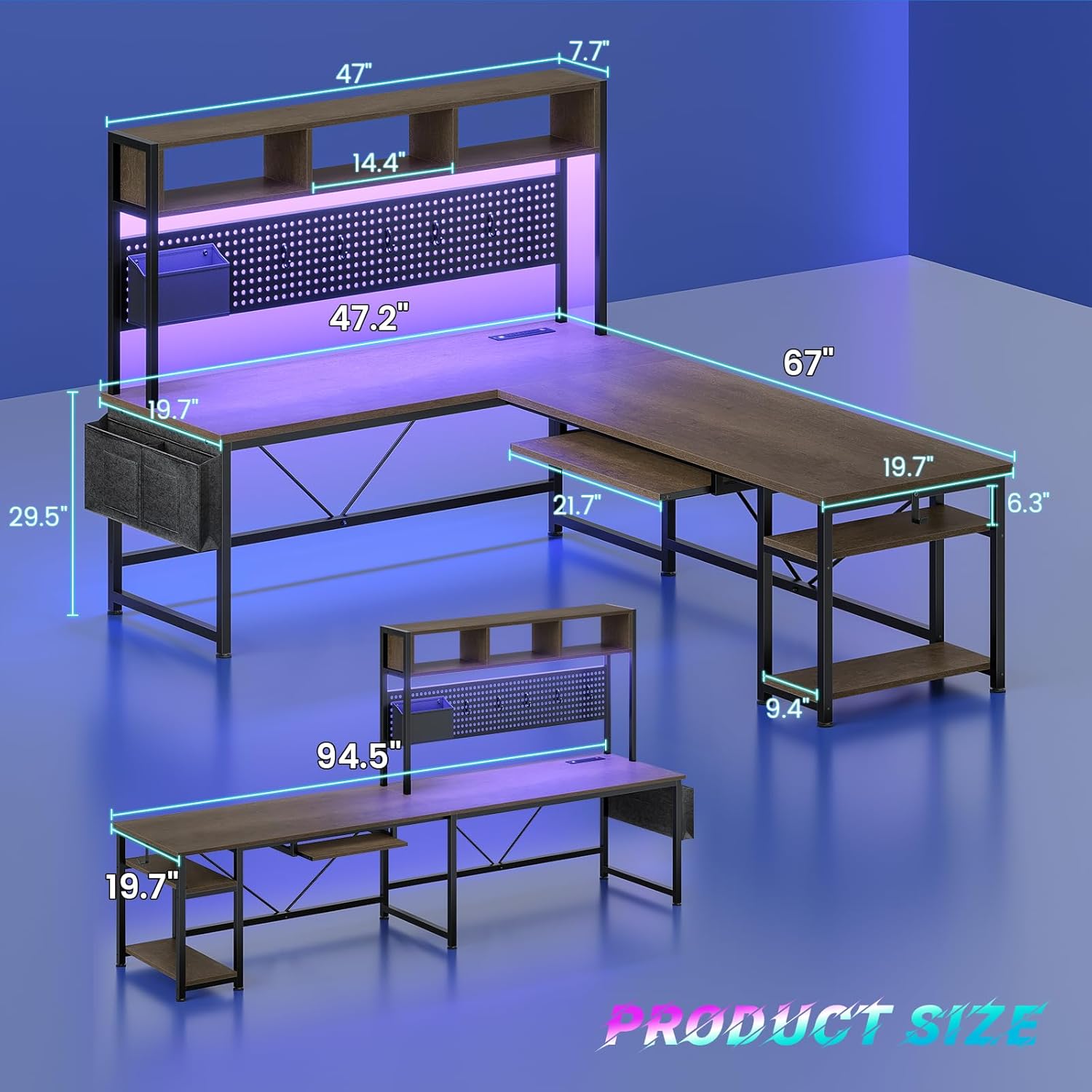
Image 3.1: Product dimensions and reversible configurations.

Image 3.2: Various reversible desk configurations.
3.2. അസംബ്ലി നുറുങ്ങുകൾ
- Lay out all parts and hardware before beginning assembly to ensure everything is present.
- Do not overtighten screws. Tighten them just enough to secure the components firmly.
- Consider having a second person assist with holding larger components during assembly for easier and safer construction.
വീഡിയോ 3.1: ഒരു ഓവർview of the SEDETA L Shaped Desk, highlighting its features and potential setup.
4. പ്രവർത്തന നിർദ്ദേശങ്ങൾ
4.1. ബിൽറ്റ്-ഇൻ പവർ ഔട്ട്ലെറ്റ്
The desk includes a charging station with 4 AC outlets and 2 USB ports, providing power for up to 6 devices simultaneously. An on/off switch allows for convenient and safe power control.

Image 4.1: Detail of the built-in power outlet with USB ports.
4.2. എൽഇഡി ലൈറ്റിംഗ് സിസ്റ്റം
The integrated RGB LED lighting system offers over 60,000 colors and 29 flashing modes. Control the lights via a remote control or a dedicated app. The lights also feature a music sync function with a built-in sensitivity-adjustable microphone, allowing the light color to change with sound and music rhythms.

Image 4.2: Features of the LED lighting system.
4.3. കീബോർഡ് ട്രേ
A pull-out keyboard tray is included, ideal for storing your keyboard and mouse, freeing up valuable desk space. The tray measures approximately 21.7 inches wide and 10.5 inches deep.

Image 4.3: Detail of the keyboard tray.
4.4. സംഭരണ സവിശേഷതകൾ
The desk provides ample storage with a pegboard, two-tier storage shelves, a storage bag, and a headphone hook. These features help keep your workspace organized and clutter-free.
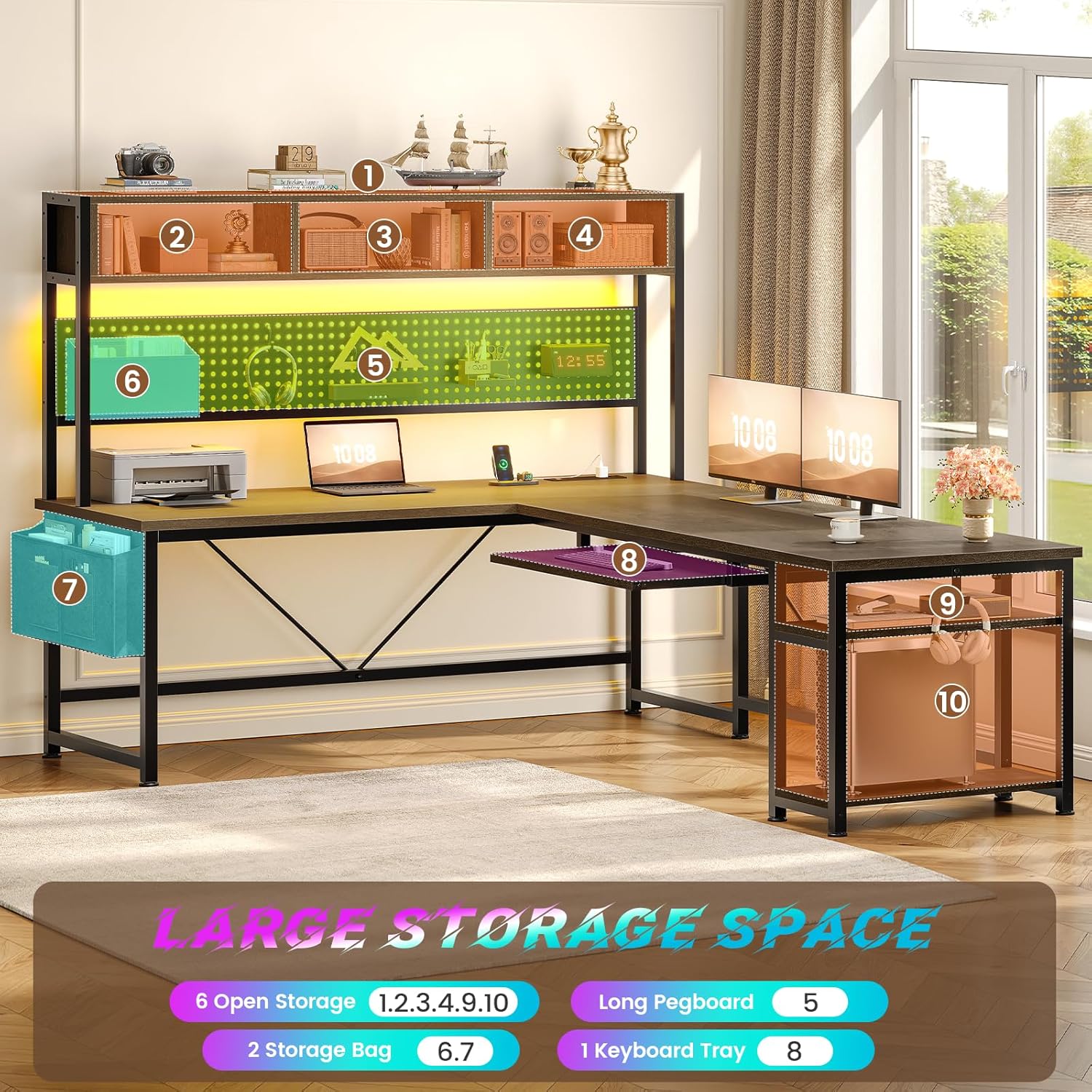
ചിത്രം 4.4: കഴിഞ്ഞുview of the desk's storage features.

Image 4.5: Detail of the pegboard and storage bag.
Video 4.1: Demonstration of the desk as a workstation, highlighting the power and USB outlets.
5. പരിപാലനം
To maintain the appearance and longevity of your desk, follow these simple maintenance guidelines:
- മൃദുവായ, ഡി ക്ലീനർ ഉപയോഗിച്ച് പ്രതലങ്ങൾ പതിവായി തുടയ്ക്കുക.amp തുണി. കഠിനമായ രാസവസ്തുക്കളോ ഉരച്ചിലുകളുള്ള ക്ലീനറുകളോ ഒഴിവാക്കുക.
- Ensure all screws and connections remain tight. Periodically check and tighten any loose fasteners.
- Keep the desk away from direct sunlight and extreme temperature changes to prevent material damage.
6. പ്രശ്നപരിഹാരം
6.1. LED Lights Not Responding to App
If the LED lights are not connecting to the app, try controlling them with the inline controller. The app may be generic and require specific pairing instructions not always provided. The inline controller offers basic color and mode selection, including a sound-reactive mode.
6.2. Desk Feels Flimsy
If the desk feels unstable, ensure all assembly screws are properly tightened. Recheck all connections, especially those supporting the main desk sections. Proper placement against a wall or in a corner can also enhance stability.
6.3. Keyboard Tray Space
The keyboard tray has specific dimensions (approximately 21.7 inches wide and 10.5 inches deep). If your keyboard and mouse setup exceeds this, consider alternative desk arrangements or a more compact keyboard/mouse combination.
7 സ്പെസിഫിക്കേഷനുകൾ
| ഫീച്ചർ | വിശദാംശങ്ങൾ |
|---|---|
| ബ്രാൻഡ് | SEDETA |
| മോഡൽ നമ്പർ | walnut brown office desk |
| ആകൃതി | L-Shape (Reversible) |
| ഉൽപ്പന്ന അളവുകൾ | 19.7"D x 67"W x 57"H (L-shape) / 94.5"W (straight) |
| നിറം | വാൽനട്ട് ബ്രൗൺ |
| മെറ്റീരിയൽ തരം | എഞ്ചിനീയറിംഗ് വുഡ് |
| ഇനത്തിൻ്റെ ഭാരം | 66 പൗണ്ട് |
| പവർ let ട്ട്ലെറ്റ് | 4 AC Outlets & 2 USB Ports, On/Off Switch |
| LED ലൈറ്റുകൾ | RGB, App/Remote Control, Music Sync |
| കീബോർഡ് ട്രേ | Included (21.7"W x 10.5"D approx.) |
| സംഭരണം | Pegboard, 2-tier shelves, storage bag, headphone hook |
| അസംബ്ലി ആവശ്യമാണ് | അതെ (ശുപാർശ ചെയ്തത് 2 പേർ) |
8. വാറൻ്റിയും പിന്തുണയും
SEDETA provides professional after-sales customer service. If your office desk arrives damaged, scratched, or with missing parts, please contact our customer support team. We aim to address your concerns within 24 hours.
For support, please refer to the contact information provided in your product packaging or visit the official SEDETA webസൈറ്റ്.