
1 സുരക്ഷാ വിവരങ്ങൾ
Read and understand all safety precautions before operating this welding machine. Failure to follow these instructions can result in serious injury or death.
1.1 പൊതു സുരക്ഷാ മുന്നറിയിപ്പുകൾ
- വൈദ്യുതാഘാതം: Welding current can kill. Do not touch live electrical parts. Wear dry, insulating gloves and clothing. Ensure the work area is dry.
- പുകയും വാതകങ്ങളും: Welding produces fumes and gases hazardous to health. Work in a well-ventilated area. Use an exhaust fan or fume extractor.
- ആർക്ക് കിരണങ്ങൾ: Arc rays can burn eyes and skin. Wear a welding helmet with appropriate shade filter and protective clothing.
- തീയും സ്ഫോടനവും: Welding sparks and hot metal can cause fires. Keep flammable materials away from the work area. Have a fire extinguisher readily available.
- പൊള്ളലുകൾ: ചൂടുള്ള ലോഹവും ഉപകരണങ്ങളും ഗുരുതരമായ പൊള്ളലിന് കാരണമാകും. സംരക്ഷണ കയ്യുറകളും വസ്ത്രങ്ങളും ധരിക്കുക.
1.2 വ്യക്തിഗത സംരക്ഷണ ഉപകരണങ്ങൾ (PPE)
- Welding helmet with appropriate shade.
- Flame-resistant clothing (long sleeves and pants).
- Leather welding gloves.
- സുരക്ഷാ ഗ്ലാസുകൾ അല്ലെങ്കിൽ ഗ്ലാസുകൾ.
- ചെവി സംരക്ഷണം.
2. ഉൽപ്പന്നം കഴിഞ്ഞുview
The ARCCAPTAIN TIG205A (Model TIG200PACDC) is a versatile multi-process welding machine designed for both professional and hobbyist use. It supports TIG (Tungsten Inert Gas) welding in both AC (Alternating Current) and DC (Direct Current) modes, as well as MMA (Manual Metal Arc) or Stick welding. Featuring advanced MCU technology and an IGBT inverter, this machine offers precise control and stable arc performance.
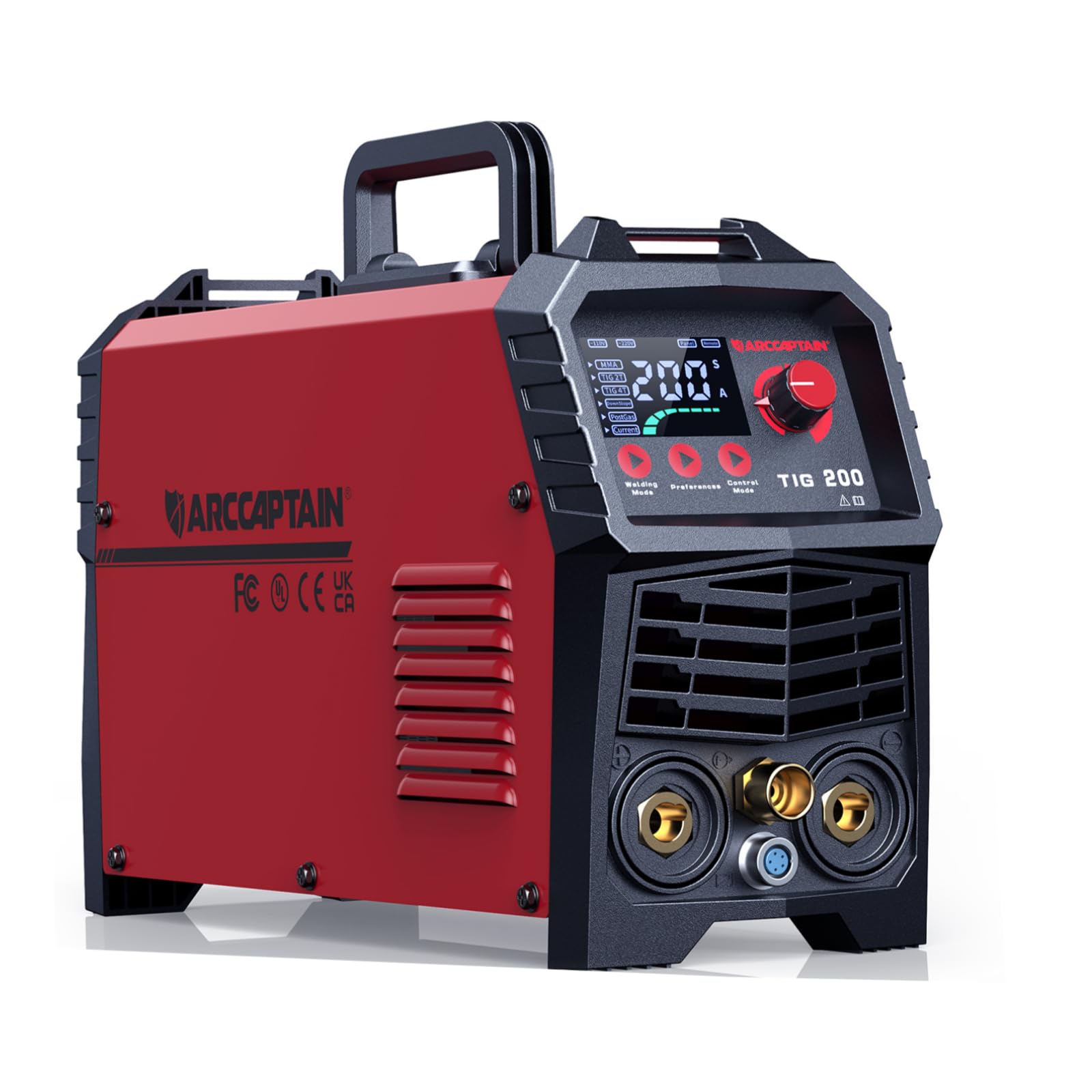
The front panel of the ARCCAPTAIN TIG205A welder, highlighting the easy-to-read digital display and intuitive control buttons for selecting welding parameters.

The ARCCAPTAIN TIG205A welding machine shown with its standard accessories, including the TIG torch, ground clamp, and power cables, ready for setup.
3. സജ്ജീകരണം
3.1 അൺപാക്കിംഗും പരിശോധനയും
- വെൽഡിംഗ് മെഷീനും എല്ലാ അനുബന്ധ ഉപകരണങ്ങളും പാക്കേജിംഗിൽ നിന്ന് ശ്രദ്ധാപൂർവ്വം നീക്കം ചെയ്യുക.
- Inspect the machine for any signs of damage during shipping. Contact your supplier immediately if any damage is found.
- പാക്കിംഗ് ലിസ്റ്റിൽ ലിസ്റ്റ് ചെയ്തിരിക്കുന്ന എല്ലാ ഘടകങ്ങളും ഉണ്ടെന്ന് ഉറപ്പാക്കുക.
3.2 പവർ കണക്ഷൻ
The TIG205A supports dual voltage input (110V/220V). Ensure the correct power cord is used and connected to a suitable power outlet with proper grounding.
- Connect the power plug to a dedicated circuit with adequate ampഇറേജ്.
- വോളിയം ഉറപ്പാക്കുകtage selector (if present) is set correctly for your power supply.
3.3 Gas Connection (for TIG Welding)
For TIG welding, an inert shielding gas (typically Argon) is required.
- Connect the gas hose from the machine's gas inlet to your Argon gas cylinder's regulator.
- ഗ്യാസ് ചോർച്ച തടയാൻ എല്ലാ കണക്ഷനുകളും ഇറുകിയതാണെന്ന് ഉറപ്പാക്കുക.
- Set the gas flow rate according to your welding application (typically 10-15 L/min).
3.4 ടോർച്ചും ഗ്രൗണ്ടും Clamp കണക്ഷൻ
- Connect the TIG torch cable to the appropriate connector on the front panel.
- ഗ്രൗണ്ട് cl കണക്ട് ചെയ്യുകamp നിയുക്ത ഗ്രൗണ്ട് ടെർമിനലിലേക്ക് കേബിൾ ബന്ധിപ്പിക്കുക.
- ഗ്രൗണ്ട് cl ഘടിപ്പിക്കുകamp securely to the workpiece, ensuring good electrical contact.
3.5 Electrode Holder Connection (for MMA Welding)
- MMA വെൽഡിങ്ങിനായി, ഇലക്ട്രോഡ് ഹോൾഡർ കേബിൾ പോസിറ്റീവ് (+) ടെർമിനലുമായി ബന്ധിപ്പിക്കുക.
- ഗ്രൗണ്ട് cl കണക്ട് ചെയ്യുകamp cable to the negative (-) terminal.

This image illustrates the advanced LED control panel of the ARCCAPTAIN TIG205A, featuring detailed parameter adjustments like DownSlope and PostGas for improved weld quality, contrasted with a simpler, less functional panel found on other machines.

An internal diagram of the ARCCAPTAIN TIG205A welding machine, revealing its advanced MCU technology, IGBT inverter, and efficient cooling system, which contribute to its performance and reliability.
4. പ്രവർത്തന നിർദ്ദേശങ്ങൾ
4.1 കൺട്രോൾ പാനൽ ഓവർview
The ARCCAPTAIN TIG205A features a large LED display for easy parameter adjustment and monitoring.

A close-up of the ARCCAPTAIN TIG205A's comprehensive LED display, illustrating the detailed settings for AC TIG, DC TIG, MMA, and SPOT welding modes, including parameters like amperage, AC balance, frequency, and waveform selection (Square and Triangle waves).
4.2 Welding Modes and Parameter Adjustment
Use the 'Welding Mode' and 'Control Mode' buttons to navigate and adjust settings.
4.2.1 TIG Welding (AC TIG, DC TIG, Pulse TIG)
- മോഡ് തിരഞ്ഞെടുക്കൽ: Select AC TIG for aluminum and magnesium alloys, DC TIG for stainless steel, carbon steel, copper, and titanium. Pulse TIG offers enhanced control for thin materials and out-of-position welding.
- നിലവിലെ (എ): Adjust the welding amperage based on material thickness and type.
- DownSlope (S): Controls the time it takes for the welding current to decrease from the peak current to the crater current, preventing crater cracking.
- PostGas (S): Sets the duration for shielding gas flow after the arc is extinguished, protecting the hot weld puddle and tungsten electrode from atmospheric contamination.
- AC Balance (%): (For AC TIG) Adjusts the balance between electrode negative and electrode positive, controlling cleaning action and penetration.
- ആവൃത്തി (Hz): (For AC TIG) Adjusts the AC waveform frequency, influencing arc focus and bead width.
- HF Start: The High-Frequency Start feature ensures easy arc initiation without touching the workpiece, preserving tungsten integrity and preventing contamination.

A welder demonstrating the High-Frequency (HF) Start feature of the ARCCAPTAIN TIG205A, which ensures super easy arc initiation without contact, resulting in clean and precise weld beads on various metals.
4.2.2 എംഎംഎ (സ്റ്റിക്ക്) വെൽഡിംഗ്
- നിലവിലെ (എ): സജ്ജമാക്കുക amperage according to the electrode type and diameter.
- ആർക്ക് ഫോഴ്സ്: Helps prevent the electrode from sticking to the workpiece by temporarily increasing the current when the arc length becomes too short.
- ചർച്ചാവിഷയം: Provides an initial surge of current to make arc ignition easier, especially with difficult-to-start electrodes.
4.3 മെറ്റീരിയൽ അനുയോജ്യത
The ARCCAPTAIN TIG205A is capable of welding a wide range of materials:
- അലുമിനിയം
- മഗ്നീഷ്യം അലോയ്
- സ്റ്റെയിൻലെസ്സ് സ്റ്റീൽ
- കാർബൺ സ്റ്റീൽ
- ചെമ്പ്
- ടൈറ്റാനിയം

This visual guide displays the diverse range of materials that can be welded using the ARCCAPTAIN TIG205A, including Aluminum, Magnesium Alloy, Stainless Steel, Carbon Steel, Copper, and Titanium, highlighting its versatility.
5. പരിപാലനം
പതിവ് അറ്റകുറ്റപ്പണികൾ നിങ്ങളുടെ വെൽഡിംഗ് മെഷീനിന്റെ ദീർഘായുസ്സും ഒപ്റ്റിമൽ പ്രകടനവും ഉറപ്പാക്കുന്നു.
5.1 വൃത്തിയാക്കൽ
- Periodically clean the machine's exterior with a dry, soft cloth.
- Use compressed air to blow out dust and debris from the ventilation openings. Ensure the machine is unplugged before cleaning.
- Clean the TIG torch collet body, collet, and gas lens regularly to ensure proper gas flow and arc stability.
5.2 പരിശോധന
- Inspect all cables (power, ground, torch) for cuts, cracks, or frayed insulation. Replace damaged cables immediately.
- Check all connections for tightness. Loose connections can cause overheating and poor performance.
- Ensure the cooling fan is free from obstructions and operating correctly.
5.3 സംഭരണം
When not in use, store the welding machine in a clean, dry environment, away from excessive dust, moisture, and extreme temperatures.
6. പ്രശ്നപരിഹാരം
നിങ്ങൾ നേരിട്ടേക്കാവുന്ന പൊതുവായ പ്രശ്നങ്ങൾക്കുള്ള പരിഹാരങ്ങൾ ഈ വിഭാഗം നൽകുന്നു.
| പ്രശ്നം | സാധ്യമായ കാരണം | പരിഹാരം |
|---|---|---|
| മെഷീൻ പവർ ഓണാക്കുന്നില്ല | No power supply; Power switch off; Internal fuse blown | Check power cord and outlet; Turn on power switch; Contact service for fuse replacement. |
| ആർക്ക് ഇല്ല / ദുർബല ആർക്ക് | Poor ground connection; Incorrect current setting; Contaminated tungsten (TIG); Incorrect electrode (MMA) | ഗ്രൗണ്ട് ക്ലീനിംഗ് ഉറപ്പാക്കുകamp is secure; Adjust current; Clean/replace tungsten; Use correct electrode. |
| Poor weld quality (porosity, contamination) | Insufficient shielding gas; Gas leak; Dirty workpiece; Incorrect PostGas setting | Check gas cylinder and flow rate; Inspect gas hose for leaks; Clean workpiece thoroughly; Adjust PostGas time. |
| ഓവർഹീറ്റ് സംരക്ഷണം സജീവമാക്കി | ഡ്യൂട്ടി സൈക്കിൾ കവിഞ്ഞു; വായുസഞ്ചാരം തടസ്സപ്പെട്ടു; ഉയർന്ന അന്തരീക്ഷ താപനില | മെഷീൻ തണുക്കാൻ അനുവദിക്കുക; വായുസഞ്ചാര ദ്വാരങ്ങൾ വൃത്തിയാക്കുക; തണുത്ത അന്തരീക്ഷത്തിൽ പ്രവർത്തിക്കുക. |
| പിശക് കോഡ് പ്രദർശിപ്പിച്ചു | പ്രത്യേക ആന്തരിക തകരാറ് | Refer to the detailed error code list in the full manual (if available) or contact ARCCAPTAIN support. |

An infographic detailing the safety features integrated into the ARCCAPTAIN TIG205A welder, including Voltage Reduction Device (VRD), overvoltage protection, overload protection, overheating protection, and overcurrent protection, ensuring safe operation.
7 സ്പെസിഫിക്കേഷനുകൾ
Technical specifications for the ARCCAPTAIN TIG205A (Model TIG200PACDC) welding machine.
| ഫീച്ചർ | വിശദാംശങ്ങൾ |
|---|---|
| നിർമ്മാതാവ് | ARCCAPTAIN |
| ഭാഗം നമ്പർ | TIG200PACDC |
| ഇനം മോഡൽ നമ്പർ | TIG200PACDC |
| പാഴ്സൽ അളവുകൾ | 54.1 x 43.94 x 34.04 സെ.മീ |
| ഇനത്തിൻ്റെ ഭാരം | 16.5 കി.ഗ്രാം |
| ബാറ്ററികൾ ആവശ്യമുണ്ടോ? | ഇല്ല |
| ASIN | B0C49XLTWP |
| ആദ്യ തീയതി ലഭ്യമാണ് | 27 നവംബർ 2024 |
8. വാറൻ്റിയും പിന്തുണയും
ARCCAPTAIN products are manufactured to high-quality standards. For warranty information, technical support, or service inquiries, please refer to the official ARCCAPTAIN webസൈറ്റിൽ ബന്ധപ്പെടുകയോ അവരുടെ ഉപഭോക്തൃ സേവനവുമായി നേരിട്ട് ബന്ധപ്പെടുകയോ ചെയ്യുക. വാറന്റി ക്ലെയിമുകൾക്കുള്ള വാങ്ങലിന്റെ തെളിവായി നിങ്ങളുടെ വാങ്ങൽ രസീത് സൂക്ഷിക്കുക.
For the most up-to-date information, visit the official ARCCAPTAIN store: ARCCAPTAIN Store