
1. ആമുഖം
The TAXNELE THC30A is a digital electronic timer switch designed for automated control of various electrical equipment. It features daily and weekly programming capabilities, allowing for up to 20 ON/OFF settings. This device is suitable for DIN rail mounting and includes a 3V Lithium battery for power reserve, ensuring time and program data are maintained during power interruptions.
2. ഉൽപ്പന്ന സവിശേഷതകൾ
- പ്രോഗ്രാം ചെയ്യാവുന്ന നിയന്ത്രണം: Up to 20 ON/OFF settings per day or week.
- മാനുവൽ അസാധുവാക്കൽ: Allows for temporary manual control (ON/AUTO/OFF).
- പവർ-ഓഫ് മെമ്മറി: Built-in 3V Lithium battery (CR2032) maintains timing, display, and program data for up to 3 years during power outages.
- ഉയർന്ന കൃത്യത: Industrial-grade chip for accurate timing.
- LCD ഡിസ്പ്ലേ: Clear digital display for easy programming and monitoring.
- DIN റെയിൽ മൗണ്ട്: Designed for easy installation on standard DIN rails.
- വിശാലമായ ആപ്ലിക്കേഷൻ: Suitable for street lights, neon lamps, advertising signs, production equipment, broadcast devices, and other power control applications.

ചിത്രം 2.1: The THC30A timer features a power-off memory function, supported by an internal CR2032 lithium battery, which retains settings and time for extended periods without external power.
3 സുരക്ഷാ വിവരങ്ങൾ
ഇൻസ്റ്റാളേഷനും പ്രവർത്തനത്തിനും മുമ്പ് എല്ലാ സുരക്ഷാ നിർദ്ദേശങ്ങളും വായിച്ച് മനസ്സിലാക്കുക. ഈ നിർദ്ദേശങ്ങൾ പാലിക്കുന്നതിൽ പരാജയപ്പെടുന്നത് വൈദ്യുതാഘാതം, തീപിടുത്തം അല്ലെങ്കിൽ ഗുരുതരമായ പരിക്കിന് കാരണമായേക്കാം.
- Always disconnect power at the circuit breaker or fuse box before installing or servicing the timer switch.
- Installation should be performed by a qualified electrician or knowledgeable individual.
- വോളിയം ഉറപ്പാക്കുകtage and current ratings of the timer match your application requirements.
- Do not exceed the maximum load capacity of 30A or 5000W.
- വെറ്റ് അല്ലെങ്കിൽ ഡിയിൽ ഉപയോഗിക്കരുത്amp environments unless specifically rated for such conditions.
- കുട്ടികളെ വൈദ്യുത ഉപകരണങ്ങളിൽ നിന്ന് അകറ്റി നിർത്തുക.
4. സജ്ജീകരണം
4.1 വയറിംഗ് ഡയഗ്രം
The THC30A timer is designed for easy wiring. Connect the input power (Live 'L' and Neutral 'N') to the 'IN' terminals and the load (e.g., light, appliance) to the 'OUT' terminals. Ensure correct polarity.

ചിത്രം 4.1: Simplified wiring diagram for the THC30A timer, illustrating connections for input power (IN) and output to the load (OUT).
4.2 Initial Power-up and Reset
Upon initial power-up or after a prolonged power outage, the LCD display may be blank. The internal battery will charge, and the display should activate. If the display is erratic or unresponsive, press the പുനഃസജ്ജമാക്കുക button using a pointed object (e.g., a pen tip) to clear all settings and restore default values.
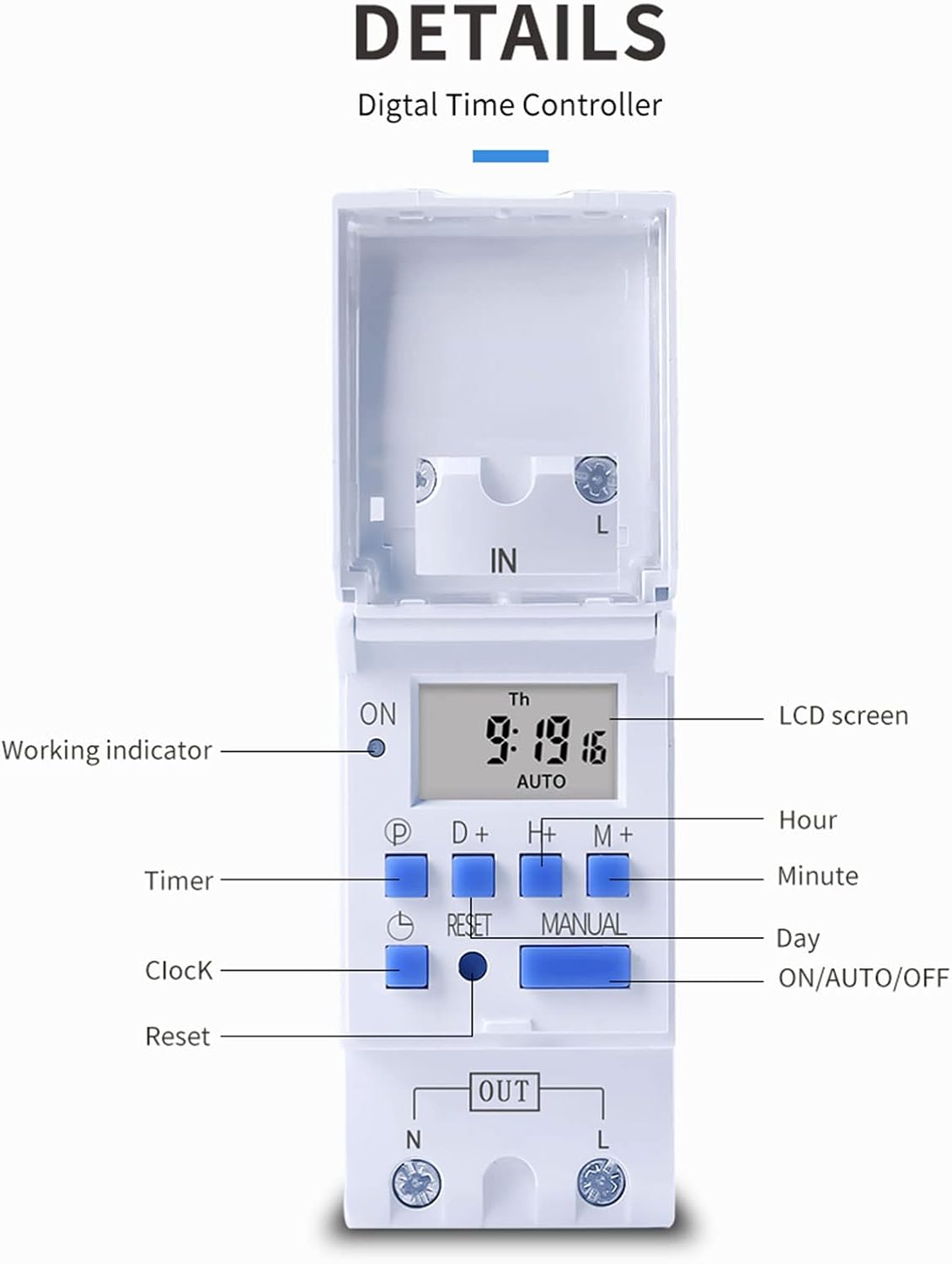
ചിത്രം 4.2: വിശദമായി view of the THC30A timer's LCD screen, control buttons (P, D+, H+, M+, RESET, MANUAL), and working indicator.
4.3 നിലവിലെ സമയം ക്രമീകരിക്കുന്നു
- അമർത്തുക ക്ലോക്ക് button (P) and hold it.
- പിടിക്കുമ്പോൾ ക്ലോക്ക്, അമർത്തുക D+ to set the current day of the week (MON, TUE, WED, THU, FRI, SAT, SUN).
- പിടിക്കുമ്പോൾ ക്ലോക്ക്, അമർത്തുക H+ to set the current hour (0-23).
- പിടിക്കുമ്പോൾ ക്ലോക്ക്, അമർത്തുക M+ to set the current minute (0-59).
- റിലീസ് ചെയ്യുക ക്ലോക്ക് ക്രമീകരണങ്ങൾ സംരക്ഷിക്കാനുള്ള ബട്ടൺ.
5. പ്രവർത്തന നിർദ്ദേശങ്ങൾ
5.1 Programming ON/OFF Times
The THC30A allows for up to 20 ON/OFF program settings. Each program consists of an ON time and an OFF time.
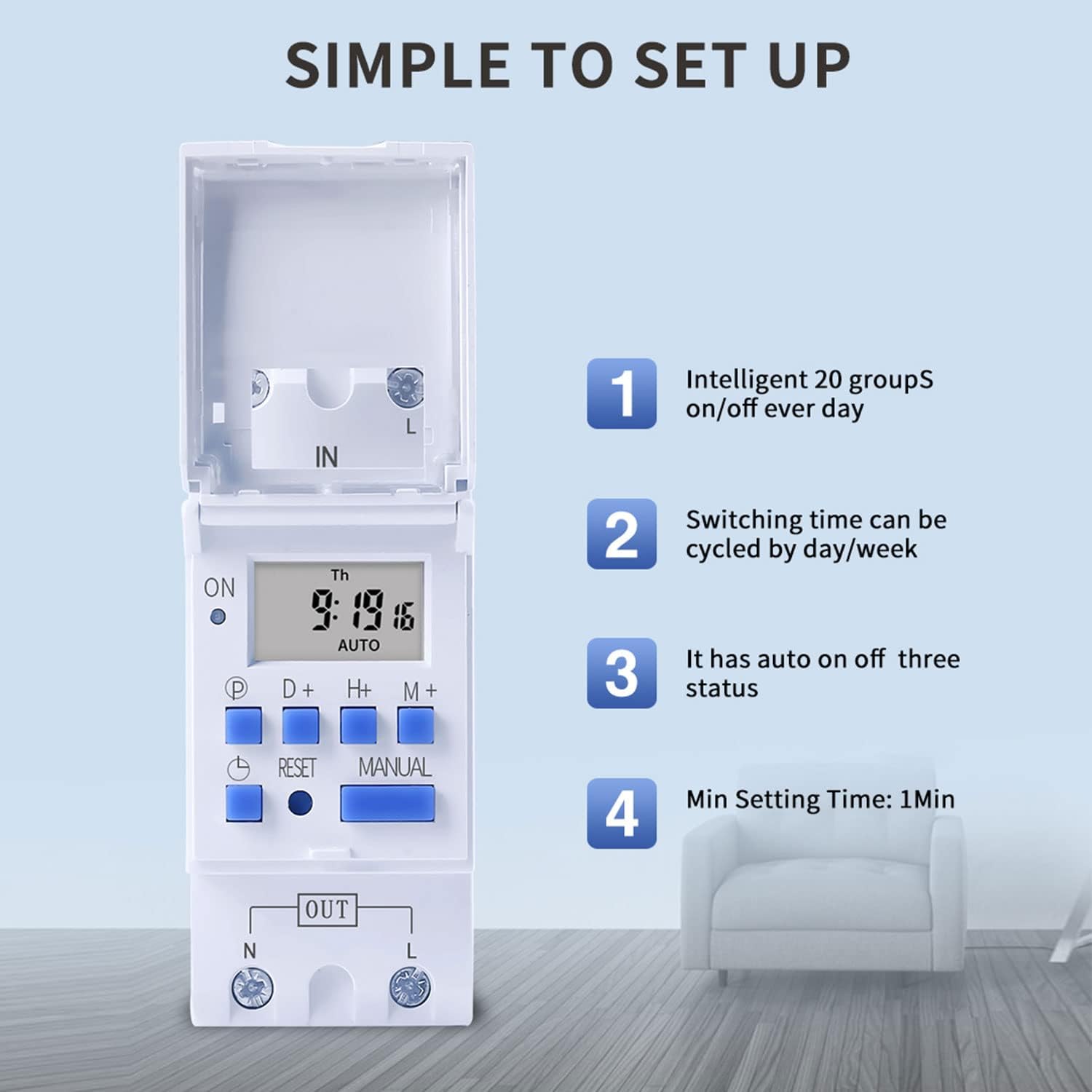
ചിത്രം 5.1: The THC30A timer's programming interface, highlighting its capacity for 20 ON/OFF settings, daily/weekly cycling, auto ON/OFF status, and a minimum setting time of 1 minute.
- അമർത്തുക P button (Program) once. The display will show '1 ON'.
- അമർത്തുക D+ to select the day(s) for this ON setting. You can choose a single day, a block of days (e.g., MON-FRI), or all 7 days.
- അമർത്തുക H+ to set the desired hour for the '1 ON' time.
- അമർത്തുക M+ to set the desired minute for the '1 ON' time.
- അമർത്തുക P വീണ്ടും. ഡിസ്പ്ലേ '1 ഓഫ്' കാണിക്കും.
- Repeat steps 2-4 to set the day(s), hour, and minute for the '1 OFF' time.
- അമർത്തുന്നത് തുടരുക P to cycle through '2 ON', '2 OFF', up to '20 ON', '20 OFF', setting each program as needed.
- ആവശ്യമുള്ള എല്ലാ പ്രോഗ്രാമുകളും സജ്ജീകരിച്ച ശേഷം, അമർത്തുക ക്ലോക്ക് button (P) to exit programming mode and return to the current time display.
5.2 മാനുവൽ അസാധുവാക്കൽ
ദി മാനുവൽ button allows you to override the programmed settings temporarily.
- അമർത്തുക മാനുവൽ once: Switches from AUTO to ON (output is continuously ON).
- അമർത്തുക മാനുവൽ again: Switches from ON to OFF (output is continuously OFF).
- അമർത്തുക മാനുവൽ a third time: Switches from OFF to AUTO (timer resumes programmed operation).
6. പരിപാലനം
6.1 ബാറ്ററി മാറ്റിസ്ഥാപിക്കൽ
The THC30A timer includes a built-in CR2032 lithium battery for power-off memory. This battery typically lasts for several years. If the display becomes dim or the time/settings are lost frequently during power outages, the battery may need replacement. Consult a qualified technician for battery replacement.
6.2 വൃത്തിയാക്കൽ
Wipe the timer's exterior with a soft, dry cloth. Do not use abrasive cleaners or solvents, as they may damage the casinജി അല്ലെങ്കിൽ ഡിസ്പ്ലേ.
7. പ്രശ്നപരിഹാരം
- പ്രദർശനം ശൂന്യമാണ്: Check power supply. If power is present, the internal battery might be fully discharged; allow time for it to charge. If still blank, press the പുനഃസജ്ജമാക്കുക ബട്ടൺ.
- പ്രോഗ്രാം ചെയ്തതുപോലെ ടൈമർ ഓൺ/ഓഫ് ചെയ്യുന്നില്ല:
- ടൈമർ ഓണാണെന്ന് ഉറപ്പാക്കുക ഓട്ടോ mode (not ON or OFF via manual override).
- Verify that the current time and day are set correctly.
- Check that the programmed ON/OFF times and days are correct and active.
- Confirm wiring connections are secure and correct.
- Load not receiving power: Check the load device (e.g., bulb, motor) for functionality. Verify input power to the timer. Ensure the timer is in an ON state (either programmed ON or manually ON).
- പവർ ഓഫായതിനുശേഷം ക്രമീകരണങ്ങൾ നഷ്ടപ്പെടും.tage: The internal battery may be depleted. Consider replacing the CR2032 battery.
8 സ്പെസിഫിക്കേഷനുകൾ

ചിത്രം 8.1: Dimensions of the TAXNELE THC30A Digital Programmable Timer Switch.
| ഫീച്ചർ | സ്പെസിഫിക്കേഷൻ |
|---|---|
| മോഡൽ | THC30A |
| ടൈപ്പ് ചെയ്യുക | Digital LCD Power Timer |
| മെറ്റീരിയൽ | പ്ലാസ്റ്റിക് |
| നിലവിലെ റേറ്റിംഗ് | 30എ |
| പവർ റേറ്റിംഗ് | 5000W |
| വാല്യംtagഇ ഓപ്ഷനുകൾ | 12V DC/AC, 24V DC/AC, 48V DC/AC, 110V AC, 220V AC, 230V AC (model dependent) |
| സമയ പിശക് | ≤2 seconds/day |
| പ്രദർശിപ്പിക്കുക | എൽസിഡി |
| Programming Interval | 1 minute to 168 hours (weekly cycle) |
| ഓൺ/ഓഫ് ക്രമീകരണം | 20 ഓൺ/ഓഫ് പ്രോഗ്രാമുകൾ |
| പ്രവർത്തന താപനില | -20℃ മുതൽ 50℃ വരെ |
| അളവുകൾ (L x W x H) | 86 X36 65 മില്ലിമീറ്റർ (3.38 X1.41 2.56 ഇഞ്ച്) |
| പവർ റിസർവ് | 3V Lithium battery (CR2032) for data retention |
9. വാറൻ്റി വിവരങ്ങൾ
TAXNELE products are manufactured to high-quality standards. This product is covered by a limited warranty against defects in materials and workmanship for a period specified by the retailer at the time of purchase. Please retain your proof of purchase for warranty claims. The warranty does not cover damage caused by improper installation, misuse, unauthorized modification, or natural disasters.
10. പിന്തുണ
For technical assistance, troubleshooting, or further inquiries regarding your TAXNELE THC30A Digital Programmable Timer Switch, please contact your retailer or the TAXNELE customer support channel provided with your purchase. When contacting support, please have your product model number (THC30A) and purchase information ready.