
ആമുഖം
This manual provides detailed instructions for the setup, operation, and maintenance of your ATTACK SHARK Wireless Bluetooth/USB Wired Gaming Mechanical Keyboard. This compact 100-key keyboard features RGB backlighting, hot-swappable switches, and multiple connectivity options for versatile use across various devices.

Image: The ATTACK SHARK Wireless Mechanical Keyboard, showcasing its 100-key layout, RGB backlighting, orange coiled USB-C cable, and a cloud-shaped wrist rest.
പാക്കേജ് ഉള്ളടക്കം
നിങ്ങളുടെ പാക്കേജിൽ എല്ലാ ഇനങ്ങളും ഉണ്ടെന്ന് ഉറപ്പാക്കുക:
- ATTACK SHARK Wireless Mechanical Keyboard
- Cloud Keyboard Wrist Rest
- USB-C to USB-A Data Cable (Coiled)
- കീക്യാപ്പും സ്വിച്ച് പുള്ളറും
- 2.4GHz യുഎസ്ബി റിസീവർ
- Additional Switches (Red Switch type)
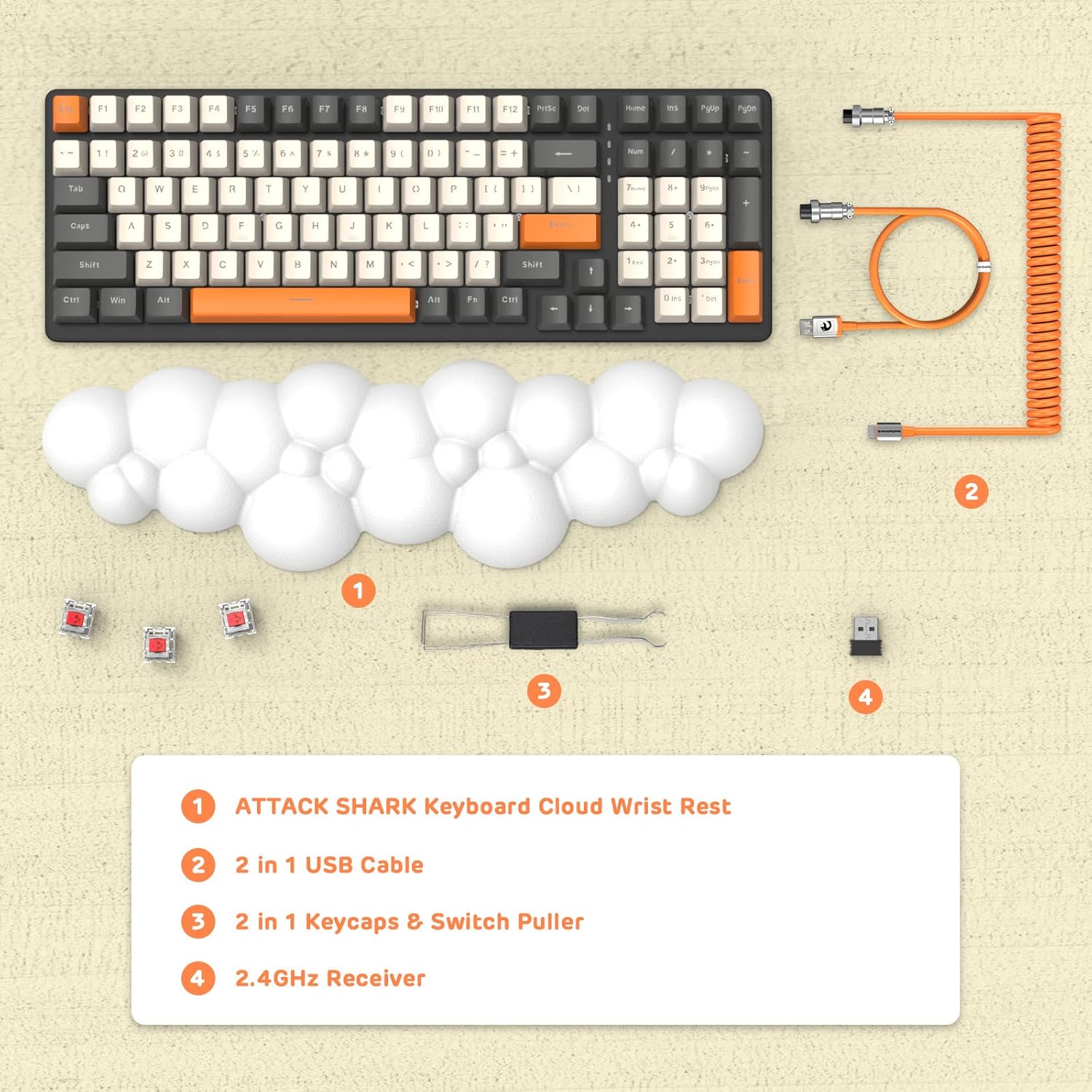
ചിത്രം: ഒരു ഓവർഹെഡ് view displaying the keyboard, cloud wrist rest, coiled USB cable, keycap and switch puller, and 2.4GHz USB receiver, along with spare switches.
സജ്ജമാക്കുക
The keyboard supports three connection modes: Bluetooth 5.0, 2.4GHz Wireless, and USB-C Wired.
1. വയർഡ് കണക്ഷൻ (USB-C)
- Connect the USB-C end of the provided coiled cable to the keyboard's USB-C port.
- നിങ്ങളുടെ കമ്പ്യൂട്ടറിൽ ലഭ്യമായ ഒരു USB പോർട്ടിലേക്ക് കേബിളിന്റെ USB-A അറ്റം ബന്ധിപ്പിക്കുക.
- The keyboard will automatically switch to wired mode (indicated by FN+5).

Image: A visual representation of the keyboard connecting to various devices (laptop, tablet, desktop, smartphone) via wired USB, 2.4GHz wireless, and Bluetooth.
2. 2.4GHz വയർലെസ് കണക്ഷൻ
- 2.4GHz യുഎസ്ബി റിസീവർ കണ്ടെത്തുക.
- നിങ്ങളുടെ കമ്പ്യൂട്ടറിൽ ലഭ്യമായ USB പോർട്ടിലേക്ക് USB റിസീവർ പ്ലഗ് ചെയ്യുക.
- അമർത്തുക FN + 4 on the keyboard to activate 2.4GHz wireless mode. The indicator light will show the connection status.
3. ബ്ലൂടൂത്ത് കണക്ഷൻ
The keyboard can store up to three Bluetooth devices.
- അമർത്തിപ്പിടിക്കുക FN + 1, FN + 2, അല്ലെങ്കിൽ FN + 3 for 3-5 seconds to enter Bluetooth pairing mode for the desired channel. The indicator light will flash rapidly.
- On your device (e.g., laptop, tablet, smartphone), navigate to Bluetooth settings and search for available devices.
- Select "ATTACK SHARK Keyboard" (or similar name) from the list to pair.
- ജോടിയാക്കിക്കഴിഞ്ഞാൽ, ഇൻഡിക്കേറ്റർ ലൈറ്റ് മിന്നുന്നത് നിർത്തുകയും ദൃഢമായി തുടരുകയും ചെയ്യും.
- ജോടിയാക്കിയ ബ്ലൂടൂത്ത് ഉപകരണങ്ങൾക്കിടയിൽ മാറാൻ, അമർത്തുക FN + 1, FN + 2, അല്ലെങ്കിൽ FN + 3.
പ്രവർത്തന നിർദ്ദേശങ്ങൾ
RGB ബാക്ക്ലൈറ്റിംഗ് നിയന്ത്രണം
ഒന്നിലധികം മോഡുകൾക്കൊപ്പം ഇഷ്ടാനുസൃതമാക്കാവുന്ന RGB ബാക്ക്ലൈറ്റിംഗ് കീബോർഡിന്റെ സവിശേഷതയാണ്.
- ബാക്ക്ലൈറ്റ് മോഡ് മാറുക: അമർത്തുക FN + INS വ്യത്യസ്ത RGB ലൈറ്റിംഗ് ഇഫക്റ്റുകളിലൂടെ സഞ്ചരിക്കാൻ.
- തെളിച്ചം ക്രമീകരിക്കുക: അമർത്തുക FN + ↑ (മുകളിലേക്കുള്ള അമ്പടയാളം) തെളിച്ചം വർദ്ധിപ്പിക്കാൻ, FN + ↓ (താഴേക്കുള്ള അമ്പടയാളം) തെളിച്ചം കുറയ്ക്കാൻ.
- വേഗത ക്രമീകരിക്കുക: അമർത്തുക FN + ← (Left Arrow) to decrease effect speed, FN + → (വലത് അമ്പടയാളം) ഇഫക്റ്റ് വേഗത വർദ്ധിപ്പിക്കാൻ.

Image: The keyboard displaying various RGB lighting patterns, with key combinations for switching modes and adjusting brightness/speed.
ഹോട്ട്-സ്വാപ്പ് ചെയ്യാവുന്ന സ്വിച്ചുകൾ
The keyboard's PCB supports 3-pin mechanical switches, allowing for easy replacement without soldering. This feature enables customization of typing feel and extends the keyboard's lifespan.
- ആവശ്യമുള്ള കീക്യാപ്പ് ശ്രദ്ധാപൂർവ്വം നീക്കം ചെയ്യാൻ നൽകിയിരിക്കുന്ന കീക്യാപ്പ് പുള്ളർ ഉപയോഗിക്കുക.
- Use the switch puller to gently grasp and remove the switch from the PCB.
- Align the pins of the new 3-pin switch with the holes on the PCB and press firmly until it clicks into place.
- കീക്യാപ്പ് മാറ്റിസ്ഥാപിക്കുക.

ചിത്രം: വിശദമായ ഒരു ചിത്രം view of the keyboard's PCB with a switch removed, demonstrating the hot-swappable feature. Spare red switches are also shown.
ബാറ്ററിയും ചാർജിംഗും
The keyboard is equipped with a 4000mAh lithium battery.
- ബാറ്ററി ലൈഫ്: Up to 200 hours of use with the backlight turned off.
- ചാർജിംഗ്: Connect the keyboard via the USB-C cable to a power source. The charging indicator light will show the charging status.
- കുറഞ്ഞ വോളിയംtagഇ സൂചകം: The keyboard features a low voltage indicator to alert you when charging is required.

Image: The keyboard shown from the side, emphasizing its 4000mAh lithium battery capacity.
മെയിൻ്റനൻസ്
നിങ്ങളുടെ കീബോർഡിന്റെ ദീർഘായുസ്സും മികച്ച പ്രകടനവും ഉറപ്പാക്കാൻ:
- വൃത്തിയാക്കൽ: Use a soft, dry cloth to wipe the keyboard surface. For deeper cleaning, remove keycaps using the provided puller and use compressed air to clear debris from between switches.
- മണിബന്ധ വിശ്രമം: The PU material of the wrist rest is durable and washable. Clean with a damp ആവശ്യമെങ്കിൽ തുണിയും വീര്യം കുറഞ്ഞ സോപ്പും.
- സംഭരണം: നേരിട്ടുള്ള സൂര്യപ്രകാശവും കടുത്ത താപനിലയും ഏൽക്കാത്ത തണുത്തതും വരണ്ടതുമായ സ്ഥലത്ത് കീബോർഡ് സൂക്ഷിക്കുക.
- ദ്രാവകങ്ങൾ ഒഴിവാക്കുക: Do not expose the keyboard to liquids. In case of spills, immediately disconnect power and allow it to dry completely before use.
ട്രബിൾഷൂട്ടിംഗ്
| ഇഷ്യൂ | സാധ്യമായ കാരണം | പരിഹാരം |
|---|---|---|
| വയർലെസ്സ് മോഡിൽ കീബോർഡ് പ്രതികരിക്കുന്നില്ല. | Low battery, incorrect mode selected, receiver not connected, or Bluetooth not paired. | Charge the keyboard. Ensure correct mode (FN+4 for 2.4G, FN+1/2/3 for Bluetooth) is selected. Verify 2.4G receiver is securely plugged in. Re-pair Bluetooth if necessary. |
| Keys are "sticking" or registering multiple inputs. | Debris under keycap/switch, faulty switch. | Remove keycap and switch, clean thoroughly with compressed air. If issue persists, replace the switch using the hot-swappable feature. |
| RGB backlight not working or dim. | Backlight turned off, brightness set too low, or low battery. | Press FN+INS to cycle modes. Adjust brightness with FN+↑ / FN+↓. Charge the keyboard. |
| Keyboard not recognized by device. | Driver issue, incorrect connection mode, or device compatibility. | Ensure correct connection mode is active. Try a different USB port or device. For wired mode, ensure the cable is fully inserted. Check device's operating system for necessary drivers (usually plug-and-play). |
സ്പെസിഫിക്കേഷനുകൾ
- മോഡൽ: 3b5c1fdb-29da-409c-b4b7-12e9e72fb741
- കണക്റ്റിവിറ്റി: Bluetooth 5.0, 2.4GHz Wireless (RF), USB-C Wired
- ലേഔട്ട്: Compact 100 Keys (98% layout)
- സ്വിച്ചുകൾ: Hot-Swappable 3-pin Mechanical (Red Switch variant)
- ബാക്ക്ലൈറ്റിംഗ്: RGB Backlit (9 modes)
- ബാറ്ററി: 4000mAh ലിഥിയം ബാറ്ററി
- അനുയോജ്യമായ ഉപകരണങ്ങൾ: Laptop, PC, Tablet (Mac/Win Supported)
- മെറ്റീരിയൽ: Polyurethane (PU) for wrist rest
- അളവുകൾ: 16.97 x 6.42 x 2.52 ഇഞ്ച് (പാക്കേജ്)
- ഇനത്തിൻ്റെ ഭാരം: 2.94 പൗണ്ട്
- പ്രത്യേക സവിശേഷതകൾ: Ergonomic design, Custom Coiled Aviator Keyboard Cable, Keycap and Switch Puller included.
വാറൻ്റിയും പിന്തുണയും
For warranty information and technical support, please refer to the documentation provided with your purchase or visit the official ATTACK SHARK webസൈറ്റ്. ഏതെങ്കിലും വാറന്റി ക്ലെയിമുകൾക്ക് നിങ്ങളുടെ വാങ്ങലിന്റെ തെളിവ് സൂക്ഷിക്കുക.
നിർമ്മാതാവ്: അറ്റാക്ക് സ്രാവ്
ആദ്യം ലഭ്യമായ തീയതി: മെയ് 8, 2023