
1. സജ്ജീകരണവും കണക്റ്റിവിറ്റിയും
The ATTACK SHARK K6 Wireless Mechanical Keyboard offers versatile connectivity options and is compatible with multiple operating systems.
1.1 പാക്കേജ് ഉള്ളടക്കം
- ATTACK SHARK K6 Wireless Mechanical Keyboard
- Cloud Keyboard Wrist Rest
- 2-in-1 USB Cable (Type-C to USB-A)
- 2-ഇൻ-1 കീക്യാപ്പ് & സ്വിച്ച് പുള്ളർ
- 2.4GHz റിസീവർ

Image: All components included with the ATTACK SHARK K6 Wireless Mechanical Keyboard.
1.2 കണക്റ്റിവിറ്റി മോഡുകൾ
The keyboard supports three connection modes: Bluetooth 5.0, 2.4GHz wireless, and USB-C wired.
- ബ്ലൂടൂത്ത് മോഡ്: അമർത്തുക FN + 1, FN + 2, അല്ലെങ്കിൽ FN + 3 to switch between three different Bluetooth devices.
- 2.4GHz വയർലെസ് മോഡ്: അമർത്തുക FN + 4. Insert the 2.4GHz receiver into your device's USB port.
- USB-C വയേർഡ് മോഡ്: അമർത്തുക FN + 5. Connect the keyboard to your device using the provided USB-C to USB-A cable.
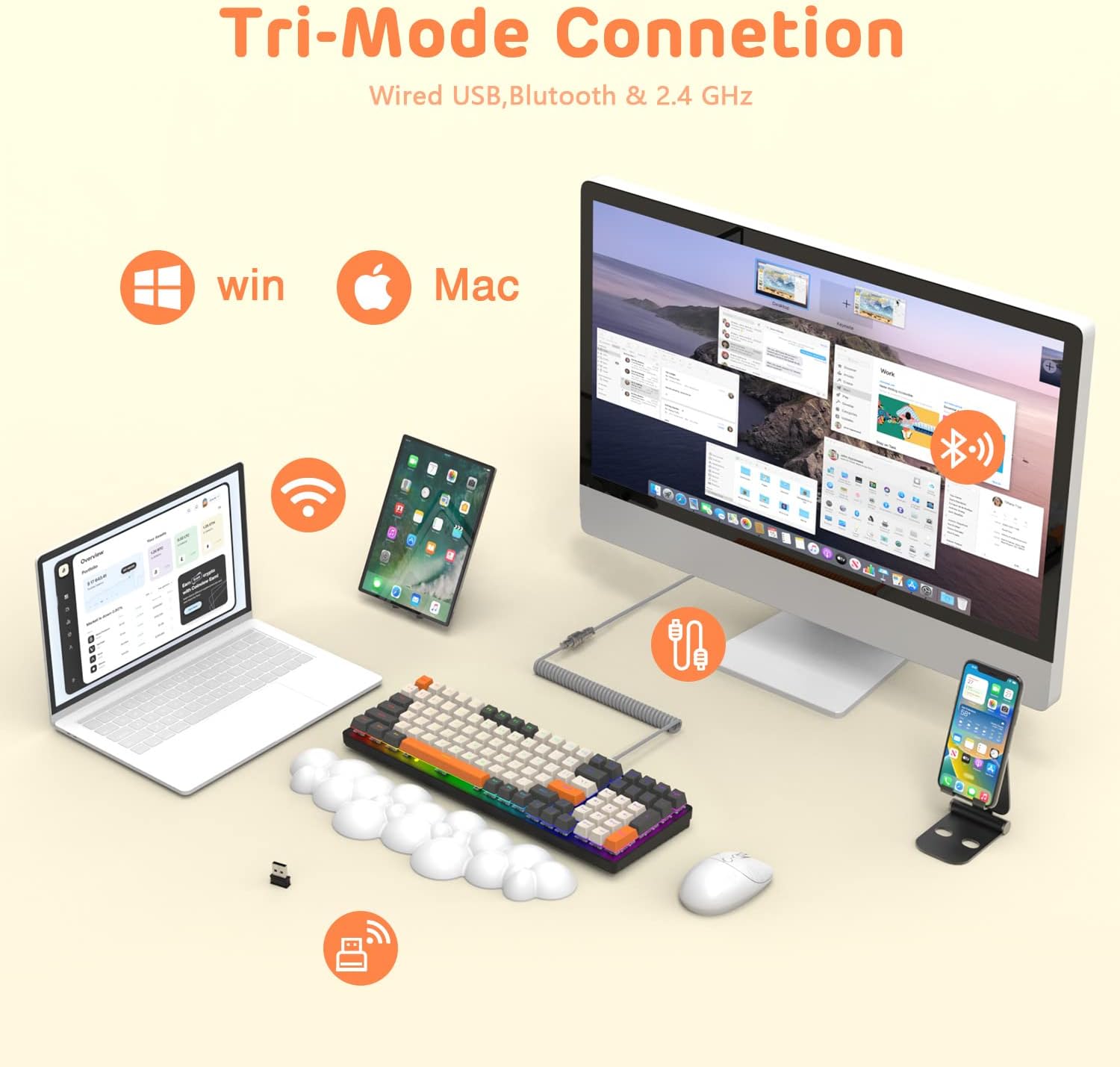
Image: The keyboard demonstrating its tri-mode connection capabilities with various devices.
1.3 കീബോർഡ് ചാർജ് ചെയ്യുന്നു
The keyboard features a 4000mAh battery. Connect the USB-C cable to the keyboard and a power source to charge. Indicator lights (blue, purple, cyan, green) will display the charging status and low voltagഇ മുന്നറിയിപ്പുകൾ.

Image: Visual representation of the keyboard's 4000mAh lithium battery capacity.

Image: The custom coiled USB-C to USB-A cable for charging and wired use.
2. പ്രവർത്തന നിർദ്ദേശങ്ങൾ
This section details the various functions and features of your ATTACK SHARK K6 keyboard.
2.1 Keyboard Layout and Ergonomics
The keyboard features a 96% compact layout with 100 keys, including a numpad, optimizing workspace while retaining full functionality. It also includes a cloud-shaped memory foam wrist rest for enhanced comfort.

Image: The 100-key compact layout of the K6 keyboard.

Image: Ergonomic design with adjustable two-stage tripod feet.

Image: The K6 keyboard with its ergonomic wrist rest and key features.

Image: Benefits of the ergonomic wrist rest for wrist pain relief.
2.2 RGB ലൈറ്റിംഗ് കസ്റ്റമൈസേഷൻ
The keyboard features customizable RGB backlighting. You can adjust the color, brightness, and flow rate of each key to create personalized lighting effects.
- ബാക്ക്ലൈറ്റ് മോഡ് മാറുക: അമർത്തുക FN + INS 9 വ്യത്യസ്ത RGB ബാക്ക്ലൈറ്റ് മോഡുകളിലൂടെ സഞ്ചരിക്കാൻ.
- തെളിച്ചം/വേഗത ക്രമീകരിക്കുക: ഉപയോഗിക്കുക FN + Arrow Keys (Up/Down for brightness, Left/Right for speed) to fine-tune the lighting effects.

ചിത്രം: കഴിഞ്ഞുview of the 9 RGB rainbow backlight modes and control keys.
2.3 ഹോട്ട്-സ്വാപ്പബിൾ സ്വിച്ചുകൾ
The K6 keyboard features a hot-swappable PCB, allowing you to easily replace 3-pin mechanical switches without soldering. This extends the lifespan of the switches and offers customization possibilities.

Image: Detail of the hot-swappable PCB and mechanical switches.
Video: A short demonstration of the K6 keyboard's retro design, PBT keycaps, and easy-to-type switches, including a close-up of a red switch.
Video: Demonstration of the K6 keyboard's RGB backlighting and typing sound, showcasing its triple-mode connectivity and mechanical switches.
3. പരിപാലനം
ശരിയായ അറ്റകുറ്റപ്പണി നിങ്ങളുടെ കീബോർഡിന്റെ ദീർഘായുസ്സും മികച്ച പ്രകടനവും ഉറപ്പാക്കുന്നു.
3.1 കീബോർഡ് വൃത്തിയാക്കൽ
- കീക്യാപ്പുകൾ: കീക്യാപ്പുകൾ നീക്കം ചെയ്യാൻ നൽകിയിരിക്കുന്ന കീക്യാപ്പ് പുള്ളർ ഉപയോഗിക്കുക. മൃദുവായ, d ഉപയോഗിച്ച് അവ വൃത്തിയാക്കുക.amp ആവശ്യമെങ്കിൽ തുണിയും വീര്യം കുറഞ്ഞ സോപ്പും ഉപയോഗിക്കുക. വീണ്ടും ഘടിപ്പിക്കുന്നതിന് മുമ്പ് അവ പൂർണ്ണമായും ഉണങ്ങിയെന്ന് ഉറപ്പാക്കുക.
- കീബോർഡ് ബോഡി: Wipe the keyboard surface with a soft, lint-free cloth. For stubborn dirt, slightly dampen the cloth with water or a gentle electronics cleaner.
- കീക്യാപ്പുകൾക്ക് കീഴിൽ: സ്വിച്ചുകൾക്കിടയിൽ നിന്ന് പൊടിയും അവശിഷ്ടങ്ങളും നീക്കം ചെയ്യാൻ കംപ്രസ് ചെയ്ത വായു ഉപയോഗിക്കുക.
3.2 സ്വിച്ച് മാറ്റിസ്ഥാപിക്കൽ
Thanks to the hot-swappable design, individual switches can be replaced if they become faulty or if you wish to customize your typing experience.
- Use the switch puller to carefully grip and pull out the desired switch.
- Align the pins of the new 3-pin switch with the holes on the PCB.
- Gently press the new switch into place until it clicks securely. Ensure the pins are not bent.
3.3 മണിബന്ധ വിശ്രമ പരിചരണം
The wrist rest is made of durable and washable PU material. Clean it with a damp cloth and mild soap as needed to maintain hygiene and appearance.
4. പ്രശ്നപരിഹാരം
If you encounter issues with your keyboard, refer to the following common solutions.
4.1 കണക്റ്റിവിറ്റി പ്രശ്നങ്ങൾ
- No Connection (Wireless): Ensure the keyboard is in the correct wireless mode (Bluetooth or 2.4GHz). Check if the 2.4GHz receiver is properly inserted or if Bluetooth is enabled on your device and the keyboard is paired.
- ഇടവിട്ടുള്ള കണക്ഷൻ: Move the keyboard closer to your device to reduce interference. Ensure the keyboard is sufficiently charged.
- വയർഡ് കണക്ഷൻ പ്രവർത്തിക്കുന്നില്ല: Verify the USB-C cable is securely connected to both the keyboard and your device. Try a different USB port or cable.
4.2 RGB Lighting Problems
- Lights Not On: Ensure the keyboard is powered on and charged. Adjust brightness using FN + മുകളിലേക്കുള്ള അമ്പടയാളം.
- Incorrect Mode/Color: ഉപയോഗിച്ച് മോഡുകളിലൂടെ സൈക്കിൾ ചെയ്യുക FN + INS.
4.3 പ്രധാന പ്രവർത്തന പ്രശ്നങ്ങൾ
- പ്രതികരിക്കാത്ത കീകൾ: Check for debris under the keycap or switch. If a specific switch is faulty, consider replacing it using the hot-swappable feature.
- Keys Double-Typing or Sticking: This can sometimes be resolved by cleaning the switch or replacing the affected switch. Ensure the switch is fully seated.
5 സ്പെസിഫിക്കേഷനുകൾ
| ഫീച്ചർ | വിശദാംശങ്ങൾ |
|---|---|
| മോഡൽ | K6 വയർലെസ് മെക്കാനിക്കൽ കീബോർഡ് |
| കണക്റ്റിവിറ്റി ടെക്നോളജി | Bluetooth 5.0, 2.4GHz RF, USB-C Wired |
| കീബോർഡ് വിവരണം | മെക്കാനിക്കൽ |
| സ്വിച്ച് തരം | Clicky Blue Switches (Hot-Swappable 3-pin) |
| ലേഔട്ട് | 96% (100 കീകൾ) |
| ബാറ്ററി ശേഷി | 4000mAh |
| ബാക്ക്ലൈറ്റിംഗ് | RGB (9 മോഡുകൾ) |
| അനുയോജ്യമായ ഉപകരണങ്ങൾ | Laptop, PC, Tablet (Mac/Win dual systems) |
| പ്രത്യേക സവിശേഷതകൾ | Ergonomic, Hot-Swap, Custom Coiled Aviator Keyboard Cable, Backlit, Wrist Rest, Rechargeable, Keycap and Switch Puller, N-Key Rollover |
| മെറ്റീരിയൽ | Polyurethane (PU) for wrist rest |
| ഇനത്തിൻ്റെ ഭാരം | 2.97 പൗണ്ട് |
| പാക്കേജ് അളവുകൾ | 17.09 x 6.46 x 2.68 ഇഞ്ച് |
6. വാറൻ്റി വിവരങ്ങൾ
നിർമ്മാതാവിന്റെ ഉദ്യോഗസ്ഥനെ കാണുക. website or product packaging for detailed warranty information regarding your ATTACK SHARK K6 Wireless Mechanical Keyboard.
7. ഉപഭോക്തൃ പിന്തുണ
For further assistance, technical support, or inquiries about your ATTACK SHARK K6 Wireless Mechanical Keyboard, please contact ATTACK SHARK customer support or visit their official webസൈറ്റ്.