
HARDELL Q0M-DC-4S
HARDELL Mini Cordless Rotary Tool 4V - User Manual
മോഡൽ: Q0M-DC-4S
1. ആമുഖം
Thank you for choosing the HARDELL Mini Cordless Rotary Tool. This manual provides essential information for the safe and efficient operation, maintenance, and troubleshooting of your new tool. Please read it thoroughly before first use and keep it for future reference.

Image 1.1: HARDELL Mini Cordless Rotary Tool with included accessories. This image displays the main tool unit, various sanding bands, cutting discs, grinding bits, drilling bits, diamond bits, polishing wheels, collets, and a wrench.
2. സുരക്ഷാ നിർദ്ദേശങ്ങൾ
തീ, വൈദ്യുത ആഘാതം, വ്യക്തിഗത പരിക്കുകൾ എന്നിവയുടെ അപകടസാധ്യത കുറയ്ക്കുന്നതിന് എല്ലായ്പ്പോഴും അടിസ്ഥാന സുരക്ഷാ മുൻകരുതലുകൾ പാലിക്കുക.
- Wear appropriate personal protective equipment, including safety glasses, gloves, and a dust mask.
- വർക്ക്പീസ് സുരക്ഷിതമാണെന്ന് ഉറപ്പാക്കുകampഓപ്പറേഷന് മുമ്പ്.
- ജോലിസ്ഥലം വൃത്തിയുള്ളതും നല്ല വെളിച്ചമുള്ളതുമായി സൂക്ഷിക്കുക.
- തീപിടിക്കുന്ന ദ്രാവകങ്ങൾ, വാതകങ്ങൾ, പൊടി എന്നിവയുടെ സാന്നിധ്യം പോലെയുള്ള സ്ഫോടനാത്മക അന്തരീക്ഷത്തിൽ ഉപകരണം പ്രവർത്തിപ്പിക്കരുത്.
- പവർ ടൂൾ പ്രവർത്തിപ്പിക്കുമ്പോൾ കുട്ടികളെയും കാഴ്ചക്കാരെയും അകറ്റി നിർത്തുക.
- ആകസ്മികമായി സ്റ്റാർട്ട് ചെയ്യുന്നത് ഒഴിവാക്കുക. ബാറ്ററി പായ്ക്കിലേക്ക് കണക്റ്റ് ചെയ്യുന്നതിനോ, ഉപകരണം എടുക്കുന്നതിനോ അല്ലെങ്കിൽ കൊണ്ടുപോകുന്നതിനോ മുമ്പ് സ്വിച്ച് ഓഫ്-പൊസിഷനിലാണെന്ന് ഉറപ്പാക്കുക.
- അതിരുകടക്കരുത്. എല്ലായ്പ്പോഴും ശരിയായ കാലും ബാലൻസും നിലനിർത്തുക.
- എന്തെങ്കിലും ക്രമീകരണങ്ങൾ വരുത്തുന്നതിനോ, ആക്സസറികൾ മാറ്റുന്നതിനോ, പവർ ടൂളുകൾ സൂക്ഷിക്കുന്നതിനോ മുമ്പ് ഉപകരണത്തിൽ നിന്ന് ബാറ്ററി പായ്ക്ക് വിച്ഛേദിക്കുക.
- Use the tool only with specifically designated battery packs.
- നിഷ്ക്രിയ ഉപകരണങ്ങൾ കുട്ടികൾക്ക് ലഭ്യമാകാതെ സൂക്ഷിക്കുക, പവർ ടൂൾ അല്ലെങ്കിൽ ഈ നിർദ്ദേശങ്ങൾ പവർ ടൂൾ പ്രവർത്തിപ്പിക്കാൻ പരിചയമില്ലാത്ത വ്യക്തികളെ അനുവദിക്കരുത്.
3. പാക്കേജ് ഉള്ളടക്കം
പാക്കേജ് തുറക്കുമ്പോൾ എല്ലാ ഇനങ്ങളും നിലവിലുണ്ടെന്നും നല്ല നിലയിലാണെന്നും ഉറപ്പാക്കുക.
- HARDELL Mini Cordless Rotary Tool 4V x 1
- Rotary Tool Accessories x 69 (including sanding bands, sanding shank, sanding paper, HSS cutting discs, wheel mandrel, aluminum oxide grinding wheels, drilling bits, diamond bits, wool polishing wheels, wrench, collets)
- ടൈപ്പ്-സി ചാർജിംഗ് കേബിൾ x 1
- Accessories Case x 1
- Black Bag x 1

Image 3.1: Detailed diagram illustrating the 69 included accessories, categorized for sanding, cutting, grinding, drilling, engraving, polishing, and other uses. This includes various bits, discs, and collets.
4 സ്പെസിഫിക്കേഷനുകൾ
| ബ്രാൻഡ് | ഹാർഡെൽ |
| മോഡൽ നമ്പർ | Q0M-DC-4S |
| വാല്യംtage | 4 വോൾട്ട് |
| പവർ ഉറവിടം | ബാറ്ററി പവർ (1 ലിഥിയം അയൺ ബാറ്ററി ഉൾപ്പെടുത്തിയിരിക്കുന്നു) |
| സ്പീഡ് ക്രമീകരണങ്ങൾ | 5-Speed (5000/8000/11000/14000/18000 RPM) |
| പരമാവധി റൊട്ടേഷണൽ സ്പീഡ് | 18000 ആർപിഎം |
| കുറഞ്ഞ വേഗത | 5000 ആർപിഎം |
| ഇനത്തിൻ്റെ ഭാരം | 0.35 പൗണ്ട് (ഏകദേശം 5.6 ഔൺസ്) |
| പ്രത്യേക സവിശേഷതകൾ | Compact, Cordless, Keyless Chuck, Multi-Use, Variable Speed, Digital Display |
| ചാർജിംഗ് | Type-C USB Charging (1-2 hours for full charge) |
| Chuck Sizes | 3/64", 1/16", 3/32" (1.0mm, 1.6mm, 2.3mm) |
5. സജ്ജീകരണവും അസംബ്ലിയും
5.1 ഉപകരണം ചാർജ് ചെയ്യുന്നു
Before first use, fully charge the rotary tool. Connect the provided Type-C charging cable to the tool's charging port and to a compatible USB power adapter (not included). The digital display will indicate charging status.

Image 5.1: The HARDELL rotary tool connected to a laptop via its Type-C USB cable for charging. The tool's display shows charging progress.
5.2 Installing/Changing Accessories
- Press down the spindle locking button located near the chuck.
- Unscrew the collet nut counter-clockwise.
- Select the appropriate collet size (3/64", 1/16", or 3/32") for your desired accessory and insert it into the chuck.
- Insert the accessory bit into the collet.
- While holding the spindle locking button, screw on the collet nut clockwise until the accessory is securely fastened. Do not overtighten.
- സ്പിൻഡിൽ ലോക്കിംഗ് ബട്ടൺ റിലീസ് ചെയ്യുക.

Image 5.2: A visual guide demonstrating the four steps to install or change accessories: pressing the lock button and unscrewing the nut, choosing a collet, inserting the bit, and tightening the nut.
6. പ്രവർത്തന നിർദ്ദേശങ്ങൾ
6.1 പവർ ഓൺ/ഓഫ്
- To turn on: Press the power button briefly. The tool will start at the lowest speed setting.
- To turn off: Press and hold the power button for approximately 2 seconds.
6.2 വേഗത ക്രമീകരിക്കൽ
The HARDELL Mini Cordless Rotary Tool features 5-speed settings. Briefly press the power button to cycle through the speeds (5000, 8000, 11000, 14000, 18000 RPM). The current speed level will be displayed on the screen.
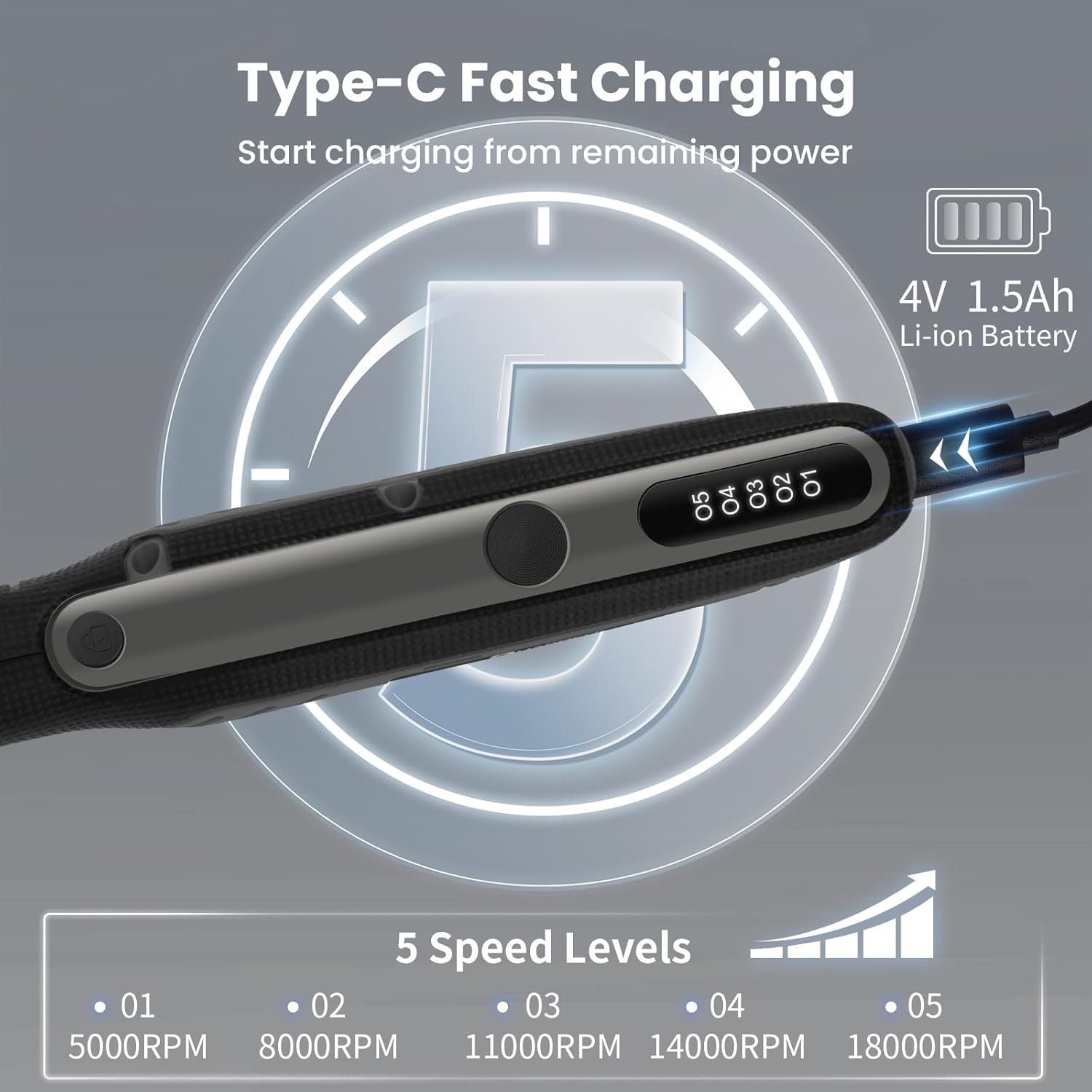
Image 6.1: The HARDELL rotary tool's digital display showing the five available speed levels, ranging from 5000 RPM to 18000 RPM.
6.3 ശുപാർശ ചെയ്യുന്ന ആപ്ലിക്കേഷനുകൾ
This tool is suitable for various light-duty tasks. Always select the appropriate accessory and speed for the material and task.
- മുറിക്കൽ: Use HSS cutting discs for thin materials like plastic or soft metals.
- കൊത്തുപണി: Diamond bits are ideal for glass, metal, and stone.
- സാൻഡിംഗ്: Sanding bands and paper are used for smoothing wood, plastic, and other soft materials.
- ഡ്രില്ലിംഗ്: Small drilling bits are suitable for creating holes in soft materials like wood, plastic, or seashells.
- മിനുക്കുപണികൾ: Wool polishing wheels can be used with polishing compounds for jewelry or other small items.

Image 6.2: A collage demonstrating the HARDELL rotary tool in use for multiple applications, including cutting, engraving, polishing, grinding, sanding, drilling, cleaning, and carving on different materials.
7. പരിപാലനം
- വൃത്തിയാക്കൽ: After each use, wipe the tool with a clean, dry cloth. Remove any dust or debris from the ventilation slots. Do not use harsh chemicals or abrasive cleaners.
- ആക്സസറി കെയർ: Clean accessories after use. Replace worn or damaged accessories immediately to ensure optimal performance and safety.
- സംഭരണം: Store the tool and accessories in the provided case or bag in a dry, cool place, away from direct sunlight and out of reach of children.
- ബാറ്ററി കെയർ: Do not store the tool with a completely discharged battery. Charge it periodically if not used for extended periods.
8. പ്രശ്നപരിഹാരം
| പ്രശ്നം | സാധ്യമായ കാരണം | പരിഹാരം |
|---|---|---|
| ഉപകരണം ഓണാകുന്നില്ല. | ബാറ്ററി ഡിസ്ചാർജ് ചെയ്തു. | Charge the battery fully using the Type-C cable. |
| Accessory wobbles or is loose. | Incorrect collet size or improperly tightened nut. | Ensure the correct collet is used and the collet nut is securely tightened. |
| പ്രവർത്തന സമയത്ത് ഉപകരണം നിർത്തുന്നു. | Overload or low battery. | Reduce pressure on the tool or recharge the battery. |
| പ്രകടനം കുറച്ചു. | Worn accessory or dirty tool. | Replace the accessory or clean the tool and ventilation slots. |
9. വാറൻ്റിയും പിന്തുണയും
For warranty information or technical support, please refer to the contact details provided with your purchase or visit the official HARDELL webസൈറ്റ്. വാറന്റി ക്ലെയിമുകൾക്കായി നിങ്ങളുടെ വാങ്ങലിന്റെ തെളിവ് സൂക്ഷിക്കുക.
Official HARDELL Store: HARDELL Store on Amazon
Ask a question about this manual
Ask about setup, troubleshooting, compatibility, parts, safety, or missing instructions. Manuals+ will review the question and use this page’s manual context to help answer it.