
FAO Schwarz Thunderbolt Jet X2
FAO Schwarz Thunderbolt Jet X2 Drone User Manual
Model: Thunderbolt Jet X2 | Brand: FAO Schwarz
ആമുഖം
Welcome to the user manual for your new FAO Schwarz Thunderbolt Jet X2 Drone. This manual provides essential information for safe operation, setup, maintenance, and troubleshooting. Please read it thoroughly before operating your drone to ensure a safe and enjoyable experience.
സുരക്ഷാ വിവരങ്ങൾ
- ഡ്രോൺ എപ്പോഴും തുറന്നതും വ്യക്തവുമായ സ്ഥലങ്ങളിൽ, ആളുകൾ, മൃഗങ്ങൾ, തടസ്സങ്ങൾ എന്നിവയിൽ നിന്ന് മാറി പ്രവർത്തിപ്പിക്കുക.
- Do not fly near airports, power lines, or restricted airspace.
- ഓരോ പറക്കലിനും മുമ്പ് ഡ്രോണിന്റെ ബാറ്ററിയും റിമോട്ട് കൺട്രോൾ ബാറ്ററികളും പൂർണ്ണമായും ചാർജ് ചെയ്തിട്ടുണ്ടെന്ന് ഉറപ്പാക്കുക.
- കറങ്ങുന്ന പ്രൊപ്പല്ലറുകളിൽ നിന്ന് വിരലുകൾ, മുടി, അയഞ്ഞ വസ്ത്രങ്ങൾ എന്നിവ അകറ്റി നിർത്തുക.
- ശക്തമായ കാറ്റിലോ പ്രതികൂല കാലാവസ്ഥയിലോ പ്രവർത്തിക്കരുത്.
- പ്രായം കുറഞ്ഞ ഉപയോക്താക്കൾക്ക് മുതിർന്നവരുടെ മേൽനോട്ടം ശുപാർശ ചെയ്യുന്നു.
ബോക്സിൽ എന്താണുള്ളത്
എല്ലാ ഘടകങ്ങളും ഉണ്ടെന്ന് ഉറപ്പാക്കുക:
- FAO Schwarz Thunderbolt Jet X2 Drone
- റിമോട്ട് കൺട്രോൾ
- Rechargeable Drone Battery
- യുഎസ്ബി ചാർജിംഗ് കേബിൾ
- Spare Propellers (if included)
- ഉപയോക്തൃ മാനുവൽ (ഈ പ്രമാണം)
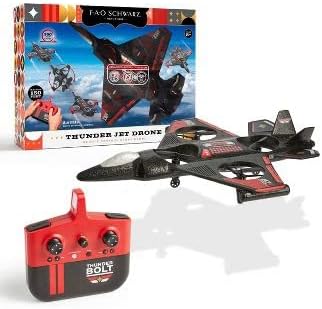
Image: The Thunderbolt Jet X2 Drone, its remote control, and the product packaging, showing the main components included.
സജ്ജമാക്കുക
1. ഡ്രോൺ ബാറ്ററി ചാർജ് ചെയ്യുന്നു
- Locate the rechargeable drone battery.
- നൽകിയിരിക്കുന്ന USB ചാർജിംഗ് കേബിളിലേക്ക് ബാറ്ററി ബന്ധിപ്പിക്കുക.
- Plug the USB cable into a standard USB power source (e.g., computer USB port, USB wall adapter).
- യുഎസ്ബി കേബിളിലെ ഇൻഡിക്കേറ്റർ ലൈറ്റ് ചാർജിംഗ് സ്റ്റാറ്റസ് കാണിക്കും (ഉദാ: ചാർജ് ചെയ്യുന്നതിന് ചുവപ്പ്, പൂർണ്ണമായും ചാർജ് ചെയ്തതിന് ഓഫ്).
- ചാർജ് ചെയ്യാൻ സാധാരണയായി ഏകദേശം 60-90 മിനിറ്റ് എടുക്കും. അമിതമായി ചാർജ് ചെയ്യരുത്.
2. റിമോട്ട് കൺട്രോൾ ബാറ്ററികൾ ഇൻസ്റ്റാൾ ചെയ്യുന്നു
- റിമോട്ട് കൺട്രോളിൻ്റെ പിൻഭാഗത്തുള്ള ബാറ്ററി കമ്പാർട്ട്മെൻ്റ് തുറക്കുക.
- Insert 3x AAA batteries (not included) into the compartment, ensuring correct polarity (+/-).
- ബാറ്ററി കമ്പാർട്ട്മെൻ്റ് സുരക്ഷിതമായി അടയ്ക്കുക.

ചിത്രം: വിശദമായ ഒരു ചിത്രം view of the remote control for the Thunderbolt Jet X2 Drone, highlighting its buttons and joysticks.
3. ഡ്രോണും റിമോട്ടും ജോടിയാക്കൽ
- ഡ്രോൺ പരന്നതും ലെവൽ ഉപരിതലത്തിൽ വയ്ക്കുക.
- Turn on the drone by pressing its power button. The drone's lights will flash.
- വിദൂര നിയന്ത്രണം ഓണാക്കുക.
- ഇടത് ജോയിസ്റ്റിക്ക് (ത്രോട്ടിൽ) മുകളിലേക്ക് തള്ളുക, തുടർന്ന് താഴേക്ക് തള്ളുക.
- The drone's lights will become solid, indicating successful pairing.
ഡ്രോൺ പ്രവർത്തിപ്പിക്കൽ
അടിസ്ഥാന നിയന്ത്രണങ്ങൾ
- ഇടത് ജോയ്സ്റ്റിക്ക് (ത്രോട്ടിൽ): Up to ascend, down to descend.
- വലത് ജോയ്സ്റ്റിക്ക് (ദിശാസൂചന): Forward to move forward, backward to move backward, left to move left, right to move right.
- ബട്ടണുകൾ ട്രിം ചെയ്യുക: Used to fine-tune the drone's stability if it drifts in any direction.
- വൺ-കീ ടേക്ക്-ഓഫ്/ലാൻഡിംഗ് ബട്ടൺ: Press to automatically take off or land.
- 360° ഫ്ലിപ്പ് ബട്ടൺ: Press this button, then push the right joystick in any direction to perform a flip.

Image: The Thunderbolt Jet X2 Drone flying in the air, with a hand holding the remote control in the foreground, illustrating active operation.
ആദ്യ ഫ്ലൈറ്റ്
- Ensure you are in a safe, open area.
- ഡ്രോൺ ഒരു പരന്ന പ്രതലത്തിൽ വയ്ക്കുക.
- Press the One-Key Take-off button, or slowly push the left joystick up to ascend.
- Practice hovering at a low altitude first.
- Use the right joystick for directional control.
- To land, press the One-Key Landing button or slowly pull the left joystick down until the drone lands.

Image: Three Thunderbolt Jet X2 Drones shown in different aerial maneuvers, demonstrating its agility and flight capabilities.
മെയിൻ്റനൻസ്
- വൃത്തിയാക്കൽ: Use a soft, dry cloth to clean the drone and remote control. Do not use water or harsh chemicals.
- പ്രൊപ്പല്ലർ പരിശോധന: Regularly check propellers for damage (bends, cracks). Replace damaged propellers immediately using the provided spares.
- ബാറ്ററി കെയർ: തണുത്തതും വരണ്ടതുമായ സ്ഥലത്ത് ബാറ്ററികൾ സൂക്ഷിക്കുക. ബാറ്ററികൾ ദീർഘനേരം പൂർണ്ണമായും ഡിസ്ചാർജ് ചെയ്യരുത്.
- സംഭരണം: When not in use, store the drone and remote in a safe place, away from direct sunlight and extreme temperatures.
ട്രബിൾഷൂട്ടിംഗ്
| പ്രശ്നം | സാധ്യമായ കാരണം | പരിഹാരം |
|---|---|---|
| ഡ്രോൺ റിമോട്ടിനോട് പ്രതികരിക്കുന്നില്ല. | Not paired; low battery; out of range. | Re-pair drone and remote; charge drone battery; replace remote batteries; ensure within 300 feet range. |
| പറക്കലിനിടെ ഡ്രോൺ തെന്നിമാറി. | Needs trimming; uneven take-off surface. | Use trim buttons to adjust; ensure drone is on a flat surface before take-off. |
| പ്രൊപ്പല്ലറുകൾ കറങ്ങുന്നില്ല. | തടസ്സം; കേടായ പ്രൊപ്പല്ലർ; മോട്ടോർ തകരാർ. | Check for obstructions; replace damaged propellers; contact support if motor issue suspected. |
സ്പെസിഫിക്കേഷനുകൾ
| ഫീച്ചർ | വിശദാംശങ്ങൾ |
|---|---|
| ബ്രാൻഡ് | എഫ്എഒ ഷ്വാർസ് |
| മോഡലിൻ്റെ പേര് | Thunderbolt Jet X2 |
| നിറം | കറുപ്പ് |
| വീഡിയോ ക്യാപ്ചർ റെസല്യൂഷൻ | 480p |
| കണക്റ്റിവിറ്റി ടെക്നോളജി | USB |
| നൈപുണ്യ നില | തുടക്കക്കാരൻ |
| ബാറ്ററി ശേഷി | 850 മില്ലിamp മണിക്കൂറുകൾ |
| വീഡിയോ ക്യാപ്ചർ ഫോർമാറ്റ് | MP4 |
| പരമാവധി പരിധി | 300 അടി |
| മെറ്റീരിയൽ | പ്ലാസ്റ്റിക് |
| ഇനത്തിൻ്റെ ഭാരം | 1.61 പൗണ്ട് |
| പാക്കേജ് അളവുകൾ | 17.48 x 12.68 x 4.37 ഇഞ്ച് |
വാറൻ്റിയും പിന്തുണയും
For warranty information or technical support, please refer to the contact details provided on the product packaging or visit the official FAO Schwarz webസൈറ്റ്. വാങ്ങിയതിന്റെ തെളിവായി നിങ്ങളുടെ വാങ്ങൽ രസീത് സൂക്ഷിക്കുക.
Ask a question about this manual
Ask about setup, troubleshooting, compatibility, parts, safety, or missing instructions. Manuals+ will review the question and use this page’s manual context to help answer it.