
1. ആമുഖം
Thank you for choosing the HARFO Fingerprint Door Lock. This advanced keyless entry system provides enhanced security and convenience for your home or office. Featuring multiple unlocking methods including fingerprint, IC cards, passcode, and backup keys, this smart lock is designed for ease of use and reliable performance. Please read this manual carefully before installation and operation to ensure proper functionality and safety.

Figure 1.1: HARFO Fingerprint Door Lock with handle set and IC cards.
2. ഉൽപ്പന്നം കഴിഞ്ഞുview
2.1 പ്രധാന സവിശേഷതകൾ
- Advanced 3D Tech Fingerprint Recognition: Unlocks within 0.3 seconds with 99.99% accuracy.
- ഒന്നിലധികം അൺലോക്കിംഗ് രീതികൾ: Fingerprint, IC Cards, Passcode, and Backup Key.
- Auto-Lock & One-touch Lock: Customizable auto-lock timer (5/10/15/30 seconds) and instant one-touch locking.
- ഉപയോക്തൃ ശേഷി: 300 ഉപയോക്താക്കളെ വരെ പിന്തുണയ്ക്കുന്നു.
- സുരക്ഷാ സവിശേഷതകൾ: One-time Passcode for temporary access, Anti-Peeping Password to prevent code exposure.
- സൗകര്യം: OLED Display with Voice Guide for easy programming, Low Battery Alarm, Mute Mode, 2000 Unlock Records, Emergency USB Power Port.
- ബഹുമുഖ ഇൻസ്റ്റാളേഷൻ: Suitable for both left-handed and right-handed doors with adjustable settings.
2.2 പാക്കേജ് ഉള്ളടക്കം
Please verify all components are present before installation:
- Smart Deadbolt Lock (Exterior Unit with Keypad and Fingerprint Sensor)
- Interior Unit (with Battery Compartment and Rotary Knob)
- Door Lock with Handle Set
- 3 x IC Cards
- 2 x ബാക്കപ്പ് കീകൾ
- Installation Accessories Package (screws, spindle, strike plate, etc.)
- ഉപയോക്തൃ മാനുവൽ (ഈ പ്രമാണം)
3. ഇൻസ്റ്റാളേഷൻ ഗൈഡ്
The HARFO Fingerprint Door Lock is designed for easy installation without the need for extra drilling, typically requiring only a screwdriver. Follow these steps carefully.
3.1 വാതിൽ അനുയോജ്യത
നിങ്ങളുടെ വാതിൽ ഇനിപ്പറയുന്ന സ്പെസിഫിക്കേഷനുകൾ പാലിക്കുന്നുണ്ടെന്ന് ഉറപ്പാക്കുക:
- വാതിൽ കനം: 1 3/8 inch to 2 3/16 inch (35mm-55mm)
- ബാക്ക്സെറ്റ്: 2-3/8 inch or 2-3/4 inch (60mm or 70mm)
- ക്രോസ് ബോർ: 2-1/8 ഇഞ്ച് (54 മിമി)
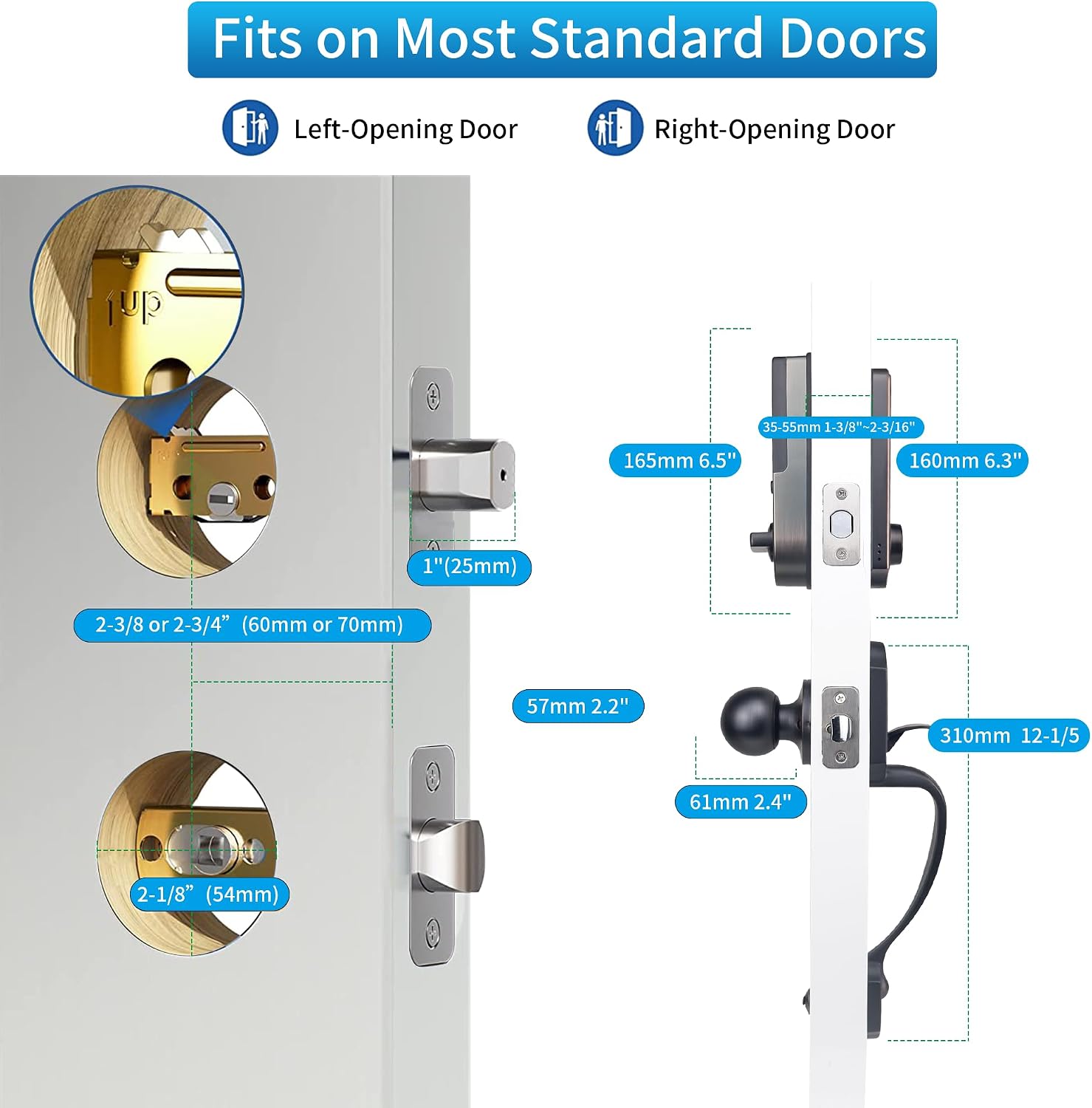
ചിത്രം 3.1: വാതിലിന്റെ അനുയോജ്യതയും ഇൻസ്റ്റാളേഷനുള്ള അളവുകളും.
3.2 Adjusting for Left/Right Handed Doors
The lock is suitable for both left-handed and right-handed doors. Adjust the Rotary Knob and "L/R Button" on the interior unit to match your door's orientation before proceeding with the full installation.
3.3 ഘട്ടം ഘട്ടമായുള്ള ഇൻസ്റ്റാളേഷൻ
- വാതിൽ തയ്യാറാക്കുക: Ensure existing holes match the required dimensions.
- ലാച്ച് ഇൻസ്റ്റാൾ ചെയ്യുക: വാതിലിന്റെ അരികിൽ ലാച്ച് തിരുകുക, സ്ക്രൂകൾ ഉപയോഗിച്ച് ഉറപ്പിക്കുക. ലാച്ച് ബോൾട്ട് ശരിയായ ദിശയിലേക്ക് അഭിമുഖീകരിക്കുന്നുണ്ടെന്ന് ഉറപ്പാക്കുക.
- Install the Exterior Unit: Feed the cable and spindle through the latch. Align the exterior unit with the door holes.
- ഇന്റീരിയർ മൗണ്ടിംഗ് പ്ലേറ്റ് ഇൻസ്റ്റാൾ ചെയ്യുക: Secure the mounting plate to the exterior unit using screws, ensuring the cable passes through the plate.
- Connect Cables and Install Interior Unit: Connect the cable from the exterior unit to the interior unit. Carefully tuck the excess cable into the door. Align the interior unit with the mounting plate and secure it with screws.
- ബാറ്ററികൾ ഇൻസ്റ്റാൾ ചെയ്യുക: Open the battery cover on the interior unit and insert 4 x 1.5V AA dry batteries (not included). Rechargeable batteries are not recommended.
- ഹാൻഡിൽ സെറ്റ് ഇൻസ്റ്റാൾ ചെയ്യുക: Attach the handle set according to the instructions provided in the accessories package.
- ടെസ്റ്റ് പ്രവർത്തനം: After installation, test the lock and handle to ensure smooth operation before closing the door.
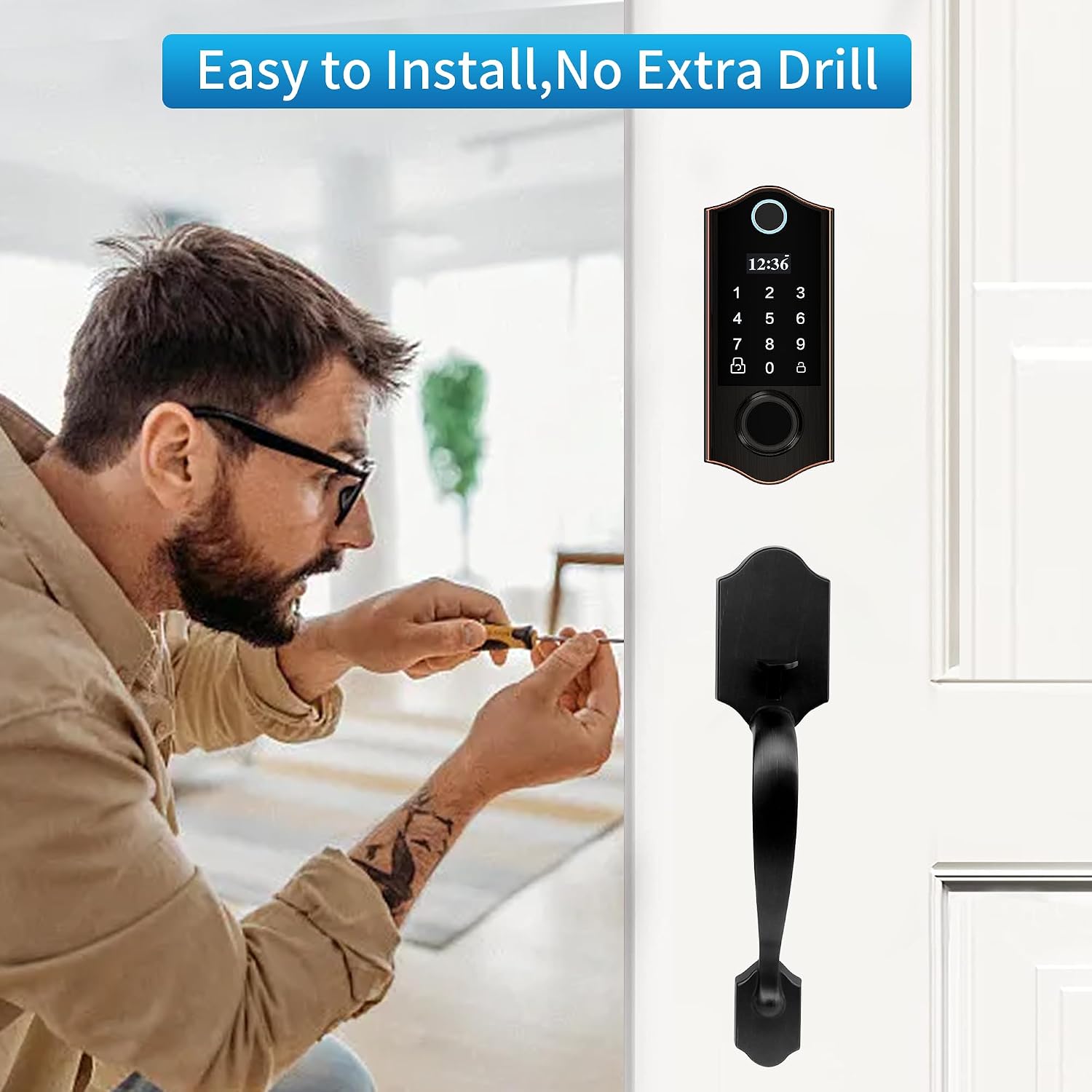
Figure 3.2: Installation is straightforward, requiring minimal tools.
4. പ്രവർത്തന നിർദ്ദേശങ്ങൾ
The HARFO Fingerprint Door Lock offers multiple convenient ways to unlock your door. The OLED display and voice guide will assist you through the programming process.
4.1 അൺലോക്ക് രീതികൾ
- ഫിംഗർപ്രിന്റ് അൺലോക്ക്: Place your registered finger on the sensor. The lock will recognize your fingerprint within 0.3 seconds and unlock.
- പാസ്കോഡ് അൺലോക്ക്: Enter your registered passcode on the keypad and press the '#' key.
- ഐസി കാർഡ് അൺലോക്ക്: Tap a registered IC card against the card reader area on the lock.
- Backup Key Unlock: In case of emergency or battery depletion, use the physical backup key to unlock the door. The keyhole is discreetly located.

Figure 4.1: The four primary methods for unlocking your HARFO door lock.
4.2 ലോക്കിംഗ് രീതികൾ
- യാന്ത്രിക ലോക്ക്: The lock can be set to automatically lock after a specified duration (5/10/15/30 seconds) once the door is closed. This feature can be enabled or disabled in the settings.
- One-touch Lock: If auto-lock is off, simply press the lock button on the keypad to secure the door.
- Inside Locking: From the interior side, you can lock or unlock the door by turning the rotary knob or pressing the dedicated lock/unlock button.

Figure 4.2: Auto-lock and one-touch lock features for enhanced security.
4.3 ആന്റി-പീപ്പിംഗ് പാസ്വേഡ്
To prevent others from guessing your passcode, you can enter random digits before or after your actual passcode. For example, if your passcode is "123456", you can enter "90121234568765". The lock will only recognize the correct sequence within the longer string.
5. User Management and Programming
The OLED display and voice guide simplify the process of managing users and settings. The lock supports up to 300 users.
5.1 പ്രോഗ്രാമിംഗ് മെനു
To access the programming menu, press the 'M' button (or similar designated button, refer to your specific lock's physical layout if different from the image) and follow the voice prompts. The main menu options typically include:
- 1. Create User: Add new fingerprints, passcodes, or IC cards.
- 2. Delete User: Remove existing users.
- 3 സിസ്റ്റം ക്രമീകരണം: Configure lock parameters like auto-lock time, mute mode, etc.
- 4. Info Query: View unlock records and user IDs.
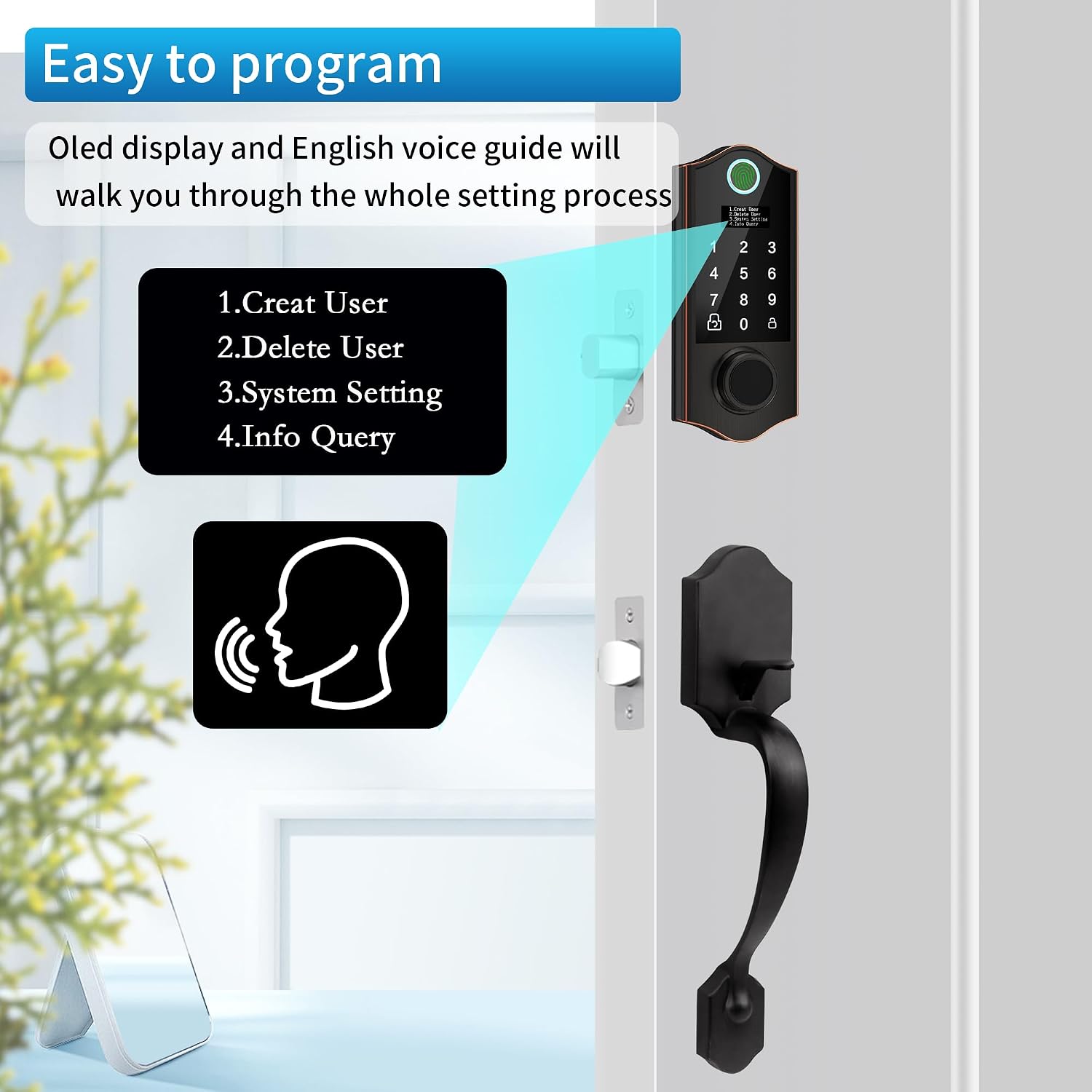
Figure 5.1: The intuitive OLED display and voice guide for programming.
5.2 ഉപയോക്താക്കളെ ചേർക്കുന്നു
Follow the voice prompts after selecting "Create User". You can add different types of users:
- അഡ്മിൻ ഉപയോക്താവ്: Has full access to programming and unlocking. It is recommended to set up at least one admin fingerprint and passcode.
- സാധാരണ ഉപയോക്താവ്: Can unlock the door but cannot access programming settings.
- Casual User (One-time Passcode): A temporary passcode that can be used only once. Ideal for visitors or delivery personnel.

ചിത്രം 5.2: ഉദാample of using a one-time passcode for temporary access.
5.3 ഉപയോക്താക്കളെ ഇല്ലാതാക്കുന്നു
Select "Delete User" from the menu. You can typically delete users by their ID number or delete all normal/casual users at once.
6. പരിപാലനം
6.1 ബാറ്ററി മാറ്റിസ്ഥാപിക്കൽ
The HARFO Fingerprint Door Lock requires 4 x 1.5V AA dry batteries (not included). It is designed for long battery life, typically up to one year. When the battery level is low, the lock will provide a low battery alarm. Replace all four batteries promptly when this alarm sounds.
Note: Rechargeable batteries are not recommended as their typical voltage (1.2V) may not provide optimal performance.
6.2 എമർജൻസി പവർ സപ്ലൈ
If the batteries completely deplete and you cannot unlock the door, you can use the emergency USB power port located on the exterior unit. Connect a portable power bank to this port to temporarily power the lock and gain entry. Always keep your backup keys in a safe, accessible location outside the door.

Figure 6.1: Emergency power supply via USB and physical backup keys.
6.3 വൃത്തിയാക്കൽ
Clean the lock's exterior with a soft, dry cloth. Avoid using abrasive cleaners or solvents, which may damage the finish or electronic components.
7. പ്രശ്നപരിഹാരം
| പ്രശ്നം | സാധ്യമായ കാരണം | പരിഹാരം |
|---|---|---|
| Lock does not respond or power on. | ഡെഡ് ബാറ്ററികൾ; തെറ്റായ ബാറ്ററി ഇൻസ്റ്റാളേഷൻ. | Replace all 4 AA dry batteries. Ensure correct polarity. Use emergency USB power if needed. |
| വിരലടയാളം തിരിച്ചറിഞ്ഞില്ല. | Fingerprint not registered; dirty sensor; finger not placed correctly. | Ensure fingerprint is registered. Clean the sensor. Try placing your finger in different orientations. Re-register fingerprint if issues persist. |
| പാസ്കോഡ് പ്രവർത്തിക്കുന്നില്ല. | Incorrect passcode entered; passcode not registered. | Verify the passcode. Ensure it is registered. Try using the Anti-Peeping Password feature correctly. |
| Lock makes unusual noises or cycles open/closed. | Mechanical obstruction; incorrect installation; internal malfunction. | Check for any obstructions around the latch or deadbolt. Re-check installation steps, especially cable connections. If problem persists, contact customer support. |
| ബാറ്ററി പെട്ടെന്ന് തീരുന്നു. | Using rechargeable batteries; frequent usage; faulty batteries. | Use only 1.5V AA dry batteries. Try a different brand of batteries. If problem persists, contact customer support. |
8 സ്പെസിഫിക്കേഷനുകൾ
| ഫീച്ചർ | വിശദാംശങ്ങൾ |
|---|---|
| മോഡലിൻ്റെ പേര് | D02H |
| ബ്രാൻഡ് | ഹാർഫോ |
| ലോക്ക് തരം | ബയോമെട്രിക്, ഡെഡ്ബോൾട്ട്, കോമ്പിനേഷൻ ലോക്ക്, കീപാഡ് |
| അൺലോക്ക് രീതികൾ | Fingerprint, IC Cards, Passcode, Backup Key |
| മെറ്റീരിയൽ | വെങ്കലം |
| നിറം | പ്രായമായ വെങ്കലം |
| ഇനത്തിന്റെ അളവുകൾ (L x W x H) | 11 x 4 x 14 ഇഞ്ച് |
| ഇനത്തിൻ്റെ ഭാരം | 4.77 പൗണ്ട് |
| പവർ ഉറവിടം | 4 x 1.5V AA Dry Batteries (not included) |
| വാതിൽ കനം പരിധി | 1 3/8 inch to 2 3/16 inch (35mm-55mm) |
| ഉപയോക്തൃ ശേഷി | 300 ഉപയോക്താക്കൾ വരെ |
| റെക്കോർഡുകൾ അൺലോക്ക് ചെയ്യുക | 2000 റെക്കോർഡുകൾ |
9. വാറൻ്റിയും പിന്തുണയും
9.1 വാറൻ്റി വിവരങ്ങൾ
The HARFO Fingerprint Door Lock typically comes with a 1-year limited warranty from the date of purchase. This warranty covers manufacturing defects and malfunctions under normal use. Please retain your proof of purchase for warranty claims. Some customers have reported receiving extended warranty coverage (e.g., 3 years) directly from customer support in specific cases.
9.2 ഉപഭോക്തൃ പിന്തുണ
For technical assistance, troubleshooting, or warranty inquiries, please contact HARFO customer support. You can typically find contact information on the product packaging, the official HARFO webസൈറ്റ്, അല്ലെങ്കിൽ നിങ്ങളുടെ വാങ്ങൽ പ്ലാറ്റ്ഫോം വഴി.
When contacting support, please be prepared to provide your product model number (D02H), purchase date, and a detailed description of the issue.