
BuTure VC70
BuTure VC70 കോർഡ്ലെസ്സ് വാക്വം ക്ലീനർ ഉപയോക്തൃ മാനുവൽ
മോഡൽ: VC70
1. ആമുഖം
Thank you for choosing the BuTure VC70 Cordless Vacuum Cleaner. This manual provides important information on the safe operation, maintenance, and troubleshooting of your new appliance. Please read this manual thoroughly before first use and keep it for future reference.
2. സുരക്ഷാ നിർദ്ദേശങ്ങൾ
തീ, വൈദ്യുതാഘാതം അല്ലെങ്കിൽ പരിക്കുകൾ എന്നിവ കുറയ്ക്കുന്നതിന് വൈദ്യുത ഉപകരണങ്ങൾ ഉപയോഗിക്കുമ്പോൾ എല്ലായ്പ്പോഴും അടിസ്ഥാന സുരക്ഷാ മുൻകരുതലുകൾ പാലിക്കുക.
- പുറത്തോ നനഞ്ഞ പ്രതലങ്ങളിലോ ഉപയോഗിക്കരുത്.
- കളിപ്പാട്ടമായി ഉപയോഗിക്കാൻ അനുവദിക്കരുത്. കുട്ടികൾ അല്ലെങ്കിൽ അടുത്ത് ഉപയോഗിക്കുമ്പോൾ വളരെ ശ്രദ്ധ ആവശ്യമാണ്.
- ഈ മാനുവലിൽ വിവരിച്ചിരിക്കുന്നതുപോലെ മാത്രം ഉപയോഗിക്കുക. നിർമ്മാതാവ് ശുപാർശ ചെയ്യുന്ന അറ്റാച്ചുമെന്റുകൾ മാത്രം ഉപയോഗിക്കുക.
- കേടായ ചരട് അല്ലെങ്കിൽ പ്ലഗ് ഉപയോഗിച്ച് ഉപയോഗിക്കരുത്. ഉപകരണം പ്രവർത്തിക്കുന്നില്ലെങ്കിൽ, വീഴുകയോ കേടുപാടുകൾ സംഭവിക്കുകയോ വെളിയിൽ ഉപേക്ഷിക്കുകയോ വെള്ളത്തിൽ വീഴുകയോ ചെയ്താൽ, അത് ഒരു സേവന കേന്ദ്രത്തിലേക്ക് തിരികെ കൊണ്ടുവരിക.
- ചരട് ഉപയോഗിച്ച് വലിക്കുകയോ കൊണ്ടുപോകുകയോ ചെയ്യരുത്, ചരട് ഒരു ഹാൻഡിലായി ഉപയോഗിക്കുക, ചരടിൽ ഒരു വാതിൽ അടയ്ക്കുക, അല്ലെങ്കിൽ മൂർച്ചയുള്ള അരികുകളിലോ മൂലകളിലോ ചരട് വലിക്കുക. ചരടിന് മുകളിലൂടെ ഉപകരണം പ്രവർത്തിപ്പിക്കരുത്. ചൂടായ പ്രതലങ്ങളിൽ നിന്ന് ചരട് സൂക്ഷിക്കുക.
- ചരട് വലിച്ചുകൊണ്ട് അൺപ്ലഗ് ചെയ്യരുത്. അൺപ്ലഗ് ചെയ്യാൻ, പ്ലഗ് പിടിക്കുക, ചരടല്ല.
- നനഞ്ഞ കൈകളാൽ പ്ലഗ്ഗോ ഉപകരണമോ കൈകാര്യം ചെയ്യരുത്.
- ഒരു വസ്തുവും തുറസ്സുകളിൽ ഇടരുത്. ഒരു ഓപ്പണിംഗും തടഞ്ഞിരിക്കുമ്പോൾ ഉപയോഗിക്കരുത്; പൊടി, ലിൻ്റ്, മുടി, വായുപ്രവാഹം കുറയ്ക്കുന്ന എന്തും എന്നിവ ഒഴിവാക്കുക.
- മുടി, അയഞ്ഞ വസ്ത്രങ്ങൾ, വിരലുകൾ, ശരീരത്തിൻ്റെ എല്ലാ ഭാഗങ്ങളും തുറസ്സുകളിൽ നിന്നും ചലിക്കുന്ന ഭാഗങ്ങളിൽ നിന്നും അകറ്റി നിർത്തുക.
- കത്തുന്നതോ പുകവലിക്കുന്നതോ ആയ സിഗരറ്റ്, തീപ്പെട്ടി, ചൂടുള്ള ചാരം എന്നിവയൊന്നും എടുക്കരുത്.
- ഗ്യാസോലിൻ പോലുള്ള കത്തുന്നതോ കത്തുന്നതോ ആയ ദ്രാവകങ്ങൾ എടുക്കാനോ അവ ഉള്ള സ്ഥലങ്ങളിൽ ഉപയോഗിക്കാനോ ഉപയോഗിക്കരുത്.
- ക്ലോറിൻ ബ്ലീച്ച്, അമോണിയ, ഡ്രെയിൻ ക്ലീനർ തുടങ്ങിയ വിഷാംശമുള്ള വസ്തുക്കൾ എടുക്കരുത്.
- ഡസ്റ്റ് ബാഗ് കൂടാതെ/അല്ലെങ്കിൽ ഫിൽട്ടറുകൾ ഇല്ലാതെ ഉപയോഗിക്കരുത്.
- അൺപ്ലഗ് ചെയ്യുന്നതിനുമുമ്പ് എല്ലാ നിയന്ത്രണങ്ങളും ഓഫാക്കുക.
- കോണിപ്പടികളിൽ വൃത്തിയാക്കുമ്പോൾ കൂടുതൽ ശ്രദ്ധിക്കണം.
- ഗ്ലാസ്, നഖങ്ങൾ, സ്ക്രൂകൾ, നാണയങ്ങൾ തുടങ്ങിയ കടുപ്പമുള്ളതോ മൂർച്ചയുള്ളതോ ആയ വസ്തുക്കൾ എടുക്കാൻ ഉപയോഗിക്കരുത്.
3. പാക്കേജ് ഉള്ളടക്കം
Carefully unpack your BuTure VC70 and check that all items are present and in good condition. If any items are missing or damaged, please contact customer support.

ചിത്രം 3.1: All components of the BuTure VC70 cordless vacuum cleaner, including the main unit, extension wand, floor brush, crevice tool, 2-in-1 brush, wall mount, charger, and spare filter.
- Main Vacuum Body (with dustbin and motor)
- വിപുലീകരണ വാൻഡ്
- മോട്ടറൈസ്ഡ് ഫ്ലോർ ബ്രഷ്
- വിള്ളൽ ഉപകരണം
- 2-ഇൻ-1 ബ്രഷ് ടൂൾ
- വാൾ മൗണ്ട് ബ്രാക്കറ്റ്
- പവർ അഡാപ്റ്റർ/ചാർജർ
- സ്പെയർ ഫിൽട്ടർ
- ഉപയോക്തൃ മാനുവൽ (ഈ പ്രമാണം)
4. ഉൽപ്പന്നം കഴിഞ്ഞുview
Familiarize yourself with the main parts of your BuTure VC70 vacuum cleaner.

ചിത്രം 4.1: The BuTure VC70 cordless vacuum cleaner shown as a stick vacuum, and in handheld configurations with different attachments, along with the wall mount and filters.
- പ്രധാന യൂണിറ്റ്: മോട്ടോർ, ഡസ്റ്റ്ബിൻ, കൺട്രോൾ പാനൽ എന്നിവ അടങ്ങിയിരിക്കുന്നു.
- വിപുലീകരണ വാൻഡ്: കുത്തനെയുള്ള വൃത്തിയാക്കലിനായി പ്രധാന യൂണിറ്റിനെ ഫ്ലോർ ബ്രഷുമായി ബന്ധിപ്പിക്കുന്നു.
- മോട്ടോറൈസ്ഡ് ഫ്ലോർ ബ്രഷ്: Features an integrated brush with soft and hard bristles for effective cleaning on various floor types.
- ഡസ്റ്റ്ബിൻ: പൊടിയും അവശിഷ്ടങ്ങളും ശേഖരിക്കുന്നതിനുള്ള സുതാര്യമായ പാത്രം.
- ഫിൽട്ടറേഷൻ സിസ്റ്റം: Multi-layer system designed to capture fine dust and allergens.
- LED ടച്ച് സ്ക്രീൻ: Displays battery level, current mode, and maintenance reminders.
5. സജ്ജീകരണവും അസംബ്ലിയും
Follow these steps to assemble your vacuum cleaner for first use.
5.1 പ്രാരംഭ ചാർജിംഗ്
Before first use, fully charge the battery. The battery is removable for convenient charging.
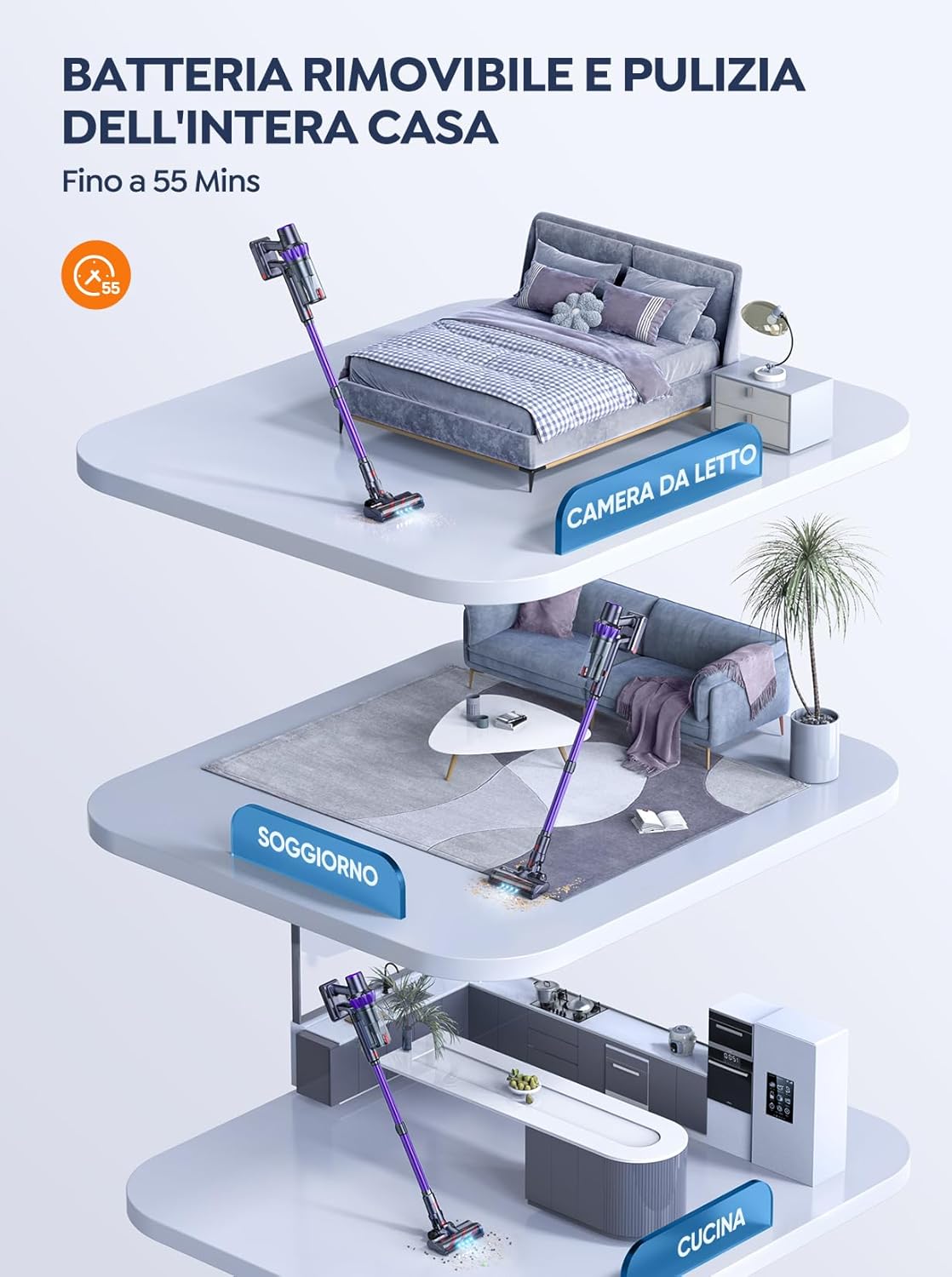
ചിത്രം 5.1: The removable battery allows for flexible charging options and extended cleaning time across multiple rooms.
- Connect the power adapter to the charging port on the main unit or directly to the battery if removed.
- ഒരു മതിൽ let ട്ട്ലെറ്റിലേക്ക് അഡാപ്റ്റർ പ്ലഗ് ചെയ്യുക.
- The LED screen will indicate charging status. A full charge typically takes 4-5 hours.
5.2 വാക്വം കൂട്ടിച്ചേർക്കൽ
- എക്സ്റ്റൻഷൻ വാൻഡ് ഘടിപ്പിക്കുക: Insert the top end of the extension wand into the main vacuum body until it clicks into place.
- ഫ്ലോർ ബ്രഷ് ഘടിപ്പിക്കുക: Insert the bottom end of the extension wand into the motorized floor brush until it clicks into place.
- Attach Accessories (for handheld use): For handheld cleaning, you can directly attach the crevice tool or 2-in-1 brush tool to the main vacuum body.
6. വാക്വം ക്ലീനർ പ്രവർത്തിപ്പിക്കുക
Learn how to effectively use your BuTure VC70 for various cleaning tasks.
6.1 പവർ ഓൺ/ഓഫ്, മോഡ് തിരഞ്ഞെടുക്കൽ

ചിത്രം 6.1: The intelligent LED touch screen provides real-time information on battery status and selected cleaning mode.
- പവർ ഓണാക്കാൻ: Press the power button on the main unit. The vacuum will start in the default mode.
- To Change Modes: Use the mode selection button on the LED touch screen to cycle through available suction modes (e.g., Eco, Standard, Max, Auto).
- പവർ ഓഫ് ചെയ്യാൻ: പവർ ബട്ടൺ വീണ്ടും അമർത്തുക.
6.2 Intelligent Automatic Suction Mode
The BuTure VC70 features an intelligent automatic suction mode that adjusts power based on floor type.
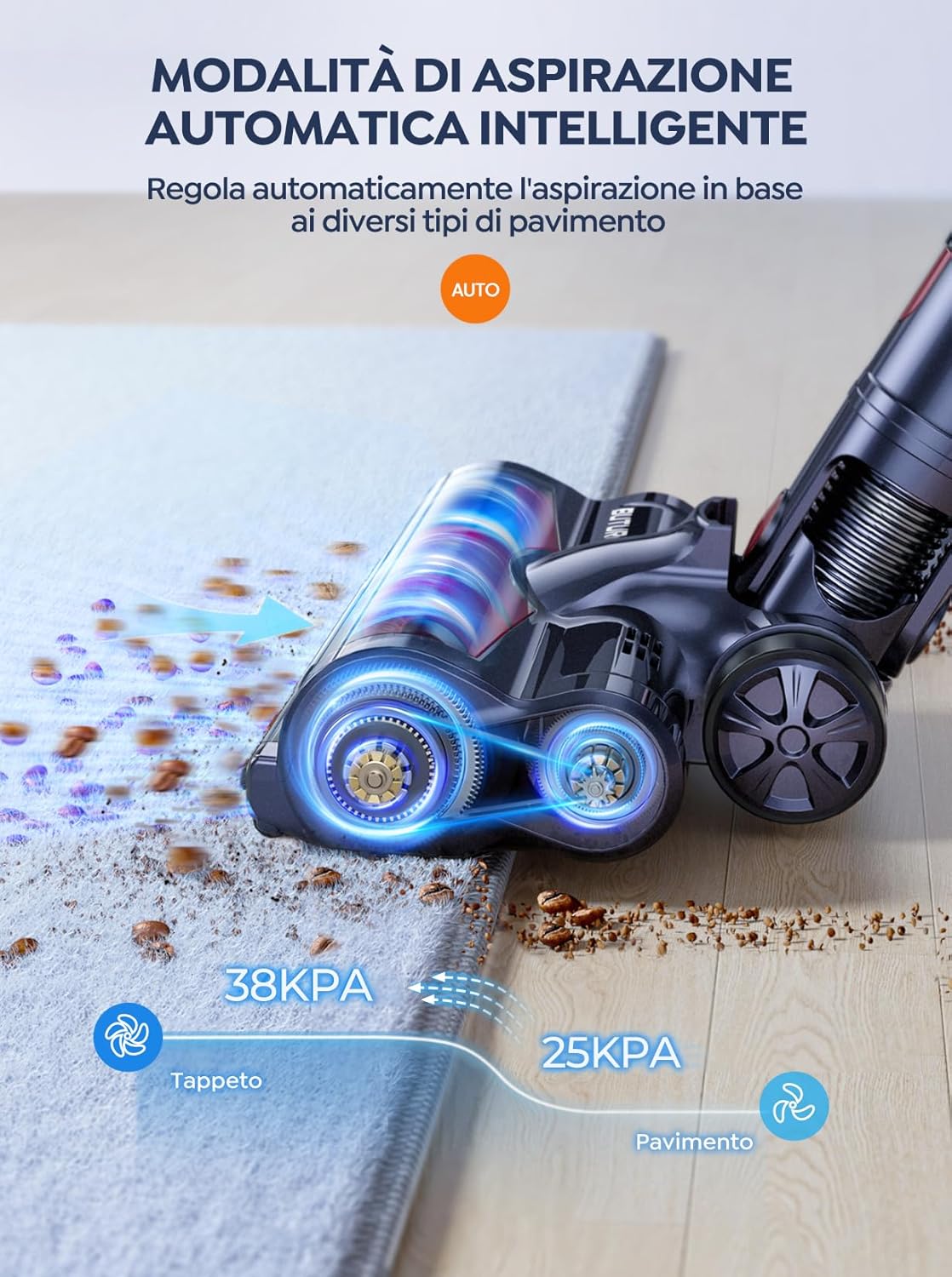
ചിത്രം 6.2: The vacuum automatically adjusts suction power, providing 38KPA for carpets and 25KPA for hard floors in Auto mode.
In Auto mode, the vacuum detects the floor type and automatically increases suction for carpets (up to 38KPA) and reduces it for hard floors (25KPA), optimizing cleaning efficiency and battery life.
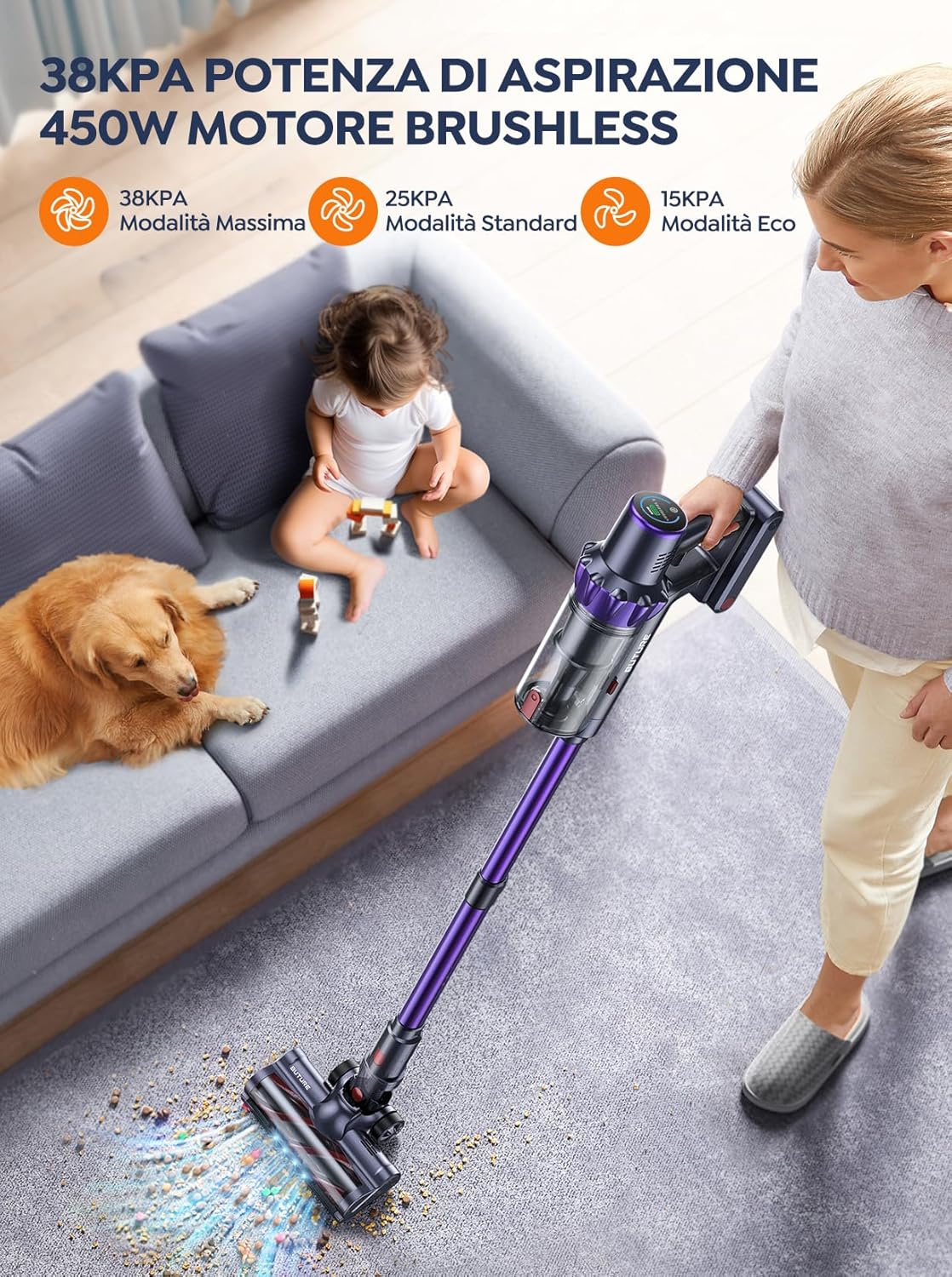
ചിത്രം 6.3: The 450W brushless motor delivers powerful suction, with modes including 38KPA Max, 25KPA Standard, and 15KPA Eco.
6.3 അറ്റാച്ചുമെന്റുകൾ ഉപയോഗിക്കുന്നത്
- വിള്ളൽ ഉപകരണം: ഇടുങ്ങിയ വിടവുകൾ, മൂലകൾ, അരികുകൾ എന്നിവയ്ക്ക് അനുയോജ്യം.
- 2-ഇൻ-1 ബ്രഷ് ടൂൾ: Use the brush for delicate surfaces like upholstery or curtains, and the nozzle for general dusting.
- മോട്ടോറൈസ്ഡ് ഫ്ലോർ ബ്രഷ്: Designed for efficient cleaning of both hard floors and carpets. Its integrated bristles effectively pick up various debris.

ചിത്രം 6.4: The motorized floor brush features a combination of soft and hard bristles to effectively clean different types of debris from various floor surfaces.
7. പരിപാലനം
പതിവ് അറ്റകുറ്റപ്പണികൾ മികച്ച പ്രകടനം ഉറപ്പാക്കുകയും നിങ്ങളുടെ വാക്വം ക്ലീനറിന്റെ ആയുസ്സ് വർദ്ധിപ്പിക്കുകയും ചെയ്യുന്നു.
7.1 ഡസ്റ്റ്ബിൻ ശൂന്യമാക്കൽ
ഓരോ ഉപയോഗത്തിനു ശേഷവും അല്ലെങ്കിൽ MAX ഫിൽ ലൈൻ എത്തുമ്പോഴും ഡസ്റ്റ്ബിൻ ശൂന്യമാക്കുക.
- പ്രധാന യൂണിറ്റിൽ നിന്ന് വേർപെടുത്താൻ ഡസ്റ്റ്ബിൻ റിലീസ് ബട്ടൺ അമർത്തുക.
- Open the dustbin lid and empty contents into a trash can.
- Close the lid and reattach the dustbin to the main unit.
7.2 ക്ലീനിംഗ് ഫിൽട്ടറുകൾ
The BuTure VC70 features an advanced multi-layer filtration system. Clean filters regularly to maintain suction power.

ചിത്രം 7.1: The advanced multi-layer filtration system captures 99.99% of dust and dirt, ensuring cleaner exhaust air.
- Remove the dustbin and locate the filters inside.
- Gently tap the filters to remove loose dust.
- Rinse the filters under cold running water. Ensure they are completely dry before reinserting (allow 24-48 hours for air drying).
- Replace filters every 3-6 months depending on usage.
7.3 ബ്രഷ് റോൾ വൃത്തിയാക്കൽ
കെട്ടിക്കിടക്കുന്ന മുടിയോ അവശിഷ്ടങ്ങളോ ഉണ്ടോ എന്ന് ഇടയ്ക്കിടെ ബ്രഷ് റോളിൽ പരിശോധിക്കുക.
- Turn off the vacuum and detach the motorized floor brush.
- Locate the brush roll access latch/button and open it.
- Remove the brush roll. Use scissors or a cleaning tool to cut and remove any tangled hair or fibers.
- Reinsert the brush roll and secure the access latch.
8. പ്രശ്നപരിഹാരം
നിങ്ങളുടെ വാക്വം ക്ലീനറിൽ പ്രശ്നങ്ങൾ നേരിടുകയാണെങ്കിൽ, പൊതുവായ പ്രശ്നങ്ങളും പരിഹാരങ്ങളും അറിയാൻ താഴെ കൊടുത്തിരിക്കുന്ന പട്ടിക കാണുക.
| പ്രശ്നം | സാധ്യമായ കാരണം | പരിഹാരം |
|---|---|---|
| വാക്വം ഓണാക്കുന്നില്ല | ബാറ്ററി ചാർജ് ചെയ്തിട്ടില്ല ബാറ്ററി ശരിയായി ഇൻസ്റ്റാൾ ചെയ്തിട്ടില്ല | ബാറ്ററി പൂർണ്ണമായും ചാർജ് ചെയ്യുക Ensure battery is securely clicked into place |
| കുറഞ്ഞ സക്ഷൻ പവർ | ഡസ്റ്റ്ബിൻ നിറഞ്ഞിരിക്കുന്നു ഫിൽട്ടറുകൾ അടഞ്ഞുപോയിരിക്കുന്നു ബ്രഷ് റോൾ കുഴഞ്ഞു കിടക്കുന്നു ഹോസ്/നോസൽ അടഞ്ഞിരിക്കുന്നു | ഡസ്റ്റ്ബിൻ ശൂന്യമാക്കുക ഫിൽട്ടറുകൾ വൃത്തിയാക്കുക അല്ലെങ്കിൽ മാറ്റിസ്ഥാപിക്കുക ബ്രഷ് റോൾ വൃത്തിയാക്കുക തടസ്സങ്ങൾ പരിശോധിച്ച് നീക്കം ചെയ്യുക |
| ബ്രഷ് റോൾ കറങ്ങുന്നില്ല | ബ്രഷ് റോൾ കുഴഞ്ഞു കിടക്കുന്നു ബ്രഷ് റോൾ മോട്ടോർ പ്രശ്നം | ബ്രഷ് റോൾ വൃത്തിയാക്കുക പ്രശ്നം നിലനിൽക്കുകയാണെങ്കിൽ ഉപഭോക്തൃ പിന്തുണയുമായി ബന്ധപ്പെടുക. |
| Vacuum stops suddenly | അമിത ചൂടാക്കൽ സംരക്ഷണം സജീവമാക്കി ബാറ്ററി കുറവാണ് | Turn off and allow to cool for 30 minutes ബാറ്ററി ചാർജ് ചെയ്യുക |
9 സ്പെസിഫിക്കേഷനുകൾ
Technical specifications for the BuTure VC70 Cordless Vacuum Cleaner.
| ഫീച്ചർ | സ്പെസിഫിക്കേഷൻ |
|---|---|
| മോഡൽ നമ്പർ | VC70 |
| ബ്രാൻഡ് | BuTure |
| റേറ്റുചെയ്ത പവർ | 450 വാട്ട്സ് |
| വാല്യംtage | 100-240 വോൾട്ട് |
| ഡസ്റ്റ്ബിൻ കപ്പാസിറ്റി | 1.5 ലിറ്റർ |
| ശബ്ദ നില | 68 ഡി.ബി |
| ഇനത്തിൻ്റെ ഭാരം | 1.81 കിലോഗ്രാം (ഏകദേശം 4 പൗണ്ട്) |
| ബാറ്ററി തരം | ലിഥിയം-അയൺ |
| നിറം | വയലറ്റ് |
10. വാറൻ്റിയും പിന്തുണയും
BuTure products are manufactured to the highest quality standards. For warranty information or technical support, please refer to the warranty card included with your purchase or visit the official BuTure website. Please have your model number (VC70) and purchase details ready when contacting support.
Ask a question about this manual
Ask about setup, troubleshooting, compatibility, parts, safety, or missing instructions. Manuals+ will review the question and use this page’s manual context to help answer it.