
ആമുഖം
Welcome to the user manual for your Qubo NEO2NW mobile phone. This device is specifically designed for seniors, featuring large buttons, a clear display, and essential functions for easy communication. Please read this manual carefully to understand how to use your phone safely and effectively.
ഉൽപ്പന്നം കഴിഞ്ഞുview
The Qubo NEO2NW is a user-friendly flip phone equipped with features tailored for convenience and safety.

ചിത്രം: The Qubo NEO2NW flip phone in its open position, displaying its large, easy-to-read keypad and clear screen. A charging dock is visible in the background, indicating its charging method.

ചിത്രം: A black flip phone displaying the digital time '22:10' on its screen. This image provides multiple views of the phone, highlighting its large keypad and clear display.
പ്രധാന സവിശേഷതകൾ:
- Large buttons for easy dialing and navigation.
- Clear 2.4-inch display with adjustable font size.
- SOS emergency button for quick contact with pre-set numbers.
- Loud ringtone and speaker for improved audibility.
- Charging dock for convenient and stable charging.
- Basic functions: Call, SMS, Phonebook, Alarm Clock, Camera, FM Radio, Torch.
സജ്ജമാക്കുക
1. അൺബോക്സിംഗും ഘടകങ്ങളും
Carefully unpack your Qubo NEO2NW phone and ensure all components are present.

ചിത്രം: ഒരു ഓവർview of the box contents, including the Qubo NEO2NW phone, its charging dock, a USB cable, a power adapter, the battery, and printed user manuals.
2. സിം കാർഡും ബാറ്ററിയും ഇൻസ്റ്റാൾ ചെയ്യുന്നു
- ഫോണിൻ്റെ പിൻ കവർ നീക്കം ചെയ്യുക.
- Insert your Micro SIM card(s) into the designated slot(s) (supports Dual SIM).
- If desired, insert a MicroSD memory card (up to 32GB) into the memory card slot.
- Insert the 800mAh Lithium-ion battery, ensuring the contacts align.
- പുറംചട്ട മാറ്റിസ്ഥാപിക്കുക.
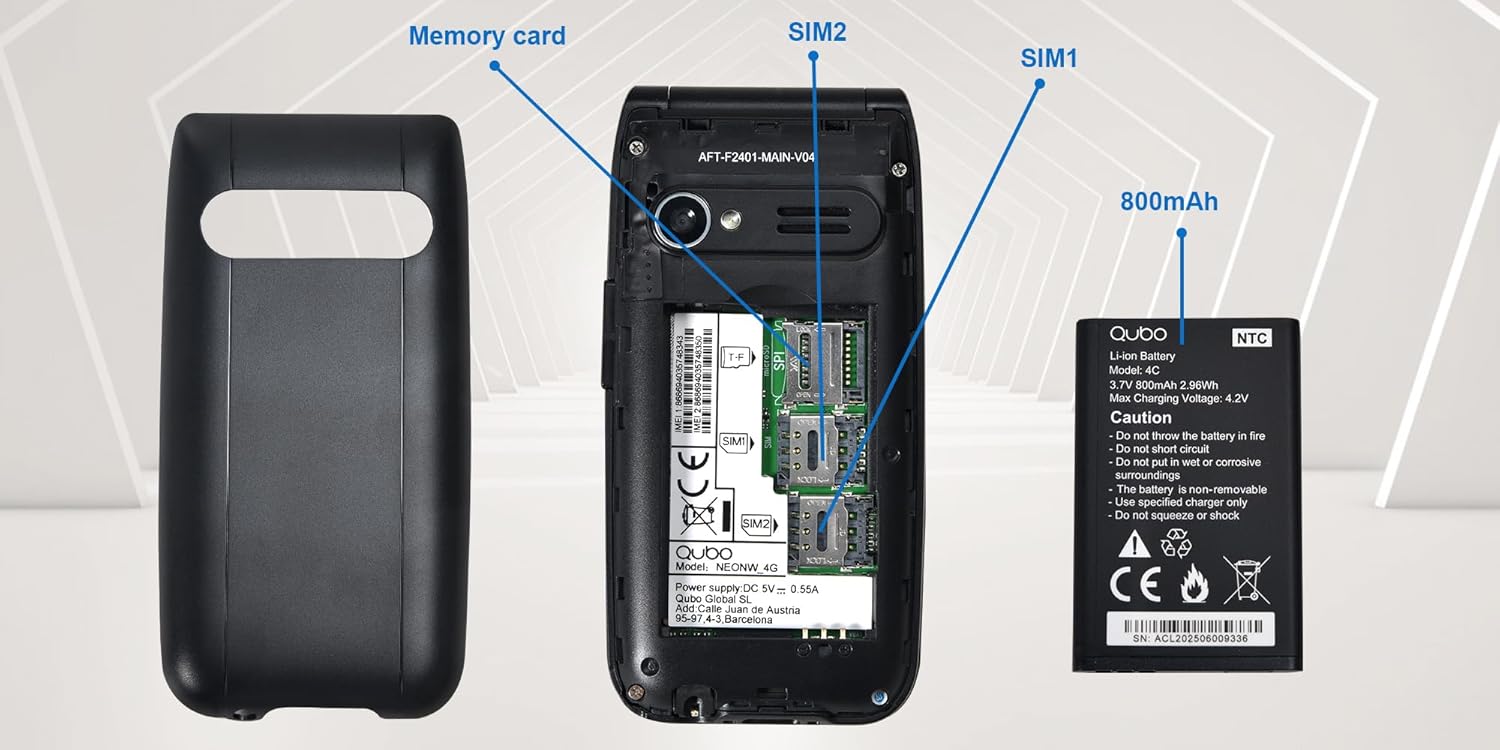
ചിത്രം: എ വിശദമായി view of the phone's interior, highlighting the slots for two Micro SIM cards (SIM1, SIM2) and a memory card. The 800mAh battery is shown separately.
3. ഫോൺ ചാർജ് ചെയ്യുന്നു
Before first use, fully charge the phone.
- Connect the USB Type-C cable to the phone and the power adapter. Plug the adapter into a wall outlet.
- Alternatively, place the phone in the charging dock. Ensure it is seated correctly and the charging indicator appears on the screen.
- ഒരു ഫുൾ ചാർജിന് ഏകദേശം 2.3 മണിക്കൂർ എടുക്കും.

ചിത്രം: This image shows the Type-C charging interface on the Qubo NEO2NW phone, along with an illustration of its battery compartment and icons indicating low power consumption and power-saving technology.
പ്രവർത്തന നിർദ്ദേശങ്ങൾ
1. പവർ ഓൺ/ഓഫ്
- പവർ ഓൺ ചെയ്യാൻ: അമർത്തിപ്പിടിക്കുക പവർ/എൻഡ് കോൾ button (red button) until the screen lights up.
- പവർ ഓഫ് ചെയ്യാൻ: അമർത്തിപ്പിടിക്കുക പവർ/എൻഡ് കോൾ button until the power off options appear, then select 'Power off'.
2. കോളുകൾ ചെയ്യലും സ്വീകരിക്കലും
- ഡയൽ ചെയ്യാൻ: കീപാഡ് ഉപയോഗിച്ച് ഫോൺ നമ്പർ നൽകി, വിളിക്കൂ button (green button).
- ഫോൺബുക്കിൽ നിന്ന്: Navigate to the Phonebook, select a contact, and press the വിളിക്കൂ ബട്ടൺ.
- ഉത്തരം നൽകാൻ: ഫോൺ റിംഗ് ചെയ്യുമ്പോൾ, അമർത്തുക വിളിക്കൂ ബട്ടൺ.
- കോൾ അവസാനിപ്പിക്കാൻ: അമർത്തുക പവർ/എൻഡ് കോൾ ബട്ടൺ.
3. SMS അയയ്ക്കലും സ്വീകരിക്കലും
- എന്നതിലേക്ക് നാവിഗേറ്റ് ചെയ്യുക സന്ദേശം മെനു.
- Select 'New Message' to compose.
- സ്വീകർത്താവിന്റെ നമ്പർ നൽകുക അല്ലെങ്കിൽ കോൺടാക്റ്റുകളിൽ നിന്ന് തിരഞ്ഞെടുക്കുക.
- കീപാഡ് ഉപയോഗിച്ച് നിങ്ങളുടെ സന്ദേശം ടൈപ്പ് ചെയ്യുക.
- 'അയയ്ക്കുക' അമർത്തുക.
4. SOS Emergency Function
The SOS button allows you to quickly contact pre-set emergency numbers.
- Setting SOS Numbers: പോകുക Settings > SOS Settings to add up to 5 emergency contacts.
- SOS സജീവമാക്കുന്നു: അടിയന്തര സാഹചര്യത്തിൽ, അമർത്തിപ്പിടിക്കുക SOS button on the back of the phone for a few seconds.
- The phone will automatically call the pre-set numbers in sequence until one answers. It will also send an emergency SMS to these contacts.

ചിത്രം: This image demonstrates the SOS emergency call feature. It shows the Qubo NEO2NW phone with a highlighted SOS button and a visual representation of how it connects to up to 5 pre-programmed family numbers in an emergency.
5. Display and Font Settings
The phone features a 2.4-inch screen with options for large fonts for better readability.

ചിത്രം: The Qubo NEO2NW phone's screen displaying large, clear fonts and the option to switch font sizes. The image also points out the loud ringtone capability and the large, tactile buttons on the keypad.
മെയിൻ്റനൻസ്
- ഫോൺ വരണ്ടതായി സൂക്ഷിക്കുക. ഈർപ്പം ഇലക്ട്രോണിക് സർക്യൂട്ടുകളെ തകരാറിലാക്കും.
- ഉയർന്ന താപനില ഒഴിവാക്കുക. ഉയർന്ന താപനില ഇലക്ട്രോണിക് ഉപകരണങ്ങളുടെ ആയുസ്സ് കുറയ്ക്കുകയും ബാറ്ററികൾക്ക് കേടുപാടുകൾ വരുത്തുകയും ചെയ്യും.
- ഫോൺ വൃത്തിയാക്കാൻ കഠിനമായ രാസവസ്തുക്കളോ, ക്ലീനിംഗ് ലായകങ്ങളോ, വീര്യം കൂടിയ ഡിറ്റർജന്റുകളോ ഉപയോഗിക്കരുത്. മൃദുവായ, ഡിറ്റർജന്റുകൾ ഉപയോഗിച്ച് തുടയ്ക്കുക.amp തുണി.
- Handle the phone gently. Do not drop, knock, or shake it.
- Use only Qubo-approved batteries, chargers, and accessories.
ട്രബിൾഷൂട്ടിംഗ്
| പ്രശ്നം | സാധ്യമായ കാരണം | പരിഹാരം |
|---|---|---|
| ഫോൺ ഓൺ ആകുന്നില്ല. | ബാറ്ററി തീർന്നു അല്ലെങ്കിൽ ശരിയായി ഇൻസ്റ്റാൾ ചെയ്തിട്ടില്ല. | Charge the battery for at least 30 minutes. Ensure the battery is correctly inserted. |
| കോളുകൾ വിളിക്കാനോ സ്വീകരിക്കാനോ കഴിയില്ല | സിം കാർഡ് ഇല്ല, സിം കാർഡ് സജീവമല്ല, അല്ലെങ്കിൽ നെറ്റ്വർക്ക് കവറേജിന് പുറത്താണ്. | Ensure SIM card is inserted and active. Check network signal. Contact your service provider. |
| SOS ബട്ടൺ പ്രവർത്തിക്കുന്നില്ല. | SOS numbers not set or incorrect. | Verify that emergency numbers are correctly configured in SOS settings. Ensure sufficient network signal. |
| മോശം ശബ്ദ നിലവാരം | Low volume, poor network, or speaker/microphone obstruction. | Adjust call volume. Move to an area with better network coverage. Ensure speaker and microphone are clear. |
സ്പെസിഫിക്കേഷനുകൾ
| ഫീച്ചർ | വിശദാംശങ്ങൾ |
|---|---|
| മോഡലിൻ്റെ പേര് | Qubo Flip Phone Charging Dock |
| ഡിസ്പ്ലേ വലിപ്പം | 2.4 ഇഞ്ച് |
| ഡിസ്പ്ലേ റെസല്യൂഷൻ | 240 x 320 പിക്സലുകൾ |
| ഓപ്പറേറ്റിംഗ് സിസ്റ്റം | KaiOS |
| റാം | 64 MB |
| സിപിയു വേഗത | 260 MHz |
| സെല്ലുലാർ ടെക്നോളജി | 2G, 3G (GSM, UMTS) |
| സിം കാർഡ് സ്ലോട്ടുകൾ | Dual SIM (Micro SIM) |
| Max Flash Memory Support | 32 GB (MicroSD) |
| പിൻ ക്യാമറ | 0.3 എം.പി |
| ബാറ്ററി ശേഷി | 800 mAh (ലിഥിയം-അയോൺ) |
| ചാർജിംഗ് സമയം | ഏകദേശം 2.3 മണിക്കൂർ |
| സംസാര സമയം | ഏകദേശം 4 മണിക്കൂർ |
| സ്റ്റാൻഡ്ബൈ സമയം | ഏകദേശം. 8 ദിവസം |
| കണക്റ്റിവിറ്റി | യുഎസ്ബി ടൈപ്പ്-സി, 3.5 എംഎം ഹെഡ്ഫോൺ ജാക്ക് |
| അളവുകൾ | 10.5 x 5.3 x 1.7 സെ.മീ |
| പ്രത്യേക സവിശേഷതകൾ | SOS Button, FM Radio, Torch, GPS |
വാറൻ്റിയും പിന്തുണയും
For warranty information, please refer to the warranty card included in your product packaging. For technical support or further assistance, please contact Qubo customer service.
- നിർമ്മാതാവ്: ഖുബോ
- ASIN: B0C5GXR2VR
- മോഡൽ നമ്പർ: 6e39af81-1411-4b00-b5ae-d8778c6ab86c
- ബന്ധപ്പെടുക: Refer to the official Qubo website or documentation for up-to-date contact information.