
1. ഓവർview
The DOOGEE T30 PRO is an advanced tablet designed for both productivity and entertainment. It features an 11-inch 2.5K display, a powerful MediaTek Helio G99 Octa-Core processor, ample memory and storage, and a long-lasting battery. This manual provides essential information for setting up, operating, maintaining, and troubleshooting your device.
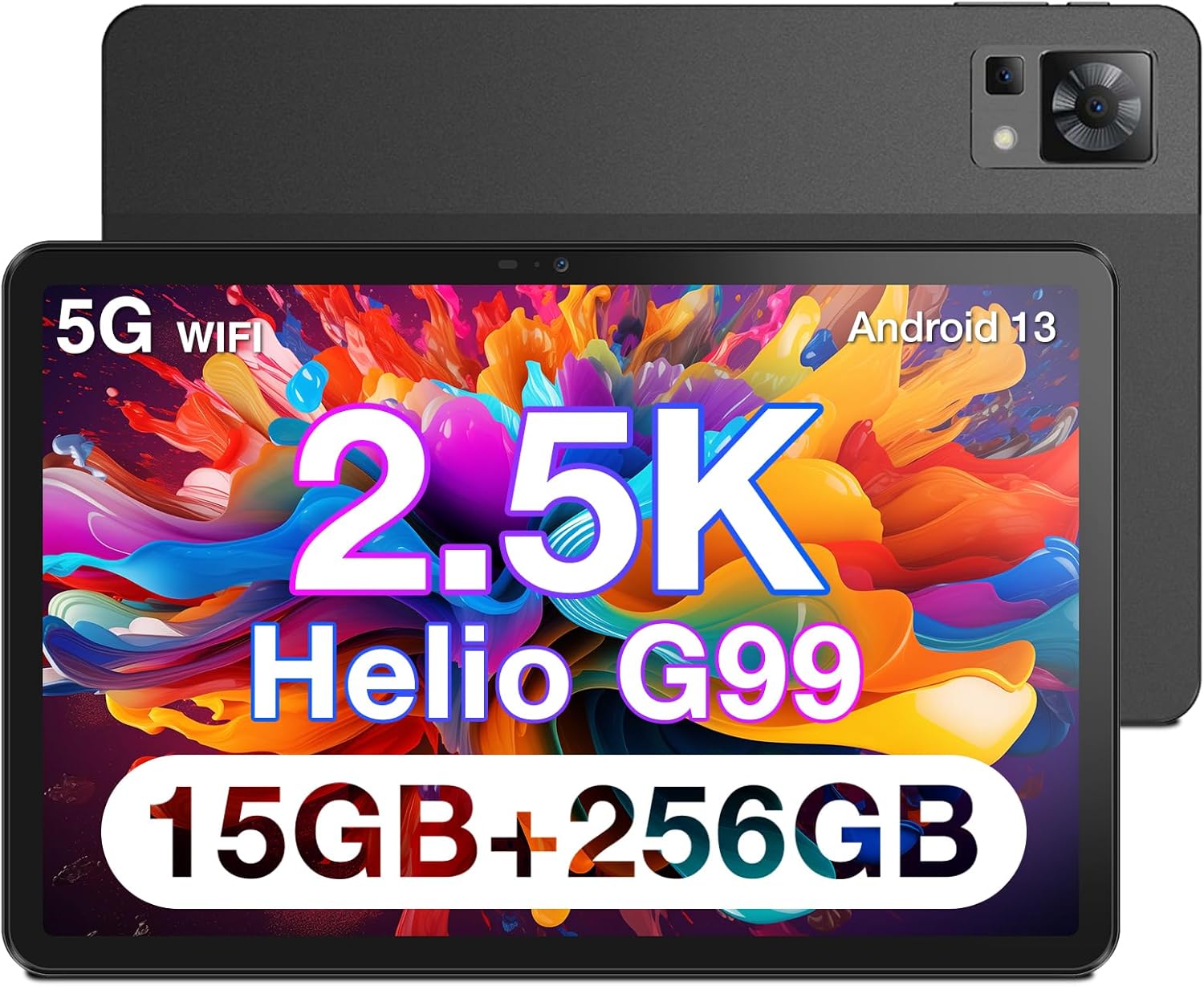
ചിത്രം 1.1: മുന്നിലും പിന്നിലും view of the DOOGEE T30 PRO Tablet, highlighting its sleek design.

Figure 1.2: Visual representation of the tablet's 2.5K resolution, 374 Pixel Density, 85% Screen to Body Ratio, and 4 Hi-Res Speakers for an enhanced audiovisual experience.

Figure 1.3: The tablet demonstrating split-screen functionality, powered by an Octa-Core 2.2GHz processor, 15GB+256GB storage, and Android 13 system.

Figure 1.4: The DOOGEE T30 PRO Tablet is TÜV SÜD Eye Safety Certified, indicating reduced blue light emission for eye protection.

Figure 1.5: The tablet's camera capabilities, featuring a 20MP Main Camera and an 8MP Front Camera, ideal for video calls and photography.

Figure 1.6: The tablet supports 4G Dual LTE and 2.4G/5G Dual Band Wi-Fi for reliable and fast connectivity.

Figure 1.7: The ultra-thin metal unibody design of the tablet, weighing 470g and measuring 7.9mm slim. Note: Stylus is optional and not included.
2. സജ്ജീകരണം
2.1 പ്രാരംഭ ചാർജിംഗ്
Before first use, fully charge your DOOGEE T30 PRO Tablet. Connect the provided USB-C cable to the tablet's charging port and the other end to a compatible power adapter. The tablet supports 33W fast charging.
Video 2.1: Official product video demonstrating the features of the DOOGEE T30 PRO, including its charging capabilities and overall design. (Source: Seller)
2.2 പവർ ഓൺ/ഓഫ്
- പവർ ഓണാക്കാൻ: Press and hold the Power button located on the side of the tablet until the DOOGEE logo appears on the screen.
- പവർ ഓഫ് ചെയ്യാൻ: പവർ ഓപ്ഷൻ മെനു ദൃശ്യമാകുന്നതുവരെ പവർ ബട്ടൺ അമർത്തിപ്പിടിക്കുക. "പവർ ഓഫ്" തിരഞ്ഞെടുത്ത് സ്ഥിരീകരിക്കുക.
- പുനരാരംഭിക്കാൻ: പവർ ഓപ്ഷനുകൾ മെനുവിൽ നിന്ന്, "പുനരാരംഭിക്കുക" തിരഞ്ഞെടുത്ത് സ്ഥിരീകരിക്കുക.
2.3 പ്രാരംഭ സജ്ജീകരണ വിസാർഡ്
ആദ്യമായി പവർ-ഓൺ ചെയ്യുമ്പോൾ, ടാബ്ലെറ്റ് നിങ്ങളെ ഒരു പ്രാരംഭ സജ്ജീകരണ വിസാർഡിലൂടെ നയിക്കും. ഓൺ-സ്ക്രീൻ നിർദ്ദേശങ്ങൾ പാലിക്കുക:
- നിങ്ങളുടെ ഭാഷ തിരഞ്ഞെടുക്കുക.
- ഒരു Wi-Fi നെറ്റ്വർക്കിലേക്ക് കണക്റ്റുചെയ്യുക.
- Sign in with your Google account (optional, but recommended for app downloads and services).
- സ്ക്രീൻ ലോക്ക് (പിൻ, പാറ്റേൺ, പാസ്വേഡ് അല്ലെങ്കിൽ ഫിംഗർപ്രിന്റ്) സജ്ജീകരിക്കുക.
- Review നിബന്ധനകളും വ്യവസ്ഥകളും അംഗീകരിക്കുക.
3. പ്രവർത്തിക്കുന്നു
3.1 ഡിസ്പ്ലേയും ദൃശ്യങ്ങളും
The 11-inch 2.5K (2560x1600) display offers crisp and vibrant visuals. Adjust brightness and display settings in the 'Settings' app under 'Display'. The tablet features hardware-level blue light filter technology, certified by TÜV SÜD, to reduce eye strain during prolonged use.
3.2 ഓഡിയോ അനുഭവം
Equipped with Hi-Res quad speakers, the tablet delivers an immersive audio experience. It also supports Widevine L1, allowing you to stream high-definition content from popular platforms like Disney+, Hulu, HBO Max, and Amazon Prime Video.
3.3 ക്യാമറ പ്രവർത്തനം
Capture moments with the 20MP main camera and take clear selfies or video calls with the 8MP front camera. Access the camera app from the home screen or app drawer.
3.4 പ്രകടനവും സംഭരണവും
Powered by the MediaTek Helio G99 Octa-Core chipset, the tablet ensures smooth multitasking and gaming. With 15GB (8GB physical + 7GB virtual) RAM and 256GB internal storage, expandable up to 2TB via TF card, you have ample space for all your applications and media.
3.5 കണക്റ്റിവിറ്റി
The tablet supports 4G Dual LTE for cellular data connectivity and 2.4G/5G Dual Band Wi-Fi for high-speed internet access. Bluetooth is also available for connecting wireless accessories.
3.6 ആൻഡ്രോയിഡ് 13 സവിശേഷതകൾ
Running on Android 13, the tablet offers an enhanced user experience with improved security and performance. Utilize features like split-screen multitasking to boost productivity, allowing you to run two apps side-by-side.
4. പരിപാലനം
4.1 ബാറ്ററി കെയർ
The 8580mAh battery provides extended usage. To maximize battery lifespan:
- തീവ്രമായ താപനില ഒഴിവാക്കുക.
- പതിവായി റീചാർജ് ചെയ്യുന്നതിനുമുമ്പ് ബാറ്ററി പൂർണ്ണമായും തീർന്നുപോകാൻ അനുവദിക്കരുത്.
- Use the original charger and cable for optimal charging speed and safety.
4.2 നിങ്ങളുടെ ടാബ്ലെറ്റ് വൃത്തിയാക്കൽ
ടാബ്ലെറ്റിന്റെ സ്ക്രീനും ബോഡിയും വൃത്തിയാക്കാൻ മൃദുവായ, ലിന്റ് രഹിത തുണി ഉപയോഗിക്കുക. കഠിനമായ പാടുകൾക്ക്, ചെറുതായി ഡി.ampതുണിയിൽ വെള്ളം അല്ലെങ്കിൽ സ്ക്രീൻ ക്ലീനർ ഉപയോഗിക്കുക. കഠിനമായ രാസവസ്തുക്കളോ ഉരച്ചിലുകളോ ഉള്ള വസ്തുക്കൾ ഉപയോഗിക്കുന്നത് ഒഴിവാക്കുക.
4.3 സോഫ്റ്റ്വെയർ അപ്ഡേറ്റുകൾ
Regularly check for and install software updates to ensure your tablet has the latest features, security patches, and performance improvements. Go to 'Settings' > 'System' > 'System update' to check for updates.
5. പ്രശ്നപരിഹാരം
5.1 പൊതുവായ പ്രശ്നങ്ങളും പരിഹാരങ്ങളും
- ടാബ്ലെറ്റ് ഓണാക്കുന്നില്ല: ബാറ്ററി ചാർജ്ജ് ചെയ്തിട്ടുണ്ടെന്ന് ഉറപ്പാക്കുക. ചാർജറുമായി കണക്റ്റ് ചെയ്ത് കുറച്ച് മിനിറ്റ് കാത്തിരുന്ന് വീണ്ടും പവർ ഓൺ ചെയ്യാൻ ശ്രമിക്കുക.
- സ്ക്രീൻ നിശ്ചലമായി അല്ലെങ്കിൽ പ്രതികരിക്കുന്നില്ല: റീസ്റ്റാർട്ട് ചെയ്യാൻ പവർ ബട്ടൺ ഏകദേശം 10-15 സെക്കൻഡ് അമർത്തിപ്പിടിക്കുക.
- വൈഫൈ കണക്ഷൻ പ്രശ്നങ്ങൾ: Try restarting your Wi-Fi router. On the tablet, go to 'Settings' > 'Network & internet' > 'Internet', then forget the network and reconnect.
- ആപ്പുകൾ ക്രാഷാകുന്നു: Clear the cache for the problematic app in 'Settings' > 'Apps' > [App Name] > 'Storage & cache' > 'Clear cache'. If the issue persists, try reinstalling the app.
- മന്ദഗതിയിലുള്ള പ്രകടനം: ആവശ്യമില്ലാത്ത പശ്ചാത്തല ആപ്പുകൾ അടയ്ക്കുക. കാഷെ മായ്ക്കുക, താൽക്കാലികം files. Consider performing a factory reset if performance issues persist after other troubleshooting steps (back up your data first).
6 സ്പെസിഫിക്കേഷനുകൾ
| ഫീച്ചർ | സ്പെസിഫിക്കേഷൻ |
|---|---|
| സ്ക്രീൻ ഡിസ്പ്ലേ വലുപ്പം | 11 ഇഞ്ച് |
| സ്ക്രീൻ റെസല്യൂഷൻ | 2560*1600 |
| പരമാവധി സ്ക്രീൻ റെസല്യൂഷൻ | 166*2560 |
| പ്രോസസ്സർ | 2.2 GHz |
| കാർഡ് വിവരണം | സംയോജിപ്പിച്ചത് |
| വയർലെസ് തരം | 802.11 ഗ്രാം |
| ബ്രാൻഡ് | ഡോഗി |
| പരമ്പര | T30PRO |
| ഇനത്തിൻ്റെ മോഡൽ നമ്പർ | T30PRO |
| ഓപ്പറേറ്റിംഗ് സിസ്റ്റം | ആൻഡ്രോയിഡ് 13 |
| ഇനത്തിൻ്റെ ഭാരം | 2.9 പൗണ്ട് |
| പാക്കേജ് അളവുകൾ | 11.3 x 7.95 x 2.52 ഇഞ്ച് |
| നിറം | കറുപ്പ് |
| പിൻഭാഗം Webക്യാം റെസല്യൂഷൻ | 20 എം.പി |
| പ്രോസസ്സർ ബ്രാൻഡ് | ഹീലിയോ ജി99 |
| ഫ്ലാഷ് മെമ്മറി വലുപ്പം | 256 ജിബി |
| ബാറ്ററികൾ | 1 ലിഥിയം പോളിമർ ബാറ്ററികൾ ആവശ്യമാണ്. (ഉൾപ്പെടുന്നു) |
| ASIN | B0C5LMNX24 |
| ആദ്യ തീയതി ലഭ്യമാണ് | സെപ്റ്റംബർ 22, 2023 |
| മോഡലിൻ്റെ പേര് | T30PRO |
| മെമ്മറി സ്റ്റോറേജ് കപ്പാസിറ്റി | 256 ജിബി |
| സ്ക്രീൻ വലിപ്പം | 11 ഇഞ്ച് |
| ഡിസ്പ്ലേ റെസല്യൂഷൻ പരമാവധി | 166*2560 |
7. വാറൻ്റിയും പിന്തുണയും
7.1 വാറൻ്റി വിവരങ്ങൾ
Your DOOGEE T30 PRO Tablet comes with a 2-വർഷ പരിമിത വാറൻ്റി. This warranty covers manufacturing defects and ensures your product functions as intended under normal use. Please retain your proof of purchase for warranty claims.
7.2 റിട്ടേൺ പോളിസി
ആസ്വദിക്കൂ a 30 ദിവസത്തെ മണി ബാക്ക് ഗ്യാരണ്ടിയും സൗജന്യ റിട്ടേണും from the date of purchase. Refer to the retailer's return policy for specific conditions and procedures.
7.3 ഉപഭോക്തൃ പിന്തുണ
For any technical assistance or inquiries, 24/7 ഓൺലൈൻ പിന്തുണ 1-ഓൺ-1 is available. Please visit the official DOOGEE website or contact their customer service channels for detailed support options.