
1. ആമുഖം
This user manual provides detailed instructions for the Rocketek PC/SC USB Smart Card Reader. This device is designed to facilitate secure digital interactions, including online identification, digital signatures, and access to various smart card applications. Please read this manual thoroughly before using the product to ensure proper functionality and longevity.
2. ഉൽപ്പന്നം കഴിഞ്ഞുview
The Rocketek PC/SC USB Smart Card Reader is a versatile device supporting a wide range of smart cards. It features a compact design and a standard USB interface for easy connectivity.
2.1 പാക്കേജ് ഉള്ളടക്കം
- Rocketek PC/SC USB Smart Card Reader
- ഉപയോക്തൃ മാനുവൽ (ഈ പ്രമാണം)
2.2 ഉപകരണ സവിശേഷതകൾ
The card reader includes dedicated slots for different card types and an indicator light for operational status.
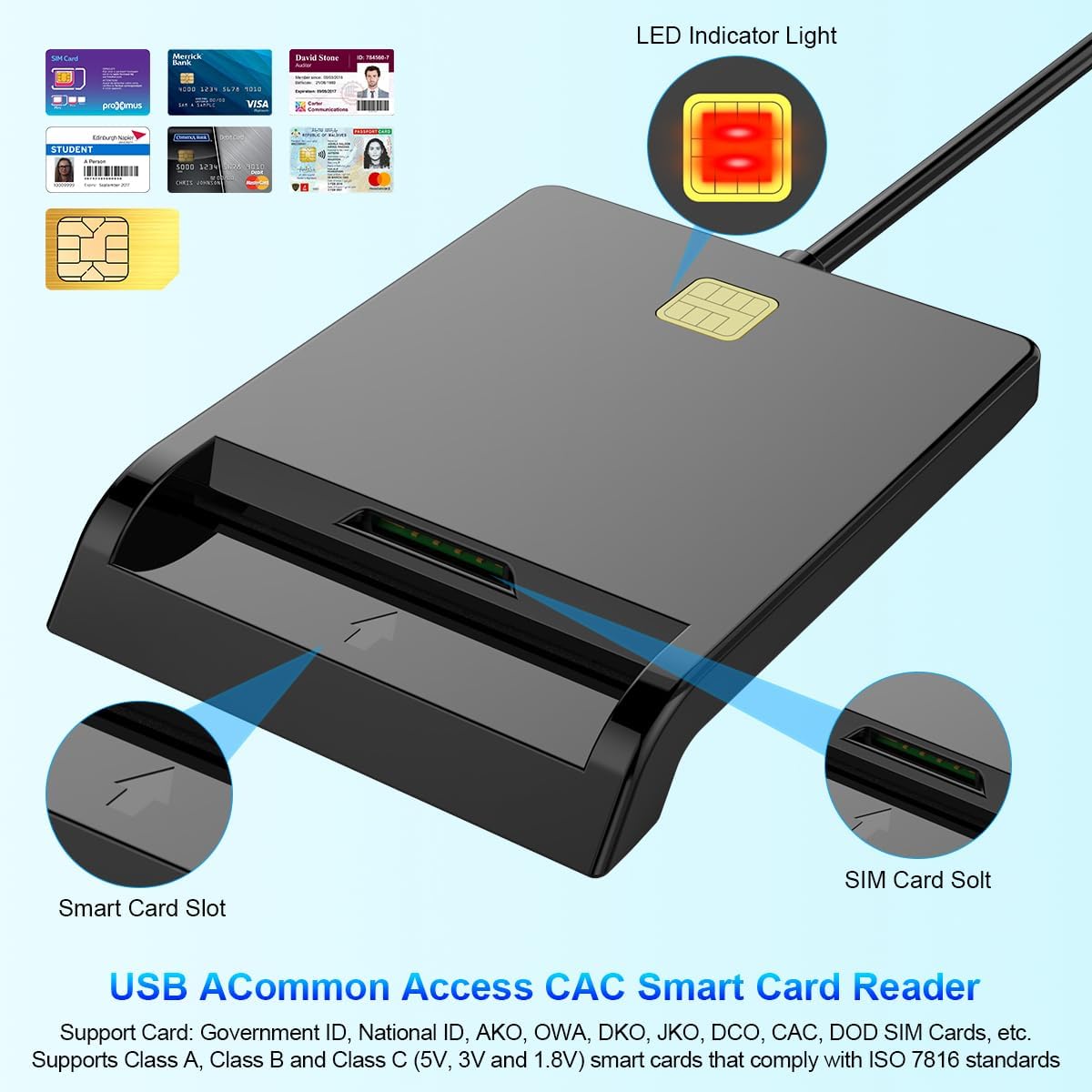
ചിത്രം 1: ഫ്രണ്ട് view of the Rocketek Smart Card Reader, highlighting the LED indicator light, the main smart card slot, and the SIM card slot.

ചിത്രം 2: The Rocketek Smart Card Reader shown with its USB connector, a SIM card, and a standard debit card, illustrating its multi-card compatibility.
3. സജ്ജീകരണം
Follow these steps to set up your Rocketek PC/SC USB Smart Card Reader.
3.1 സിസ്റ്റം ആവശ്യകതകൾ
- ഓപ്പറേറ്റിംഗ് സിസ്റ്റം: Windows 98 / Me / 2000 / NT 4.0 / XP / CE / Vista / 7 / 8 / 8.1 / 10 / 11, Chromebook OS, Linux, Ubuntu, Mac OS.
- ഇൻ്റർഫേസ്: ലഭ്യമായ യുഎസ്ബി പോർട്ട്.

ചിത്രം 3: The card reader is compatible with various operating systems, including different versions of Windows and Linux.
3.2 ഉപകരണം ബന്ധിപ്പിക്കുന്നു
- നിങ്ങളുടെ കമ്പ്യൂട്ടറിലോ ലാപ്ടോപ്പിലോ ലഭ്യമായ USB പോർട്ട് കണ്ടെത്തുക.
- Plug the USB connector of the Rocketek Smart Card Reader into the USB port.
- The device is generally പ്ലഗ് & പ്ലേ for Windows systems, meaning it should be recognized automatically without manual driver installation. For Mac OS and Linux, or for specific smart card applications (e.g., Belgian eID, CAC cards), additional drivers or official software may be required. Refer to the card issuer's website for necessary software.
4. പ്രവർത്തന നിർദ്ദേശങ്ങൾ
Using the Rocketek PC/SC USB Smart Card Reader is straightforward.
4.1 Inserting a Smart Card
- കാർഡ് റീഡർ നിങ്ങളുടെ കമ്പ്യൂട്ടറുമായി ബന്ധിപ്പിച്ചിട്ടുണ്ടെന്ന് ഉറപ്പാക്കുക.
- For standard smart cards (e.g., ID cards, bank cards), insert the card into the main smart card slot with the chip facing upwards and towards the reader.
- For SIM cards, insert the SIM card into the dedicated SIM card slot.
- The LED indicator light on the reader will illuminate or flash to indicate card detection and activity.
4.2 കാർഡ് റീഡർ ഉപയോഗിക്കുന്നു
- Once the card is inserted and recognized, you can use it with compatible software for tasks such as:
- Online banking
- ഡിജിറ്റൽ ഒപ്പുകൾ
- Online tax declarations
- Accessing government services (e.g., Belgian eID)
- CAC, AKO, OWA, DKO, JKO, NKO, BOL, GKO, Marinenet, AF-Portal, Pure Edge Viewഎർ ആപ്ലിക്കേഷനുകൾ
- പ്രധാനപ്പെട്ടത്: The reader is designed to read only one card at a time. Do not attempt to insert multiple cards simultaneously into different slots if they are intended for active use.

ചിത്രം 4: The card reader supports high-speed data transmission but can only process one smart card or SIM card at any given moment.
5. പരിപാലനം
To ensure optimal performance and extend the lifespan of your card reader, follow these maintenance guidelines:
- ഉപകരണം വൃത്തിയായും പൊടിയില്ലാതെയും സൂക്ഷിക്കുക. വൃത്തിയാക്കാൻ മൃദുവായതും ഉണങ്ങിയതുമായ തുണി ഉപയോഗിക്കുക.
- വായനക്കാരനെ തീവ്രമായ താപനില, ഈർപ്പം അല്ലെങ്കിൽ നേരിട്ടുള്ള സൂര്യപ്രകാശം ഏൽക്കുന്നത് ഒഴിവാക്കുക.
- Do not insert foreign objects into the card slots.
- Handle the USB cable gently to prevent damage.
- Store the reader in a safe place when not in use.
6. പ്രശ്നപരിഹാരം
If you encounter issues with your Rocketek Smart Card Reader, refer to the following common problems and solutions:
6.1 ഉപകരണം തിരിച്ചറിഞ്ഞിട്ടില്ല
- യുഎസ്ബി കണക്ഷൻ പരിശോധിക്കുക: Ensure the reader is firmly plugged into a working USB port. Try a different USB port or a different computer if possible.
- കമ്പ്യൂട്ടർ പുനരാരംഭിക്കുക: ചിലപ്പോൾ ഒരു ലളിതമായ പുനരാരംഭം തിരിച്ചറിയൽ പ്രശ്നങ്ങൾ പരിഹരിക്കും.
- ഡ്രൈവർ ഇൻസ്റ്റാളേഷൻ: While the device is generally plug-and-play for Windows, some specific smart cards (e.g., certain government IDs, health cards) or operating systems (Mac OS, Linux) may require dedicated drivers or middleware. Visit the official website of your smart card issuer or the Rocketek support page for driver downloads.
6.2 Card Not Reading
- ശരിയായ ഉൾപ്പെടുത്തൽ: Ensure the smart card is inserted correctly with the chip facing the right direction and fully seated in the slot.
- Card Condition: Check the smart card for any visible damage or dirt on the chip. Clean the chip gently with a soft, dry cloth if necessary.
- സോഫ്റ്റ്വെയർ അനുയോജ്യത: Verify that you have the correct software installed for the specific type of smart card you are trying to read (e.g., eID software for Belgian ID cards).
- Single Card Rule: Ensure only one card is inserted into the reader at a time.
6.3 മന്ദഗതിയിലുള്ള പ്രകടനം
- USB പോർട്ട്: Ensure you are using a high-speed USB port (e.g., USB 2.0 or 3.0).
- സിസ്റ്റം ഉറവിടങ്ങൾ: പശ്ചാത്തലത്തിൽ പ്രവർത്തിക്കുന്ന, സിസ്റ്റം റിസോഴ്സുകൾ ഉപയോഗിക്കുന്ന അനാവശ്യ ആപ്ലിക്കേഷനുകൾ അടയ്ക്കുക.
7 സ്പെസിഫിക്കേഷനുകൾ
| ബ്രാൻഡ് | Rocketek |
| മോഡൽ | B0C5LR8DTN |
| കണക്റ്റിവിറ്റി ടെക്നോളജി | USB |
| അനുയോജ്യമായ ഉപകരണങ്ങൾ | കമ്പ്യൂട്ടറുകൾ, ലാപ്ടോപ്പുകൾ |
| ഓപ്പറേറ്റിംഗ് സിസ്റ്റങ്ങൾ | Windows 98 / Me / 2000 / NT 4.0 / XP / CE / Vista / 7 / 8 / 8.1 / 10 / 11, Chromebook OS, Linux, Ubuntu, Mac OS |
| പ്രത്യേക ഫീച്ചർ | പ്ലഗ് & പ്ലേ |
| പിന്തുണയ്ക്കുന്ന കാർഡ് തരങ്ങൾ | Smart, ID, CAC, CRS, CNS, IC, SIM, etc. (ISO 7816 Class A, B, C for 5V, 3V and 1.8V smart cards) |
| അളവുകൾ (ഏകദേശം.) | 84mm (L) x 65mm (W) x 9.5mm (H) |
| Cable Length (Approx.) | 95cm / 2.5in |

ചിത്രം 5: Approximate dimensions of the Rocketek Smart Card Reader and its integrated USB cable.
8. വാറൻ്റിയും പിന്തുണയും
Rocketek stands behind the quality of its products.
8.1 നിർമ്മാതാവിന്റെ വാറന്റി
All Rocketek USB CAC smart card readers come with a worry-free 12 മാസത്തെ നിർമ്മാതാവിന്റെ വാറന്റി വാങ്ങിയ തീയതി മുതൽ. സാധാരണ ഉപയോഗത്തിലുള്ള മെറ്റീരിയലുകളിലെയും വർക്ക്മാൻഷിപ്പുകളിലെയും വൈകല്യങ്ങൾ ഈ വാറന്റി ഉൾക്കൊള്ളുന്നു.
8.2 ഉപഭോക്തൃ പിന്തുണ
If you have any questions, require technical assistance, or experience issues with your product, please do not hesitate to contact Rocketek customer support directly. Refer to the product packaging or the Rocketek official webബന്ധപ്പെടാനുള്ള വിവരങ്ങൾക്കുള്ള സൈറ്റ്.