
Asustor AS5402T
ASUSTOR AS5402T NAS User Manual
Model: AS5402T | Brand: Asustor
ആമുഖം
This manual provides comprehensive instructions for the setup, operation, and maintenance of your ASUSTOR AS5402T Network Attached Storage (NAS) device. The AS5402T is a high-performance 2-bay NAS designed for home and small office environments, featuring an Intel Quad-Core 2.0GHz CPU, four M.2 NVMe SSD slots, and dual 2.5 Gigabit Ethernet ports for efficient data management and multimedia streaming.

Figure 1: ASUSTOR AS5402T NAS Unit
The AS5402T NAS unit, shown from the front, highlighting its sleek black design and front-facing USB port.
സുരക്ഷാ വിവരങ്ങൾ
Please read all safety instructions carefully before using the device. Failure to follow these instructions may result in electric shock, fire, or damage to the device.
- Ensure the power adapter is connected to a grounded outlet.
- ഉപകരണം വെള്ളത്തിലോ അമിതമായ ഈർപ്പത്തിലോ തുറന്നുകാട്ടരുത്.
- വെന്റിലേഷൻ തുറസ്സുകൾ തടയരുത്. ഉപകരണത്തിന് ചുറ്റും ശരിയായ വായുസഞ്ചാരം ഉറപ്പാക്കുക.
- ഉപകരണത്തിനൊപ്പം നൽകിയിരിക്കുന്ന പവർ അഡാപ്റ്റർ മാത്രം ഉപയോഗിക്കുക.
- നേരിട്ട് സൂര്യപ്രകാശത്തിലോ ചൂട് സ്രോതസ്സുകൾക്ക് സമീപമോ ഉപകരണം സ്ഥാപിക്കുന്നത് ഒഴിവാക്കുക.
- ഉപകരണം സ്വയം തുറക്കാനോ നന്നാക്കാനോ ശ്രമിക്കരുത്. എല്ലാ സേവനങ്ങളും യോഗ്യതയുള്ള ഉദ്യോഗസ്ഥരെ ഏൽപ്പിക്കുക.
പാക്കേജ് ഉള്ളടക്കം
താഴെ ലിസ്റ്റ് ചെയ്തിരിക്കുന്ന എല്ലാ ഇനങ്ങളും നിങ്ങളുടെ പാക്കേജിൽ ഉൾപ്പെടുത്തിയിട്ടുണ്ടെന്ന് ഉറപ്പാക്കുക. ഏതെങ്കിലും ഇനങ്ങൾ നഷ്ടപ്പെട്ടിട്ടുണ്ടെങ്കിലോ കേടായിട്ടുണ്ടെങ്കിലോ, നിങ്ങളുടെ റീട്ടെയിലറെ ബന്ധപ്പെടുക.

Figure 2: AS5402T Package Contents and Dimensions
This diagram illustrates the AS5402T unit's dimensions and lists the included accessories: the NAS unit, Quick Installation Guide, AC Power Cord, AC Power Adapter, two RJ-45 LAN Cables (Cat 5e), and eight Flat Head Screws for 2.5" HDDs.
- ASUSTOR AS5402T Unit x1
- ദ്രുത ഇൻസ്റ്റലേഷൻ ഗൈഡ് x1
- എസി പവർ കോർഡ് x1
- എസി പവർ അഡാപ്റ്റർ x1
- RJ-45 LAN Cable (Cat 5e) x2
- Flat Head Screw (for 2.5" HDD) x8
ഹാർഡ്വെയർ കഴിഞ്ഞുview
Familiarize yourself with the components and ports of your AS5402T NAS.
Figure 3: AS5402T Front and Rear Panel Layout
This image displays the front and rear panels of the AS5402T, labeling key components such as the Power Button, various LED indicators (Power, System Status, Network, USB, Hard Drive), One Touch Backup Button, USB 3.2 Gen 2 ports, HDMI port, 2.5-Gigabit Ethernet ports, Reset Button, DC input, System Fan, and K-Lock security slot.
ഫ്രണ്ട് പാനൽ
- പവർ ബട്ടൺ: Turns the NAS on or off.
- LED സൂചകങ്ങൾ:
- പവർ എൽഇഡി: പവർ സ്റ്റാറ്റസ് സൂചിപ്പിക്കുന്നു.
- System Status LED: Shows system health.
- Network LED: Indicates network activity.
- USB LED: Indicates USB device connection.
- Hard Drive LEDs: Show status of installed hard drives.
- One Touch Backup Button: Initiates a quick backup from a connected USB device.
- USB 3.2 Gen 2 പോർട്ട്: യുഎസ്ബി ഉപകരണങ്ങൾ ബന്ധിപ്പിക്കുന്നതിന്.
പിൻ പാനൽ
- USB 3.2 Gen 2 പോർട്ടുകൾ (x2): അധിക ഹൈ-സ്പീഡ് യുഎസ്ബി പോർട്ടുകൾ.
- എച്ച്ഡിഎംഐ പോർട്ട്: ഒരു ഡിസ്പ്ലേയിലേക്ക് ബന്ധിപ്പിക്കുന്നതിന്.
- 2.5-Gigabit Ethernet Ports (x2): നെറ്റ്വർക്ക് കണക്റ്റിവിറ്റിക്കായി.
- റീസെറ്റ് ബട്ടൺ: Resets the NAS to factory defaults (use with caution).
- DC ഇൻപുട്ട്: പവർ അഡാപ്റ്റർ കണക്ഷൻ.
- സിസ്റ്റം ഫാൻ: For cooling the system.
- K-Lock: കെൻസിംഗ്ടൺ സുരക്ഷാ സ്ലോട്ട്.
ആന്തരിക ഘടകങ്ങൾ
- Drive Bays (x2): For 3.5" or 2.5" SATA HDDs/SSDs.
- M.2 NVMe SSD Slots (x4): For high-speed NVMe SSDs, ideal for caching or storage pools.
- DDR4 റാം: 4GB DDR4-2933 RAM, expandable.
- Intel Celeron N5105 CPU: Quad-Core 2.0GHz processor.


Figure 4: Internal M.2 Slots and Dual 2.5GbE Ports
The left image shows the four internal M.2 NVMe SSD slots, providing high-speed storage expansion. The right image highlights the dual 2.5-Gigabit Ethernet ports on the rear panel, enabling fast network connectivity.
സജ്ജമാക്കുക
Follow these steps to set up your AS5402T NAS for the first time.
1 ഹാർഡ്വെയർ ഇൻസ്റ്റാളേഷൻ
- ഹാർഡ് ഡ്രൈവുകൾ/എസ്എസ്ഡികൾ ഇൻസ്റ്റാൾ ചെയ്യുക:
Slide out the drive trays from the front of the NAS. Secure your 3.5" or 2.5" SATA HDDs/SSDs into the trays using the provided screws. Slide the trays back into the NAS until they click into place.
- M.2 NVMe SSD-കൾ ഇൻസ്റ്റാൾ ചെയ്യുക (ഓപ്ഷണൽ):
Locate the M.2 slots inside the NAS. Carefully insert the M.2 NVMe SSDs into the slots and secure them with the retaining screws.
- നെറ്റ്വർക്ക് കേബിളുകൾ ബന്ധിപ്പിക്കുക:
Connect one or both 2.5-Gigabit Ethernet ports on the rear of the NAS to your router or network switch using the provided RJ-45 LAN cables.
- പവർ ബന്ധിപ്പിക്കുക:
Connect the AC power adapter to the DC input port on the rear of the NAS, then plug the power cord into a grounded electrical outlet.
- പവർ ഓൺ:
Press the Power Button on the front panel to turn on the NAS. The Power LED will illuminate.
2. Initial Configuration (ADM Setup)
Once the NAS is powered on, you will need to access the ASUSTOR Data Master (ADM) operating system for initial setup.


Figure 5: ADM Setup Process and Control Center
The left image illustrates the four-step process for setting up the ASUSTOR NAS. The right image shows the ASUSTOR Control Center application, used to discover and manage your NAS on the network.
- Download ASUSTOR Control Center:
On a computer connected to the same network as your NAS, download and install the ASUSTOR Control Center utility from the official ASUSTOR webസൈറ്റ് (www.asustor.com/service/downloads).
- Discover NAS:
Launch ASUSTOR Control Center. It will automatically scan your network and display your AS5402T NAS. Select your NAS from the list.
- Initialize System:
Follow the on-screen prompts to initialize the system. This includes creating an administrator password, setting up network configurations, and installing the latest ADM firmware.
- Create Storage Pool and Volume:
After ADM installation, you will be guided to create a storage pool and volume. Choose your preferred RAID level (e.g., RAID 1 for data redundancy with two drives) and file system (e.g., Btrfs for advanced features like snapshots).
Operating the NAS
This section covers common operations and features of the ASUSTOR AS5402T NAS.
ആക്സസ് ചെയ്യുന്നു Fileകളും ഡാറ്റയും

Figure 6: Cross-Platform Multi-User Access
The AS5402T supports access from various devices including desktops, laptops, tablets, and smartphones, enabling seamless file sharing across different operating systems.
- നെറ്റ്വർക്ക് ഓഹരികൾ: Access shared folders on your NAS directly from your computer's file explorer (Windows File Explorer, macOS Finder) using SMB/CIFS or NFS protocols.
- File Explorer (ADM): ബിൽറ്റ്-ഇൻ ഉപയോഗിക്കുക File Explorer application within the ADM web interface to manage files directly from your browser.
- മൊബൈൽ ആപ്പുകൾ: Download ASUSTOR mobile apps (e.g., AiData) for convenient file access and management on your smartphone or tablet.
ഉപയോക്താവും ഗ്രൂപ്പ് മാനേജ്മെന്റും
Manage user accounts and groups to control access permissions to shared folders and applications.
- നാവിഗേറ്റ് ചെയ്യുക Access Control > Local Users or Local Groups in ADM.
- Create new users, assign passwords, and configure their access rights to specific folders.
- Organize users into groups for easier management of permissions.
Application Installation (App Central)
Extend the functionality of your NAS by installing various applications from App Central.

Figure 7: Personal Plex Media Center
The AS5402T can serve as a powerful media server, allowing you to stream and play videos, music, and photos across various devices using applications like Plex.
- തുറക്കുക ആപ്പ് സെൻട്രൽ from the ADM desktop.
- Browse categories or search for specific applications (e.g., Plex Media Server, Download Center, Surveillance Center).
- Click "Install" to add the application to your NAS.

Figure 8: ASUSTOR Integration with Adobe Creative Cloud
ASUSTOR NAS devices are designed to integrate with professional creative workflows, including Adobe Creative Cloud, providing efficient storage solutions for content creators.
Data Backup and Synchronization
Protect your data by configuring backup and synchronization tasks.
- Backup & Restore: Schedule backups to external USB drives, remote NAS devices, or cloud storage services.
- DataSync Center: സമന്വയിപ്പിക്കുക files with public cloud services like Google Drive, Dropbox, and OneDrive.
- Snapshots (Btrfs): If using Btrfs, utilize Snapshot Center to create point-in-time copies of your data for quick recovery from accidental deletion or ransomware attacks.
Remote Access and Multimedia
Access your NAS content from anywhere and enjoy multimedia features.

Figure 9: Live Streaming Capabilities
The AS5402T supports live streaming setups, allowing users to broadcast content to various platforms like YouTube, Twitch, and Facebook.
- EZ-Connect: Simplify remote access setup without complex router configurations.
- LooksGood: Manage and stream your video collection.
- SoundsGood: Organize and play your music library.
- ഫോട്ടോ ഗാലറി: Browse and share your photo albums.
- HDMI ഔട്ട്പുട്ട്: Connect the NAS directly to a TV or monitor for direct multimedia playback. The AS5402T supports 10-bit 4K hardware decoding.
മെയിൻ്റനൻസ്
Regular maintenance ensures optimal performance and data integrity of your NAS.
- ഫേംവെയർ അപ്ഡേറ്റുകൾ: Regularly check for and install ADM firmware updates via Settings > EZ-Update to ensure your system has the latest features, security patches, and bug fixes.
- System Health Monitoring: Monitor system status, CPU usage, memory usage, and disk health using the സിസ്റ്റം വിവരങ്ങൾ ഒപ്പം സ്റ്റോറേജ് മാനേജർ applications in ADM.
- ഡിസ്ക് ആരോഗ്യ പരിശോധന: Periodically run S.M.A.R.T. tests on your hard drives through സ്റ്റോറേജ് മാനേജർ to detect potential issues early.
- Clean Ventilation: Ensure the NAS ventilation openings are clear of dust and obstructions to prevent overheating.
ട്രബിൾഷൂട്ടിംഗ്
നിങ്ങൾ നേരിട്ടേക്കാവുന്ന പൊതുവായ പ്രശ്നങ്ങൾക്കുള്ള പരിഹാരങ്ങൾ ഈ വിഭാഗം നൽകുന്നു.
| പ്രശ്നം | സാധ്യമായ കാരണം | പരിഹാരം |
|---|---|---|
| NAS പവർ ഓൺ ചെയ്യുന്നില്ല. | Power cable loose, power adapter faulty, power outlet issue. | Check all power connections. Try a different power outlet. Ensure the power adapter is functioning. |
| Cannot find NAS on network. | Network cable disconnected, incorrect IP settings, firewall blocking. | Verify LAN cable connection. Use ASUSTOR Control Center to locate the NAS. Temporarily disable firewall on your computer. Ensure NAS and computer are on the same network segment. |
| പതുക്കെ file ട്രാൻസ്ഫർ വേഗത. | Network congestion, faulty cable, drive performance issues, network adapter settings. | Check network cable integrity. Ensure your network infrastructure (router, switch) supports 2.5GbE. Verify drive health in Storage Manager. Disable Jumbo Frames if not supported by all devices. |
| Hard drive LED blinking red. | Drive failure, bad sectors, RAID degradation. | പരിശോധിക്കുക സ്റ്റോറേജ് മാനേജർ for detailed drive status. If a drive has failed, replace it and repair the RAID volume. Back up critical data immediately. |
| Forgot ADM password. | പാസ്വേഡ് മറന്നുപോയി. | Use the reset button on the rear panel (refer to manual for specific reset procedure, usually a 3-second press for network settings reset, 10-second for factory reset without data loss). |
സ്പെസിഫിക്കേഷനുകൾ
Detailed technical specifications for the ASUSTOR AS5402T NAS.
| ഫീച്ചർ | വിവരണം |
|---|---|
| സിപിയു | Intel Celeron N5105 Quad-Core 2.0GHz (Burst up to 2.9GHz) |
| റാം | 4GB DDR4-2933 (expandable) |
| ഡ്രൈവ് ബേകൾ | 2 x 3.5"/2.5" SATA III/II HDD/SSD |
| M.2 സ്ലോട്ടുകൾ | 4 x M.2 NVMe SSD slots |
| ഇഥർനെറ്റ് പോർട്ടുകൾ | 2 x 2.5 Gigabit Ethernet (2.5GbE) |
| USB പോർട്ടുകൾ | 3 x USB 3.2 Gen 2 (10 Gbps) |
| HDMI ഔട്ട്പുട്ട് | 1 x HDMI 2.0b |
| അളവുകൾ (HxWxD) | 170 x 114 x 230 മിമി (6.69 x 4.49 x 9.06 ഇഞ്ച്) |
| ഭാരം | 2 കി.ഗ്രാം (4.4 പൗണ്ട്) |
| വൈദ്യുതി ഉപഭോഗം | (Varies by usage, refer to product page for specifics) |
| പിന്തുണയ്ക്കുന്ന RAID ലെവലുകൾ | Single, JBOD, RAID 0, RAID 1 |
| File സിസ്റ്റം | Internal: EXT4, Btrfs; External: FAT32, NTFS, HFS+, EXT3, EXT4 |
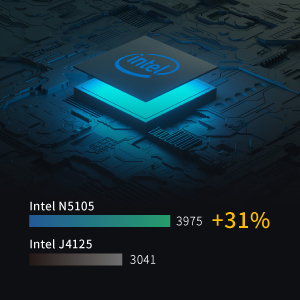
Figure 10: Intel N5105 CPU Performance
A visual representation of the Intel N5105 CPU's performance, indicating a significant improvement over previous generations like the Intel J4125.
പിന്തുണയും വാറൻ്റിയും
For further assistance and warranty information, please refer to the following resources:
- Official ASUSTOR Webസൈറ്റ്: സന്ദർശിക്കുക www.asustor.com ഉൽപ്പന്ന വിവരങ്ങൾ, പതിവുചോദ്യങ്ങൾ, പിന്തുണാ ഉറവിടങ്ങൾ എന്നിവയ്ക്കായി.
- ഓൺലൈൻ ഉപയോക്തൃ മാനുവൽ: A detailed PDF user manual is available for download at ASUSTOR AS5402T User Manual (PDF).
- സാങ്കേതിക സഹായം: Contact ASUSTOR technical support through their website for specific issues not covered in this manual.
- വാറൻ്റി വിവരങ്ങൾ: The ASUSTOR AS5402T comes with a standard manufacturer's warranty. Please refer to the warranty card included with your product or the official ASUSTOR webനിർദ്ദിഷ്ട നിബന്ധനകൾക്കും വ്യവസ്ഥകൾക്കുമുള്ള സൈറ്റ്.
Ask a question about this manual
Ask about setup, troubleshooting, compatibility, parts, safety, or missing instructions. Manuals+ will review the question and use this page’s manual context to help answer it.