
1. ആമുഖം
വൈവിധ്യമാർന്ന ലേബലിംഗ് ആവശ്യങ്ങൾക്കായി രൂപകൽപ്പന ചെയ്തിരിക്കുന്ന ഒരു മിനി പോർട്ടബിൾ ബ്ലൂടൂത്ത് തെർമൽ ലേബൽ പ്രിന്ററാണ് MARKLIFE P50 ലേബൽ മേക്കർ മെഷീൻ. ഇത് തെർമൽ പ്രിന്റിംഗ് സാങ്കേതികവിദ്യ ഉപയോഗിക്കുന്നു, കറുപ്പും വെളുപ്പും പ്രിന്റിംഗിനെ പിന്തുണയ്ക്കുന്നു, കൂടാതെ വിലാസങ്ങൾ, വസ്ത്രങ്ങൾ, ആഭരണങ്ങൾ, റീട്ടെയിൽ ബാർകോഡുകൾ, ചെറുകിട ബിസിനസുകൾ, ഹോം ഓർഗനൈസേഷൻ, ഓഫീസ് ഉപയോഗം എന്നിവയ്ക്കായി ലേബലുകൾ സൃഷ്ടിക്കുന്നതിന് അനുയോജ്യമാണ്. നിങ്ങളുടെ P50 ലേബൽ മേക്കർ സജ്ജീകരിക്കുന്നതിനും പ്രവർത്തിപ്പിക്കുന്നതിനും പരിപാലിക്കുന്നതിനുമുള്ള സമഗ്രമായ നിർദ്ദേശങ്ങൾ ഈ മാനുവൽ നൽകുന്നു.

ചിത്രം: "നന്ദി" ലേബൽ, "ഗ്രേപ്പ്ഫ്രൂട്ട് ജ്യൂസ്" ലേബൽ, വെളുത്ത വിടവിന്റെ റോളുകൾ, വൃത്താകൃതിയിലുള്ള വിടവ്, ക്ലിയർ വിടവ് ലേബലുകൾ എന്നിവയുൾപ്പെടെ വ്യത്യസ്ത തരം ലേബലുകൾ ഉപയോഗിച്ച് കാണിച്ചിരിക്കുന്ന MARKLIFE P50 ലേബൽ മേക്കർ. ഒരു മുൻample ലേബൽ "വയർലെസ് പ്രിന്റർ ബിൽറ്റ്-ഇൻ ഫയർവാൾ സപ്പോർട്ട് WDS,WPS 123456" കാണിക്കുന്നു.
2. ബോക്സിൽ എന്താണുള്ളത്?
നിങ്ങളുടെ MARKLIFE P50 ലേബൽ മേക്കർ അൺബോക്സ് ചെയ്യുമ്പോൾ, എല്ലാ ഘടകങ്ങളും ഉണ്ടെന്ന് ഉറപ്പാക്കുക:
- മാർക്ലൈഫ് P50 ലേബൽ മേക്കർ മെഷീൻ
- ലേബലുകൾ (സാധാരണയായി 3 ടേപ്പുകൾ ഉൾപ്പെടുന്നു: 1.57"x1.18" വെളുത്ത വിടവ്, 2"x2" വൃത്താകൃതിയിലുള്ള വിടവ്, 1.57"x0.79" സുതാര്യ വിടവ് ലേബലുകൾ)
- USB-C ചാർജിംഗ് കേബിൾ
3. സജ്ജീകരണ ഗൈഡ്
3.1 ഉപകരണം ചാർജ് ചെയ്യുന്നു
പോർട്ടബിൾ ഉപയോഗത്തിനായി P50 ലേബൽ മേക്കറിൽ ബിൽറ്റ്-ഇൻ 1200mAh റീചാർജ് ചെയ്യാവുന്ന ബാറ്ററിയുണ്ട്. ആദ്യ ഉപയോഗത്തിന് മുമ്പ്, ഉപകരണം പൂർണ്ണമായും ചാർജ് ചെയ്തിട്ടുണ്ടെന്ന് ഉറപ്പാക്കുക.
- നൽകിയിരിക്കുന്ന USB-C ചാർജിംഗ് കേബിൾ ലേബൽ മേക്കറിലെ ചാർജിംഗ് പോർട്ടുമായി ബന്ധിപ്പിക്കുക.
- കേബിളിന്റെ മറ്റേ അറ്റം അനുയോജ്യമായ ഒരു USB പവർ അഡാപ്റ്ററുമായി (ഉൾപ്പെടുത്തിയിട്ടില്ല) അല്ലെങ്കിൽ കമ്പ്യൂട്ടറിന്റെ USB പോർട്ടുമായി ബന്ധിപ്പിക്കുക.
- ചാർജിംഗ് ഇൻഡിക്കേറ്റർ ലൈറ്റ് ചാർജിംഗ് സ്റ്റാറ്റസ് കാണിക്കും. നിർദ്ദിഷ്ട പ്രകാശ സ്വഭാവങ്ങൾക്കായി ഉപകരണത്തിന്റെ LED ഇൻഡിക്കേറ്റർ ഗൈഡ് കാണുക (ഉദാ. ചാർജ് ചെയ്യുന്നതിനുള്ള സോളിഡ് ലൈറ്റ്, പൂർണ്ണമായി ചാർജ് ചെയ്യുമ്പോൾ ഓഫാക്കുക).
ചിത്രം: കോംപാക്റ്റ് MARKLIFE P50 ലേബൽ മേക്കർ ഒരു ഹാൻഡ്ബാഗിൽ വയ്ക്കുന്ന ഒരാൾ, അതിന്റെ പോർട്ടബിലിറ്റി എടുത്തുകാണിക്കുന്നു. ഐക്കണുകൾ "പോർട്ടബിൾ", "ബിൽറ്റ്-ഇൻ 1200mAh ബാറ്ററി", "ടൈപ്പ്-സി ചാർജിംഗ്" എന്നിവ സൂചിപ്പിക്കുന്നു.
3.2 ലേബലുകൾ ലോഡുചെയ്യുന്നു
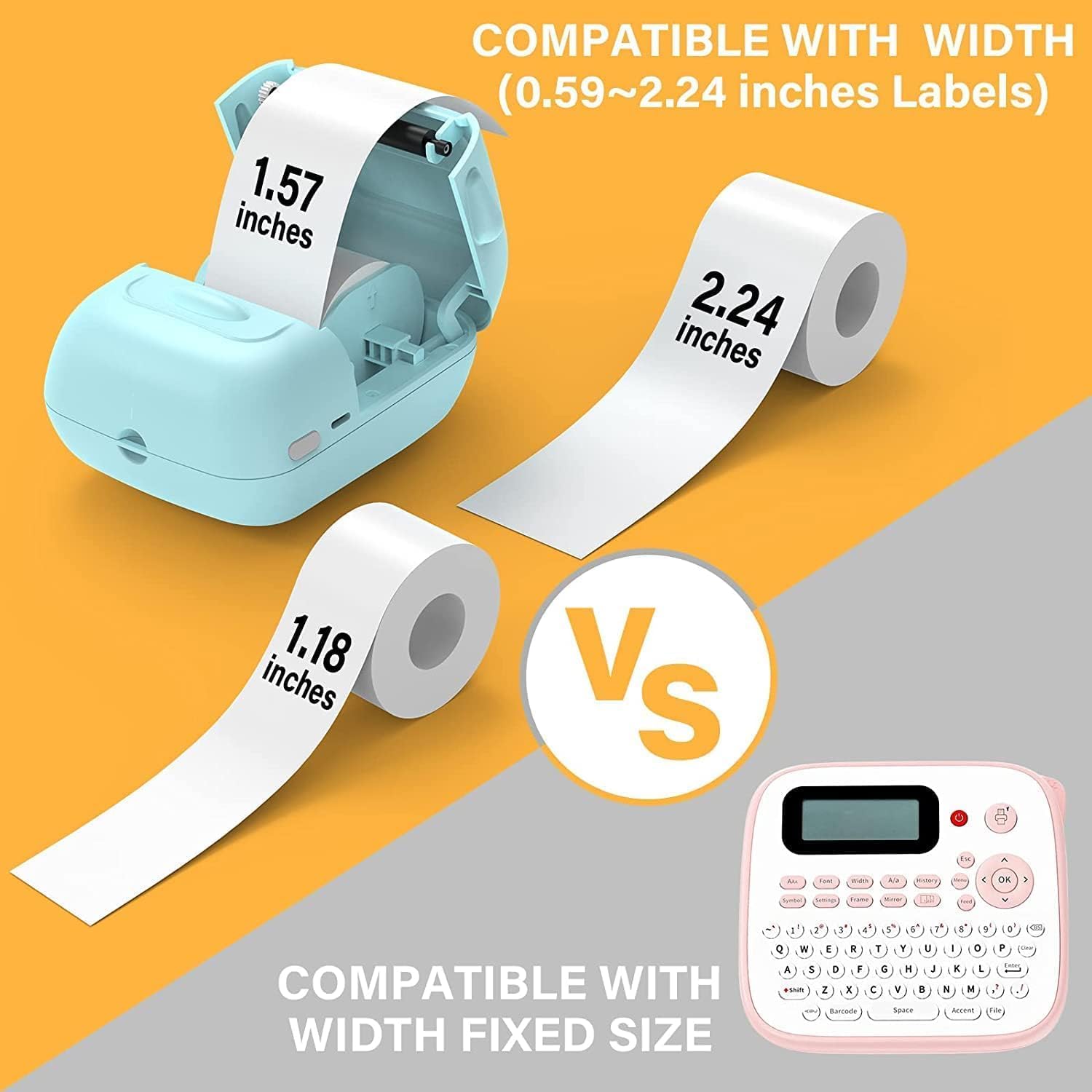
P50 ലേബൽ മേക്കർ 0.59 ഇഞ്ച് മുതൽ 2.24 ഇഞ്ച് വരെയുള്ള ലേബൽ വീതികളെ പിന്തുണയ്ക്കുന്നു. അനുയോജ്യമായ തെർമൽ ലേബലുകൾ ഉപയോഗിക്കുന്നുണ്ടെന്ന് ഉറപ്പാക്കുക.
- ഉപകരണത്തിലെ ലേബൽ കമ്പാർട്ട്മെന്റ് കവർ തുറക്കുക.
- പ്രിന്റിംഗ് ഉപരിതലം മുകളിലേക്ക് അഭിമുഖമായി വരുന്ന വിധത്തിൽ ലേബൽ റോൾ തിരുകുക, അങ്ങനെ റോൾ കമ്പാർട്ടുമെന്റിൽ ശരിയായി സ്ഥാപിച്ചിട്ടുണ്ടെന്ന് ഉറപ്പാക്കുക.
- ലേബൽ പേപ്പറിന്റെ ഒരു ചെറിയ ഭാഗം സ്ലോട്ടിൽ നിന്ന് പുറത്തെടുക്കുക, അത് കട്ടിംഗ് എഡ്ജിന് അപ്പുറത്തേക്ക് അല്പം നീട്ടുക.
- ലേബൽ കമ്പാർട്ട്മെന്റ് കവർ അതിന്റെ സ്ഥാനത്ത് ക്ലിക്കു ചെയ്യുന്നത് വരെ ദൃഢമായി അടയ്ക്കുക. പ്രിന്റർ ലേബൽ വലുപ്പം സ്വയമേവ കണ്ടെത്തും.

ചിത്രം: ലഭ്യമായ വ്യത്യസ്ത വലുപ്പങ്ങൾ ചിത്രീകരിക്കുന്ന മൂന്ന് റോളുകൾ ലേബലുകൾ പ്രദർശിപ്പിച്ചിരിക്കുന്നു: 1.57"x0.78" (40x20mm) വ്യക്തമായ വിടവ്, 1.57"x1.18" (40x30mm) വെളുത്ത വിടവ്, 2"x2" (50x50mm) സർക്കിൾ വിടവ് ലേബലുകൾ. ഈ റോളുകൾ "കൂടുതൽ ആവശ്യങ്ങൾ നിറവേറ്റുന്നു" എന്ന് ചിത്രം ഊന്നിപ്പറയുന്നു.
ചിത്രം: MARKLIFE P50 ലേബൽ മേക്കർ, 0.59 മുതൽ 2.24 ഇഞ്ച് വരെയുള്ള വീതികളുമായുള്ള അനുയോജ്യത സൂചിപ്പിക്കുന്ന ലേബലുകളുടെ ഒരു റോൾ ഉപയോഗിച്ച് കാണിച്ചിരിക്കുന്നു. ഇത് ഒരു നിശ്ചിത ലേബൽ വലുപ്പമുള്ള ഒരു പരമ്പരാഗത ലേബൽ മേക്കറുമായി വ്യത്യാസപ്പെട്ടിരിക്കുന്നു.
3.3 നിങ്ങളുടെ ഉപകരണത്തിലേക്ക് (സ്മാർട്ട്ഫോൺ/പിസി) കണക്റ്റുചെയ്യുന്നു
P50 ലേബൽ നിർമ്മാതാവ് സ്മാർട്ട്ഫോണുകൾക്ക് ബ്ലൂടൂത്ത് വഴി വയർലെസ് കണക്റ്റിവിറ്റിയും വിൻഡോസ് പിസികൾക്ക് യുഎസ്ബി കണക്ഷനും വാഗ്ദാനം ചെയ്യുന്നു.
3.3.1 സ്മാർട്ട്ഫോൺ കണക്ഷൻ (ബ്ലൂടൂത്ത്)
- നിങ്ങളുടെ സ്മാർട്ട്ഫോണിന്റെ ആപ്പ് സ്റ്റോറിൽ നിന്ന് "മാർക്ക് ലൈഫ്" ആപ്ലിക്കേഷൻ ഡൗൺലോഡ് ചെയ്യുക (ആൻഡ്രോയിഡിനും iOS-നും ലഭ്യമാണ്).
- നിങ്ങളുടെ സ്മാർട്ട്ഫോണിൽ ബ്ലൂടൂത്ത് പ്രവർത്തനക്ഷമമാക്കിയിട്ടുണ്ടെന്ന് ഉറപ്പാക്കുക.
- P50 ലേബൽ മേക്കർ ഓണാക്കുക.
- മാർക്ക് ലൈഫ് ആപ്പ് തുറക്കുക. ഏകദേശം 33 അടി ചുറ്റളവിൽ ബ്ലൂടൂത്ത് 4.0 വഴി ആപ്പ് യാന്ത്രികമായി ലേബൽ മേക്കറെ തിരയുകയും ബന്ധിപ്പിക്കുകയും ചെയ്യും.
3.3.2 പിസി കണക്ഷൻ (യുഎസ്ബി)
വിൻഡോസ് പിസി ഉപയോക്താക്കൾക്ക് ഓൺലൈൻ സോഫ്റ്റ്വെയർ ലഭ്യമാണ്. ഔദ്യോഗിക MARKLIFE കാണുക. webപിസി സോഫ്റ്റ്വെയർ ഡൗൺലോഡ് ചെയ്യുന്നതിനും ഇൻസ്റ്റാൾ ചെയ്യുന്നതിനുമുള്ള നിർദ്ദേശങ്ങൾക്കായി സൈറ്റിലോ ആപ്പിന്റെ സഹായ വിഭാഗത്തിലോ പോകുക.
4. പ്രവർത്തന നിർദ്ദേശങ്ങൾ
4.1 മാർക്ക്ലൈഫ് ആപ്പ് സവിശേഷതകൾ
ലേബൽ സൃഷ്ടിക്കുന്നതിനായി മാർക്ക് ലൈഫ് ആപ്പ് ശക്തവും ഉപയോക്തൃ-സൗഹൃദവുമായ ഒരു ഇന്റർഫേസ് നൽകുന്നു:
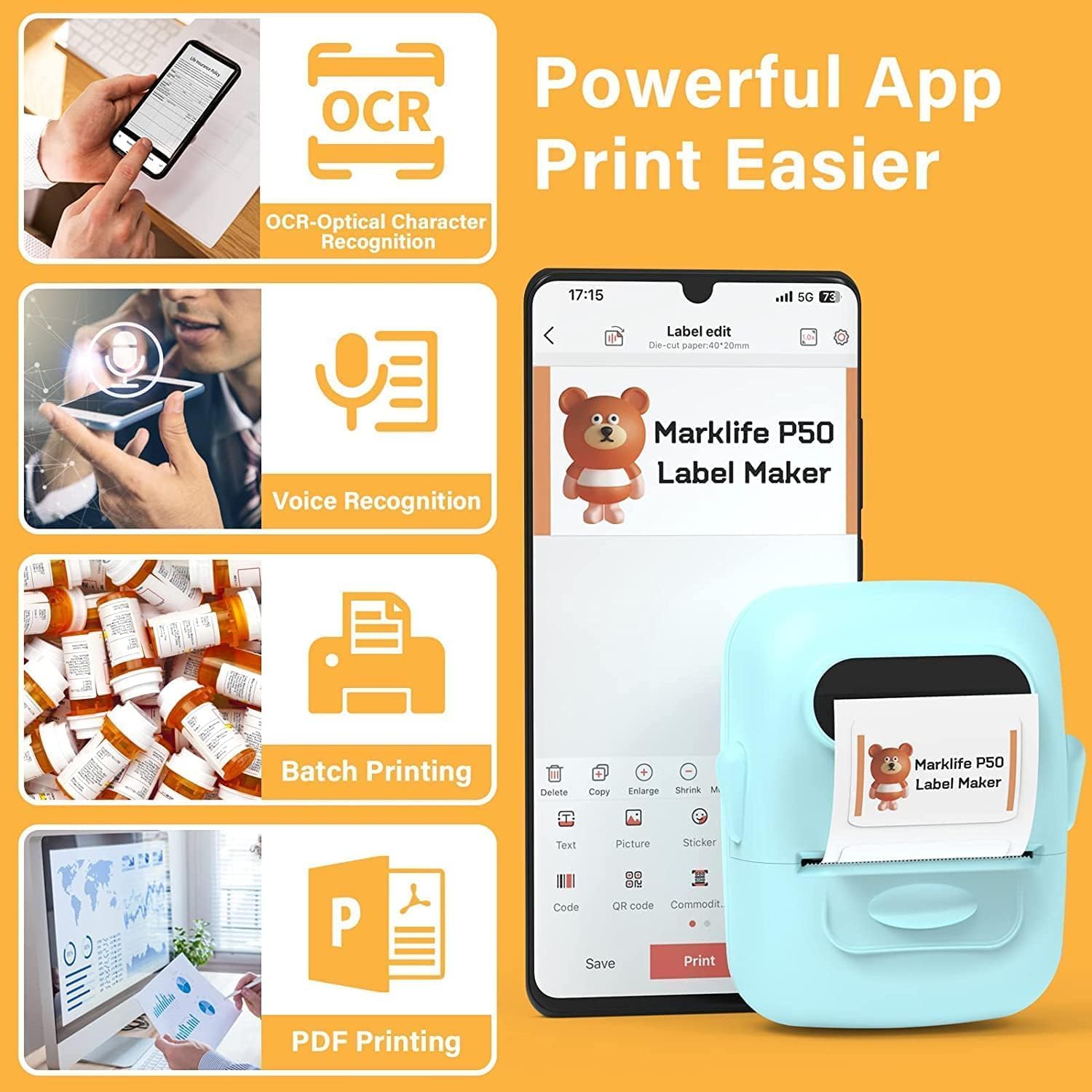
- OCR (ഒപ്റ്റിക്കൽ ക്യാരക്ടർ റെക്കഗ്നിഷൻ): നിങ്ങളുടെ ലേബലുകൾക്കായി എഡിറ്റ് ചെയ്യാവുന്ന ടെക്സ്റ്റാക്കി മാറ്റാൻ ചിത്രങ്ങളിൽ നിന്ന് ടെക്സ്റ്റ് സ്കാൻ ചെയ്യുക.
- ശബ്ദം തിരിച്ചറിയൽ: ലേബൽ ഇൻപുട്ടിൽ വേഗത്തിൽ സംസാരിക്കുന്ന വാക്കുകൾ ടെക്സ്റ്റിലേക്ക് പരിവർത്തനം ചെയ്യുക.
- ബാച്ച് പ്രിൻ്റിംഗ്: ഒരേ ലേബലിന്റെ ഒന്നിലധികം പകർപ്പുകൾ കാര്യക്ഷമമായി പ്രിന്റ് ചെയ്യുക.
- PDF പ്രിന്റിംഗ്: PDF പ്രമാണങ്ങളിൽ നിന്ന് നേരിട്ട് ലേബലുകൾ പ്രിന്റ് ചെയ്യുക.
- ചിത്രം ചേർക്കൽ: നിങ്ങളുടെ സ്വന്തം ഫോട്ടോകളോ ചിത്രങ്ങളോ ലേബലുകളിൽ ചേർക്കുക.
- ബാർകോഡ്/ക്യുആർ കോഡ് ജനറേഷൻ: പുതിയവ സൃഷ്ടിക്കുന്നതിനോ ഇഷ്ടാനുസൃത QR കോഡുകൾ സൃഷ്ടിക്കുന്നതിനോ നിലവിലുള്ള ബാർകോഡുകൾ സ്കാൻ ചെയ്യുക.
- ടെംപ്ലേറ്റുകൾ: വ്യത്യസ്ത ലേബൽ തരങ്ങൾക്കായി (വസ്ത്രങ്ങൾ, വില, കേബിൾ, ആഭരണങ്ങൾ, വിലാസം, ചേരുവകൾ മുതലായവ) മുൻകൂട്ടി രൂപകൽപ്പന ചെയ്ത വിവിധ ടെംപ്ലേറ്റുകൾ ആക്സസ് ചെയ്യുക.

ചിത്രം: MARKLIFE P50 ലേബൽ നിർമ്മാതാവ് അതിന്റെ "ബാച്ച് പ്രിന്റിംഗ്" കഴിവ് പ്രകടമാക്കുന്ന ഒരു നീണ്ട ബാർകോഡ് ലേബൽ സ്ട്രിപ്പ് അച്ചടിക്കുന്നത് കാണിക്കുന്നു. ഒരു ഉദാഹരണംampകാണിച്ചിരിക്കുന്ന ബാർകോഡ് "123456" ആണ്.

ചിത്രം: OCR (ഒപ്റ്റിക്കൽ ക്യാരക്ടർ റെക്കഗ്നിഷൻ), വോയ്സ് റെക്കഗ്നിഷൻ, ബാച്ച് പ്രിന്റിംഗ്, PDF പ്രിന്റിംഗ് തുടങ്ങിയ സവിശേഷതകൾ ഹൈലൈറ്റ് ചെയ്യുന്ന മാർക്ക്ലൈഫ് ആപ്പ് ഇന്റർഫേസ് ഒരു സ്മാർട്ട്ഫോൺ സ്ക്രീനിൽ പ്രദർശിപ്പിക്കുന്നു. ഫോണിന് അടുത്തായി P50 ലേബൽ മേക്കർ ഒരു ലേബൽ പ്രിന്റ് ചെയ്യുന്നതായി കാണിച്ചിരിക്കുന്നു.
4.2 ലേബലുകൾ സൃഷ്ടിക്കലും അച്ചടിക്കലും
- നിങ്ങളുടെ ലേബൽ രൂപകൽപ്പന ചെയ്യുക: മാർക്ക്ലൈഫ് ആപ്പ് തുറന്ന് ഒരു ടെംപ്ലേറ്റ് തിരഞ്ഞെടുക്കുക അല്ലെങ്കിൽ പുതിയ ഡിസൈൻ ആരംഭിക്കുക. ടെക്സ്റ്റ്, ഇമേജുകൾ, ബാർകോഡുകൾ, മറ്റ് ഘടകങ്ങൾ എന്നിവ ചേർക്കാൻ വിവിധ എഡിറ്റിംഗ് ടൂളുകൾ ഉപയോഗിക്കുക.
- ക്രമീകരണങ്ങൾ ക്രമീകരിക്കുക: പ്രിന്റ് ചെയ്യുന്നതിനുമുമ്പ്, പ്രിന്റ് ജോലി മെച്ചപ്പെടുത്തുന്നതിന് ആപ്പിനുള്ളിൽ പ്രിന്റ് സാന്ദ്രതയും ഫോട്ടോ ഗുണനിലവാര ക്രമീകരണങ്ങളും ക്രമീകരിക്കാൻ നിങ്ങൾക്ക് കഴിയും.
- പ്രിൻ്റ്: നിങ്ങളുടെ ഡിസൈൻ പൂർത്തിയായിക്കഴിഞ്ഞാൽ, ആപ്പിലെ "പ്രിന്റ്" ബട്ടൺ ടാപ്പ് ചെയ്യുക. ലേബൽ നിർമ്മാതാവ് നിങ്ങളുടെ ലേബൽ വേഗത്തിൽ പ്രിന്റ് ചെയ്യും.
- കട്ട് ലേബൽ: പ്രിന്ററിന്റെ ഔട്ട്പുട്ട് സ്ലോട്ടിൽ നിന്ന് പ്രിന്റ് ചെയ്ത ലേബൽ സ്വമേധയാ കീറുകയോ മുറിക്കുകയോ ചെയ്യുക.

ചിത്രം: MARKLIFE P50 ലേബൽ നിർമ്മാതാവ് ഒരു വസ്ത്രം അച്ചടിക്കുന്നത് കാണിച്ചിരിക്കുന്നു. tag "NAME DRESS SIZE:16S/64A PRICE: $7.00" ഉം "0123456789005" എന്ന ബാർകോഡും ഉള്ളവ. മറ്റുള്ളവ ഉദാ.ampകൈകൊണ്ട് നിർമ്മിച്ച സോപ്പുകളിലും ബേക്കറി ഇനങ്ങളിലും ലേബലുകൾ ഉൾപ്പെടുത്തിയിട്ടുണ്ട്, ഇത് വൈവിധ്യമാർന്ന പ്രയോഗങ്ങൾ പ്രകടമാക്കുന്നു.
5. പരിപാലനം
ശരിയായ അറ്റകുറ്റപ്പണി നിങ്ങളുടെ MARKLIFE P50 ലേബൽ മേക്കറിന്റെ ദീർഘായുസ്സും മികച്ച പ്രകടനവും ഉറപ്പാക്കുന്നു.
- പ്രിൻ്റ് ഹെഡ് വൃത്തിയാക്കുന്നു: മൃദുവായ, ലിന്റ് രഹിത തുണി ഉപയോഗിച്ച് തെർമൽ പ്രിന്റ് ഹെഡ് പതിവായി വൃത്തിയാക്കുക d.ampഐസോപ്രോപൈൽ ആൽക്കഹോൾ ചേർത്തിരിക്കുന്നു. വൃത്തിയാക്കുന്നതിന് മുമ്പ് ഉപകരണം ഓഫാക്കി തണുപ്പിച്ചിട്ടുണ്ടെന്ന് ഉറപ്പാക്കുക.
- പുറം വൃത്തിയാക്കൽ: മൃദുവായതും ഉണങ്ങിയതുമായ തുണി ഉപയോഗിച്ച് ഉപകരണത്തിന്റെ പുറംഭാഗം തുടയ്ക്കുക. അബ്രസീവ് ക്ലീനറുകളോ ലായകങ്ങളോ ഉപയോഗിക്കുന്നത് ഒഴിവാക്കുക.
- ലേബൽ സംഭരണം: അകാല മങ്ങലോ കേടുപാടുകളോ തടയാൻ, നേരിട്ടുള്ള സൂര്യപ്രകാശത്തിൽ നിന്നും ചൂടിൽ നിന്നും അകന്ന്, തണുത്തതും വരണ്ടതുമായ സ്ഥലത്ത് താപ ലേബലുകൾ സൂക്ഷിക്കുക.
- ബാറ്ററി കെയർ: ദീർഘകാല സംഭരണത്തിനായി, ബാറ്ററി ഏകദേശം 50% വരെ ചാർജ് ചെയ്ത് തണുത്തതും വരണ്ടതുമായ സ്ഥലത്ത് സൂക്ഷിക്കുക. ബാറ്ററിയുടെ ആരോഗ്യം നിലനിർത്താൻ കുറച്ച് മാസങ്ങൾ കൂടുമ്പോൾ റീചാർജ് ചെയ്യുക.
6. പ്രശ്നപരിഹാരം
നിങ്ങളുടെ P50 ലേബൽ മേക്കറിൽ പ്രശ്നങ്ങൾ നേരിടുകയാണെങ്കിൽ, ഇനിപ്പറയുന്ന പൊതുവായ പ്രശ്നങ്ങളും പരിഹാരങ്ങളും പരിശോധിക്കുക:
| പ്രശ്നം | സാധ്യമായ കാരണം | പരിഹാരം |
|---|---|---|
| പ്രിന്റർ ഓണാകുന്നില്ല. | ബാറ്ററി കുറവാണ് അല്ലെങ്കിൽ ചാർജ് ഇല്ല. | USB-C കേബിൾ ഉപയോഗിച്ച് ഉപകരണം ഒരു പവർ സ്രോതസ്സുമായി ബന്ധിപ്പിച്ച് ചാർജ് ചെയ്യുക. |
| ബ്ലൂടൂത്ത് വഴി ബന്ധിപ്പിക്കാൻ കഴിയില്ല. | ഫോണിൽ Bluetooth ഓഫാണ്, ആപ്പ് തുറന്നിട്ടില്ല, അല്ലെങ്കിൽ പ്രിന്റർ വളരെ ദൂരെയാണ്. | നിങ്ങളുടെ ഫോണിൽ ബ്ലൂടൂത്ത് പ്രവർത്തനക്ഷമമാക്കിയിട്ടുണ്ടെന്നും, മാർക്ക്ലൈഫ് ആപ്പ് തുറന്നിട്ടുണ്ടെന്നും, പ്രിന്റർ 33 അടിക്കുള്ളിലാണെന്നും ഉറപ്പാക്കുക. ആവശ്യമെങ്കിൽ രണ്ട് ഉപകരണങ്ങളും പുനരാരംഭിക്കുക. |
| ലേബലുകൾ ശൂന്യമോ മങ്ങിയതോ ആണ്. | ലേബൽ റോൾ തെറ്റായി (തലകീഴായി) ചേർത്തിരിക്കുന്നു അല്ലെങ്കിൽ പ്രിന്റ് ഹെഡ് വൃത്തികെട്ടതാണ്. | പ്രിന്റിംഗ് ഉപരിതലം മുകളിലേക്ക് അഭിമുഖീകരിക്കുന്ന തരത്തിൽ ലേബൽ റോൾ വീണ്ടും തിരുകുക. മെയിന്റനൻസ് വിഭാഗത്തിൽ വിവരിച്ചിരിക്കുന്നതുപോലെ തെർമൽ പ്രിന്റ് ഹെഡ് വൃത്തിയാക്കുക. |
| ലേബലുകൾ തെറ്റായി ക്രമീകരിച്ചിരിക്കുന്നു അല്ലെങ്കിൽ ഭാഗികമായി അച്ചടിച്ചിരിക്കുന്നു. | ലേബൽ റോൾ ശരിയായി സ്ഥാപിച്ചിട്ടില്ല അല്ലെങ്കിൽ കമ്പാർട്ടുമെന്റിനുള്ളിൽ സ്ലൈഡ് ചെയ്തിട്ടില്ല. | ലേബൽ കമ്പാർട്ട്മെന്റ് തുറക്കുക, റോൾ വലതുവശത്തേക്ക് തള്ളി ഉറപ്പിച്ച് വച്ചിട്ടുണ്ടെന്ന് ഉറപ്പാക്കുക. കവർ അടയ്ക്കുക. പ്രിന്റർ യാന്ത്രികമായി കാലിബ്രേറ്റ് ചെയ്യണം. പ്രശ്നങ്ങൾ നിലനിൽക്കുകയാണെങ്കിൽ, ലഭ്യമെങ്കിൽ ആപ്പ് വഴി വീണ്ടും കാലിബ്രേറ്റ് ചെയ്യാൻ ശ്രമിക്കുക. |
| ആപ്പ് ക്രാഷാകുന്നു അല്ലെങ്കിൽ പ്രിന്റ് ചെയ്യുന്നതിന് ഇടയ്ക്കിടെ പുനരാരംഭിക്കേണ്ടതുണ്ട്. | സോഫ്റ്റ്വെയർ തകരാർ അല്ലെങ്കിൽ ആപ്പ് കാഷെ പ്രശ്നം. | മാർക്ക്ലൈഫ് ആപ്പ് നിർബന്ധിച്ച് അടച്ച് വീണ്ടും തുറക്കുക. പ്രശ്നം നിലനിൽക്കുകയാണെങ്കിൽ ആപ്പിന്റെ കാഷെ മായ്ക്കുക അല്ലെങ്കിൽ ആപ്പ് വീണ്ടും ഇൻസ്റ്റാൾ ചെയ്യുക. നിങ്ങളുടെ ഫോണിന്റെ ഓപ്പറേറ്റിംഗ് സിസ്റ്റം കാലികമാണെന്ന് ഉറപ്പാക്കുക. |
7 സ്പെസിഫിക്കേഷനുകൾ
| ഫീച്ചർ | വിശദാംശങ്ങൾ |
|---|---|
| ബ്രാൻഡ് | മാർക്ക് ലൈഫ് |
| മോഡലിൻ്റെ പേര് | P50 ലേബൽ പ്രിന്റർ |
| പ്രിൻ്റിംഗ് ടെക്നോളജി | തെർമൽ |
| കണക്റ്റിവിറ്റി ടെക്നോളജി | ബ്ലൂടൂത്ത്, യുഎസ്ബി |
| പരമാവധി മീഡിയ വലുപ്പം | 2 ഇഞ്ച് (0.59" - 2.24" വീതിയുള്ള ലേബലുകളുമായി പൊരുത്തപ്പെടുന്നു) |
| പരമാവധി കറുപ്പും വെളുപ്പും പ്രിന്റ് റെസല്യൂഷൻ | 300 ഡിപിഐ |
| പ്രിൻ്റർ ഔട്ട്പുട്ട് | മോണോക്രോം (കറുപ്പും വെളുപ്പും) |
| നിയന്ത്രണ രീതി | ആപ്പ് (ആൻഡ്രോയിഡ്, iOS) |
| പ്രത്യേക ഫീച്ചർ | ആപ്പ് വഴി ഭാരം കുറഞ്ഞ, പോർട്ടബിൾ, സ്കാൻ പ്രവർത്തനം |
| ഇനത്തിൻ്റെ ഭാരം | 1.39 പൗണ്ട് |
| ഉൽപ്പന്ന അളവുകൾ | 4"D x 3"W x 2"H |
| ബാറ്ററി | ബിൽറ്റ്-ഇൻ 1200mAh (USB-C വഴി റീചാർജ് ചെയ്യാവുന്നതാണ്) |
8. വാറൻ്റിയും പിന്തുണയും
MARKLIFE ഉൽപ്പന്നങ്ങൾ ഉയർന്ന നിലവാരമുള്ള മാനദണ്ഡങ്ങൾ പാലിച്ചാണ് നിർമ്മിക്കുന്നത്. വാറന്റി വിവരങ്ങൾ, സാങ്കേതിക പിന്തുണ അല്ലെങ്കിൽ സേവന അന്വേഷണങ്ങൾ എന്നിവയ്ക്കായി, ദയവായി MARKLIFE ഉപഭോക്തൃ പിന്തുണയുമായി നേരിട്ട് ബന്ധപ്പെടുക. വിശദാംശങ്ങൾ സാധാരണയായി ഔദ്യോഗിക MARKLIFE-ൽ കാണാം. webസൈറ്റ് അല്ലെങ്കിൽ മാർക്ക്ലൈഫ് ആപ്ലിക്കേഷന്റെ സഹായ വിഭാഗത്തിനുള്ളിൽ.
ഏതെങ്കിലും വാറന്റി ക്ലെയിമുകൾക്കായി നിങ്ങളുടെ വാങ്ങിയതിന്റെ തെളിവ് സൂക്ഷിക്കുക.