
1. ആമുഖം
The TAXNELE STC-3028 is a versatile digital temperature and humidity controller designed for precise environmental management. It features a dual display for simultaneous monitoring of temperature and humidity, and can be configured to control both heating/cooling and humidification/dehumidification equipment. This manual provides essential information for the safe and effective installation, operation, and maintenance of your STC-3028 controller.
2. ഉൽപ്പന്നം കഴിഞ്ഞുview
The STC-3028 controller integrates a high-accuracy sensor to measure both temperature and humidity. Its front panel features two digital displays, one for temperature (left) and one for humidity (right), along with control buttons for setting parameters. Output relays allow connection to external heating, cooling, humidifying, or dehumidifying devices.

ചിത്രം 2.1: മുൻഭാഗം view of the STC-3028 Temperature and Humidity Controller, showing the dual digital display and control buttons.
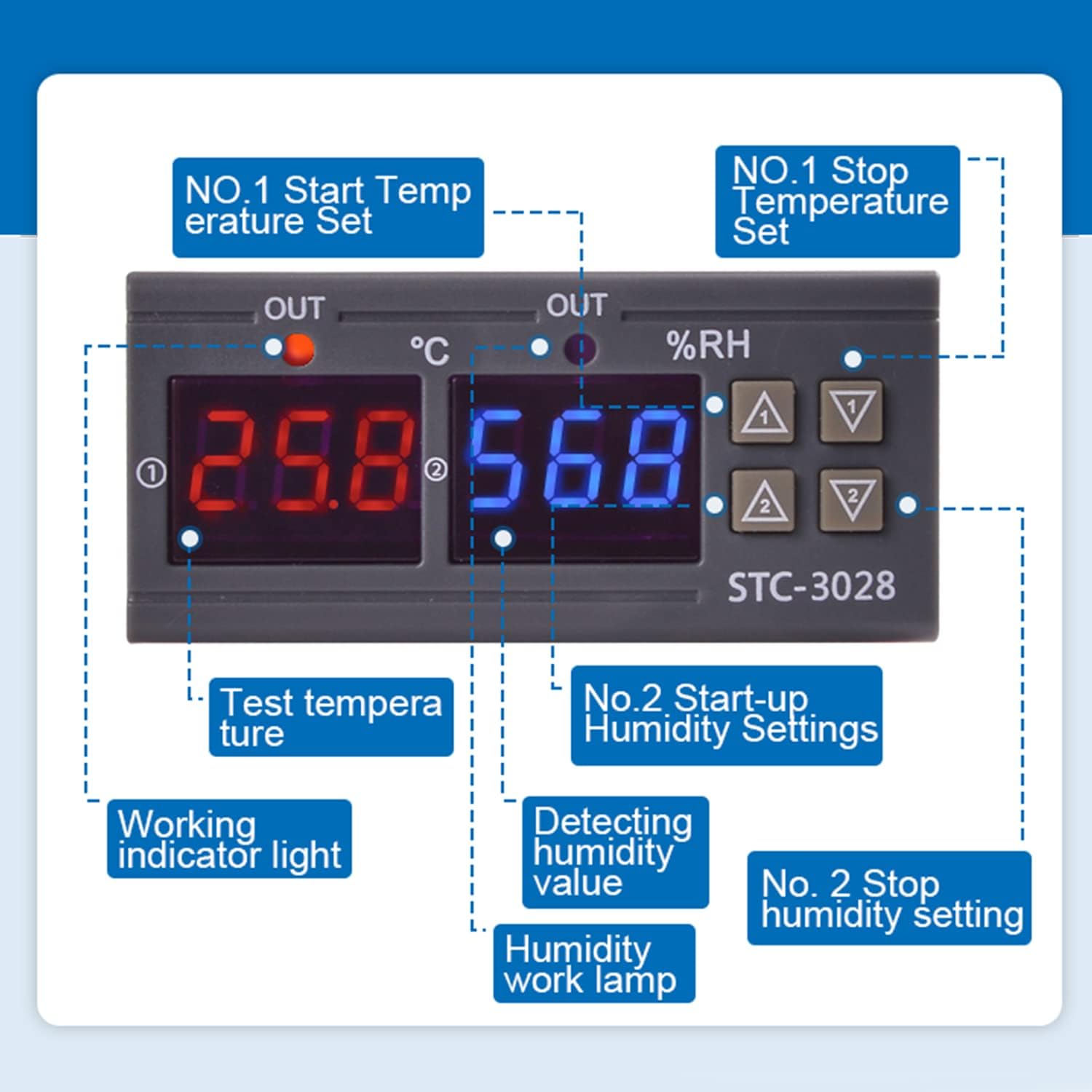
ചിത്രം 2.2: വിശദമായി view of the STC-3028 display and control buttons, indicating the temperature display, humidity display, working indicators, and parameter setting buttons.
3 സ്പെസിഫിക്കേഷനുകൾ
| പരാമീറ്റർ | മൂല്യം |
|---|---|
| മോഡൽ | എസ്ടിസി-3028 |
| ഇൻപുട്ട് വോളിയംtage | DC 12V |
| ഷെൽ മെറ്റീരിയൽ | PC and ABS Fireproof |
| താപനില നിയന്ത്രണ പരിധി | -50°C മുതൽ 120°C വരെ |
| ഈർപ്പം നിയന്ത്രണ പരിധി | 00% RH മുതൽ 100% RH വരെ |
| അളക്കൽ കൃത്യത | ±0.1°C / ±0.1%RH |
| നിയന്ത്രണ കൃത്യത | ±0.1°C / ±0.1%RH |
| Output Relay Contact Capacity | പരമാവധി 10A |
| സെൻസർ ദൈർഘ്യം | 1 മീറ്റർ |
| Controller Dimensions (L*W*D) | 75 മിമി * 34 മിമി * 85 മിമി |
| Sensor Dimensions (L*W) | 2.17 ഇഞ്ച് * 0.98 ഇഞ്ച് |
| സെൻസർ കേബിൾ ദൈർഘ്യം | 40.35 ഇഞ്ച് |
4. ഇൻസ്റ്റലേഷൻ
4.1 മൗണ്ടിംഗ്
The STC-3028 is designed for panel mounting. Ensure adequate space for ventilation and access to wiring terminals. Refer to the dimensions below for proper cutout size.

Figure 4.1: Dimensions of the STC-3028 controller and its integrated sensor, including cable length, for installation planning.
4.2 വയറിംഗ് ഡയഗ്രമുകൾ
മുന്നറിയിപ്പ്: Ensure power is disconnected before performing any wiring to prevent electric shock or damage to the device. All wiring should be performed by a qualified professional.
The STC-3028 offers two primary wiring configurations depending on whether the load uses an independent power supply or shares the controller's power supply.
Figure 4.2: Wiring diagram for connecting the STC-3028 where the controlled load (e.g., heater, cooler) has its own independent power supply. The controller's power input (L, N) is separate from the load's power, and the controller's output terminals act as a switch for the load's circuit.

Figure 4.3: Wiring diagram for connecting the STC-3028 where the controlled load shares the same power supply as the controller. The controller's power input (L, N) also supplies power to the load through the controller's output terminals, which switch the live (L) connection to the load.
Ensure all connections are secure and correctly matched to the terminals. Incorrect wiring can damage the device or pose a safety hazard.
5. ഓപ്പറേഷൻ
5.1 പവർ ഓൺ/ഓഫ്
Once wired correctly, apply power to the controller. The digital displays will illuminate, showing the current temperature and humidity readings.
5.2 താപനില പാരാമീറ്ററുകൾ ക്രമീകരിക്കുന്നു
- Set Startup Temperature: അമർത്തുക "മുകളിലേക്ക്" button (labeled ▲1 or ▲ for temperature) once to display the current startup temperature. Long press the "മുകളിലേക്ക്" button for approximately 3 seconds until the display flashes. Use the "മുകളിലേക്ക്" ഒപ്പം "Down" വസ്തുതകൾ buttons to adjust the desired startup temperature. The setting will automatically save after a few seconds of inactivity.
- സ്റ്റോപ്പ് താപനില സജ്ജമാക്കുക: അമർത്തുക "Down" വസ്തുതകൾ button (labeled ▼1 or ▼ for temperature) once to display the current stop temperature. Long press the "Down" വസ്തുതകൾ button for approximately 3 seconds until the display flashes. Use the "മുകളിലേക്ക്" ഒപ്പം "Down" വസ്തുതകൾ buttons to adjust the desired stop temperature. The setting will automatically save after a few seconds of inactivity.
5.3 Setting Humidity Parameters
- Set Startup Humidity: അമർത്തുക "മുകളിലേക്ക്" button (labeled ▲2 or ▲ for humidity) once to display the current startup humidity. Long press the "മുകളിലേക്ക്" button for approximately 3 seconds until the display flashes. Use the "മുകളിലേക്ക്" ഒപ്പം "Down" വസ്തുതകൾ buttons to adjust the desired startup humidity. The setting will automatically save after a few seconds of inactivity.
- Set Stop Humidity: അമർത്തുക "Down" വസ്തുതകൾ button (labeled ▼2 or ▼ for humidity) once to display the current stop humidity. Long press the "Down" വസ്തുതകൾ button for approximately 3 seconds until the display flashes. Use the "മുകളിലേക്ക്" ഒപ്പം "Down" വസ്തുതകൾ buttons to adjust the desired stop humidity. The setting will automatically save after a few seconds of inactivity.
5.4 Temperature and Humidity Correction (Calibration)
To correct or calibrate the temperature and humidity readings, press the "മുകളിലേക്ക്" ഒപ്പം "Down" വസ്തുതകൾ buttons simultaneously. Follow the on-screen prompts to adjust the offset if necessary. This feature allows for fine-tuning the sensor readings to match a known reference.
6. പരിപാലനം
- വൃത്തിയാക്കൽ: Regularly wipe the controller's surface with a soft, dry cloth. Do not use abrasive cleaners or solvents, as they may damage the casinജി അല്ലെങ്കിൽ ഡിസ്പ്ലേ.
- സെൻസർ പരിചരണം: Keep the sensor clean and free from dust or debris. Avoid exposing the sensor to extreme physical shock or corrosive environments, which can affect its accuracy and lifespan.
- കണക്ഷനുകൾ: Periodically check all wiring connections to ensure they remain secure. Loose connections can lead to intermittent operation or device malfunction.
7. പ്രശ്നപരിഹാരം
If you encounter issues with your STC-3028 controller, consider the following common troubleshooting steps:
-
ഡിസ്പ്ലേ/പവർ ഇല്ല:
- Check the power supply connection to the controller. Ensure it matches the specified 12VDC input.
- പവർ സ്രോതസ്സ് സജീവമാണെന്നും ശരിയായ വോളിയം നൽകുന്നുണ്ടെന്നും ഉറപ്പാക്കുക.tage.
-
തെറ്റായ വായനകൾ:
- Ensure the sensor is properly connected to the controller.
- Check if the sensor is clean and unobstructed.
- Perform a temperature and humidity correction (calibration) as described in Section 5.4 if you have a reliable reference instrument.
-
ലോഡ് സജീവമാക്കുന്നില്ല:
- Verify that the wiring to the load is correct and secure, referring to Section 4.2.
- Check the set startup and stop parameters for temperature and humidity to ensure they are configured to activate the load under current conditions.
- Confirm that the load itself (e.g., heater, humidifier) is functional.
ഈ ഘട്ടങ്ങൾ പ്രശ്നം പരിഹരിക്കുന്നില്ലെങ്കിൽ, കൂടുതൽ സഹായത്തിനായി ഉപഭോക്തൃ പിന്തുണയുമായി ബന്ധപ്പെടുക.
8. വാറൻ്റിയും പിന്തുണയും
Specific warranty information for the TAXNELE STC-3028 controller is not provided within this manual. For details regarding warranty coverage, technical support, or service, please refer to the product packaging, the point of purchase, or contact TAXNELE customer service directly.