
ആമുഖം
This manual provides detailed instructions for the setup, operation, and maintenance of your TONOR TW630 UHF Dual Wireless Microphone System. Please read this manual thoroughly before using the product to ensure proper function and longevity.
ബോക്സിൽ എന്താണുള്ളത്
താഴെ ലിസ്റ്റ് ചെയ്തിരിക്കുന്ന എല്ലാ ഇനങ്ങളും നിങ്ങളുടെ പാക്കേജിൽ ഉൾപ്പെടുത്തിയിട്ടുണ്ടെന്ന് ഉറപ്പാക്കുക:
- 2 x ഹാൻഡ്ഹെൽഡ് മൈക്രോഫോണുകൾ
- 6.35mm പ്ലഗുള്ള 1 x റിസീവർ
- 2 x ആന്റി-സ്ലിപ്പ് വളയങ്ങൾ
- 2 x Mic Covers (Foam Windscreens)
- 1 x USB ചാർജിംഗ് കേബിൾ
- 1 x ഉപയോക്തൃ മാനുവൽ

Image: All components included in the TONOR TW630 package.
ഉൽപ്പന്നം കഴിഞ്ഞുview
The TONOR TW630 system features two durable metal handheld microphones and a compact plug-in receiver, designed for clear audio transmission over a UHF frequency band.

ചിത്രം: വിശദമായത് view of the microphone, showing its display, power button, and channel switch button.
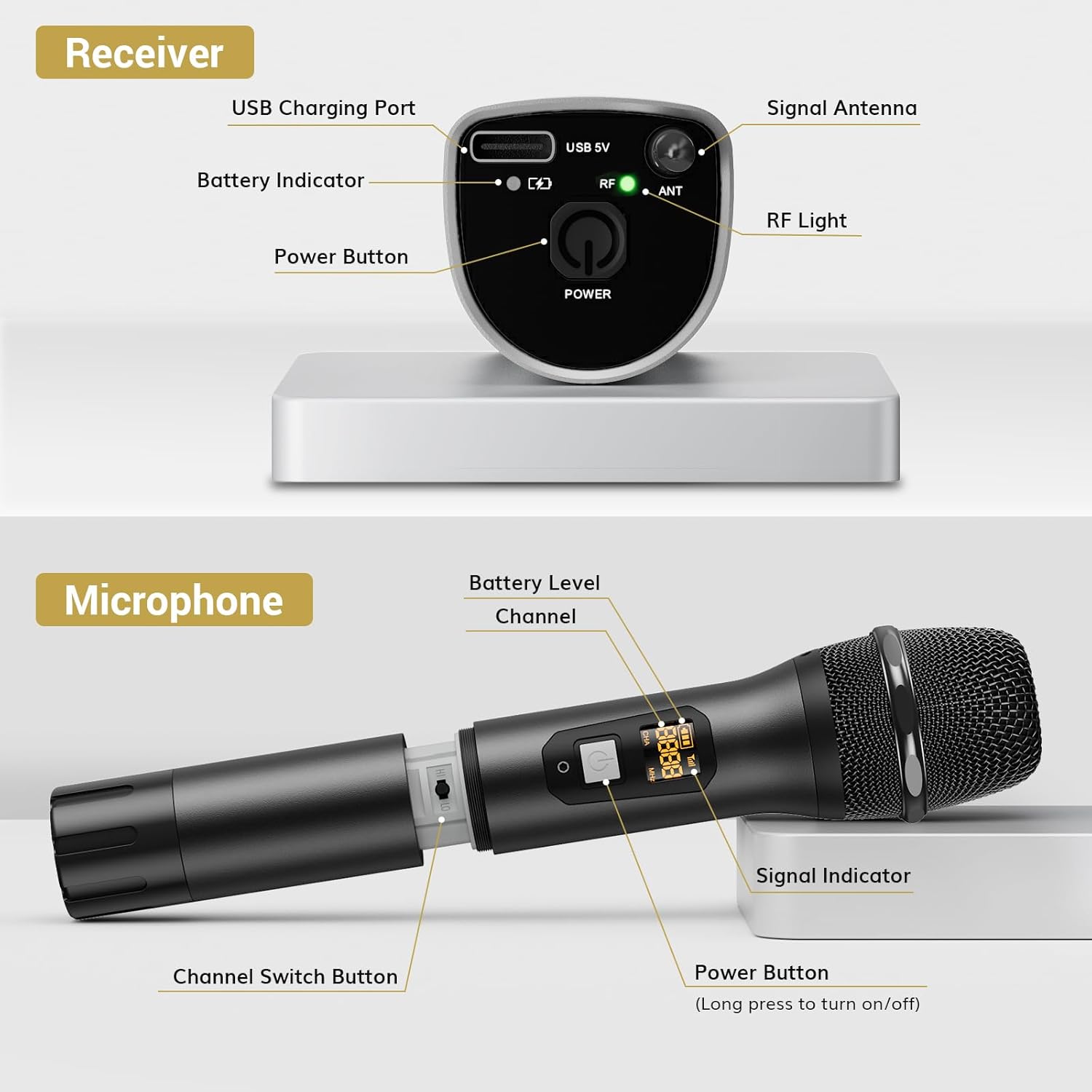
ചിത്രം: വിശദമായത് view of the receiver, highlighting its charging port, antenna, and indicator lights.
പ്രധാന സവിശേഷതകൾ:
- വയർലെസ് സ്വാതന്ത്ര്യം: Up to 200ft (60m) operating range (line of sight).
- സ്ഥിരതയുള്ള സിഗ്നൽ: 15 adjustable channels to minimize interference.
- നീണ്ടുനിൽക്കുന്ന നിർമ്മാണം: Microphones and receiver are made of rugged metal.
- വിപുലീകരിച്ച ബാറ്ററി ലൈഫ്: Receiver provides up to 6 hours of use on a 2-3 hour charge.
സജ്ജീകരണ ഗൈഡ്
1. വൈദ്യുതി വിതരണം
- മൈക്രോഫോണുകൾ: Each microphone requires 2 x AA batteries (not included). Open the battery compartment at the bottom of the microphone and insert the batteries, observing polarity.
- റിസീവർ: The receiver has a built-in rechargeable battery. Charge it using the provided USB cable and a 5V adapter (not included). A full charge takes approximately 2-3 hours and provides up to 6 hours of operation.

Image: Instructions for powering the microphone with AA batteries and charging the receiver via USB.
2. Pairing the Microphones and Receiver
The system is designed for automatic pairing:
- Turn on both the microphone(s) and the receiver.
- The receiver will automatically sync its frequency with the microphone(s). The RF light on the receiver will illuminate when a stable connection is established.
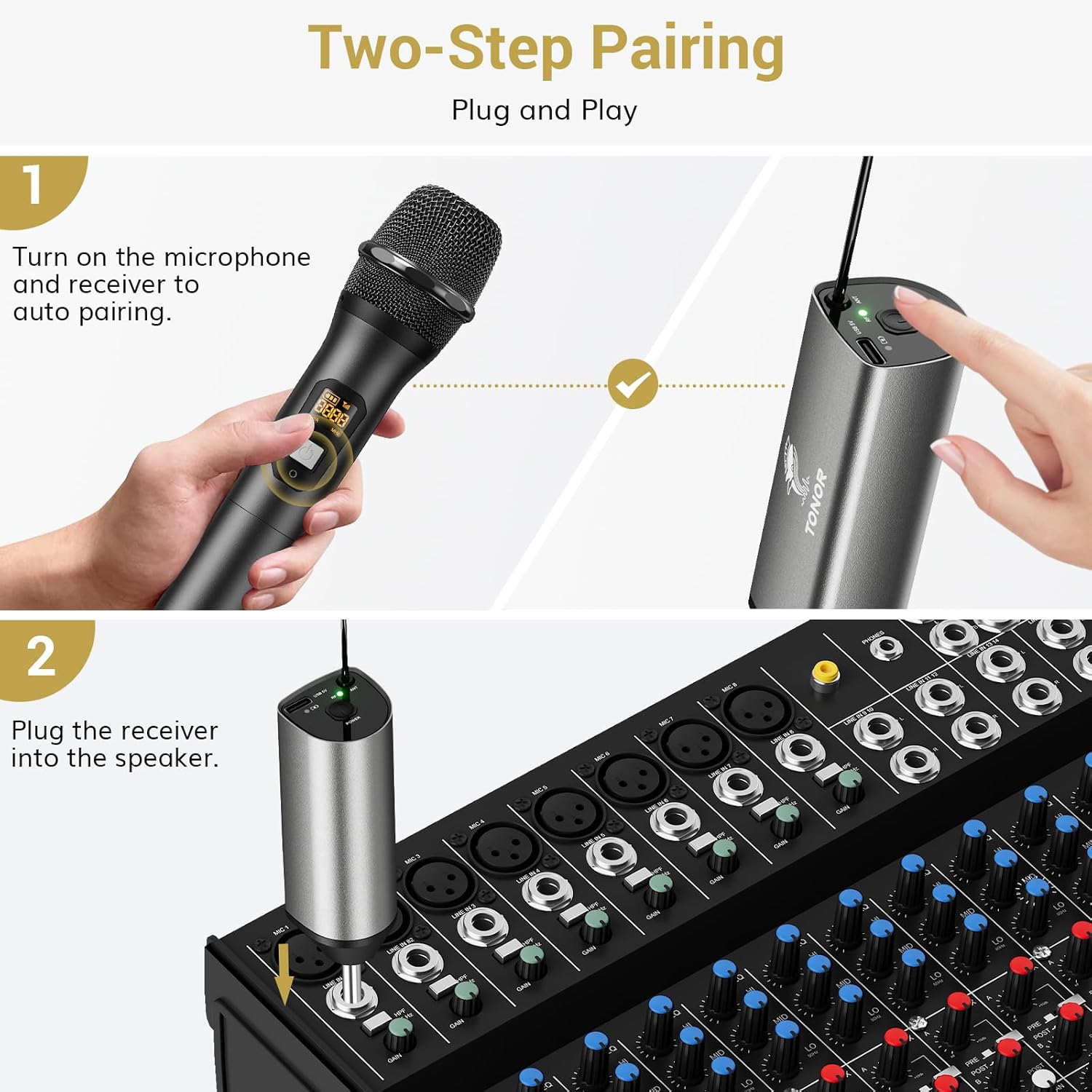
Image: Visual guide for the two-step pairing process and connecting the receiver.
3. ഓഡിയോ ഉപകരണങ്ങളിലേക്ക് ബന്ധിപ്പിക്കുന്നു
Plug the 6.35mm receiver directly into the "MIC IN" input of compatible audio equipment.
- അനുയോജ്യമായ ഉപകരണങ്ങൾ: Powered speakers, karaoke machines, amplifiers, mixers, and audio interfaces.
- അനുയോജ്യമല്ലാത്ത ഉപകരണങ്ങൾ: This system is not compatible with phones, computers, or tablets directly. An additional 3.5mm (1/8") adapter is required for these devices (not included).

ചിത്രം: ഉദാamples of compatible audio devices and correct input connection.
പ്രവർത്തന നിർദ്ദേശങ്ങൾ
ചാനൽ സ്വിച്ചിംഗ്
The TW630 system offers 15 adjustable channels to avoid interference. If you experience signal issues or are using multiple sets simultaneously, you can change the microphone's channel:
- To switch channels, briefly press the "Channel Switch Button" located inside the microphone's battery compartment (after unscrewing the bottom part).
- The display on the microphone will show the current channel (CHA) and frequency (MHz).
- The receiver will automatically adjust to the new channel.

Image: Guide to changing microphone channels.
Using Multiple Microphone Sets
Up to 15 sets of TONOR TW630 systems can be used simultaneously without interference. Ensure each set operates on a different channel to prevent signal conflicts.
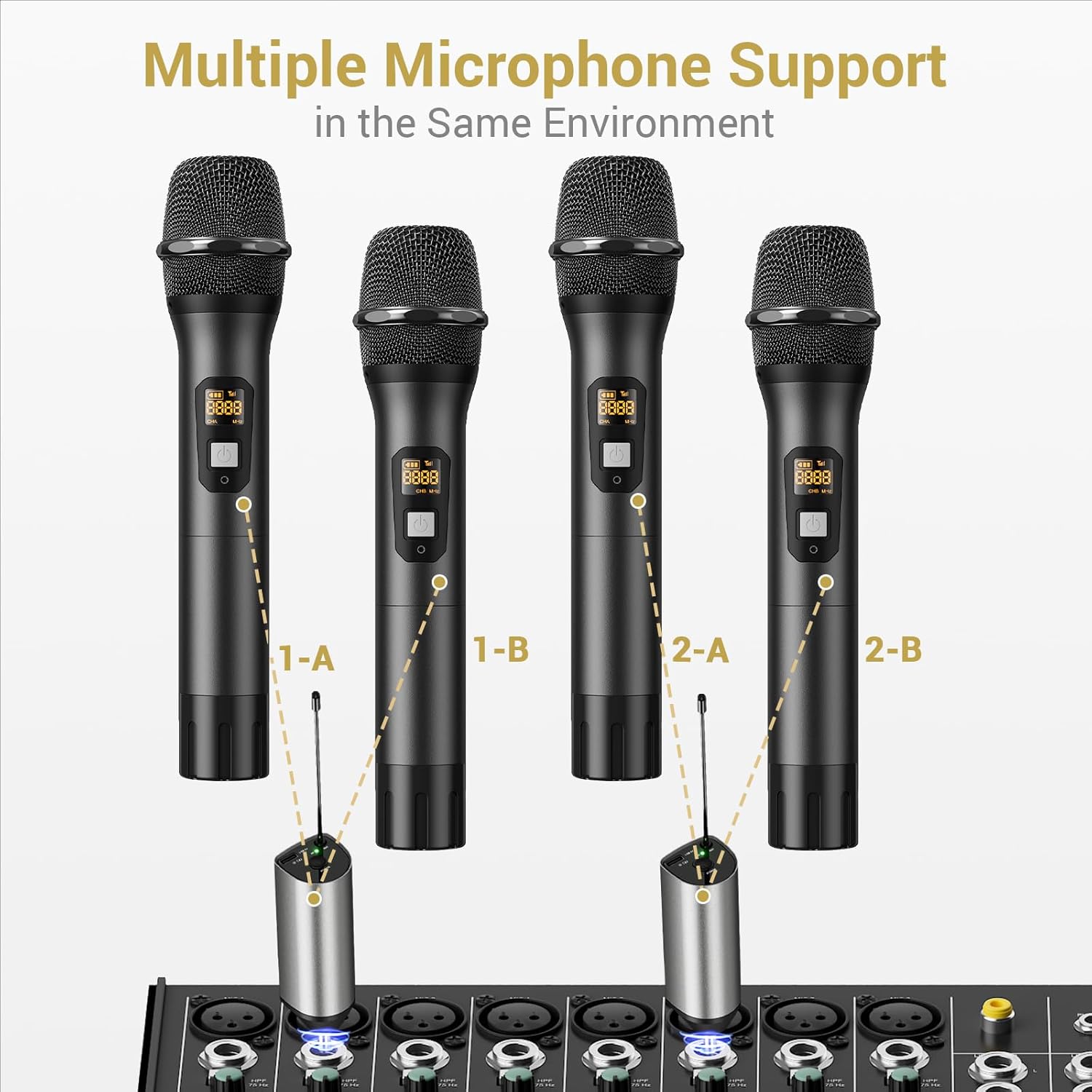
Image: Setup for using multiple microphone systems in the same environment.
മെയിൻ്റനൻസ്
- വൃത്തിയാക്കൽ: Wipe the microphones and receiver with a soft, dry cloth. Do not use liquid cleaners or solvents.
- ബാറ്ററി കെയർ: Remove AA batteries from microphones if not in use for extended periods to prevent leakage. Recharge the receiver regularly to maintain battery health.
- സംഭരണം: നേരിട്ടുള്ള സൂര്യപ്രകാശത്തിൽ നിന്നും കടുത്ത താപനിലയിൽ നിന്നും അകന്ന് തണുത്തതും വരണ്ടതുമായ സ്ഥലത്ത് സിസ്റ്റം സൂക്ഷിക്കുക.
- മൈക്രോഫോൺ കവറുകൾ: Use the provided foam mic covers to protect against wind noise and moisture.
ട്രബിൾഷൂട്ടിംഗ്
| പ്രശ്നം | സാധ്യമായ കാരണം | പരിഹാരം |
|---|---|---|
| മൈക്രോഫോണിൽ നിന്ന് ശബ്ദമില്ല |
|
|
| തടസ്സം അല്ലെങ്കിൽ മോശം ശബ്ദ നിലവാരം |
|
|
| റിസീവർ ചാർജ് ചെയ്യുന്നില്ല |
|
|
സ്പെസിഫിക്കേഷനുകൾ
| ഫീച്ചർ | വിശദാംശങ്ങൾ |
|---|---|
| ബ്രാൻഡ് | ടോണർ |
| മോഡലിൻ്റെ പേര് | TW630 |
| ഇനം മോഡൽ നമ്പർ | TN120106 |
| കണക്റ്റിവിറ്റി ടെക്നോളജി | UHF |
| കണക്റ്റർ തരം | 6.35 mm ജാക്ക് |
| മൈക്രോഫോൺ ഫോം ഫാക്ടർ | ഹാൻഡ്ഹെൽഡ് |
| മെറ്റീരിയൽ | ലോഹം |
| ചാനലുകളുടെ എണ്ണം | 15 |
| ഓഡിയോ സെൻസിറ്റിവിറ്റി | 52 ഡെസിബെൽ |
| സിഗ്നൽ-ടു-നോയിസ് അനുപാതം | 70 ഡി.ബി |
| പോളാർ പാറ്റേൺ | ഏകദിശ |
| പവർ ഉറവിടം | Battery Powered (Microphones: 2x AA each; Receiver: Rechargeable Lithium Ion) |
| റിസീവർ ചാർജിംഗ് സമയം | 2-3 മണിക്കൂർ |
| Receiver Working Time | 6 മണിക്കൂർ വരെ |
| പ്രവർത്തന ശ്രേണി | 200 അടി / 60 മീ (കാഴ്ചയുടെ രേഖ) |
| ഇനത്തിൻ്റെ ഭാരം | 1.32 പൗണ്ട് (600 ഗ്രാം) |
| പാക്കേജ് അളവുകൾ | 11.18 x 6.42 x 2.99 ഇഞ്ച് |
സുരക്ഷാ വിവരങ്ങൾ
- Do not expose the product to water or excessive moisture.
- ഉൽപ്പന്നം ശക്തമായ ആഘാതങ്ങൾക്ക് വിധേയമാക്കുകയോ ഉപേക്ഷിക്കുകയോ ചെയ്യരുത്.
- Use only a 5V adapter for charging the receiver to prevent damage.
- കുട്ടികൾക്ക് ലഭ്യമാകാതെ സൂക്ഷിക്കുക.
- യൂണിറ്റ് സ്വയം വേർപെടുത്താനോ നന്നാക്കാനോ ശ്രമിക്കരുത്. യോഗ്യതയുള്ള സേവന ഉദ്യോഗസ്ഥരെ ബന്ധപ്പെടുക.
വാറൻ്റിയും പിന്തുണയും
For warranty information and technical support, please refer to the official TONOR website or contact TONOR customer service directly. Keep your purchase receipt for warranty claims.
You can visit the TONOR store on Amazon for more information: TONOR Store