
ആമുഖം
This manual provides essential information for the safe and efficient operation of your Sharp 40FH6EA 40-inch Full HD Android TV. Please read these instructions thoroughly before using your television and retain them for future reference.
സുരക്ഷാ വിവരങ്ങൾ
തീ, വൈദ്യുതാഘാതം, പരിക്കുകൾ എന്നിവ കുറയ്ക്കുന്നതിന് ഈ ടെലിവിഷൻ ഉപയോഗിക്കുമ്പോൾ എല്ലായ്പ്പോഴും അടിസ്ഥാന സുരക്ഷാ മുൻകരുതലുകൾ പാലിക്കുക.
- മഴയോ ഈർപ്പമോ ടിവിയെ തുറന്നുകാട്ടരുത്.
- വെന്റിലേഷൻ തുറക്കൽ തടയരുത്.
- പവർ കോർഡ് അതിൽ കയറുകയോ പിഞ്ച് ചെയ്യുകയോ ചെയ്തിട്ടില്ലെന്ന് ഉറപ്പാക്കുക.
- ഇടിമിന്നൽ ഉണ്ടാകുമ്പോഴോ ദീർഘനേരം ഉപയോഗിക്കാതിരിക്കുമ്പോഴോ ടിവി പ്ലഗ് ഊരിവയ്ക്കുക.
- എല്ലാ സേവനങ്ങളും യോഗ്യതയുള്ള സേവന ഉദ്യോഗസ്ഥർക്ക് റഫർ ചെയ്യുക.
പാക്കേജ് ഉള്ളടക്കം
Verify that all items listed below are included in your TV package:
- Sharp 40FH6EA 40-inch Full HD Android TV
- റിമോട്ട് കൺട്രോൾ
- 2 x AAA ബാറ്ററികൾ (റിമോട്ട് കൺട്രോളിനായി)
- ദ്രുത ആരംഭ ഗൈഡ്
- TV Stands (if not pre-attached)
സജ്ജമാക്കുക
1. പായ്ക്ക് ചെയ്യലും പ്ലേസ്മെന്റും
Carefully remove the TV from its packaging. Place the TV on a stable, flat surface or mount it on a wall using a compatible VESA mount (200 x 200 mm). Ensure adequate ventilation around the TV.
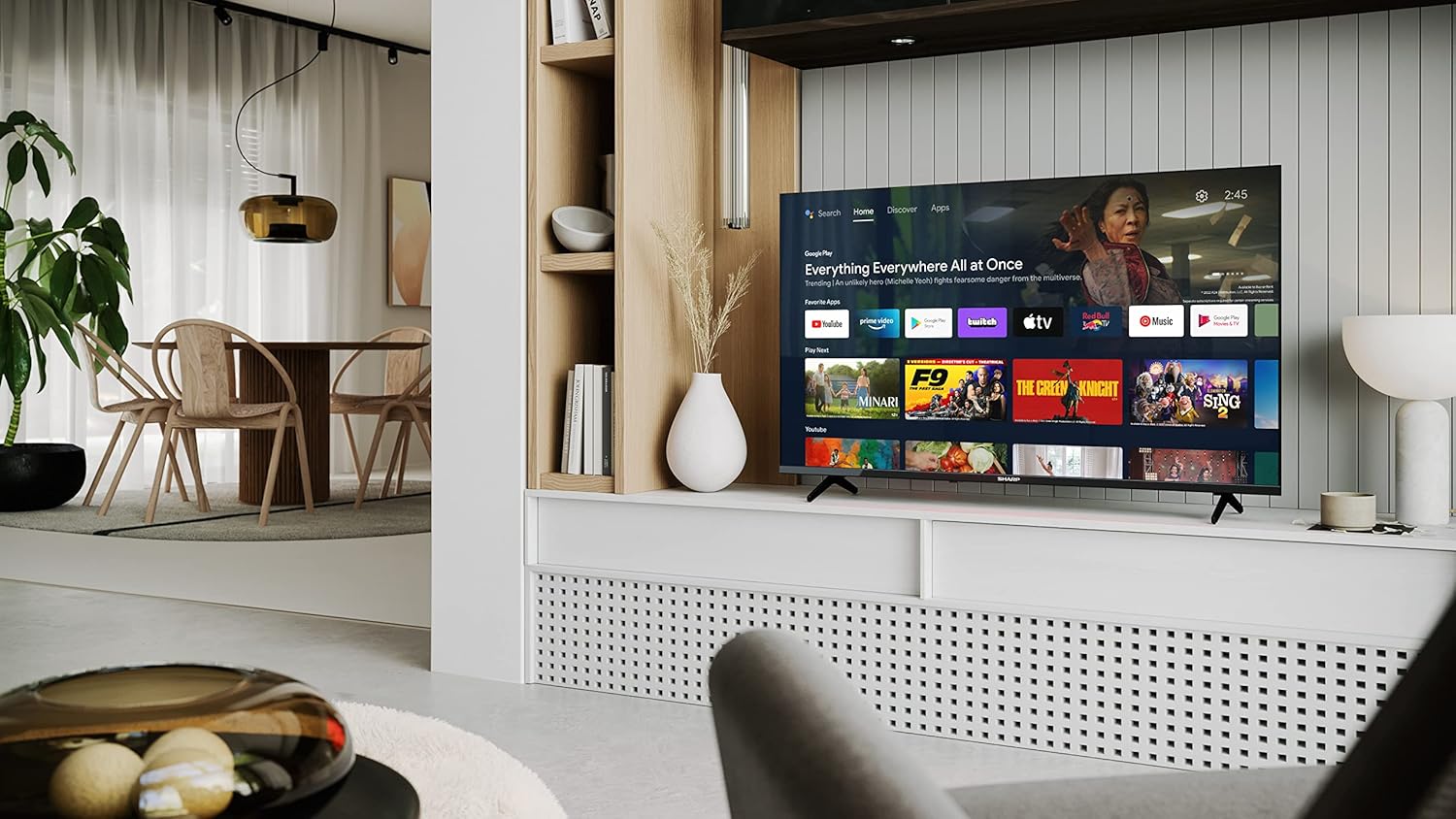
Image: Sharp 40FH6EA TV integrated into a living room environment, showcasing അതിന്റെ ഫ്രെയിംലെസ്സ് ഡിസൈൻ.
2. സ്റ്റാൻഡ് ഘടിപ്പിക്കൽ
If you are not wall-mounting, attach the included stands to the bottom of the TV. Follow the instructions in the Quick Start Guide for proper assembly.

ചിത്രം: ക്ലോസ്-അപ്പ് view of the TV stand attached to the bottom of the Sharp 40FH6EA television.
3. ബാഹ്യ ഉപകരണങ്ങൾ ബന്ധിപ്പിക്കുന്നു
Connect your devices such as Blu-ray players, game consoles, or sound systems to the TV's input ports.
- എച്ച്ഡിഎംഐ: Use HDMI cables for high-definition video and audio. This TV has 3 HDMI ports.
- USB: Connect USB devices for media playback. This TV has 2 USB ports.
- ആന്റിന/കേബിൾ: Connect your antenna or cable TV feed for broadcast channels.
- ഇഥർനെറ്റ്: വയർഡ് ഇന്റർനെറ്റ് കണക്ഷന് വേണ്ടി.
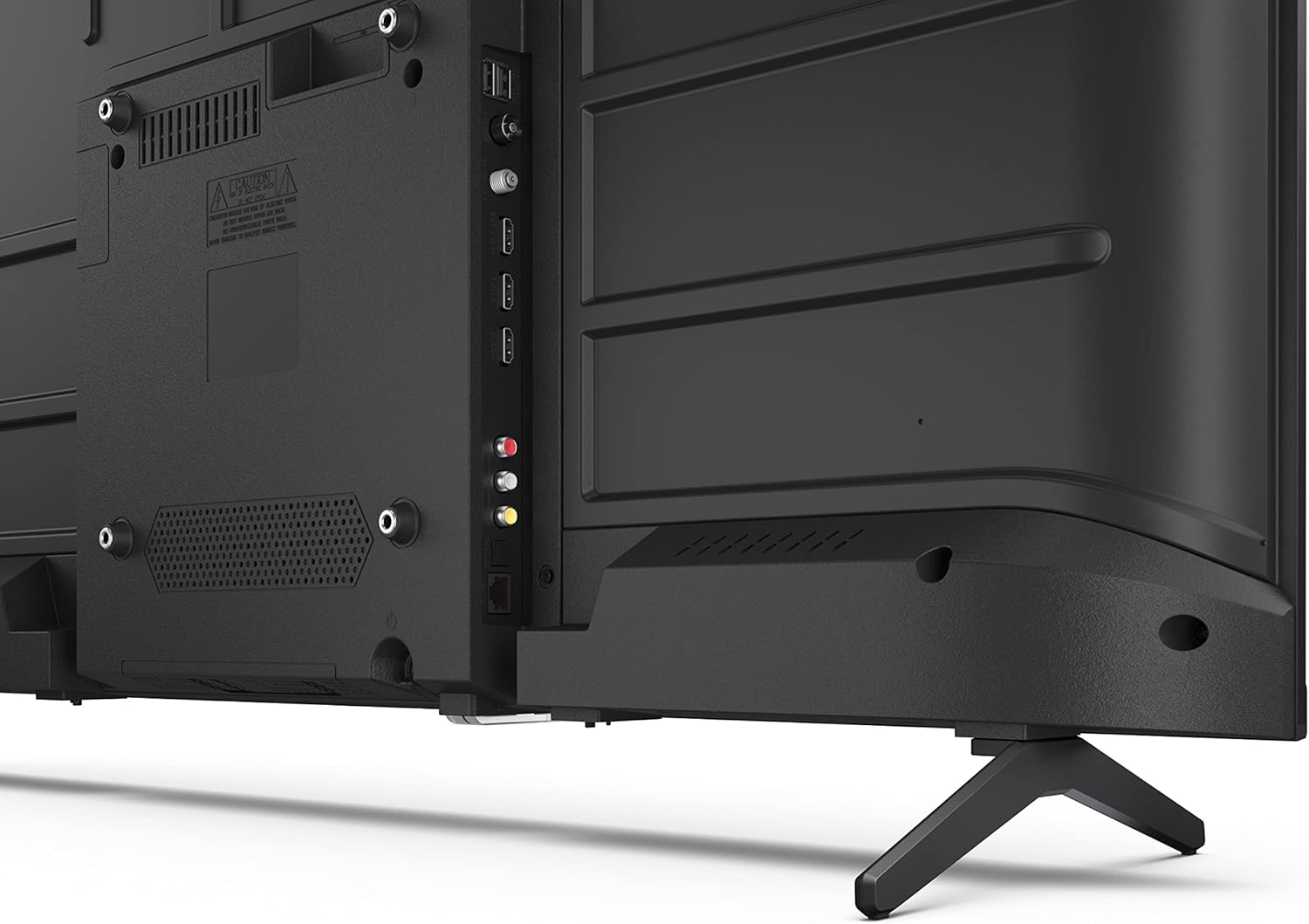
ചിത്രം: പിൻഭാഗം view of the Sharp 40FH6EA TV, highlighting the various input ports including HDMI, USB, and antenna connections.

ചിത്രം: വശം view of the Sharp 40FH6EA TV, showing additional connectivity ports for easy access.
4. പവർ കണക്ഷൻ
പവർ കോർഡ് ടിവിയുടെ പവർ ഇൻപുട്ടിലേക്കും പിന്നീട് ഒരു വാൾ ഔട്ട്ലെറ്റിലേക്കും പ്ലഗ് ചെയ്യുക.
5. പ്രാരംഭ സജ്ജീകരണം
ആദ്യമായി പവർ-ഓൺ ചെയ്യുമ്പോൾ, ടിവി നിങ്ങളെ പ്രാരംഭ സജ്ജീകരണ പ്രക്രിയയിലൂടെ നയിക്കും. നിങ്ങളുടെ ഭാഷ തിരഞ്ഞെടുക്കൽ, വൈ-ഫൈ നെറ്റ്വർക്കിലേക്ക് കണക്റ്റുചെയ്യൽ, Android ടിവി സവിശേഷതകൾ ആക്സസ് ചെയ്യുന്നതിന് നിങ്ങളുടെ Google അക്കൗണ്ട് ഉപയോഗിച്ച് സൈൻ ഇൻ ചെയ്യൽ എന്നിവ ഇതിൽ ഉൾപ്പെടുന്നു.
പ്രവർത്തന നിർദ്ദേശങ്ങൾ
1 റിമോട്ട് കൺട്രോൾ ഓവർview
The included remote control allows you to navigate the TV's interface and control various functions. Insert the 2 AAA batteries as indicated.
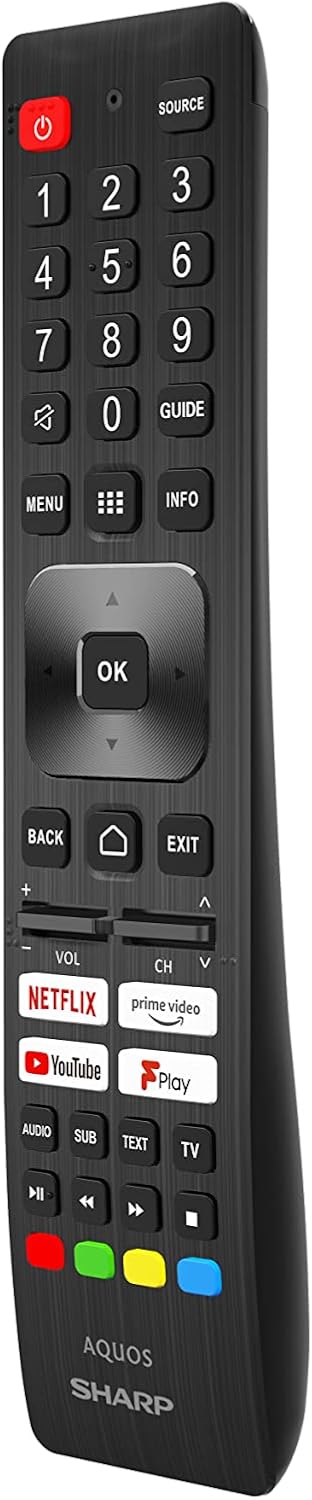
Image: The Sharp 40FH6EA TV remote control, featuring dedicated buttons for popular streaming services and Google Assistant.
- പവർ ബട്ടൺ: ടിവി ഓണാക്കുകയോ ഓഫാക്കുകയോ ചെയ്യുന്നു.
- നാവിഗേഷൻ പാഡ് (ശരി ബട്ടൺ): മെനു നാവിഗേഷനും തിരഞ്ഞെടുപ്പിനും.
- വോളിയം +/-: വോളിയം ലെവൽ ക്രമീകരിക്കുന്നു.
- ചാനൽ +/-: ടിവി ചാനലുകൾ മാറ്റുന്നു.
- ഹോം ബട്ടണ്: ആൻഡ്രോയിഡ് ടിവി ഹോം സ്ക്രീനിലേക്ക് മടങ്ങുന്നു.
- ഗൂഗിൾ അസിസ്റ്റന്റ് ബട്ടൺ: ശബ്ദ നിയന്ത്രണം സജീവമാക്കുന്നു.
- ആപ്പ് കുറുക്കുവഴി ബട്ടണുകൾ: Direct access to Netflix, Prime Video, YouTube, etc.
2. ആൻഡ്രോയിഡ് ടിവി ഇന്റർഫേസ്
Your Sharp 40FH6EA runs on Android TV 11, providing access to a wide range of apps, streaming services, and smart features.

Image: The Sharp 40FH6EA Android TV displaying its home screen with various streaming applications and content recommendations.
- ഹോം സ്ക്രീൻ: Provides quick access to installed apps, recommended content, and settings.
- Google അസിസ്റ്റൻ്റ്: Use voice commands via the remote to search for content, control smart home devices, and get information.
- Chromecast ബിൽറ്റ്-ഇൻ: നിങ്ങളുടെ സ്മാർട്ട്ഫോണിൽ നിന്നോ ടാബ്ലെറ്റിൽ നിന്നോ കമ്പ്യൂട്ടറിൽ നിന്നോ നേരിട്ട് ടിവിയിലേക്ക് ഉള്ളടക്കം കാസ്റ്റുചെയ്യുക.
- ഗൂഗിൾ പ്ലേ സ്റ്റോർ: കൂടുതൽ ആപ്പുകളും ഗെയിമുകളും ഡൗൺലോഡ് ചെയ്യുക.
3. ഇൻപുട്ട് തിരഞ്ഞെടുക്കൽ
Press the "Source" button on your remote control to switch between different input sources (HDMI 1, HDMI 2, HDMI 3, TV, USB, etc.).
മെയിൻ്റനൻസ്
1. ടിവി വൃത്തിയാക്കൽ
- വൃത്തിയാക്കുന്നതിന് മുമ്പ് എപ്പോഴും ടിവി അൺപ്ലഗ് ചെയ്യുക.
- സ്ക്രീനും കാബിനറ്റും തുടയ്ക്കാൻ മൃദുവായതും ഉണങ്ങിയതുമായ തുണി ഉപയോഗിക്കുക.
- കഠിനമായ അടയാളങ്ങൾക്ക്, നേരിയ dampതുണിയിൽ വെള്ളം അല്ലെങ്കിൽ നേരിയതും ഉരച്ചിലുകൾ ഇല്ലാത്തതുമായ ഒരു സ്ക്രീൻ ക്ലീനർ ഉപയോഗിക്കുക. സ്ക്രീനിൽ നേരിട്ട് ക്ലീനർ സ്പ്രേ ചെയ്യരുത്.
2. സോഫ്റ്റ്വെയർ അപ്ഡേറ്റുകൾ
Your Android TV may receive automatic software updates. Ensure your TV is connected to the internet to receive these updates, which can improve performance and add new features. You can also manually check for updates in the TV's settings menu.
ട്രബിൾഷൂട്ടിംഗ്
നിങ്ങളുടെ ടിവിയിൽ പ്രശ്നങ്ങൾ നേരിടുകയാണെങ്കിൽ, ഇനിപ്പറയുന്ന പൊതുവായ പ്രശ്നങ്ങളും പരിഹാരങ്ങളും പരിശോധിക്കുക:
| പ്രശ്നം | സാധ്യമായ പരിഹാരം |
|---|---|
| ശക്തിയില്ല | പവർ കോർഡ് ടിവിയിലേക്കും വാൾ ഔട്ട്ലെറ്റിലേക്കും സുരക്ഷിതമായി പ്ലഗ് ചെയ്തിട്ടുണ്ടോയെന്ന് പരിശോധിക്കുക. ഔട്ട്ലെറ്റിന് പവർ ഉണ്ടെന്ന് ഉറപ്പാക്കുക. |
| ചിത്രമില്ല, പക്ഷേ ശബ്ദം ഉണ്ട് | ശരിയായ ഇൻപുട്ട് ഉറവിടം തിരഞ്ഞെടുത്തിട്ടുണ്ടെന്ന് ഉറപ്പാക്കുക. ബാഹ്യ ഉപകരണങ്ങളിലേക്കുള്ള കേബിൾ കണക്ഷനുകൾ പരിശോധിക്കുക. |
| ശബ്ദമില്ല, പക്ഷേ ചിത്രം ഉണ്ട് | Check the volume level and mute settings. Ensure external audio devices are properly connected and configured. |
| റിമോട്ട് കൺട്രോൾ പ്രവർത്തിക്കുന്നില്ല | ബാറ്ററികൾ മാറ്റിസ്ഥാപിക്കുക. റിമോട്ടിനും ടിവിക്കും ഇടയിൽ തടസ്സങ്ങളൊന്നുമില്ലെന്ന് ഉറപ്പാക്കുക. |
| Wi-Fi-യിലേക്ക് കണക്റ്റുചെയ്യാൻ കഴിയില്ല | നിങ്ങളുടെ റൂട്ടറും മോഡവും പരിശോധിക്കുക. ടിവിയും നെറ്റ്വർക്ക് ഉപകരണങ്ങളും പുനരാരംഭിക്കുക. വൈഫൈ പാസ്വേഡ് വീണ്ടും നൽകുക. |
| ആപ്പുകൾ മന്ദഗതിയിലാണ് അല്ലെങ്കിൽ ക്രാഷാകുന്നു | Close unused apps. Clear app cache or data in settings. Restart the TV. |
സ്പെസിഫിക്കേഷനുകൾ
Detailed technical specifications for the Sharp 40FH6EA Android TV:
| ഫീച്ചർ | വിശദാംശങ്ങൾ |
|---|---|
| മോഡൽ നമ്പർ | 40FH6EA |
| സ്ക്രീൻ വലിപ്പം | 40 ഇഞ്ച് (101 സെ.മീ. ഡയഗണൽ) |
| ഡിസ്പ്ലേ ടെക്നോളജി | എൽഇഡി |
| റെസലൂഷൻ | പൂർണ്ണ എച്ച്ഡി (1920 x 1080p) |
| പുതുക്കിയ നിരക്ക് | 50 Hz (Native), 60 Hz (Display) |
| വീക്ഷണാനുപാതം | 16:9 |
| കോൺട്രാസ്റ്റ് റേഷ്യോ | 1000:1 |
| Viewing ആംഗിൾ | 178 ഡിഗ്രി |
| HDR പിന്തുണ | HDR10 |
| ഇമേജ് മെച്ചപ്പെടുത്തൽ | സജീവ ചലനം 400 |
| ഓപ്പറേറ്റിംഗ് സിസ്റ്റം | Android TV (Version 11) |
| പ്രത്യേക സവിശേഷതകൾ | Google അസിസ്റ്റന്റ്, Chromecast അന്തർനിർമ്മിതം |
| ഓഡിയോ ഔട്ട്പുട്ട് | 2 x 8W RMS Stereo Speakers |
| ഓഡിയോ ടെക്നോളജീസ് | Dolby Audio, Dolby Digital, Dolby Digital Plus, Dolby AC-4 |
| കണക്റ്റിവിറ്റി | വൈ-ഫൈ, ബ്ലൂടൂത്ത്, ഇഥർനെറ്റ് |
| HDMI പോർട്ടുകൾ | 3 (HDMI 2.1 അനുയോജ്യം) |
| USB പോർട്ടുകൾ | 2 |
| ട്യൂണർ തരം | DVB-T/T2/C/S/S2 |
| VESA മൗണ്ടിംഗ് സ്റ്റാൻഡേർഡ് | 200 x 200 മി.മീ |
| വൈദ്യുതി ഉപഭോഗം | 36 Watts (Operational) |
| അളവുകൾ (W x H x D) | 89.2 x 55.5 x 21.3 സെ.മീ (സ്റ്റാൻഡോടുകൂടി) |
| നിറം | കറുപ്പ് |

Image: Diagram illustrating the physical dimensions of the Sharp 40FH6EA TV, including width, height, and depth.

Image: The energy efficiency label for the Sharp 40FH6EA TV, showing its energy class and consumption.
View EPREL ഉൽപ്പന്ന വിവരങ്ങൾ
വാറൻ്റിയും പിന്തുണയും
Your Sharp 40FH6EA television comes with a standard manufacturer's warranty. Please refer to the warranty card included in your package for specific terms and conditions.
For technical support, service inquiries, or to obtain replacement parts, please contact Sharp customer service. Contact information can typically be found on the Sharp official webസൈറ്റ് അല്ലെങ്കിൽ നിങ്ങളുടെ ടിവിയിൽ നൽകിയിരിക്കുന്ന ഡോക്യുമെന്റേഷനിൽ.
- നിർമ്മാതാവ്: മൂർച്ചയുള്ള
- മോഡൽ വർഷം: 2023
- സോഫ്റ്റ്വെയർ അപ്ഡേറ്റുകൾ ഉറപ്പ്: Information not available (as per product data)
- സ്പെയർ പാർട്സ് ലഭ്യത: Information not available (as per product data)