
1. ആമുഖം
This manual provides detailed instructions for the setup, operation, and maintenance of your LOKMAT APPLLP Max 4G Smart Watch. This device combines advanced smartwatch features with 4G cellular capabilities, running on Android 9.0. Please read this manual thoroughly to ensure proper usage and to maximize your experience with the product.
2. പാക്കേജ് ഉള്ളടക്കം
പാക്കേജ് തുറക്കുമ്പോൾ, എല്ലാ ഇനങ്ങളും അവിടെയുണ്ടെന്ന് ഉറപ്പാക്കുക:
- LOKMAT APPLLP Max Smart Watch
- ചാർജിംഗ് കേബിൾ
- ഉപയോക്തൃ മാനുവൽ
- SIM Card Ejector Tool (if applicable)
3. ഡിവൈസ് ഓവർview
Familiarize yourself with the physical components of your smartwatch.

ചിത്രം 3.1: ഫ്രണ്ട് view of the LOKMAT APPLLP Max Smart Watch, displaying an active video call. The large rectangular screen is prominent, showing a contact's image and call controls.

ചിത്രം 3.2: വശവും മുകളിലും views illustrating the dimensions of the LOKMAT APPLLP Max Smart Watch. The watch measures approximately 77.2mm in length, 53.6mm in width, and 15mm in thickness.
- ഡിസ്പ്ലേ: 2.88-inch LCD touchscreen (480 x 640 resolution).
- സൈഡ് ബട്ടണുകൾ: Typically for power on/off, screen wake, and back functions.
- ക്യാമറ: Dual cameras for video calls and photography.
- സിം കാർഡ് സ്ലോട്ട്: For 4G cellular connectivity.
- ചാർജിംഗ് പോർട്ടുകൾ: Magnetic charging pins on the back.
- ഹൃദയമിടിപ്പ് സെൻസർ: ആരോഗ്യ നിരീക്ഷണത്തിനായി പിന്നിൽ സ്ഥിതിചെയ്യുന്നു.
4. സജ്ജീകരണം
4.1. സിം കാർഡ് ഇൻസ്റ്റാളേഷൻ
The LOKMAT APPLLP Max supports 4G cellular connectivity via a Nano SIM card. Follow these steps to install your SIM card:
- സ്മാർട്ട് വാച്ച് പൂർണ്ണമായും ഓഫ് ചെയ്യുക.
- വാച്ചിന്റെ വശത്തുള്ള സിം കാർഡ് സ്ലോട്ട് കണ്ടെത്തുക.
- Use the provided SIM ejector tool (or a small pin) to open the SIM tray.
- Carefully place your Nano SIM card into the tray, ensuring correct orientation.
- Insert the SIM tray back into the watch until it clicks into place.

ചിത്രം 4.1: Illustration of a Nano SIM card being inserted into the LOKMAT APPLLP Max Smart Watch. The image highlights the SIM card slot and the 4G network capability.
4.2. പ്രാരംഭ പവർ ഓണും കോൺഫിഗറേഷനും
Press and hold the power button (usually on the side) until the LOKMAT logo appears. Follow the on-screen prompts to select your language, connect to a Wi-Fi network, and set up your Google account. Adjust date, time, and other personal preferences as guided by the Android 9.0 operating system.
5. പ്രവർത്തന നിർദ്ദേശങ്ങൾ
5.1. അടിസ്ഥാന നാവിഗേഷൻ
- Swipe Up/Down/Left/Right: Navigate through menus, notifications, and quick settings.
- ടാപ്പ് ചെയ്യുക: ഒരു ഇനം തിരഞ്ഞെടുക്കുകയോ ഒരു ആപ്ലിക്കേഷൻ തുറക്കുകയോ ചെയ്യുക.
- ലോംഗ് പ്രസ്സ്: Access additional options or customize watch faces.
- സൈഡ് ബട്ടൺ: Typically acts as a 'back' button or returns to the home screen.
5.2. കോളുകൾ ചെയ്യലും സ്വീകരിക്കലും
With the installed Nano SIM card, your smartwatch can make and receive 4G calls, including video calls.
- വോയ്സ് കോളുകൾ: Open the 'Phone' app, dial a number, or select a contact.
- വീഡിയോ കോളുകൾ: Utilize compatible video calling applications (e.g., Google Duo, WhatsApp) through the watch's dual cameras.
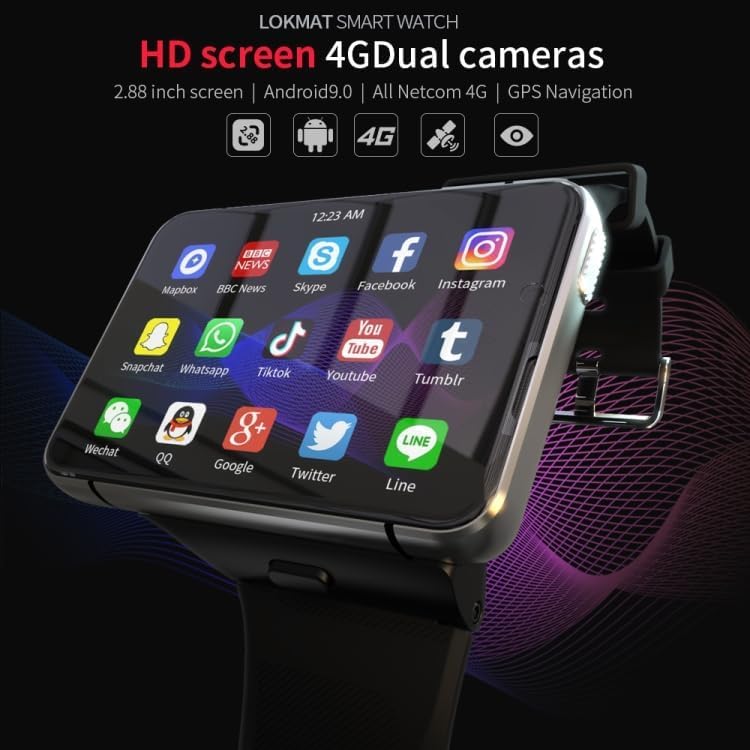
ചിത്രം 5.1: The LOKMAT APPLLP Max Smart Watch screen showing a grid of application icons, including social media, news, and communication apps, demonstrating its Android 9.0 capabilities.
5.3. ഫിറ്റ്നസ് ട്രാക്കിംഗ്
The smartwatch includes sensors for monitoring various fitness activities and health metrics.
- ഹൃദയമിടിപ്പ് നിരീക്ഷണം: Access the heart rate app to measure your pulse.
- Movement Patterns: Track activities such as outdoor running, indoor running, walking, hiking, and mountaineering.
- സ്റ്റെപ്പ് കൗണ്ടർ: Monitor your daily steps, distance, and calories burned.

ചിത്രം 5.2: A visual representation of the smartwatch's fitness tracking capabilities, showing options for various movement patterns like running and hiking, along with real-time display of heart rate, duration, and steps.
5.4. ജിപിഎസ് നാവിഗേഷൻ
The built-in GPS allows for accurate location tracking and navigation. Use compatible mapping applications available on the Android 9.0 platform.
5.5. ക്യാമറ പ്രവർത്തനങ്ങൾ
The LOKMAT APPLLP Max features dual cameras for various photographic and video functions.
- ചിത്രങ്ങൾ എടുക്കു: Open the camera app to capture photos.
- വീഡിയോ ചാറ്റ്: Engage in video conversations using supported applications.
- വീഡിയോ റീപ്ലേ: View recorded videos directly on the watch.

ചിത്രം 5.3: ഒരു ക്ലോസപ്പ് view of the smartwatch's camera lens, highlighting its capabilities for video chat, video replay, and taking pictures.
6. പരിപാലനം
6.1. ചാർജിംഗ്
To charge your smartwatch, connect the provided charging cable to the magnetic charging pins on the back of the watch and a compatible USB power source. Ensure the pins are clean and dry before charging.
6.2. വൃത്തിയാക്കൽ
Wipe the watch screen and body with a soft, lint-free cloth. For stubborn smudges, slightly dampതുണിയിൽ വെള്ളം ഒഴിക്കുക. കഠിനമായ രാസവസ്തുക്കളോ ഉരച്ചിലുകളോ ഉള്ള വസ്തുക്കൾ ഉപയോഗിക്കുന്നത് ഒഴിവാക്കുക.
6.3. സംഭരണം
When not in use for extended periods, store the smartwatch in a cool, dry place. It is recommended to charge the device to about 50% before long-term storage to preserve battery health.
7. പ്രശ്നപരിഹാരം
- Watch does not power on: Ensure the watch is fully charged. Try connecting it to the charger for at least 30 minutes.
- No 4G signal: Check if the SIM card is correctly inserted and activated. Verify network coverage in your area.
- ടച്ച്സ്ക്രീൻ പ്രതികരിക്കുന്നില്ല: വാച്ച് റീസ്റ്റാർട്ട് ചെയ്യുക. പ്രശ്നം നിലനിൽക്കുകയാണെങ്കിൽ, സ്ക്രീൻ വൃത്തിയുള്ളതും വരണ്ടതുമാണെന്ന് ഉറപ്പാക്കുക.
- Apps crashing or slow performance: Close background applications. Clear app cache or consider a factory reset if problems continue (back up data first).
- GPS not accurate: നിങ്ങൾ തെളിഞ്ഞ കാലാവസ്ഥയുള്ള ഒരു തുറന്ന സ്ഥലത്താണെന്ന് ഉറപ്പാക്കുക view of the sky. Check if location services are enabled in settings.
8 സ്പെസിഫിക്കേഷനുകൾ
| മോഡൽ | APPLLP Max |
| ഓപ്പറേറ്റിംഗ് സിസ്റ്റം | ആൻഡ്രോയിഡ് 9.0 |
| പ്രോസസ്സർ | MTK6761 ക്വാഡ് കോർ |
| മെമ്മറി | 4 ജിബി റാം + 64 ജിബി സ്റ്റോറേജ് |
| പ്രദർശിപ്പിക്കുക | 2.88 inches LCD, 480 x 640 resolution |
| കണക്റ്റിവിറ്റി | 4G (Nano SIM), Wi-Fi, Bluetooth |
| ജിപിഎസ് | അന്തർനിർമ്മിത ജിപിഎസ് |
| ക്യാമറകൾ | Dual Cameras (1300W + 500W) |
| പ്രത്യേക സവിശേഷതകൾ | Video Call, Heart Rate Monitor, Multiple Movement Patterns |
| ബാറ്ററി ശേഷി | 2300 mAh |
| അളവുകൾ | ഏകദേശം. 77.2 x 53.6 x 15 മി.മീ |
| ഭാരം | 320 ഗ്രാം |
ശ്രദ്ധിക്കുക: മുൻകൂർ അറിയിപ്പ് കൂടാതെ സ്പെസിഫിക്കേഷനുകൾ മാറ്റത്തിന് വിധേയമാണ്.
9. വാറൻ്റിയും പിന്തുണയും
For warranty information and technical support, please refer to the warranty card included in your product packaging or visit the official LOKMAT webവാറന്റി ക്ലെയിമുകൾക്കുള്ള വാങ്ങലിന്റെ തെളിവായി നിങ്ങളുടെ വാങ്ങൽ രസീത് സൂക്ഷിക്കുക.