
1. ആമുഖം
Welcome to the CHUBORY F89 Foldable Brushless Drone user manual. This guide provides essential information for the safe and effective operation, maintenance, and troubleshooting of your new drone. Please read this manual thoroughly before operating the device to ensure optimal performance and to prevent damage.
The CHUBORY F89 is designed for beginners, offering a stable flight experience with powerful brushless motors and a 1080P HD camera for capturing aerial footage.
2. സുരക്ഷാ മാർഗ്ഗനിർദ്ദേശങ്ങൾ
Operating a drone requires responsibility. Adhere to the following safety guidelines:
- മാനുവൽ വായിക്കുക: ഉപയോഗിക്കുന്നതിന് മുമ്പ് എല്ലാ നിർദ്ദേശങ്ങളും മുന്നറിയിപ്പുകളും മനസ്സിലാക്കുക.
- പ്രായ നിയന്ത്രണം: This product is suitable for children (beginners) but adult supervision is recommended.
- ഫ്ലൈറ്റ് പരിസ്ഥിതി: ആളുകൾ, മൃഗങ്ങൾ, കെട്ടിടങ്ങൾ, വൈദ്യുതി ലൈനുകൾ എന്നിവയിൽ നിന്ന് അകലെ, തുറന്നതും തടസ്സമില്ലാത്തതുമായ സ്ഥലങ്ങളിൽ പറക്കുക. ശക്തമായ കാറ്റിലോ പ്രതികൂല കാലാവസ്ഥയിലോ പറക്കുന്നത് ഒഴിവാക്കുക.
- കാഴ്ചയുടെ രേഖ നിലനിർത്തുക: Always keep the drone within your visual line of sight.
- ബാറ്ററി സുരക്ഷ: Use only approved batteries and chargers. Do not overcharge or puncture batteries. Discontinue use if batteries are damaged or swollen.
- പ്രൊപ്പല്ലർ സുരക്ഷ: Keep hands, face, and loose clothing away from rotating propellers.
- സ്വകാര്യതയെ ബഹുമാനിക്കുക: Be mindful of privacy laws when recording videos or taking photos.
- പ്രാദേശിക നിയന്ത്രണങ്ങൾ: Be aware of and comply with all local drone regulations and laws.
3. പാക്കേജ് ഉള്ളടക്കം
നിങ്ങളുടെ പാക്കേജിൽ എല്ലാ ഇനങ്ങളും ഉണ്ടെന്ന് ഉറപ്പാക്കുക:
- CHUBORY F89 Drone
- റിമോട്ട് കൺട്രോൾ
- Lithium-ion Batteries (2 included)
- യുഎസ്ബി ചാർജിംഗ് കേബിൾ
- സ്പെയർ പ്രൊപ്പല്ലറുകൾ
- ചുമക്കുന്ന ബാഗ്
- ഉപയോക്തൃ മാനുവൽ (ഈ പ്രമാണം)
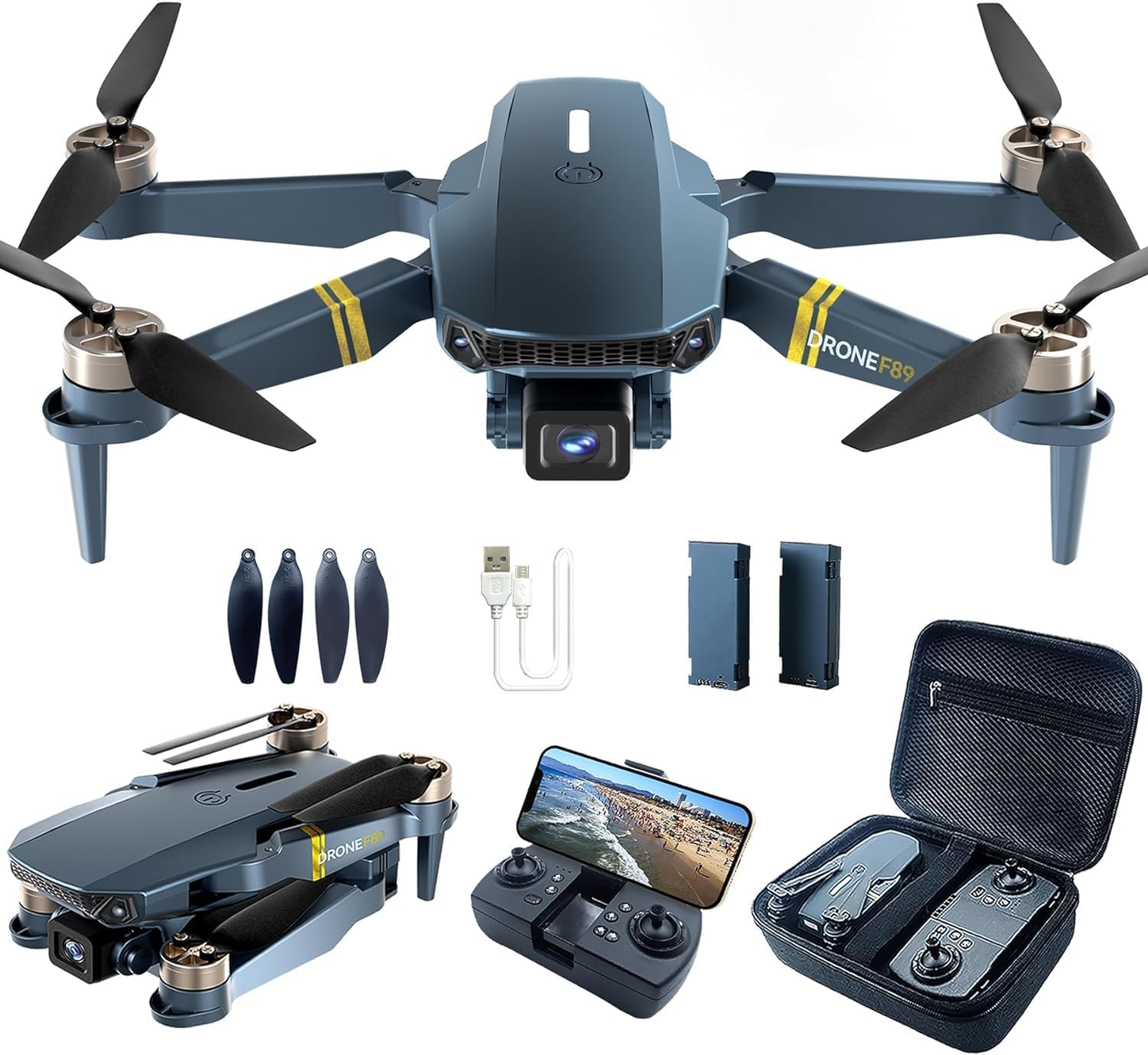
Image 3.1: CHUBORY F89 Drone, remote control, batteries, charging cable, spare propellers, and carrying bag.
4. ഡ്രോൺ ഓവർview
Familiarize yourself with the main components of your CHUBORY F89 drone.
- മടക്കാവുന്ന കൈകൾ: For compact storage and transport.
- ബ്രഷ്ലെസ് മോട്ടോറുകൾ: Provide powerful and efficient flight.
- പ്രൊപ്പല്ലറുകൾ: Generate lift for flight.
- 1080P HD ക്യാമറ: Captures high-definition photos and videos with a 120° wide-angle view.
- ബാറ്ററി കമ്പാർട്ട്മെൻ്റ്: Houses the drone's flight battery.
- LED ഇൻഡിക്കേറ്റർ ലൈറ്റുകൾ: Provide status information (e.g., power, signal, battery).

Image 4.1: The CHUBORY F89 drone showcasing its design and propellers.
5 റിമോട്ട് കൺട്രോൾ ഓവർview
The remote control is your primary interface for flying the drone. Understand its buttons and functions.
- ഇടത് ജോയിസ്റ്റിക്: ഉയരം (മുകളിലേക്ക്/താഴേക്ക്) ഭ്രമണം (ഇടത്തേക്ക്/വലത്തേക്ക്) എന്നിവ നിയന്ത്രിക്കുന്നു.
- വലത് ജോയിസ്റ്റിക്: മുന്നോട്ടും പിന്നോട്ടും ഇടത്തോട്ടോ വലത്തോട്ടോ ഉള്ള ചലനങ്ങൾ നിയന്ത്രിക്കുന്നു.
- വൺ-കീ ടേക്ക് ഓഫ്/ലാൻഡിംഗ് ബട്ടൺ: ഓട്ടോമാറ്റിക് ടേക്ക് ഓഫ് അല്ലെങ്കിൽ ലാൻഡിംഗ് ആരംഭിക്കുന്നു.
- സ്പീഡ് സ്വിച്ച്: Adjusts flight speed (e.g., low, medium, high).
- ഫോട്ടോ/വീഡിയോ ബട്ടൺ: Triggers camera functions.
- ഫോൺ ഉടമ: Securely holds your smartphone for FPV viewing.
Note: Specific button layouts may vary slightly. Refer to the diagram in your quick start guide for precise identification.
6. ബാറ്ററി ഇൻസ്റ്റാളേഷനും ചാർജിംഗും
6.1 ഡ്രോൺ ബാറ്ററി
- ഡ്രോൺ ഓഫ് ചെയ്തിട്ടുണ്ടെന്ന് ഉറപ്പാക്കുക.
- ഡ്രോണിലെ ബാറ്ററി കമ്പാർട്ട്മെന്റ് കണ്ടെത്തുക.
- Insert the fully charged Lithium-ion battery into the compartment, ensuring it clicks into place.
- ബാറ്ററി കമ്പാർട്ട്മെൻ്റ് കവർ സുരക്ഷിതമായി അടയ്ക്കുക.
6.2 ഡ്രോൺ ബാറ്ററി ചാർജ് ചെയ്യുന്നു
- യുഎസ്ബി ചാർജിംഗ് കേബിൾ ഡ്രോൺ ബാറ്ററിയുമായി ബന്ധിപ്പിക്കുക.
- Connect the other end of the USB cable to a USB power adapter (5V/1A recommended) or a computer USB port.
- The indicator light on the charging cable/battery will show charging status (e.g., red for charging, green/off for fully charged).
- Charging typically takes approximately 180 minutes for a full charge. Do not leave batteries unattended while charging.
6.3 റിമോട്ട് കൺട്രോൾ ബാറ്ററികൾ
The remote control typically uses standard AA batteries (not included) or has a built-in rechargeable battery. Refer to the remote control's specific instructions for battery installation.
7. സജ്ജീകരണം
7.1 ഡ്രോൺ തുറക്കൽ
Gently unfold the drone arms until they lock into position. Ensure all arms are fully extended before flight.
7.2 പവർ ഓണാക്കലും ജോടിയാക്കലും
- ഡ്രോൺ പരന്നതും ലെവൽ ഉപരിതലത്തിൽ വയ്ക്കുക.
- Press and hold the power button on the drone until the indicator lights flash.
- Power on the remote control. The remote control will emit a beep, and its indicator light will flash.
- Push the left joystick up and then pull it down. The drone and remote control will pair, indicated by solid lights and a confirmation beep.
7.3 App Installation and Wi-Fi Connection (FPV)
- Download the dedicated CHUBORY FPV app from your smartphone's app store (iOS/Android).
- Ensure the drone is powered on.
- On your smartphone, go to Wi-Fi settings and connect to the Wi-Fi network named "CHUBORY-F89-XXXXXX" (or similar).
- Open the CHUBORY FPV app. You should see the live camera feed from the drone.
8. പ്രവർത്തിക്കുന്നു
8.1 പ്രീ-ഫ്ലൈറ്റ് ചെക്ക്
- ഡ്രോണിന്റെയും റിമോട്ട് കൺട്രോളിന്റെയും ബാറ്ററികൾ പൂർണ്ണമായും ചാർജ് ചെയ്തിട്ടുണ്ടെന്ന് ഉറപ്പാക്കുക.
- പ്രൊപ്പല്ലറുകൾ സുരക്ഷിതമായി ഘടിപ്പിച്ചിട്ടുണ്ടെന്നും കേടുപാടുകൾ സംഭവിച്ചിട്ടില്ലെന്നും പരിശോധിക്കുക.
- Confirm drone arms are fully unfolded and locked.
- Calibrate the drone (if required by the app or quick start guide).
8.2 ടേക്ക് ഓഫും ലാൻഡിംഗും
- മാനുവൽ ടേക്ക് ഓഫ്: Push both joysticks diagonally outwards and downwards to start the motors. Then, gently push the left joystick up to ascend.
- വൺ-കീ ടേക്ക് ഓഫ്: Press the One-Key Takeoff button on the remote control. The drone will automatically ascend to a safe height.
- മാനുവൽ ലാൻഡിംഗ്: Gently pull the left joystick down to descend. Once landed, pull both joysticks diagonally inwards and downwards to stop the motors.
- വൺ-കീ ലാൻഡിംഗ്: Press the One-Key Landing button. The drone will automatically descend and land.
8.3 അടിസ്ഥാന ഫ്ലൈറ്റ് നിയന്ത്രണങ്ങൾ
- കയറ്റം/ഇറക്കം: Left joystick up/down.
- മുന്നോട്ട്/പിന്നോട്ട്: വലത് ജോയിസ്റ്റിക്ക് മുകളിലേക്കും താഴേക്കും.
- ഇടത്തോട്ടോ വലത്തോട്ടോ തിരിയുക (യാവ്): ഇടത് ജോയിസ്റ്റിക്ക് ഇടത്/വലത്.
- ഇടത്തോട്ടോ വലത്തോട്ടോ പറക്കുക (സ്ട്രാഫ്): വലത് ജോയിസ്റ്റിക്ക് ഇടത്/വലത്.
8.4 ക്യാമറ പ്രവർത്തനം
- ഫോട്ടോ എടുക്കുക: Press the Photo button on the remote control or tap the camera icon in the app.
- വീഡിയോ റെക്കോർഡ് ചെയ്യുക: Press the Video button on the remote control or tap the video icon in the app to start/stop recording.
- View ഫൂtage: Access recorded photos and videos through the app's gallery or by connecting the drone's memory card (if applicable) to a computer.

Image 8.1: The CHUBORY F89 drone in flight, demonstrating its aerial capabilities.
9. പരിപാലനം
- വൃത്തിയാക്കൽ: Use a soft, dry cloth to clean the drone and remote control. Avoid water or harsh chemicals.
- പ്രൊപ്പല്ലർ പരിശോധന: പ്രൊപ്പല്ലറുകളിൽ വിള്ളലുകൾ, വളവുകൾ അല്ലെങ്കിൽ കേടുപാടുകൾ എന്നിവയ്ക്കായി പതിവായി പരിശോധിക്കുക. കേടായ പ്രൊപ്പല്ലറുകൾ ഉടൻ മാറ്റിസ്ഥാപിക്കുക.
- ബാറ്ററി കെയർ: Store batteries in a cool, dry place. Do not store fully charged or completely depleted batteries for extended periods. Charge them to about 50-60% for long-term storage.
- സംഭരണം: When not in use, fold the drone arms and store the drone and accessories in the provided carrying bag to protect them from dust and damage.
10. പ്രശ്നപരിഹാരം
| പ്രശ്നം | സാധ്യമായ കാരണം | പരിഹാരം |
|---|---|---|
| ഡ്രോൺ പവർ ഓൺ ചെയ്യുന്നില്ല. | ബാറ്ററി തീർന്നു അല്ലെങ്കിൽ ശരിയായി ഇൻസ്റ്റാൾ ചെയ്തിട്ടില്ല. | Charge the battery fully. Ensure battery is correctly inserted and connected. |
| Drone does not pair with remote control. | തെറ്റായ ജോടിയാക്കൽ ക്രമം അല്ലെങ്കിൽ കുറഞ്ഞ റിമോട്ട് ബാറ്ററി. | Ensure both devices are powered on. Repeat pairing steps (Section 7.2). Replace remote control batteries if necessary. |
| പറക്കലിനിടെ ഡ്രോൺ തെന്നിമാറി. | Not calibrated or environmental factors (wind). | Perform drone calibration on a flat surface. Avoid flying in windy conditions. Use trim adjustments on the remote control. |
| No FPV feed in the app. | Wi-Fi not connected or app issue. | Ensure your phone is connected to the drone's Wi-Fi network. Restart the app and drone. |
| ചെറിയ ഫ്ലൈറ്റ് സമയം. | Battery not fully charged or aged battery. | Ensure battery is fully charged. Consider replacing old batteries if performance degrades significantly. |
11 സ്പെസിഫിക്കേഷനുകൾ
| ബ്രാൻഡ് | ചുബോറി |
| മോഡലിൻ്റെ പേര് | F89 |
| ഇനത്തിൻ്റെ ഭാരം | 116 ഗ്രാം |
| ഉൽപ്പന്ന അളവുകൾ (L x W x H) | 4.5 x 7.5 x 13.5 സെ.മീ (മടക്കിക്കളയുന്നു) |
| ബാറ്ററികൾ | 2 ലിഥിയം-അയൺ ബാറ്ററികൾ (ഉൾപ്പെടുത്തിയിരിക്കുന്നു) |
| വീഡിയോ റെക്കോർഡിംഗ് റെസല്യൂഷൻ | 1080p |
| പ്രത്യേക ഫീച്ചർ | 120° Wide-angle 1080p HD Camera, Brushless Motors |
| കണക്റ്റിവിറ്റി ടെക്നോളജി | Wireless (Wi-Fi FPV) |
| നൈപുണ്യ നില | തുടക്കക്കാരൻ |
| പ്രായപരിധി (വിവരണം) | കുട്ടി |
12. വാറൻ്റിയും പിന്തുണയും
CHUBORY products are manufactured to high-quality standards. For warranty information, please refer to the documentation provided at the time of purchase or contact CHUBORY customer support.
If you encounter any issues not covered in this manual or require further assistance, please contact our customer support team through the official CHUBORY webസൈറ്റ് അല്ലെങ്കിൽ നിങ്ങളുടെ റീട്ടെയിലർ.
Please have your model number (F89) and purchase details ready when contacting support.