
TEYES CC3 2K
TEYES CC3 2K Car Radio Multimedia Navigation System User Manual
മോഡൽ: CC3 2K | ബ്രാൻഡ്: ടൈകൾ | Compatible with: Mazda 3 II (BL) 2009-2013
ആമുഖം
This manual provides detailed instructions for the installation, operation, and maintenance of your TEYES CC3 2K Car Radio Multimedia Navigation System. Designed specifically for Mazda 3 II (BL) models from 2009 to 2013, this head unit offers advanced features including a 2K in-cell display, Android 10 operating system, GPS navigation, and comprehensive multimedia capabilities. Please read this manual thoroughly before installation and use to ensure proper function and safety.
പാക്കേജ് ഉള്ളടക്കം
താഴെ ലിസ്റ്റ് ചെയ്തിരിക്കുന്ന എല്ലാ ഇനങ്ങളും നിങ്ങളുടെ പാക്കേജിൽ ഉൾപ്പെടുത്തിയിട്ടുണ്ടെന്ന് ഉറപ്പാക്കുക. ഏതെങ്കിലും ഇനങ്ങൾ നഷ്ടപ്പെട്ടിട്ടുണ്ടെങ്കിലോ കേടായിട്ടുണ്ടെങ്കിലോ, ദയവായി നിങ്ങളുടെ വിൽപ്പനക്കാരനെ ബന്ധപ്പെടുക.
- 1x TEYES CC3 2K Head Unit
- 1x OEM Panel (Frame for Mazda 3 II BL)
- 1x USB കേബിൾ
- 1x ജിപിഎസ് ആന്റിന
- 1x AUX കേബിൾ
- 1x 4G WiFi Antenna
- 1x പവർ കേബിൾ
- 1x AHD 1080p Rear Camera
- 1x Audio & Video Harness + RCA cables
- 1x Screws & Screwdriver
- 1x ക്ലീനിംഗ് തുണി
- 1x Wiring Diagram
- 1x Electronic Instruction (e-book)

ചിത്രം 1: കഴിഞ്ഞുview of the TEYES CC3 2K package contents.

ചിത്രം 2: OEM Panel (Frame) designed for Mazda 3 II BL 2009-2013.
പ്രധാന അനുയോജ്യതാ കുറിപ്പ്
Please be aware of specific vehicle configurations. If your Mazda 3 II (BL) has a particular plug type (as shown in Figure 3), it may not support the original small screen display functionality after installing the TEYES CC3 2K head unit.

ചിത്രം 3: Example of a specific plug type and original small screen display that may not be supported.
ഇൻസ്റ്റാളേഷനും സജ്ജീകരണവും
Professional installation is highly recommended for this product to ensure correct wiring and optimal performance. Refer to the included wiring diagram and electronic instruction manual (e-book) for detailed, vehicle-specific installation steps.
പൊതു ഇൻസ്റ്റാളേഷൻ ഘട്ടങ്ങൾ:
- തയ്യാറാക്കൽ: ഏതെങ്കിലും വൈദ്യുത ജോലി ആരംഭിക്കുന്നതിന് മുമ്പ് വാഹനത്തിന്റെ ബാറ്ററി വിച്ഛേദിക്കുക.
- യഥാർത്ഥ യൂണിറ്റ് നീക്കം ചെയ്യുക: Carefully remove the factory radio and trim panels from your Mazda 3 II (BL).
- വയറിംഗ് ബന്ധിപ്പിക്കുക: Connect the provided power cable, USB cable, GPS antenna, AUX cable, and 4G WiFi antenna to the TEYES CC3 2K head unit. Refer to the wiring diagram for correct connections.
- പിൻ ക്യാമറ ഇൻസ്റ്റാൾ ചെയ്യുക: If installing the AHD 1080p rear camera, route its cable to the head unit and connect it according to the instructions.
- Mount Head Unit: Secure the TEYES CC3 2K head unit into the OEM panel and then into the vehicle's dashboard opening.
- ടെസ്റ്റ് പ്രവർത്തനം: Reconnect the vehicle's battery and power on the unit to test all functions (radio, navigation, touch screen, steering wheel controls, camera, etc.) before fully reassembling the dashboard.
- അന്തിമ അസംബ്ലി: എല്ലാ ട്രിം പാനലുകളും വീണ്ടും ഇൻസ്റ്റാൾ ചെയ്യുക.

ചിത്രം 4: TEYES CC3 2K head unit installed in a Mazda 3 II (BL).
പ്രവർത്തന നിർദ്ദേശങ്ങൾ
Power On/Off and Basic Navigation:
Press the power button on the unit's side panel or the vehicle's ignition to turn the system on or off. The Android 10 operating system provides a familiar touchscreen interface. Navigate through applications and settings using touch gestures.
സ്റ്റിയറിംഗ് വീൽ നിയന്ത്രണം:
The TEYES CC3 2K supports integration with your vehicle's original steering wheel buttons. This allows for convenient control of volume, track changes, and other functions without taking your hands off the wheel. Configuration may be required in the system settings.

ചിത്രം 5: Steering wheel controls for convenient operation.
USB കണക്റ്റിവിറ്റി:
The unit provides multiple USB outputs for data transfer, allowing connection of USB drives for media playback or other compatible devices. Ensure proper connection for stable data transfer.

ചിത്രം 6: Multiple USB outputs for data transfer.
സ്പ്ലിറ്റ് സ്ക്രീൻ മോഡ്:
Utilize the split-screen feature to run two applications simultaneously, such as navigation on one side and multimedia playback on the other. This enhances multitasking and user convenience.

ചിത്രം 7: Split screen mode displaying navigation and video simultaneously.
റേഡിയോ പ്രവർത്തനം:
Access local radio stations with the integrated radio tuner. The system supports RDS (Radio Data System) for enhanced information display where available.

ചിത്രം 8: Radio interface for tuning into local stations.
വിപുലമായ ഓഡിയോ സവിശേഷതകൾ
ഡ്യുവൽ DSP ഓഡിയോ പ്രോസസ്സിംഗ്:
The TEYES CC3 2K features dual DSP (Digital Signal Processor) chips (ADAU1701 + ROHM32107) for superior audio processing. This allows for precise sound tuning and optimization, delivering a high-fidelity audio experience.

ചിത്രം 9: Audio playback interface, benefiting from dual DSP processing.
27-Segment Equalizer (EQ):
Fine-tune your audio output with the advanced 27-segment equalizer. This allows for detailed adjustment of frequency bands to match your personal preferences and vehicle acoustics.
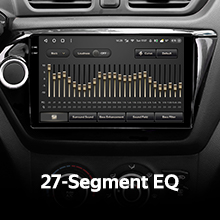
ചിത്രം 10: 27-Segment Equalizer for precise audio customization.
Optical and Coaxial Digital Audio Output:
For audiophiles, the unit provides optical and coaxial digital audio outputs, allowing connection to external high-fidelity audio processors or amplifiers for an uncompromised sound experience.

ചിത്രം 11: Audio output settings, including digital options.
Sound Filtering:
Advanced sound filtering options are available to optimize audio output for different speaker configurations and listening environments, ensuring clear and balanced sound reproduction.

ചിത്രം 12: Sound filtering interface for audio optimization.
പിൻഭാഗം View ക്യാമറ പ്രവർത്തനം
The included AHD 1080p rear camera provides real-time viewing of your vehicle's rear surroundings when reversing. The system also supports video recording from the camera, enhancing safety and providing a record of events.

ചിത്രം 13: Real-time rear view camera display with recording option.
ഉൽപ്പന്നം കഴിഞ്ഞുview വീഡിയോ
ഒരു വിഷ്വൽ ഓവറിനായി ഈ ഔദ്യോഗിക ഉൽപ്പന്ന വീഡിയോ കാണുക.view of the TEYES CC3 2K head unit's features and user interface.
വീഡിയോ 1: TEYES CC3 2K Product Overview. This video demonstrates the unit's design, internal components, and various user interface screens in a car environment.
സ്പെസിഫിക്കേഷനുകൾ
| ബ്രാൻഡ് | ടൈകൾ |
| മോഡൽ | CC3 2K |
| ഓപ്പറേറ്റിംഗ് സിസ്റ്റം | ആൻഡ്രോയിഡ് |
| റാം | 6 ജിബി |
| ROM | 128 ജിബി |
| സ്ക്രീൻ വലിപ്പം | 9.5 ഇഞ്ച് |
| ഡിസ്പ്ലേ തരം | LED, 2K In-cell Touchscreen |
| പ്രോസസ്സർ | 8 കോറുകൾ 2.0GHz |
| കണക്റ്റിവിറ്റി ടെക്നോളജി | Bluetooth (QCC3031QFN Qualcomm), USB, WIFI, Hotspot, 4G Internet |
| മാപ്പ് തരം | North America (Supported Satellite Navigation System: GPS) |
| ഓഡിയോ put ട്ട്പുട്ട് മോഡ് | Stereo (2*DSP ADAU1701 + ROHM32107, Optical and Coaxial Digital Audio Output) |
| Rear Camera Support | AHD 1080p (Included), Real-time viewing and video recording |
| അനുയോജ്യമായ വാഹന തരം | Car (Mazda 3 II BL 2009-2013) |
| നിർമ്മാതാവ് | Shenzhen TEYES High tech Co., Ltd. |
| മോഡൽ വർഷം | 2023 |
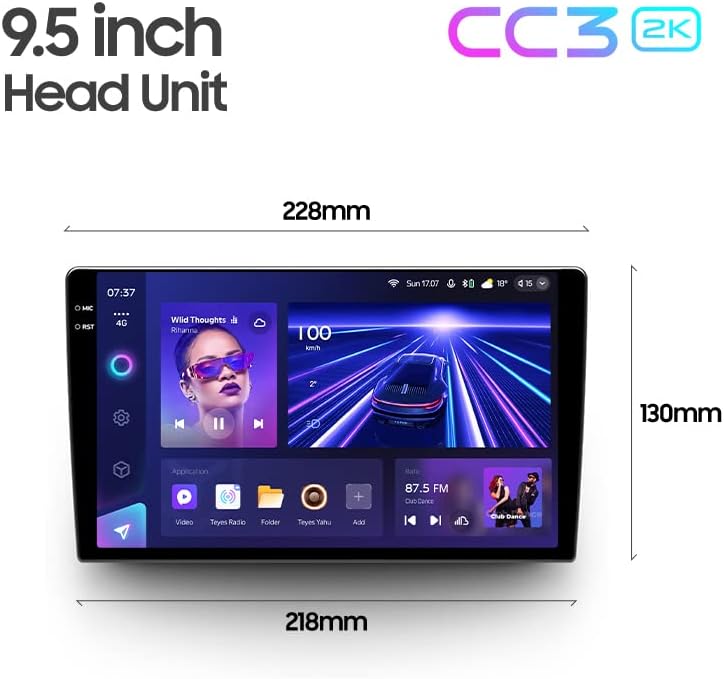
ചിത്രം 14: Dimensions of the 9.5-inch TEYES CC3 2K Head Unit.
ട്രബിൾഷൂട്ടിംഗ്
If you encounter issues with your TEYES CC3 2K system, please refer to the following common troubleshooting steps:
- ശക്തിയില്ല: Check all power cable connections. Ensure the vehicle's battery is properly connected and charged.
- ശബ്ദമില്ല: Verify speaker connections. Check audio settings within the unit, including volume levels and mute status. Ensure external amplifiers (if used) are powered on.
- ജിപിഎസ് സിഗ്നൽ പ്രശ്നങ്ങൾ: GPS ആന്റിന സുരക്ഷിതമായി ബന്ധിപ്പിച്ചിട്ടുണ്ടെന്നും വ്യക്തമായ ഒരു സ്ഥലത്ത് സ്ഥാപിച്ചിട്ടുണ്ടെന്നും ഉറപ്പാക്കുക. view ആകാശത്തിന്റെ (ഉദാ. ഡാഷ്ബോർഡിൽ).
- ടച്ച്സ്ക്രീൻ പ്രതികരിക്കുന്നില്ല: Try restarting the unit. If the issue persists, a factory reset might be necessary (refer to the e-book for instructions).
- ബ്ലൂടൂത്ത് കണക്ഷൻ പ്രശ്നങ്ങൾ: ഹെഡ് യൂണിറ്റിലും നിങ്ങളുടെ മൊബൈൽ ഉപകരണത്തിലും ബ്ലൂടൂത്ത് പ്രവർത്തനക്ഷമമാക്കിയിട്ടുണ്ടെന്ന് ഉറപ്പാക്കുക. മുമ്പത്തെ ജോടിയാക്കലുകൾ ഇല്ലാതാക്കി വീണ്ടും ജോടിയാക്കാൻ ശ്രമിക്കുക.
- പിൻ ക്യാമറ പ്രദർശിപ്പിക്കുന്നില്ല: Check the camera's power and video signal connections. Ensure the vehicle is in reverse gear.
- സിസ്റ്റം ലാഗ്/ഫ്രീസിംഗ്: Close unnecessary background applications. Clear cache if possible. A system restart often resolves temporary performance issues.
For more detailed troubleshooting, consult the electronic instruction manual (e-book) provided with your product.
വാറൻ്റിയും പിന്തുണയും
വാറൻ്റി വിവരങ്ങൾ:
The TEYES CC3 2K Car Radio Multimedia Navigation System comes with a 1 വർഷത്തെ വാറൻ്റി from the date of purchase. This warranty covers manufacturing defects and malfunctions under normal use. It does not cover damage caused by improper installation, misuse, accidents, unauthorized modifications, or natural disasters.
വാറൻ്റി ക്ലെയിമുകൾക്കായി നിങ്ങളുടെ വാങ്ങിയതിൻ്റെ തെളിവ് സൂക്ഷിക്കുക.
ഉപഭോക്തൃ പിന്തുണ:
For technical assistance, warranty claims, or further inquiries, please contact your original point of purchase or visit the official TEYES website for support resources. Ensure you have your product model number (CC3 2K) and purchase details ready when contacting support.
അനുബന്ധ രേഖകൾ - CC3 2K
 |
TEYES R2 Front and Rear Parking Sensors: Intelligent Blind Spot Detection Enhance driving safety with TEYES R2 Front and Rear Parking Sensors. This system offers intelligent blind spot detection, accurate distance alerts, wireless reception, and compatibility with TEYES head units for superior parking assistance. |
 |
TEYES CC3 2K ഉപയോക്തൃ മാനുവൽ TEYES CC3 2K കാർ ഇൻഫോടെയ്ൻമെന്റ് സിസ്റ്റത്തിനായുള്ള സമഗ്രമായ നിർദ്ദേശങ്ങൾ ഈ മാനുവലിൽ ഉൾപ്പെടുന്നു. പ്രാരംഭ സജ്ജീകരണം, സാങ്കേതിക സവിശേഷതകൾ, ഇന്റർഫേസ് നാവിഗേഷൻ, ആപ്ലിക്കേഷൻ ഉപയോഗം (VM കണക്റ്റ്, വിയറ്റ്മാപ്പ് എന്റർടൈൻമെന്റ്, വിയറ്റ്മാപ്പ് സ്റ്റോർ, കാർ ലിങ്ക് 2.0 എന്നിവയുൾപ്പെടെ), ബ്ലൂടൂത്ത് കണക്റ്റിവിറ്റി, സ്പ്ലിറ്റ്-സ്ക്രീൻ പ്രവർത്തനം, സ്റ്റിയറിംഗ് വീൽ നിയന്ത്രണങ്ങൾ, ഇലക്ട്രോണിക് വാറന്റി ആക്ടിവേഷൻ, ഉപഭോക്തൃ പിന്തുണ എന്നിവ ഇതിൽ ഉൾപ്പെടുന്നു. |
 |
Android Car Radio Player User Manual - Teyes Comprehensive user manual for the Teyes Android car radio player, covering installation, setup, features like navigation, music, video, Bluetooth, and troubleshooting. |
 |
Shenzhen TEYES High tech CC4PRO Car Headunit FCC Part 27 Test Report This document details the test report for the Shenzhen TEYES High tech CC4PRO Car Headunit, covering compliance testing under FCC Part 27. It includes results for RF output power, peak-to-average ratio, occupied bandwidth, band edge compliance, spurious emissions, and frequency stability. |
 |
Universal Power Cable & CANbus Decoder Installation Guide - TEYES Detailed installation guide for the Universal Power Cable and CANbus Decoder kit, including setup instructions, troubleshooting power issues, connecting reverse cameras, and CANbus configuration for TEYES car navigation systems. |
 |
Confidentiality Request for TEYES Car Headunits (FCC ID: 2BF4O-CC32K) Official request for confidentiality of technical documents submitted for car headunit models CC3, CC4, CC5, LUX1, LUX2, and related variants by Shenzhen TEYES High tech Co., Ltd., under FCC regulations. |
Ask a question about this manual
Ask about setup, troubleshooting, compatibility, parts, safety, or missing instructions. Manuals+ will review the question and use this page’s manual context to help answer it.