
1. ഉൽപ്പന്നം കഴിഞ്ഞുview
The hohem iSteady MT2 Kit is a versatile 3-axis gimbal stabilizer designed for a wide range of cameras, including mirrorless cameras, pocket cameras, action cameras, and smartphones. It features advanced stabilization technology, an integrated AI tracker, and a magnetic fill light to enhance your filming experience.

Image: The hohem iSteady MT2 Kit Gimbal Stabilizer shown with a mirrorless camera, smartphone, pocket camera, and action camera, illustrating its multi-device compatibility.
2. പാക്കേജ് ഉള്ളടക്കം
നിങ്ങളുടെ പാക്കേജിൽ എല്ലാ ഇനങ്ങളും ഉണ്ടെന്ന് ഉറപ്പാക്കുക:
- iSteady MT2 Gimbal Stabilizer (1)
- Fill Light with AI Vision Sensor (1)
- ട്രൈപോഡ് (1)
- L-Bracket (Arca-Swiss) (1)
- തമ്പ് സ്ക്രൂ (2)
- സ്റ്റോറേജ് ബാഗ് (1)
- ഉപയോക്തൃ മാനുവൽ (1)
- Mobile Phone Quick Release Plate (Arca-Swiss) (1)
- Type A - C Gimbal Charging Cable (1)
- Camera Control Cable (7)
- Thumb Screw Wrench (1)
- Adapter for Action Camera (1)

Image: An illustration detailing all accessories and components included in the iSteady MT2 Kit, such as the gimbal, AI tracker, cables, and mounting plates.
3. സജ്ജീകരണ നിർദ്ദേശങ്ങൾ
3.1 Attaching the Camera/Smartphone
The iSteady MT2 Kit features a Multi 4.0 quick installation system for efficient mounting and switching between horizontal and vertical orientations.
- Select the appropriate quick release plate: Use the L-Bracket (Arca-Swiss) for cameras or the Mobile Phone Quick Release Plate (Arca-Swiss) for smartphones. An Adapter for Action Camera is also provided.
- Attach the plate to your device: Securely fasten the chosen quick release plate to your camera or smartphone.
- Mount the device onto the gimbal: Slide the quick release plate with your device into the gimbal's mounting slot until it clicks into place.
- Switching between orientations: To switch between landscape and portrait mode, remove the camera with the L-bracket, rotate it 90 degrees, and reattach it to the gimbal. This process takes approximately 3 seconds.

Image: A visual guide showing a camera mounted horizontally and then vertically on the iSteady MT2 Kit, highlighting the quick 3-second transition.
3.2 ഗിംബലിനെ സന്തുലിതമാക്കൽ
Proper balancing is crucial for optimal performance and battery life. Adjust the gimbal arms until your camera remains level in all axes when powered off.
3.3 ക്യാമറ നിയന്ത്രണ കേബിളുകൾ ബന്ധിപ്പിക്കുന്നു
Use the provided camera control cables to connect your camera to the gimbal for integrated control functions. Refer to the compatibility list in the specifications section to select the correct cable for your camera model.
3.4 Attaching the AI Vision Sensor and Magnetic Fill Light
The AI Vision Sensor and Magnetic Fill Light can be attached to the designated magnetic points on the gimbal for enhanced functionality.
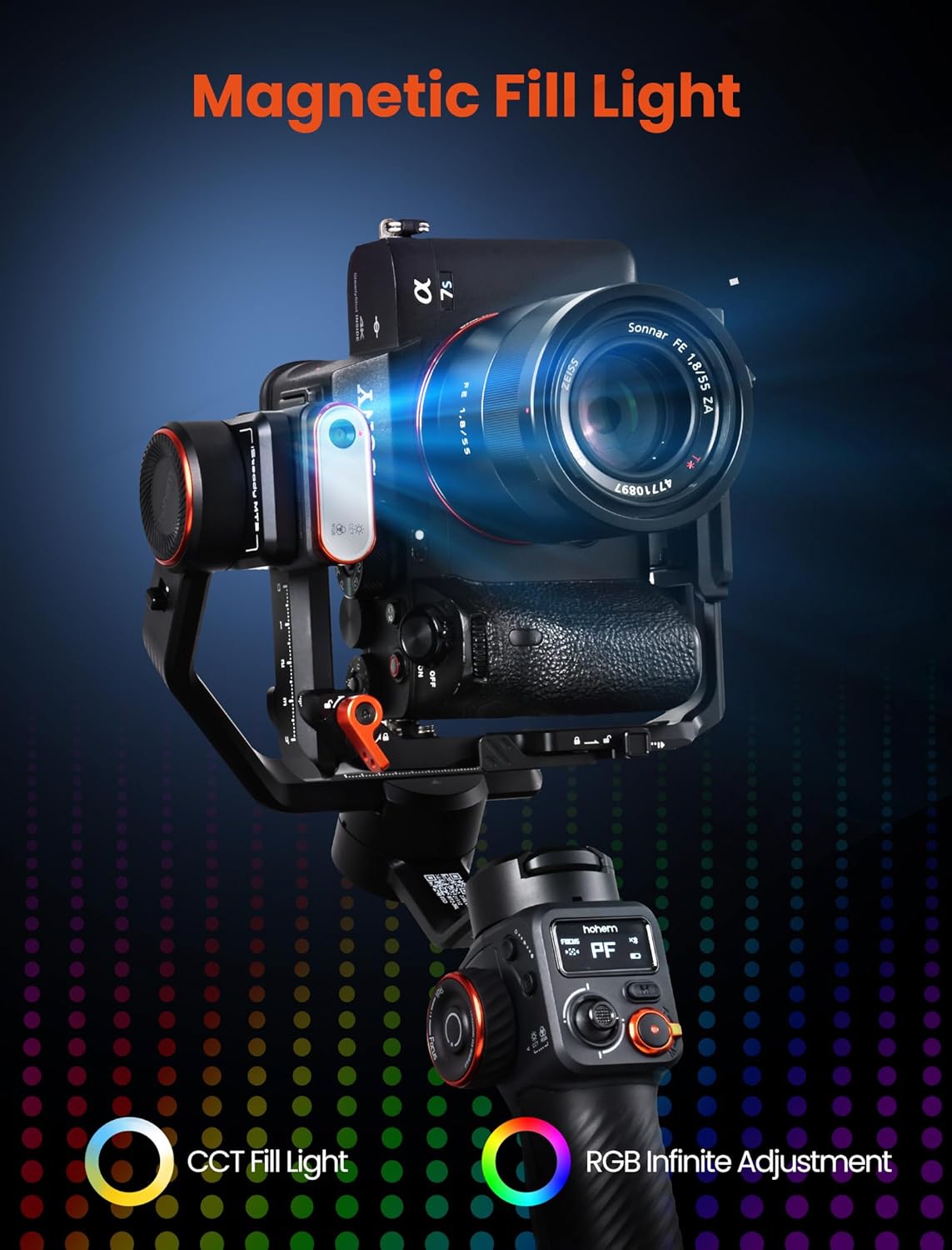
ചിത്രം: വിശദമായ ഒരു ചിത്രം view of the magnetic fill light and AI vision sensor attached to the gimbal, ready for use.
4. പ്രവർത്തന നിർദ്ദേശങ്ങൾ
4.1 പവർ ഓൺ/ഓഫ്, അടിസ്ഥാന നിയന്ത്രണങ്ങൾ
Press and hold the power button to turn the gimbal on or off. The OLED screen will display the current mode and battery status.
- Shortcut Trigger: One key to activate sports mode, quickly return to center, or enter full lock mode.
- Multifunctional Wheel: Controls horizontal roll rotation, adjusts picture vignette, and CCT & RGB double dimming for the fill light.
- Memory A/B Button: Intelligently records shooting trajectories, allows quick setting of starting points, moving time delay, and direct shooting.

ചിത്രം: വിശദമായ ഒരു ചിത്രം view of the gimbal's control interface, highlighting the shortcut trigger, multifunctional wheel, and memory A/B buttons for quick adjustments and mode changes.
4.2 AI Tracking Functionality
The integrated AI tracker automatically identifies and follows subjects, keeping them centered in the frame. This feature is ideal for solo content creation.
- ആംഗ്യ നിയന്ത്രണം: Use specific hand gestures to start or suspend AI tracking. For example, an 'OK' gesture might start tracking, while an open palm might suspend it.
- AI Custom Composition: Frame your shots with gestures to define the desired composition, and the AI will maintain it as you move.

Image: A woman in a kitchen setting, demonstrating the AI tracker's ability to keep her in frame while she moves, indicated by a red tracking box.

Image: A woman demonstrating gesture control for the AI tracking feature, making an 'OK' sign to initiate or pause tracking.
4.3 Stabilization (iSteady 7.0 Anti-shake Algorithm)
The iSteady MT2 Kit utilizes the iSteady 7.0 anti-shake algorithm, providing a 30% increase in stability for smooth footage, even during dynamic movements.

Image: A side-by-side comparison showing blurred footage from a handheld camera next to clear, stable footage captured with the iSteady MT2 Kit, featuring a skateboarder in motion.
4.4 Magnetic Fill Light Operation
The magnetic fill light offers CCT (Correlated Color Temperature) and RGB (Red, Green, Blue) adjustment options to control lighting effects and enhance the atmosphere of your shots.

Image: The magnetic fill light attached to the gimbal, illustrating its capability to produce both CCT and RGB lighting effects for creative illumination.
4.5 Bluetooth Control
Connect your camera or smartphone via Bluetooth to the gimbal for seamless photo and video capture control directly from the gimbal's buttons.

Image: A hand interacting with the gimbal's control panel, with a Bluetooth icon displayed on the screen, signifying wireless control capabilities.
4.6 ഷൂട്ടിംഗ് മോഡുകളും സവിശേഷതകളും
- വെർട്ടിക്കൽ ഷൂട്ടിംഗ്: Supports vertical video mode setups, including screen flip options for cameras like the Sony ZV-E10, enabling effortless selfies and vlogging.
- 360° Inception: The stabilizer supports 360-degree rotation left and right, and 290-degree tilt, allowing for dynamic, multi-angle shots.
- Low Angle Shot: Easily switch to briefcase handle mode for smooth low-angle shots. (Note: Briefcase Handle is not included and can be purchased separately).
- ക്രിയേറ്റീവ് മോഡുകൾ: Explore panoramic shots, dolly zoom effects, and timelapse videos.

Image: A woman capturing a selfie with a camera mounted vertically on the iSteady MT2 Kit, demonstrating the screen flip feature for easy self-monitoring.

Image: A visual representation of the gimbal's 360-degree inception mode, showing a spiral staircase to illustrate the dynamic rotational capabilities.
5. പവർ മാനേജ്മെന്റ്
The gimbal offers extended battery life and reverse charging capabilities.
- ബാറ്ററി ലൈഫ്: Up to 17 hours of operation on a single charge.
- വേഗത്തിലുള്ള ചാർജ്: Achieves a full charge in approximately 3 hours.
- വിപരീത ചാർജിംഗ്: The gimbal can act as a power bank to charge your smartphone or other devices.

Image: The iSteady MT2 Kit gimbal connected to a camera, illustrating its long-lasting 17-hour battery life, 3-hour fast charging, and reverse charging capabilities.
6. പരിപാലനം
To ensure the longevity and optimal performance of your hohem iSteady MT2 Kit, follow these maintenance guidelines:
- വൃത്തിയാക്കൽ: Use a soft, dry cloth to clean the gimbal body. Avoid using liquid cleaners or solvents.
- സംഭരണം: Store the gimbal in its provided storage bag in a cool, dry place when not in use.
- ബാറ്ററി കെയർ: For long-term storage, charge the battery to approximately 50-60% every three months to prevent deep discharge.
- ആഘാതം ഒഴിവാക്കുക: Protect the gimbal from drops and impacts, which can damage the motors and internal components.
7. പ്രശ്നപരിഹാരം
7.1 ഓട്ടോമാറ്റിക് കാലിബ്രേഷൻ
If the stabilizer appears slightly tilted after manual leveling, you can perform an automatic calibration:
- നടപടിക്രമം: Simply press the 'M' button five times in quick succession. The gimbal will automatically calibrate itself.

Image: A visual guide demonstrating how to initiate automatic calibration by pressing the 'M' button five times, with the gimbal adjusting its position.
7.2 പൊതുവായ പ്രശ്നങ്ങൾ
- ഗിംബാൽ പവർ ഓൺ ചെയ്യുന്നില്ല: ബാറ്ററി ആവശ്യത്തിന് ചാർജ് ചെയ്തിട്ടുണ്ടെന്ന് ഉറപ്പാക്കുക. ചാർജിംഗ് കേബിൾ ബന്ധിപ്പിച്ച് വീണ്ടും ശ്രമിക്കുക.
- അസ്ഥിരമായ ഫൂtage: Re-balance the camera on the gimbal. Perform an automatic calibration. Ensure the camera's weight is within the gimbal's payload capacity.
- AI tracking not working: Ensure the AI Vision Sensor is properly attached and unobstructed. Check lighting conditions; extreme low light or heavy backlighting can affect performance. Use clear hand gestures.
- ബ്ലൂടൂത്ത് കണക്ഷൻ പ്രശ്നങ്ങൾ: Ensure Bluetooth is enabled on both the gimbal and your device. Try re-pairing the devices.
8 സ്പെസിഫിക്കേഷനുകൾ
| ഫീച്ചർ | സ്പെസിഫിക്കേഷൻ |
|---|---|
| ഉൽപ്പന്ന അളവുകൾ | 12.2 x 8.85 x 4.13 ഇഞ്ച് |
| ഇനത്തിൻ്റെ ഭാരം | 1.44 പൗണ്ട് |
| മോഡൽ നമ്പർ | iSMT2K |
| ബാറ്ററികൾ | 1 ഒരു ബാറ്ററി ആവശ്യമാണ് |
| നിർമ്മാതാവ് | hohem Technology Co., LTD. |
| നിറം | കറുപ്പ് |
| അനുയോജ്യമായ ഉപകരണങ്ങൾ | Action Camera, Compact Camera, Mirrorless Camera, Smartphone |
| പേലോഡ് കപ്പാസിറ്റി | 2.64 പൗണ്ട് വരെ |
| Camera Width Support | Max 5.27 inches |
| Camera Height Support | Max 3.96 inches |
| Camera Thickness + Lens Length Support | Max 6.94 inches |
| യു.പി.സി | 195221000912 |
8.1 ക്യാമറ അനുയോജ്യത
The hohem iSteady MT2 Kit is compatible with a wide range of cameras. Below is a list of some compatible models:
| ബ്രാൻഡ് | അനുയോജ്യമായ മോഡലുകൾ |
|---|---|
| സോണി | α7S III, α7R III, α7R IV, α7R V, α7C, α7 III (α7M3), α7 IV (α7M4), α7 II, α6100, α6400, α6600, α1, α9, α9 II, FX3, RX100 VII, ZV-1, ZV-E1, ZV-E10 |
| കാനൻ | EOS RP, EOS 200D, EOS R, M50, EOS R5, M50 Mark II, EOS R6, M6 Mark II, EOS R7, PowerShot G7 X Mark III |
| നിക്കോൺ | Z FC, Z6 II, Z7 II, Z50 |

Image: A compatibility chart listing various camera models from Sony, Canon, and Nikon that are supported by the iSteady MT2 Kit.
9. വാറൻ്റിയും പിന്തുണയും
9.1 വാറൻ്റി വിവരങ്ങൾ
Please refer to the official hohem website or your purchase documentation for detailed warranty terms and conditions. Typically, hohem products come with a limited warranty covering manufacturing defects.
9.2 ഉപഭോക്തൃ പിന്തുണ
For technical assistance, troubleshooting, or service inquiries, please contact hohem customer support. You can find contact information on the official hohem webസൈറ്റ് അല്ലെങ്കിൽ നിങ്ങൾ ഉൽപ്പന്നം വാങ്ങിയ റീട്ടെയിലർ വഴി.
ഡൗൺലോഡ് ചെയ്യാൻ ഔദ്യോഗിക ഉപയോക്തൃ മാനുവൽ (PDF) ലഭ്യമാണ്: ഉപയോക്തൃ മാനുവൽ (PDF) ഡൗൺലോഡ് ചെയ്യുക
Visit the official hohem store for more products and information: hohem Official Store