
AKAMATE B0C8CGGHBW
AKAMATE Portable 7-Inch QLED Car Stereo User Manual
Model: Apple CarPlay Portable Car Stereo (B0C8CGGHBW)
1. ആമുഖം
Thank you for choosing the AKAMATE Portable 7-Inch QLED Touch Screen Car Stereo. This device is designed to enhance your driving experience by providing seamless integration with your smartphone via Wireless Apple CarPlay and Android Auto. Enjoy features such as GPS navigation, music streaming, hands-free calling, and voice commands on a vibrant QLED display. This manual provides detailed instructions for setup, operation, and maintenance to ensure optimal performance and longevity of your device.

Figure 1: AKAMATE Portable 7-Inch QLED Car Stereo. This image displays the main unit of the portable car stereo with its 7-inch QLED touchscreen, showing a typical smartphone interface with app icons for phone, music, maps, and messages. A suction cup mount is visible at the bottom, and a steering wheel control remote is shown in the bottom right corner.
2. ബോക്സിൽ എന്താണുള്ളത്?
നിങ്ങളുടെ പാക്കേജിൽ ഇനിപ്പറയുന്ന എല്ലാ ഘടകങ്ങളും ഉൾപ്പെടുത്തിയിട്ടുണ്ടെന്ന് ദയവായി പരിശോധിക്കുക:
- Portable Car Screen
- Suction Cup Holder & Suction Cup Mount Base
- Cigarette Lighter Power Cable & Sunshade Cover
- AUX Cable & Backup Camera Input Cable
- ഉപയോക്തൃ മാനുവൽ (ഈ പ്രമാണം)
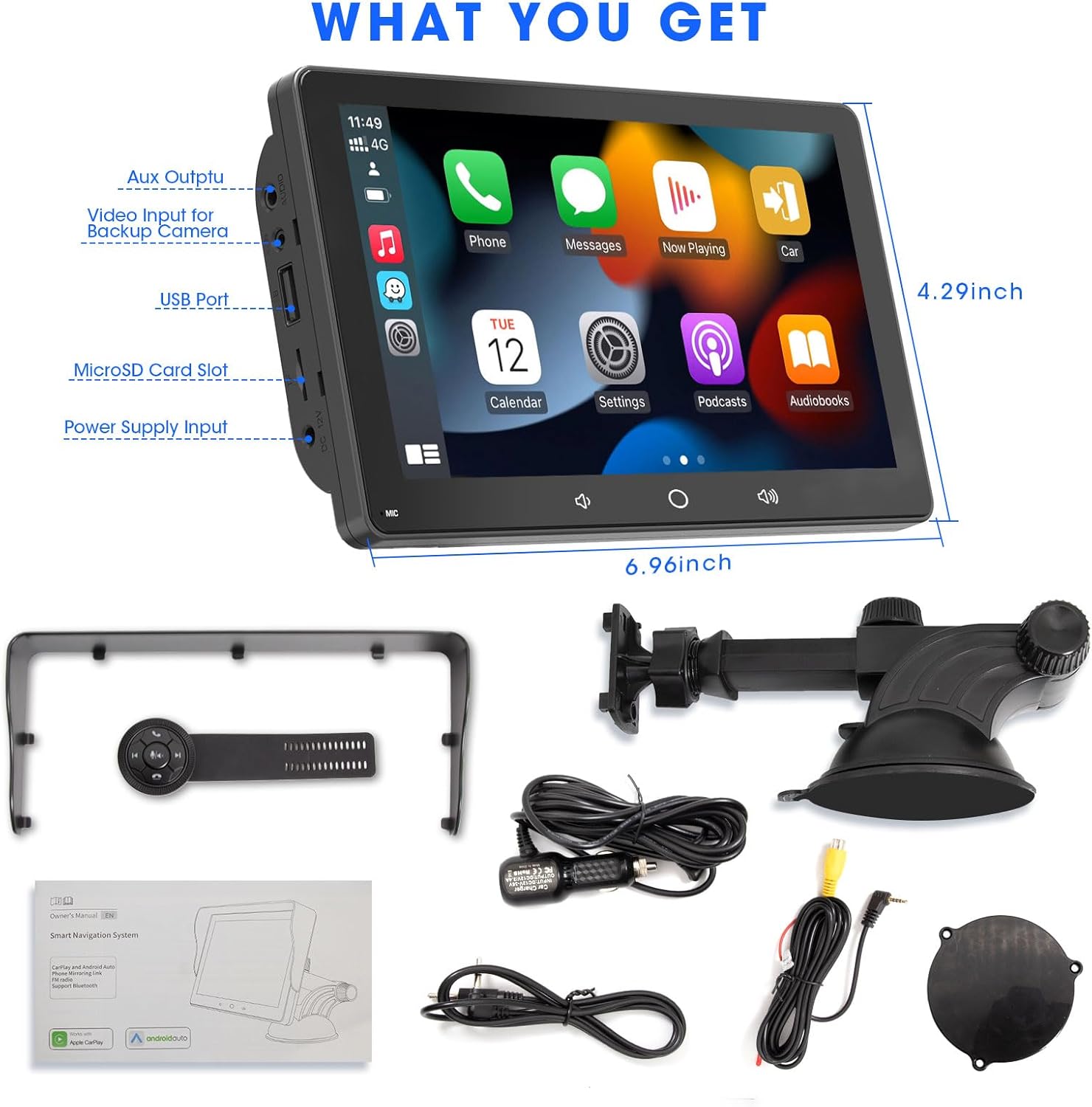
Figure 2: Package Contents. This image illustrates all the items included in the product box: the portable car screen, suction cup holder, cigarette lighter power cable, sunshade cover, AUX cable, backup camera input cable, and the user manual. Dimensions of the main unit are also indicated.
3. സജ്ജീകരണവും ഇൻസ്റ്റാളേഷനും
The AKAMATE Portable Car Stereo is designed for easy plug-and-play installation. Follow these steps to set up your device:
- മൗണ്ടിംഗ് ലൊക്കേഷൻ തിരഞ്ഞെടുക്കുക: Decide whether to mount the unit on your dashboard or windshield. The suction cup mount allows for flexible positioning.
- യൂണിറ്റിലേക്ക് മൗണ്ട് ഘടിപ്പിക്കുക: Align the four holes on the back of the portable car screen with the corresponding pegs on the suction cup holder. Gently push until it clicks into place.
- സുരക്ഷിത മ Mount ണ്ട്:
- For Windshield: Press the suction cup firmly against the clean windshield surface and engage the locking lever to create a strong vacuum seal.
- For Dashboard: Use the self-adhesive bracket (if included, or a separate adhesive pad) to secure the mount to a flat, clean area of your dashboard.
- പവർ ബന്ധിപ്പിക്കുക: Insert the cigarette lighter power cable into your vehicle's 12V/24V cigarette lighter socket. Connect the other end to the "Power Supply Input" port on the side of the portable car screen.
- പ്രാരംഭ പവർ ഓൺ: The device should power on automatically once connected to power. Follow any on-screen prompts for initial setup.

Figure 3: Mounting Options. This diagram illustrates two common mounting methods: dashboard mounted and windshield mounted, both utilizing the strong suction cup holder for secure placement.

Figure 4: Plug & Play Installation. This image provides a visual guide for the simple three-step installation process: aligning the unit with the mount, securing the mount to the dashboard or windshield, and connecting the power cable to the car's cigarette lighter.
4. പ്രവർത്തന നിർദ്ദേശങ്ങൾ
4.1. വയർലെസ് കാർപ്ലേ / ആൻഡ്രോയിഡ് ഓട്ടോ കണക്ഷൻ
Connect your smartphone wirelessly to access navigation, music, calls, and more.
- നിങ്ങളുടെ ഫോണിന്റെ ബ്ലൂടൂത്തും വൈഫൈയും പ്രവർത്തനക്ഷമമാക്കിയിട്ടുണ്ടെന്ന് ഉറപ്പാക്കുക.
- On the car stereo, go to the "CarPlay" or "Android Auto" icon.
- The device will search for available phones. Select your phone from the list.
- Follow the on-screen prompts on both the car stereo and your phone to complete the pairing process. This may involve confirming a code.
- Once connected, your phone's CarPlay or Android Auto interface will appear on the QLED screen.

Figure 5: Wireless Connection. This image demonstrates the wireless connectivity feature, showing a smartphone connected to the car stereo via Bluetooth and Wi-Fi for seamless Apple CarPlay and Android Auto integration, enabling access to GPS navigation, voice control, music, and messages.

Figure 6: Core Features. This image highlights the main functionalities of the device, including CarPlay, Android Auto, Mirrorlink, FM Transmission, Steering Wheel Control (SWC), and QLED Touchscreen.
4.2. Wireless Mirrorlink
The device supports wireless mirror-link for both iOS and Android phones, allowing you to display your phone's screen directly on the QLED display.
- Select the "MirrorLink" icon on the main interface.
- Follow the specific instructions displayed on the screen for iOS or Android devices to establish the connection.

Figure 7: Wireless Mirrorlink. This image demonstrates the wireless mirrorlink function, where a smartphone's screen is mirrored onto the portable car stereo, allowing users to view content like videos directly on the larger display.
4.3. സ്റ്റിയറിംഗ് വീൽ നിയന്ത്രണം
The included IR remote with 5 buttons and a rotary knob can be attached to your steering wheel for convenient control of the unit.
- വോളിയം നിയന്ത്രണം: Use the rotary knob to adjust volume up or down.
- ട്രാക്ക് നിയന്ത്രണം: Use the skip forward/backward buttons to change music tracks.
- കോൾ മാനേജ്മെൻ്റ്: Answer or hang up calls using the dedicated buttons.
- Mute/Play/Pause: Control audio playback with the central button.

Figure 8: Wireless Steering Wheel Control. This image shows the smart car steering wheel remote, designed for safe and convenient control of the screen's functions, including call management and music navigation, without taking hands off the wheel.

Figure 9: Steering Wheel Control for Calls. This image illustrates how the steering wheel remote can be used to manage phone calls and music playback, providing a safe and convenient way to interact with the car stereo.
4.4. Audio Output Options (Bluetooth 5.0, AUX, FM Transmission)
The device offers multiple ways to output audio to your car's stereo system:
- ബിൽറ്റ്-ഇൻ സ്പീക്കർ: For basic audio output directly from the unit.
- ബ്ലൂടൂത്ത് 5.0: Connect to your car's Bluetooth system for high-quality audio streaming and hands-free calling.
- ഓക്സ് ഔട്ട്പുട്ട്: Connect the portable dash screen to your car's head unit using the provided 3.5mm audio cable for a direct wired connection.
- എഫ്എം ട്രാൻസ്മിഷൻ: Set the portable car screen and your car's head unit to the same FM frequency to transmit audio wirelessly. This is ideal for vehicles without AUX or Bluetooth input.

Figure 10: FM & AUX Audio Output. This image shows the various audio output methods available: FM Transmitter, AUX-output, and the built-in speaker, allowing flexibility in how audio is played through your vehicle's sound system.

Figure 11: AUX and FM Transmission. This image highlights the AUX and FM transmission capabilities, providing alternative methods for audio output to your car's stereo system.
4.5. QLED Touchscreen and Settings
The 7-inch QLED display offers a high-resolution (1024*600) and responsive touch interface. Navigate through menus and settings by tapping and swiping.
- സിസ്റ്റം ക്രമീകരണങ്ങൾ: Adjust general device settings, including language, time, and display options.
- EQ ക്രമീകരണം: Customize audio equalization with the 16-band pre-set EQ to match your preferences.
- വാൾപേപ്പർ: Change the background image of the interface.
- തെളിച്ചം: Adjust screen brightness for optimal visibility in various lighting conditions.

Figure 12: QLED HD Touchscreen. This image compares the QLED display quality ("Ours") against a generic display ("Others"), emphasizing its 1024*600 high resolution, 99% sRGB, HDR support, and responsive touchscreen for a superior viewഅനുഭവം.

Figure 13: QLED Smart Display. This image highlights the QLED smart display, emphasizing its ability to deliver brighter, richer, and more lifelike colors for an enhanced viewing experience of movies, shows, and sports.
4.6. അധിക സവിശേഷതകൾ
- USB പോർട്ടുകൾ: The power plug includes 2 USB ports for multi-device fast charging.
- SD Card Slot & USB Flash Disk: Supports digital multimedia playback (up to 128GB).
- ബാക്കപ്പ് ക്യാമറ ഇൻപുട്ട്: The portable car stereo supports input from a backup camera (camera not included).

Figure 14: Backup Camera Input. This image shows the portable car stereo displaying a backup camera feed, indicating its compatibility with external backup cameras (camera not included).
5. പരിപാലനം
To ensure the longevity and optimal performance of your AKAMATE Portable Car Stereo, follow these maintenance guidelines:
- വൃത്തിയാക്കൽ: സ്ക്രീനും പുറംഭാഗവും വൃത്തിയാക്കാൻ മൃദുവായതും ഉണങ്ങിയതുമായ തുണി ഉപയോഗിക്കുക. പ്രതലത്തിന് കേടുവരുത്തുന്ന അബ്രസിവ് ക്ലീനറുകളോ ലായകങ്ങളോ ഉപയോഗിക്കരുത്.
- താപനില: Do not expose the device to extreme temperatures (hot or cold) for extended periods, as this can affect internal components and battery life.
- സംഭരണം: ഉപകരണം ദീർഘനേരം സൂക്ഷിക്കുകയാണെങ്കിൽ, അത് വൈദ്യുതിയിൽ നിന്ന് വിച്ഛേദിച്ച് തണുത്തതും വരണ്ടതുമായ സ്ഥലത്ത് സൂക്ഷിക്കുക.
- കൈകാര്യം ചെയ്യൽ: ഉപകരണം ശ്രദ്ധയോടെ കൈകാര്യം ചെയ്യുക. അത് താഴെയിടുകയോ ശക്തമായ ആഘാതങ്ങൾക്ക് വിധേയമാക്കുകയോ ചെയ്യരുത്.
- പവർ കണക്ഷൻ: Ensure the power cable is securely connected but do not force it. Disconnect by pulling the plug, not the cable.
6. പ്രശ്നപരിഹാരം
If you encounter issues with your AKAMATE Portable Car Stereo, please refer to the following common problems and solutions:
| പ്രശ്നം | സാധ്യമായ കാരണം | പരിഹാരം |
|---|---|---|
| ഉപകരണം പവർ ഓണാക്കുന്നില്ല. | സിഗരറ്റ് ലൈറ്ററിൽ നിന്ന് വൈദ്യുതിയില്ല; കണക്ഷൻ അയഞ്ഞിരിക്കുന്നു. | Check if the cigarette lighter socket is working. Ensure the power cable is securely plugged into both the device and the car socket. |
| Touch screen malfunction. | Unit reset incorrectly. | Do not reset the unit unless instructed by support. If this occurs, contact customer support for assistance. |
| Cannot connect to CarPlay/Android Auto wirelessly. | Bluetooth/Wi-Fi off; incorrect pairing; interference. | Ensure Bluetooth and Wi-Fi are active on your phone. Forget the device in your phone's Bluetooth settings and re-pair. Try restarting both the phone and the car stereo. |
| ഓഡിയോ ഇല്ല അല്ലെങ്കിൽ മോശം ഓഡിയോ നിലവാരം. | Incorrect audio output setting; FM interference; loose AUX cable. |
|
| Steering wheel control not responding. | Remote battery low; remote not paired. | Check the remote's battery. Ensure the remote is properly paired with the unit according to the setup instructions. |
For issues not listed here, please contact AKAMATE customer support.
7 സ്പെസിഫിക്കേഷനുകൾ
| ഫീച്ചർ | വിശദാംശങ്ങൾ |
|---|---|
| ഉൽപ്പന്ന അളവുകൾ | 6.96 x 0.78 x 4.29 ഇഞ്ച് |
| ഇനത്തിൻ്റെ ഭാരം | 1.7 പൗണ്ട് |
| ഡിസ്പ്ലേ തരം | 7-Inch QLED Touch Screen |
| ഡിസ്പ്ലേ റെസല്യൂഷൻ | 1024*600 |
| കണക്റ്റിവിറ്റി ടെക്നോളജി | Wireless CarPlay, Android Auto, AirPlay, Autolink, Bluetooth 5.0, Wi-Fi, USB, AUX, FM |
| വൈദ്യുതി വിതരണം | 12V/24V Cigarette Lighter |
| അനുയോജ്യമായ ഉപകരണങ്ങൾ | സ്മാർട്ട്ഫോൺ |
| ഓഡിയോ put ട്ട്പുട്ട് മോഡ് | സ്റ്റീരിയോ |
| SD Card/USB Flash Disk Support | പരമാവധി 128 ജിബി |
| ഇക്യു പ്രീസെറ്റുകൾ | 16-ബാൻഡ് |
8. വാറൻ്റിയും പിന്തുണയും
AKAMATE products are designed for reliability and performance. For specific warranty details, please refer to the warranty card included in your product packaging or visit the official AKAMATE webസൈറ്റ്.
ഉപഭോക്തൃ പിന്തുണ
If you require further assistance, technical support, or have questions regarding your AKAMATE Portable Car Stereo, please contact our customer service team:
- ഓൺലൈൻ പിന്തുണ: സന്ദർശിക്കുക AKAMATE Store on Amazon പതിവുചോദ്യങ്ങൾക്കും കോൺടാക്റ്റ് ഓപ്ഷനുകൾക്കും.
- ഇമെയിൽ പിന്തുണ: നിങ്ങളുടെ ഉൽപ്പന്ന പാക്കേജിംഗ് അല്ലെങ്കിൽ ഔദ്യോഗിക webസമർപ്പിത പിന്തുണ ഇമെയിൽ വിലാസത്തിനായുള്ള സൈറ്റ്.
When contacting support, please have your product model number (B0C8CGGHBW) and purchase details ready.
Ask a question about this manual
Ask about setup, troubleshooting, compatibility, parts, safety, or missing instructions. Manuals+ will review the question and use this page’s manual context to help answer it.