This manual provides detailed instructions for the KZZI K75 PRO RGB 75% Wireless Gasket Mechanical Keyboard. It covers product features, setup, operation, maintenance, troubleshooting, and technical specifications to ensure optimal use and longevity of your device.
ബോക്സിൽ എന്താണുള്ളത്
അൺബോക്സിംഗ് ചെയ്യുമ്പോൾ, ഇനിപ്പറയുന്ന എല്ലാ ഇനങ്ങളും ഉൾപ്പെടുത്തിയിട്ടുണ്ടെന്ന് ദയവായി ഉറപ്പാക്കുക:
K75 Gasket Keyboard
2-in-1 USB Cable (1.8m)
പൊടി കവർ
2-ഇൻ-1 കീക്യാപ്പ് & സ്വിച്ച് പുള്ളർ
4 Replacement Switches
Image: All items included in the KZZI K75 Pro keyboard package, including the keyboard, USB cable, dust cover, keycap/switch puller, and replacement switches.
ഉൽപ്പന്നം കഴിഞ്ഞുview
ഗാസ്കറ്റ് മൗണ്ട് ഘടന
The K75 PRO features a gasket mount structure with a 1.2mm slotted PCB with Flex cuts and four high-quality sound-absorbing layers. This design creates a cushion between the plate and the base, providing a consistent, softer, and more comfortable typing feel with pleasing acoustic feedback.
ചിത്രം: പൊട്ടിത്തെറിച്ചു view illustrating the gasket mount structure with multiple sound-dampening layers for enhanced typing feel and acoustics.
Custom Hot-Swappable Switches
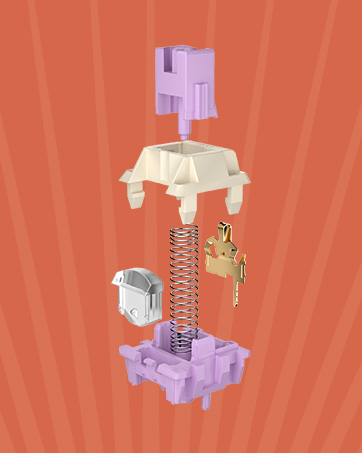
The keyboard is equipped with pre-lubed Eternity Tactile Switches, featuring south-facing transparent light diffusers. These switches offer a clear keystroke feeling, a clean typing sound, and brighter RGB backlight effects. The hot-swappable PCB is compatible with both 3-pin and 5-pin switches, allowing for easy customization.
ചിത്രം: വിശദമായത് view of the custom POM switches, highlighting their design for comfortable typing and high-fidelity sound.Video: A comparison of the typing sounds between Eternity Tactile Switches and Moment Linear Switches on the KZZI K75 Pro keyboard.Image: The hot-swappable PCB of the KZZI K75 Pro, demonstrating compatibility with 3-pin and 5-pin switches for easy customization.
LED Power Display and Battery
The K75 PRO features an always-visible battery level indicator and a built-in 3750mAh battery. With backlighting off, the battery can last up to 200 hours. A full charge takes approximately 6-7 hours.
Image: Close-up of the KZZI K75 Pro's integrated LED power display, showing the current battery percentage.
82-Key ANSI Layout
This compact TKL mechanical keyboard features a 75% layout with 82 keys, saving desk space while maintaining typing comfort. The double-shot PBT keycaps contribute to durability and a retro aesthetic.
Image: The KZZI K75 Pro keyboard in its 75% layout, showcasing the key arrangement and overall design.Image: Diagram illustrating the physical dimensions of the KZZI K75 Pro keyboard.
Extra Hub Ports
The keyboard includes one USB port and two Type-C ports, providing convenient connectivity for various peripherals such as a mouse or USB flash drive. Note that the first Type-C port on the left is exclusively for wired mode and charging.
Image: Detail of the integrated USB and Type-C hub ports on the KZZI K75 Pro, showing connectivity options.
സജ്ജമാക്കുക
കണക്റ്റിവിറ്റി മോഡുകൾ
The KZZI K75 PRO supports triple-mode connectivity: USB Type-C wired, 2.4GHz wireless, and Bluetooth 5.0. You can easily switch between these modes using the sensitive knob on the keyboard.
Image: The 3-mode toggle switch on the KZZI K75 Pro, allowing selection between wired, 2.4GHz, and Bluetooth connections.Video: Demonstrates the wired, 2.4GHz wireless, and Bluetooth connectivity options of the KZZI K75 Pro keyboard, including pairing instructions and device switching.
വയേർഡ് മോഡ് (USB-C)
Connect the provided USB-C cable to the keyboard's dedicated wired port (the leftmost Type-C port).
കേബിളിന്റെ മറ്റേ അറ്റം നിങ്ങളുടെ കമ്പ്യൂട്ടറിന്റെ USB പോർട്ടുമായി ബന്ധിപ്പിക്കുക.
Ensure the mode switch on the keyboard is set to the wired position.
2.4GHz വയർലെസ് മോഡ്
Locate the 2.4GHz USB receiver (dongle) in the keyboard's storage slot.
നിങ്ങളുടെ കമ്പ്യൂട്ടറിൽ ലഭ്യമായ USB പോർട്ടിലേക്ക് USB റിസീവർ പ്ലഗ് ചെയ്യുക.
Set the mode switch on the keyboard to the 2.4GHz position. The keyboard should automatically connect.
ബ്ലൂടൂത്ത് 5.0 മോഡ്
Set the mode switch on the keyboard to the Bluetooth position.
On your device (computer, tablet, smartphone), enable Bluetooth and search for available devices.
Select "KZZI K75 Pro" or a similar name from the list to pair.
The keyboard can store up to three Bluetooth connections. Switch between them by pressing Fn + Q, Fn + W, അല്ലെങ്കിൽ Fn + E.
To reset Bluetooth connections, press and hold Fn + Q + W + E ഏകദേശം 5 സെക്കൻഡ് നേരത്തേക്ക്.
പ്രവർത്തന നിർദ്ദേശങ്ങൾ
നോബ് ഫങ്ഷണാലിറ്റി
The multi-function knob allows for quick adjustments. Typically, rotating the knob controls volume, and pressing it mutes/unmutes audio. Specific functions may be customized via software.
RGB ബാക്ക്ലൈറ്റ് കസ്റ്റമൈസേഷൻ
The keyboard features customizable RGB backlighting. Various lighting effects, brightness levels, and animation speeds can be adjusted directly on the keyboard using key combinations or through the dedicated software.
Programmable Software Support
The KZZI K75 PRO is supported by programmable software, allowing users to:
Customize keyboard shortcuts.
മാക്രോകൾ സൃഷ്ടിച്ച് നിയോഗിക്കുക.
Personalize RGB backlight effects and colors.
ഫേംവെയർ അപ്ഡേറ്റ് ചെയ്യുക.
Refer to the KZZI official webസോഫ്റ്റ്വെയർ ഡൗൺലോഡിനും വിശദമായ നിർദ്ദേശങ്ങൾക്കുമുള്ള സൈറ്റ്.
Image: Screenshot of the KZZI K75 Pro's software interface, showing options for key remapping, macro creation, and RGB lighting customization.വീഡിയോ: ഒരു ഓവർview of the KZZI K75 Pro RGB Gasket Mounted Mechanical Keyboard, showcasing അതിന്റെ സവിശേഷതകളും രൂപകൽപ്പനയും.
മെയിൻ്റനൻസ്
വൃത്തിയാക്കൽ
കീക്യാപ്പുകൾ: കീക്യാപ്പുകൾ നീക്കം ചെയ്യാൻ നൽകിയിരിക്കുന്ന കീക്യാപ്പ് പുള്ളർ ഉപയോഗിക്കുക. വീര്യം കുറഞ്ഞ സോപ്പ് ലായനിയും മൃദുവായ തുണിയും ഉപയോഗിച്ച് അവ വൃത്തിയാക്കുക, തുടർന്ന് വീണ്ടും ഘടിപ്പിക്കുന്നതിന് മുമ്പ് കഴുകി നന്നായി ഉണക്കുക.
കീബോർഡ് ബോഡി: കീബോർഡ് പ്രതലം മൃദുവായ, d ടവൽ ഉപയോഗിച്ച് തുടയ്ക്കുക.amp തുണി. അമിതമായ ഈർപ്പം ഒഴിവാക്കുക.
കീകൾക്കിടയിൽ: താക്കോലുകൾക്കിടയിൽ നിന്ന് പൊടിയും അവശിഷ്ടങ്ങളും നീക്കം ചെയ്യാൻ കംപ്രസ് ചെയ്ത വായു ഉപയോഗിക്കുക.
സ്വിച്ച് മാറ്റിസ്ഥാപിക്കൽ
Utilize the included 2-in-1 keycap & switch puller to carefully remove and replace switches. Ensure the new switch pins are aligned correctly before pressing it into the PCB to avoid damage.
ട്രബിൾഷൂട്ടിംഗ്
കീബോർഡ് പ്രതികരിക്കുന്നില്ല: Ensure the keyboard is charged and the correct connectivity mode (wired, 2.4GHz, or Bluetooth) is selected. For wireless modes, check battery level.
ബ്ലൂടൂത്ത് ജോടിയാക്കൽ പ്രശ്നങ്ങൾ: Try resetting the Bluetooth connections by holding Fn + Q + W + E for 5 seconds. Ensure your device's Bluetooth is enabled and discoverable.
2.4GHz connection issues: Ensure the USB receiver is securely plugged in and the keyboard is in 2.4GHz mode. Try plugging the receiver into a different USB port.
കീകൾ പ്രവർത്തിക്കുന്നില്ല: If individual keys are not working, try replacing the switch using the provided spare switches and switch puller.
ബാക്ക്ലൈറ്റ് പ്രവർത്തിക്കുന്നില്ല: Check software settings for backlight control. Ensure the keyboard is not in a low-power state.
സ്പെസിഫിക്കേഷനുകൾ
മോഡൽ നമ്പർ
കെ75 പ്രോ
ഉൽപ്പന്ന അളവുകൾ
13.22 x 6.12 x 1.63 ഇഞ്ച് (335.8mm x 155.5mm x 41.4mm)
ഇനത്തിൻ്റെ ഭാരം
3.07 പൗണ്ട്
കണക്റ്റിവിറ്റി ടെക്നോളജി
BT 5.0, 2.4GHz Wireless, USB-C Wired
കീബോർഡ് വിവരണം
മെക്കാനിക്കൽ
അനുയോജ്യമായ ഉപകരണങ്ങൾ
Gaming Console, PC, Mac, iOS, Android
പ്രത്യേക സവിശേഷതകൾ
82 Keys Layout, RGB Backlit, Gasket Mount, Hot-Swappable, Rechargeable, LED Power Display, Extra Hub Ports
ചിത്രം: വിശദമായത് view of the KZZI K75 Pro keyboard, highlighting keycap and switch features.
വാറൻ്റിയും പിന്തുണയും
For warranty information, technical support, or service inquiries, please contact KZZI customer support through their official webഉൽപ്പന്നം വാങ്ങിയ സൈറ്റ് അല്ലെങ്കിൽ റീട്ടെയിലർ. വാറന്റി ക്ലെയിമുകൾക്കായി നിങ്ങളുടെ വാങ്ങിയതിന്റെ തെളിവ് സൂക്ഷിക്കുക.
Ask a question about this manual
Ask about setup, troubleshooting, compatibility, parts, safety, or missing instructions. Manuals+ will review the question and use this page’s manual context to help answer it.