
ഏലിയൻവെയർ AW520H
ഏലിയൻവെയർ AW520H വയർഡ് ഗെയിമിംഗ് ഹെഡ്സെറ്റ് ഉപയോക്തൃ മാനുവൽ
മോഡൽ: AW520H
ആമുഖം
This manual provides instructions for the Alienware AW520H Wired Gaming Headset. It covers setup, operation, maintenance, and troubleshooting to ensure optimal performance and longevity of your device.
The Alienware AW520H headset is designed to deliver precision audio with Hi-Res certified drivers and Dolby Atmos spatial audio support, integrated into a comfortable and adjustable design.
ബോക്സിൽ എന്താണുള്ളത്
പാക്കേജിൽ എല്ലാ ഘടകങ്ങളും ഉണ്ടെന്ന് ഉറപ്പാക്കുക:
- Alienware AW520H Wired Gaming Headset
- ഡോക്യുമെന്റേഷൻ (ഉപയോക്തൃ മാനുവൽ, വാറന്റി വിവരങ്ങൾ)
ഉൽപ്പന്നം കഴിഞ്ഞുview
Familiarize yourself with the key components and features of your Alienware AW520H headset.
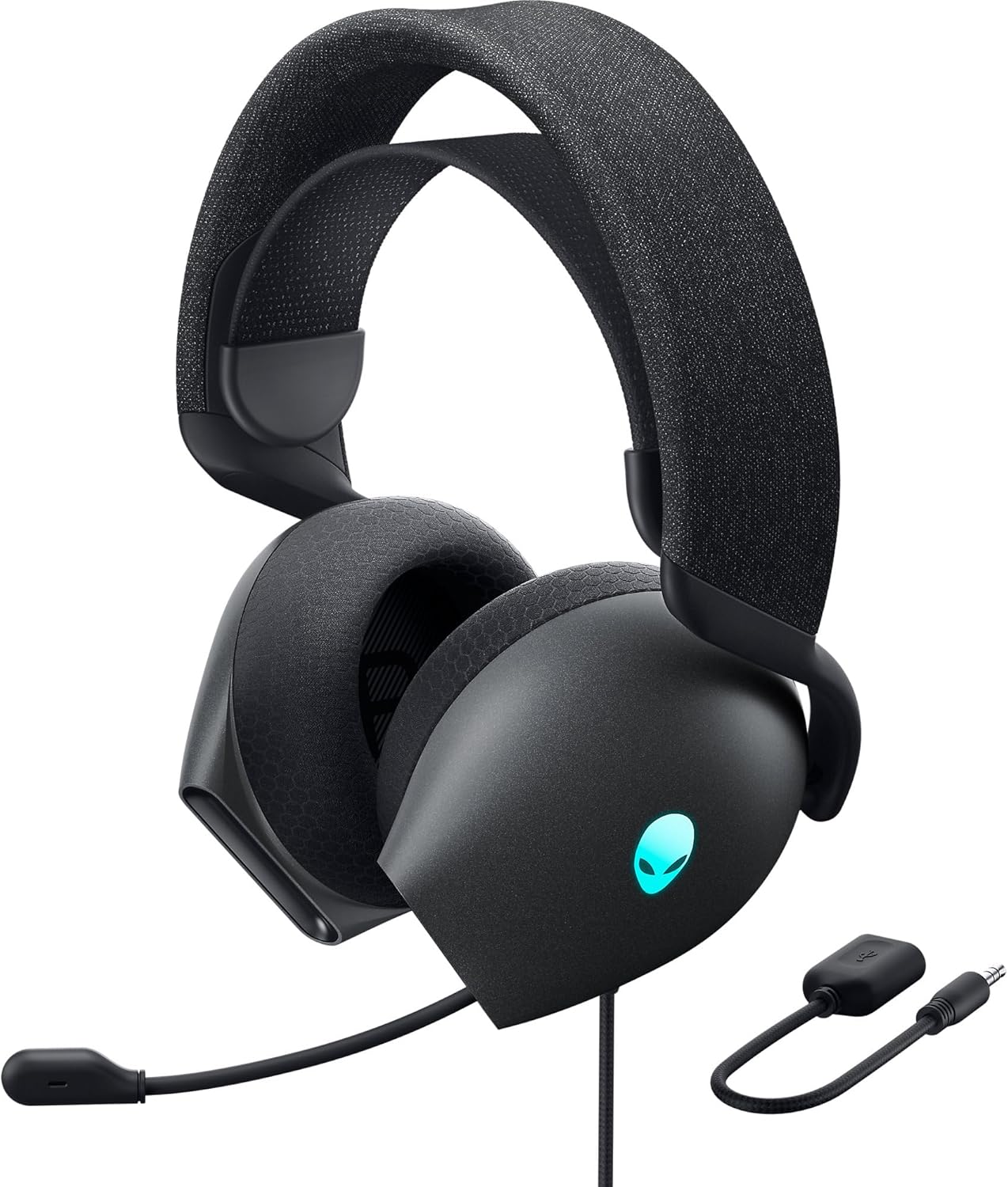

പ്രധാന സവിശേഷതകൾ:
- Hi-Res Certified Drivers: Delivers clear and rich sound across a wide frequency range.
- Dolby Atmos Spatial Audio: Provides precise positional audio for an immersive experience.
- AI-Driven Noise Cancellation Microphone: Retractable boom mic focuses on your voice, reducing ambient noise.
- സുഖപ്രദമായ ഡിസൈൻ: Features soft memory foam ear pads with breathable fabric and an adjustable suspension headband for extended wear.
- AlienFX RGB Lighting: Customizable RGB lighting on the earcups, controllable via Alienware Command Center.
- ബഹുമുഖ കണക്റ്റിവിറ്റി: Supports both USB and 3.5mm connections for broad compatibility.
സജ്ജമാക്കുക
Follow these steps to set up your Alienware AW520H headset.
1. ഹെഡ്സെറ്റ് ബന്ധിപ്പിക്കുന്നു
The AW520H offers flexible connectivity options:
- 3.5mm ഓഡിയോ ജാക്ക്: Connect the 3.5mm cable directly to your PC, gaming console controller, or any other compatible device with a 3.5mm audio port. This provides basic audio and microphone functionality.
- USB കണക്ഷൻ: For full functionality, including Dolby Atmos spatial audio and AlienFX RGB lighting customization, connect the headset via USB to your PC. This typically involves using a 3.5mm to USB adapter if your PC does not have a combined audio jack.


2. Software Installation (Optional, for full features)
To unlock the full potential of your headset, including Dolby Atmos and AlienFX RGB lighting customization, install the Alienware Command Center software on your PC. This software allows for personalized audio profileഎസ്, ലൈറ്റിംഗ് ഇഫക്റ്റുകൾ.
- Download the latest version of Alienware Command Center from the official Alienware support webസൈറ്റ്.
- ഇൻസ്റ്റാളേഷൻ പൂർത്തിയാക്കാൻ ഓൺ-സ്ക്രീൻ നിർദ്ദേശങ്ങൾ പാലിക്കുക.
- Connect your headset via USB to ensure it is recognized by the software.
പ്രവർത്തന നിർദ്ദേശങ്ങൾ
ഓഡിയോ നിയന്ത്രണങ്ങൾ
The headset features integrated controls for convenient audio management:
- വോളിയം വീൽ: Located on the earcup, rotate the wheel to increase or decrease the audio volume.
- മൈക്രോഫോൺ മ്യൂട്ട് ബട്ടൺ: Press the button on the earcup to mute or unmute the microphone.

മൈക്രോഫോൺ ഉപയോഗം
The AW520H features an AI-driven noise-canceling retractable boom microphone:
- നീട്ടുക/പിൻവലിക്കുക: Gently pull the microphone boom out from the earcup to extend it for use. Push it back into the earcup to retract it when not needed.
- സ്ഥാനനിർണ്ണയം: ഒപ്റ്റിമൽ ശബ്ദ വ്യക്തതയ്ക്കായി, മൈക്രോഫോൺ നിങ്ങളുടെ വായിൽ നിന്ന് ഏകദേശം 1-2 ഇഞ്ച് അകലെ സ്ഥാപിക്കുക.
- ശബ്ദം റദ്ദാക്കൽ: The AI-driven noise cancellation automatically works to filter out ambient sounds, focusing on your voice.

സുഖസൗകര്യങ്ങൾക്കായി ക്രമീകരിക്കൽ
The headset is designed for comfort during long gaming sessions:
- Suspension Headband: Slide the suspension headband up or down to find the ideal fit for your head size.
- Earcup Rotation: The earcups can slightly pivot to conform to the shape of your ears.
- മെമ്മറി ഫോം ഇയർ പാഡുകൾ: The soft memory foam ear pads with breathable fabric provide cushioning and ventilation.

AlienFX RGB Lighting
Customize the RGB lighting on your headset using the Alienware Command Center software:
- Alienware കമാൻഡ് സെന്റർ തുറക്കുക.
- Navigate to the lighting settings for your AW520H headset.
- Select desired colors, effects, and brightness levels.
- Ensure the headset is connected via USB for lighting customization.
മെയിൻ്റനൻസ്
ശരിയായ അറ്റകുറ്റപ്പണി നിങ്ങളുടെ ഹെഡ്സെറ്റിന്റെ ദീർഘായുസ്സും പ്രകടനവും ഉറപ്പാക്കുന്നു.
- വൃത്തിയാക്കൽ: ഇയർകപ്പുകളും ഹെഡ്ബാൻഡും തുടയ്ക്കാൻ മൃദുവായതും ഉണങ്ങിയതുമായ തുണി ഉപയോഗിക്കുക. കഠിനമായ അഴുക്കിന്, അൽപ്പം ഡി.amp തുണി ഉപയോഗിക്കാം, പക്ഷേ അമിതമായ ഈർപ്പം ഒഴിവാക്കുക. കഠിനമായ രാസവസ്തുക്കളോ അബ്രസിവ് ക്ലീനറുകളോ ഉപയോഗിക്കരുത്.
- സംഭരണം: Store the headset in a clean, dry place away from extreme temperatures and direct sunlight. Retract the microphone when not in use to protect it.
- കേബിൾ കെയർ: Avoid sharp bends or kinks in the audio cable. Do not pull on the cable to disconnect the headset.
- ഇയർ പാഡുകൾ: The ear pads are made of breathable fabric and memory foam. While durable, they are not designed for frequent removal. If replacement is needed, consult Alienware support.
ട്രബിൾഷൂട്ടിംഗ്
If you encounter issues with your Alienware AW520H headset, refer to the following common solutions:
ഓഡിയോ ഇല്ല അല്ലെങ്കിൽ കുറഞ്ഞ ശബ്ദം
- കണക്ഷനുകൾ പരിശോധിക്കുക: Ensure the 3.5mm cable or USB connection is securely plugged into both the headset and your device.
- വോളിയം ലെവലുകൾ: Verify that the volume wheel on the headset is turned up. Check the audio output settings on your PC or console to ensure the headset is selected as the default output device and volume is not muted.
- സോഫ്റ്റ്വെയർ/ഡ്രൈവറുകൾ: If connected via USB, ensure Alienware Command Center is installed and updated. Check your operating system's sound settings for driver issues.
- മറ്റൊരു ഉപകരണത്തിൽ പരീക്ഷിക്കുക: ഹെഡ്സെറ്റിലോ യഥാർത്ഥ ഉപകരണത്തിലോ ആണോ പ്രശ്നം എന്ന് നിർണ്ണയിക്കാൻ ഹെഡ്സെറ്റ് മറ്റൊരു ഉപകരണത്തിലേക്ക് (ഉദാഹരണത്തിന് സ്മാർട്ട്ഫോൺ, മറ്റൊരു പിസി) ബന്ധിപ്പിക്കുക.
മൈക്രോഫോൺ പ്രവർത്തിക്കുന്നില്ല
- മ്യൂട്ട് ബട്ടൺ ചെക്ക് ചെയ്യുക: ഹെഡ്സെറ്റിലെ മൈക്രോഫോൺ മ്യൂട്ട് ബട്ടൺ സജീവമാക്കിയിട്ടില്ലെന്ന് ഉറപ്പാക്കുക.
- മൈക്രോഫോൺ സ്ഥാനം: Verify the microphone boom is fully extended and positioned correctly.
- ഇൻപുട്ട് ക്രമീകരണങ്ങൾ: Check your PC or console's sound input settings to ensure the headset microphone is selected as the default input device. Adjust microphone volume levels.
- അപ്ലിക്കേഷൻ ക്രമീകരണങ്ങൾ: Some applications (e.g., Discord, Zoom) have their own microphone settings. Verify the correct microphone is selected within these applications.
- സോഫ്റ്റ്വെയർ/ഡ്രൈവറുകൾ: If connected via USB, ensure Alienware Command Center is installed and updated.
AlienFX RGB Lighting Not Working
- USB കണക്ഷൻ: Ensure the headset is connected via USB to your PC. RGB lighting functionality requires a USB connection.
- Alienware Command Center: Verify that Alienware Command Center is installed and running. Check the lighting settings within the software for the headset.
- സോഫ്റ്റ്വെയർ അപ്ഡേറ്റ്: Ensure Alienware Command Center and headset firmware are up to date.
സ്പെസിഫിക്കേഷനുകൾ
| ഫീച്ചർ | വിശദാംശങ്ങൾ |
|---|---|
| മോഡലിൻ്റെ പേര് | AW520H |
| കണക്റ്റിവിറ്റി ടെക്നോളജി | Wired (USB, 3.5 mm Jack) |
| ഓഡിയോ ഡ്രൈവർ തരം | ഡൈനാമിക് ഡ്രൈവർ |
| ഫ്രീക്വൻസി പ്രതികരണം | 40 KHz (40,000 Hz) |
| പ്രതിരോധം | 32 ഓം |
| ശബ്ദ നിയന്ത്രണം | Active Noise Cancellation (AI-driven for mic) |
| മൈക്രോഫോൺ | Retractable, Unidirectional |
| നിയന്ത്രണങ്ങൾ | Volume Control, Microphone Mute (On-headset) |
| ചെവി പ്ലേസ്മെൻ്റ് | ചെവിക്ക് മുകളിൽ |
| ഫോം ഫാക്ടർ | ചെവിയിൽ |
| മെറ്റീരിയൽ | Memory foam, breathable fabric |
| നിറം | Dark Side of the Moon |
| ഉൽപ്പന്ന അളവുകൾ | 7.28 x 4.35 x 8.46 ഇഞ്ച് |
| ഇനത്തിൻ്റെ ഭാരം | 11.8 ഔൺസ് |
| നിർമ്മാതാവ് | ഡെൽ |
| അനുയോജ്യമായ ഉപകരണങ്ങൾ | Windows, wired devices |
വാറൻ്റിയും പിന്തുണയും
For warranty information and technical support, please refer to the documentation included with your product or visit the official Alienware support webസൈറ്റ്.
നിർമ്മാതാവ്: ഡെൽ
മോഡൽ നമ്പർ: AW520H
ആദ്യം ലഭ്യമായ തീയതി: ജൂൺ 30, 2023
For further assistance, please contact Alienware customer support through their official channels.
Ask a question about this manual
Ask about setup, troubleshooting, compatibility, parts, safety, or missing instructions. Manuals+ will review the question and use this page’s manual context to help answer it.