
APORO T4
Occus APORO T4 Wired Teaching Ampലൈഫ്ഫയർ യൂസർ മാന്വൽ
Model: APORO T4 | Brand: Generic
ആമുഖം
Thank you for choosing the Occus APORO T4 Wired Teaching Amplifier. This portable amplifier is designed to provide clear and powerful sound for teaching, presentations, and other public speaking engagements. Please read this manual thoroughly before using the device to ensure proper operation and maintenance.
സുരക്ഷാ വിവരങ്ങൾ
- ഉപകരണം വെള്ളത്തിലോ അമിതമായ ഈർപ്പത്തിലോ തുറന്നുകാട്ടരുത്.
- ശക്തമായ ആഘാതങ്ങൾക്ക് ഉപകരണം ഇടുകയോ ഇടുകയോ ചെയ്യുന്നത് ഒഴിവാക്കുക.
- ഉപകരണം സ്വയം വേർപെടുത്താനോ നന്നാക്കാനോ ശ്രമിക്കരുത്. യോഗ്യതയുള്ള സേവന ഉദ്യോഗസ്ഥരെ ബന്ധപ്പെടുക.
- കുട്ടികൾക്ക് ലഭ്യമാകാതെ സൂക്ഷിക്കുക.
- നിർദ്ദിഷ്ട ചാർജിംഗ് വോളിയം മാത്രം ഉപയോഗിക്കുകtage (110V input).
ഉൽപ്പന്നം കഴിഞ്ഞുview
The APORO T4 is a compact and powerful teaching amplifier. Familiarize yourself with its components and controls.
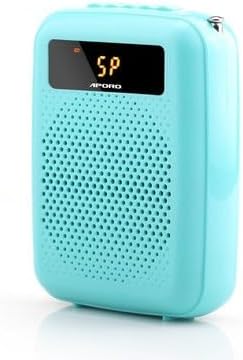
ചിത്രം 1: മുൻഭാഗം view of the APORO T4 Teaching Amplifier (Blue model).
This image shows the compact blue amplifier with its front speaker grille and a small display screen at the top.
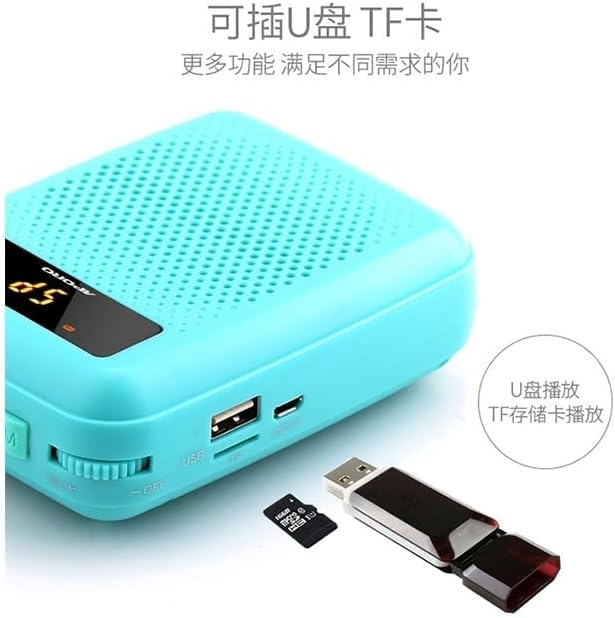
Figure 2: Top panel controls and ports of the APORO T4 Ampജീവൻ.
This image details the top side of the amplifier, showing the antenna, microphone input (MIC), REC button for recording, previous track button, play/pause button, next track button, mode button (M), and the power/volume rotary knob (ON+).
ഘടകങ്ങൾ:
- പ്രധാന യൂണിറ്റ്: ദി amplifier body with integrated speaker.
- Microphone Input (MIC): വയർഡ് മൈക്രോഫോൺ ബന്ധിപ്പിക്കുന്നതിന്.
- ആൻ്റിന: For wireless signal reception (if applicable to specific models).
- നിയന്ത്രണ ബട്ടണുകൾ: REC, Previous, Play/Pause, Next, Mode (M).
- പവർ/വോളിയം നോബ്: Rotary knob for turning the device on/off and adjusting volume.
- USB പോർട്ട്: യുഎസ്ബി ഡ്രൈവ് പ്ലേബാക്കിനായി.
- ടിഎഫ് കാർഡ് സ്ലോട്ട്: For TF (microSD) card playback.
സജ്ജമാക്കുക
1. അൺബോക്സിംഗും പ്രാരംഭ പരിശോധനയും:
Carefully remove all components from the packaging. Check for any visible damage. Ensure all accessories are present.
2. ചാർജ് ചെയ്യുന്നു Ampജീവപര്യന്തം:
ആദ്യ ഉപയോഗത്തിന് മുമ്പ്, പൂർണ്ണമായും ചാർജ് ചെയ്യുക amplifier. Connect the charging cable to the device's charging port and the other end to a 110V power source. The charging indicator will show the charging status. A full charge typically takes 3-4 hours.
3. Wearing/Placement:
The APORO T4 is designed for waist hanging. Attach the included strap to the amplifier and wear it comfortably around your waist. Ensure the speaker faces forward for optimal sound projection.
4. മൈക്രോഫോൺ ബന്ധിപ്പിക്കുന്നു:
Insert the microphone's 3.5mm jack into the "MIC" port on the top of the amplifier (refer to Figure 2). Ensure it is securely connected.
പ്രവർത്തന നിർദ്ദേശങ്ങൾ
1. പവർ ഓൺ/ഓഫ്, വോളിയം നിയന്ത്രണം:
പവർ ചെയ്യാൻ amplifier, rotate the Power/Volume knob clockwise until you hear a click and the display illuminates. Continue rotating clockwise to increase the volume. Rotate counter-clockwise to decrease volume. To power off, rotate the knob counter-clockwise until it clicks off.
2. മോഡ് തിരഞ്ഞെടുക്കൽ:
Press the "M" (Mode) button to cycle through available modes, such as Microphone Amplification, USB Playback, or TF Card Playback. The current mode will be indicated on the display.
3. USB/TF കാർഡ് പ്ലേബാക്ക്:

Figure 3: USB and TF card slots on the APORO T4 Ampജീവൻ.
This image shows the side of the amplifier with a USB port and a TF (microSD) card slot, along with a USB drive and a TF card for illustration.
- Insert a USB flash drive or a TF (microSD) card with audio fileഅതത് സ്ലോട്ടിലേക്ക്.
- Switch to USB or TF Card mode using the "M" button.
- Use the Previous (|<) ഒപ്പം അടുത്തത് (>> |) buttons to navigate tracks.
- പ്ലേ/പോസ് അമർത്തുക (> ||) button to play or pause audio.
4. Recording Function:
To record audio (e.g., your voice through the microphone), ensure a USB drive or TF card is inserted. Press the "REC" button to start recording. Press "REC" again to stop recording. Recordings are saved to the inserted storage device.
5. Wireless Functionality (UHF/Bluetooth):

Figure 4: Comparison of wired and wireless versions of the APORO T4 Ampജീവൻ.
This image illustrates the difference between a wired version (left, 12W power, large coverage) and a UHF wireless Bluetooth version (right, 30m wireless range, more freedom of movement). Note that the specific model may vary in wireless capabilities.
Some versions of the APORO T4 amplifier may include UHF wireless or Bluetooth connectivity. If your model supports this, activate the respective mode via the "M" button. Follow the pairing instructions for your wireless microphone or Bluetooth device. The UHF wireless version offers a range of up to 30 meters.
മെയിൻ്റനൻസ്
1. വൃത്തിയാക്കൽ:
തുടയ്ക്കുക amplifier with a soft, dry cloth. Do not use liquid cleaners or abrasive materials.
2. സംഭരണം:
Store the device in a cool, dry place away from direct sunlight and extreme temperatures. If storing for a long period, charge the battery every 3 months to maintain its lifespan.
ട്രബിൾഷൂട്ടിംഗ്
| പ്രശ്നം | സാധ്യമായ കാരണം | പരിഹാരം |
|---|---|---|
| സ്പീക്കറിൽ നിന്ന് ശബ്ദമില്ല. | Device is off; Volume is too low; Microphone not connected properly; Battery is low. | Turn on the device; Increase volume; Reconnect microphone; Charge the battery. |
| ശബ്ദം വികലമാണ് അല്ലെങ്കിൽ അവ്യക്തമാണ്. | Microphone too close to speaker (feedback); Volume too high; Microphone faulty. | Increase distance between microphone and speaker; Reduce volume; Try another microphone if available. |
| ഉപകരണം ചാർജ് ചെയ്യുന്നില്ല. | Charging cable faulty; Power source issue; Charging port damaged. | Check charging cable and power source; Try a different cable/adapter; Contact support if port is damaged. |
| USB/TF card not recognized. | Card/drive not inserted correctly; Incompatible file format; Corrupted media. | Reinsert card/drive; Ensure files are in a compatible format (e.g., MP3); Try a different card/drive. |
സ്പെസിഫിക്കേഷനുകൾ
- തരം: Hand Tool Parts (as per product description, though functionally an ampജീവപര്യന്തം)
- ബിൽറ്റ്-ഇൻ ബാറ്ററി കപ്പാസിറ്റി: 2000 mAh - 4000 mAh
- ഇൻപുട്ട് വോളിയംtage: 110V
- പവർ ഔട്ട്പുട്ട്: 12W (for wired version, as per image)
- വയർലെസ് ശ്രേണി: Up to 30 meters (for UHF wireless version, as per image)
- നിറം: Blue (as per current product variant)
- മോഡൽ നമ്പർ: OCS-40DB9853777418A7511F9524BD8B69FC
- നിർമ്മാതാവ്: ജനറിക്
വാറൻ്റിയും പിന്തുണയും
This product comes with a standard manufacturer's warranty. For warranty claims, technical support, or service inquiries, please refer to the contact information provided with your purchase or contact the seller directly. Keep your purchase receipt as proof of purchase.
For further assistance, you may visit the product page on Amazon.ca: Occus APORO T4 Amplifier Product Page
Ask a question about this manual
Ask about setup, troubleshooting, compatibility, parts, safety, or missing instructions. Manuals+ will review the question and use this page’s manual context to help answer it.