
ആമുഖം
Welcome to your new TIMESS wall clock. This manual provides instructions for the setup, operation, and maintenance of your 14-inch silent wall clock, which features an analog time display and an integrated LCD for perpetual calendar and temperature readings.
Key features of your TIMESS wall clock include:
- Silent, non-ticking quartz movement for a peaceful environment.
- Large, easy-to-read analog dial with clear numbers and minute marks.
- Integrated LCD display showing month, date, day of the week, and temperature in Fahrenheit.
- Durable construction with a refined piano lacquer frame and an HD glass panel.

This image displays the TIMESS 14-inch wall clock, highlighting its blue frame, large white numbers, and the integrated LCD screen at the bottom of the dial.
പാക്കേജ് ഉള്ളടക്കം
എല്ലാ ഇനങ്ങളും ഉണ്ടെന്ന് ഉറപ്പാക്കാൻ പാക്കേജ് ഉള്ളടക്കങ്ങൾ പരിശോധിക്കുക:
- TIMESS 14-inch Wall Clock Unit
- മൗണ്ടിംഗ് ഹുക്ക്
- ഉപയോക്തൃ മാനുവൽ (ഈ പ്രമാണം)
സജ്ജമാക്കുക
1. ബാറ്ററി ഇൻസ്റ്റാളേഷൻ
Your clock requires two (2) AA carbon batteries (not included) for operation. Alkaline batteries are not recommended as they may affect the clock's movement over time.
- ക്ലോക്കിന്റെ പിൻഭാഗത്ത് ബാറ്ററി കമ്പാർട്ട്മെന്റ് കണ്ടെത്തുക.
- Insert two AA carbon batteries according to the polarity indicators (+/-) inside the compartment.

This image shows the rear of the clock, highlighting the battery compartment for two AA batteries and the silent quartz movement mechanism.
2. Setting the Analog Time
After installing the batteries, set the analog time:
- Locate the time adjustment knob on the back of the clock.
- മണിക്കൂർ, മിനിറ്റ് സൂചികൾ ശരിയായ സമയം കാണിക്കുന്നത് വരെ നോബ് ഘടികാരദിശയിലോ എതിർ ഘടികാരദിശയിലോ തിരിക്കുക.
3. Setting the LCD Display (Date and Temperature)
The LCD display automatically activates and shows the month, date, day of the week, and temperature once batteries are installed. No manual setting is required for the date and time on the LCD.
To switch the temperature unit between Celsius (°C) and Fahrenheit (°F):
- Locate the 'UP' button on the back of the clock, usually near the battery compartment or LCD module.
- Double-press this button to toggle the temperature unit. The default display is Fahrenheit (°F).

ഈ ചിത്രം വിശദമായ ഒരു വിവരണം നൽകുന്നു view of the LCD screen, clearly showing the month, date, day of the week (SAT), and temperature (79.0 °F).
4. ക്ലോക്ക് മൗണ്ട് ചെയ്യുന്നു
To securely mount your clock on a wall:
- നിങ്ങളുടെ ചുമരിൽ അനുയോജ്യമായ ഒരു സ്ഥലം തിരഞ്ഞെടുക്കുക.
- Use a wall anchor and screw (not included) appropriate for your wall type.
- Hang the clock using the keyhole slot located on the back of the clock. Ensure it is stable and level.
This image shows a white plastic mounting hook, indicating the clock can be easily hung on a wall.
പ്രവർത്തന നിർദ്ദേശങ്ങൾ
Reading the Analog Time
The large numbers and distinct hands on the clock face allow for easy reading of the current hour and minute.
എൽസിഡി ഡിസ്പ്ലേ വായിക്കുന്നു
The LCD continuously displays the current month, date, day of the week, and ambient temperature. The temperature reading is updated periodically to reflect changes in the environment.
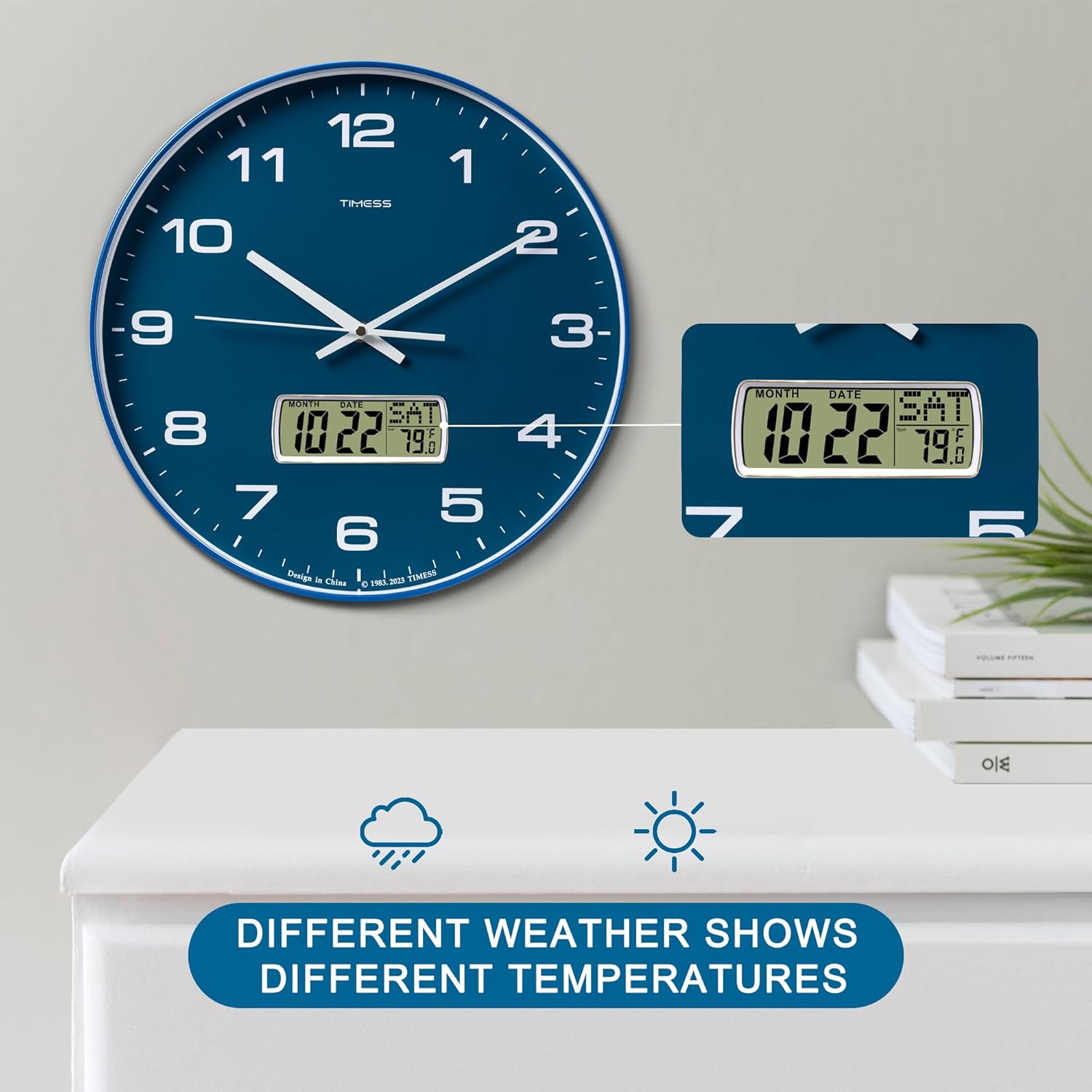
This image illustrates the clock's LCD display, emphasizing its ability to show real-time temperature, which may vary with environmental conditions.
മെയിൻ്റനൻസ്
ബാറ്ററി മാറ്റിസ്ഥാപിക്കൽ
When the clock hands slow down, stop moving, or the LCD display dims or becomes blank, it is time to replace the batteries. Follow the battery installation steps in Section 3.1 to replace the two AA carbon batteries.
വൃത്തിയാക്കൽ
To clean the clock, gently wipe the surface with a soft, dry cloth. Avoid using abrasive cleaners, chemical solvents, or harsh detergents, as these may damage the finish or the LCD screen.

This image highlights the HD glass panel, which protects the clock face and LCD, and should be cleaned gently.
ട്രബിൾഷൂട്ടിംഗ്
Clock Not Keeping Time
- ഇഷ്യൂ: Analog hands are not moving or display incorrect time.
- പരിഹാരം: Check if the batteries are correctly installed and have sufficient power. Replace with fresh AA carbon batteries if necessary. Adjust the time using the knob on the back of the clock.
LCD ഡിസ്പ്ലേ പ്രവർത്തിക്കുന്നില്ല
- ഇഷ്യൂ: LCD screen is blank, dim, or displays incorrect information.
- പരിഹാരം: Ensure batteries are properly inserted and are not depleted. Replace batteries if needed.
Incorrect Temperature Unit
- ഇഷ്യൂ: Temperature is displayed in Celsius instead of Fahrenheit, or vice versa.
- പരിഹാരം: Double-press the 'UP' button on the back of the clock to toggle between Celsius and Fahrenheit.
സ്പെസിഫിക്കേഷനുകൾ
ഉൽപ്പന്ന സവിശേഷതകൾ
| ഫീച്ചർ | വിശദാംശങ്ങൾ |
|---|---|
| ബ്രാൻഡ് | സമയം |
| മോഡൽ നമ്പർ | P59D-3-Blue |
| നിറം | Calendar Blue |
| ഉൽപ്പന്ന അളവുകൾ | 35.56 x 3.81 x 35.56 സെ.മീ (14 x 1.5 x 14 ഇഞ്ച്) |
| ഇനത്തിൻ്റെ ഭാരം | 1.36 കി.ഗ്രാം (3 പൗണ്ട്) |
| മെറ്റീരിയൽ | അക്രിലോണിട്രൈൽ ബ്യൂട്ടാഡീൻ സ്റ്റൈറൈൻ (എബിഎസ്) |
| ഡിസ്പ്ലേ തരം | Analog with LCD Digital |
| പ്രത്യേക സവിശേഷതകൾ | Perpetual Calendar Display, Temperature Display (°F/°C) |
| പവർ ഉറവിടം | 2 x AA Carbon Batteries (not included) |

This image visually confirms the clock's dimensions, indicating a 14-inch diameter and 1.8-inch depth.
പ്രധാനപ്പെട്ട സുരക്ഷാ വിവരങ്ങൾ
- ക്ലോക്കിനെ തീവ്രമായ താപനിലയിലോ, നേരിട്ടുള്ള സൂര്യപ്രകാശത്തിലോ, ഉയർന്ന ആർദ്രതയിലോ തുറന്നുകാട്ടരുത്.
- ക്ലോക്ക് താഴെയിടുകയോ ശക്തമായ ആഘാതങ്ങൾക്ക് വിധേയമാക്കുകയോ ചെയ്യുന്നത് ഒഴിവാക്കുക.
- ഉപയോഗിച്ച ബാറ്ററികൾ പ്രാദേശിക നിയന്ത്രണങ്ങൾ അനുസരിച്ച് ഉത്തരവാദിത്തത്തോടെ നീക്കം ചെയ്യുക.
- ബാറ്ററികൾ കുട്ടികൾക്ക് ലഭ്യമാകാതെ സൂക്ഷിക്കുക.
- പഴയതും പുതിയതുമായ ബാറ്ററികളോ വ്യത്യസ്ത തരം ബാറ്ററികളോ മിക്സ് ചെയ്യരുത്.
വാറൻ്റിയും ഉപഭോക്തൃ പിന്തുണയും
For warranty information and customer support, please refer to the documentation provided with your purchase or contact TIMESS customer service directly. Contact details are typically available on the manufacturer's official webസൈറ്റ് അല്ലെങ്കിൽ നിങ്ങളുടെ റീട്ടെയിലർ വഴി.