
1. ആമുഖം
This manual provides detailed instructions for the setup, operation, and maintenance of your TECLAST N15 Mini PC. Please read this manual thoroughly before using the device to ensure proper functionality and to prevent damage.
The TECLAST N15 is a compact desktop computer featuring an Intel Celeron N5095 processor, 16GB DDR4 RAM, and a 512GB SSD. It supports triple 4K monitor output and comes with Windows 11 Pro pre-installed, making it suitable for various applications including office work, creative design, and multimedia entertainment.
2. ബോക്സിൽ എന്താണുള്ളത്?
പാക്കേജിൽ എല്ലാ ഇനങ്ങളും ഉണ്ടെന്ന് ഉറപ്പാക്കുക:
- 1 x TECLAST N15 Mini PC
- 1 x പവർ അഡാപ്റ്റർ
- 1 x VESA മൗണ്ട്
- 1 x HDMI കേബിൾ
- 1 x ഉപയോക്തൃ മാനുവൽ

Image: Contents of the TECLAST N15 Mini PC package.
3. ഉൽപ്പന്നം കഴിഞ്ഞുview
3.1. അളവുകളും രൂപകൽപ്പനയും
The TECLAST N15 Mini PC is designed for compactness and portability, measuring approximately 4.5 x 1.6 x 4.5 inches (115 x 43 x 115 mm) and weighing around 400g. Its aluminum body ensures a sturdy structure.
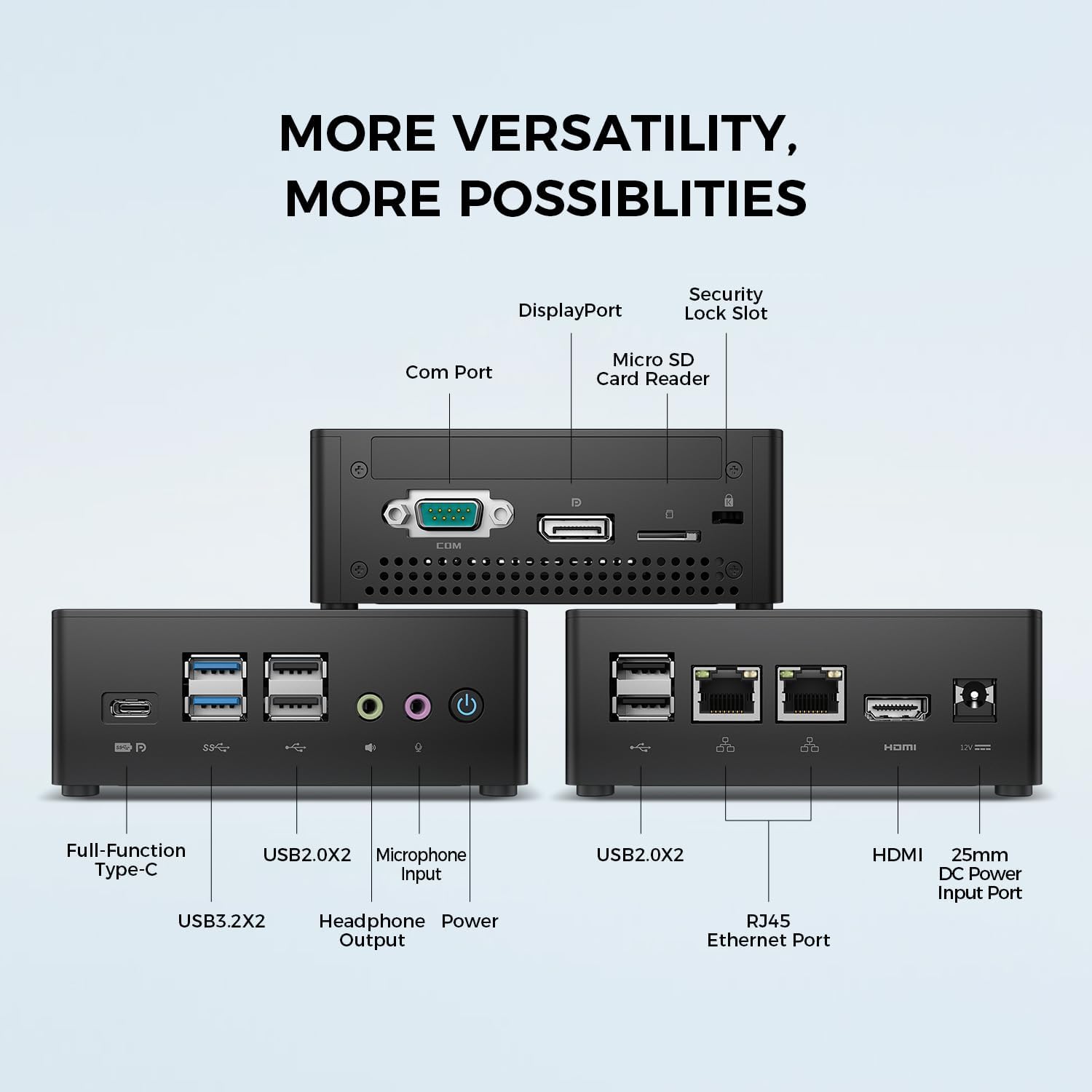
Image: TECLAST N15 Mini PC dimensions and compact design.
3.2. തുറമുഖങ്ങളും കണക്റ്റിവിറ്റിയും
The N15 Mini PC offers extensive connectivity options to support various peripherals and displays.
- ഫ്രണ്ട് പോർട്ടുകൾ: 1x Full-Function Type-C, 2x USB 3.0, 2x USB 2.0, 1x Headphone Output, 1x Microphone Input, Power Button.
- സൈഡ് പോർട്ടുകൾ: 1x COM Port, 1x DisplayPort, 1x Micro SD Card Reader, 1x Security Lock Slot.
- പിൻ തുറമുഖങ്ങൾ: 2x RJ45 Ethernet Ports (2.5Gbps), 2x USB 2.0, 1x HDMI Port, 1x DC Power Input.

ചിത്രം: കഴിഞ്ഞുview of the TECLAST N15 Mini PC's various connectivity ports.

Image: Front panel ports of the TECLAST N15 Mini PC.

Image: Side panel ports of the TECLAST N15 Mini PC.

Image: Rear panel ports of the TECLAST N15 Mini PC.
3.3. ആന്തരിക ഘടകങ്ങൾ
The N15 features an Intel Gen 11 N5095 processor, 16GB DDR4 RAM, and a 512GB PCIe 3.0 SSD. It also includes an M.2 E-slot for function expansion (pre-occupied by a wireless network card by default).

Image: Internal components of the TECLAST N15 Mini PC.
4. സജ്ജീകരണ നിർദ്ദേശങ്ങൾ
4.1. പെരിഫറലുകൾ ബന്ധിപ്പിക്കുന്നു
- ഡിസ്പ്ലേ ബന്ധിപ്പിക്കുക: Use the HDMI, DisplayPort, or Full-Function Type-C port to connect your monitor(s). The N15 supports up to three 4K displays simultaneously.
- കീബോർഡും മൗസും ബന്ധിപ്പിക്കുക: Plug your USB keyboard and mouse into the available USB ports.
- നെറ്റ്വർക്ക് ബന്ധിപ്പിക്കുക: For a wired connection, connect an Ethernet cable to one of the two RJ45 ports. For wireless, ensure your Wi-Fi network is available during initial setup.
- പവർ ബന്ധിപ്പിക്കുക: Plug the power adapter into the DC power input port on the Mini PC, then connect the adapter to a power outlet.
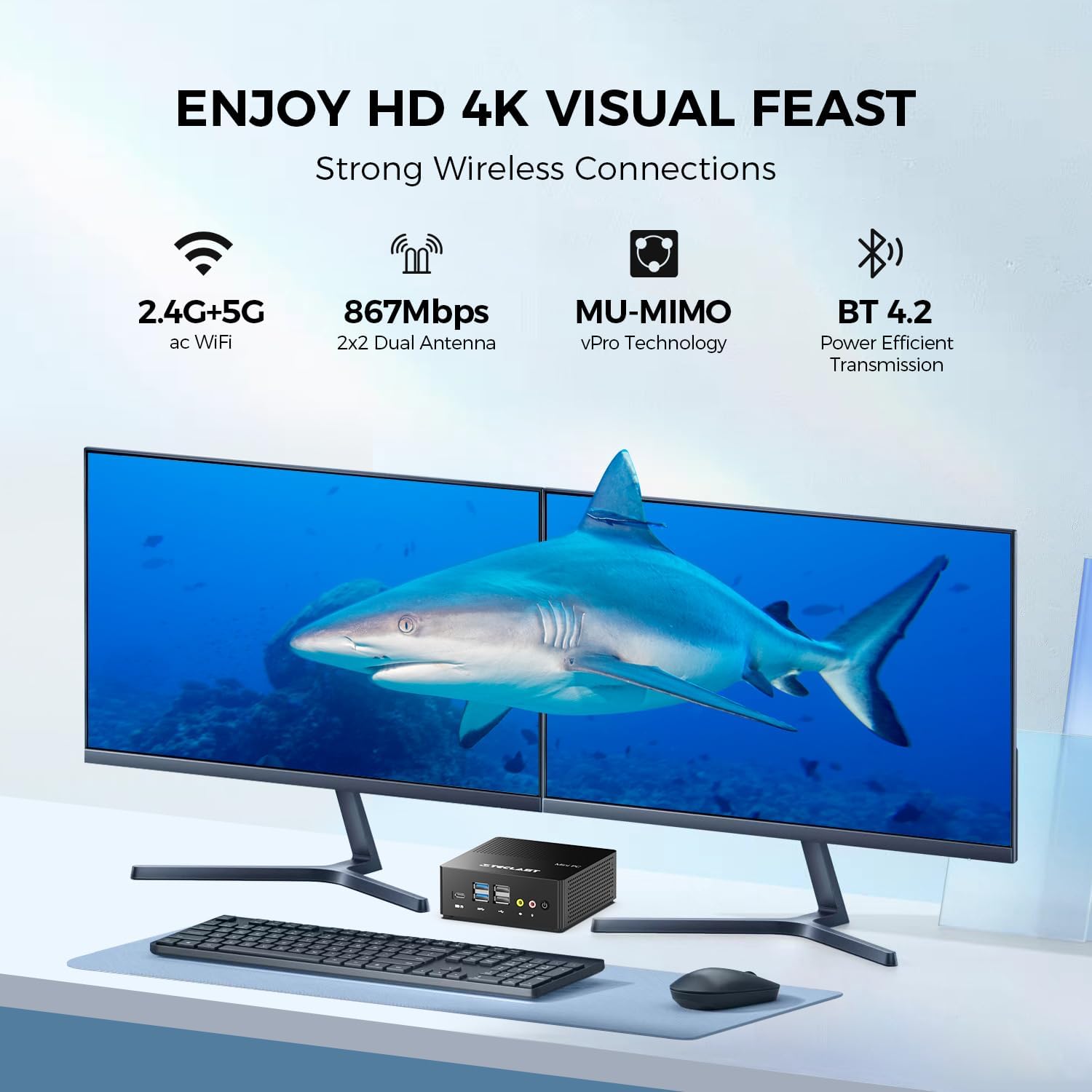
ചിത്രം: ഉദാample setup with the TECLAST N15 Mini PC connected to multiple displays and peripherals.
4.2. പ്രാരംഭ പവർ ഓൺ
Press the power button on the front of the Mini PC. The device will boot into Windows 11 Pro. Follow the on-screen instructions to complete the initial Windows setup, including language, region, network connection, and user account creation.
4.3. VESA Mount Installation (Optional)
The included VESA mount allows you to attach the Mini PC to the back of a compatible monitor or to a wall, saving desk space. Refer to the VESA mount instructions for detailed installation steps.

Image: TECLAST N15 Mini PC with VESA mount for space-saving installation.
5. പ്രവർത്തന നിർദ്ദേശങ്ങൾ
5.1. Windows 11 Pro
Your TECLAST N15 Mini PC comes with Windows 11 Pro pre-installed. This operating system provides a secure and versatile environment for various tasks, from productivity to entertainment. Ensure Windows updates are regularly installed to maintain system security and performance.

Image: Windows 11 Pro interface on the TECLAST N15 Mini PC.
5.2. മൾട്ടി-മോണിറ്റർ സജ്ജീകരണം
The Mini PC supports connecting up to three displays simultaneously at 4096x2160@60Hz via HDMI, DisplayPort, and the Full-Function Type-C port. This allows for an extended workspace, enhancing productivity for tasks like creative design, data analysis, or multi-tasking.
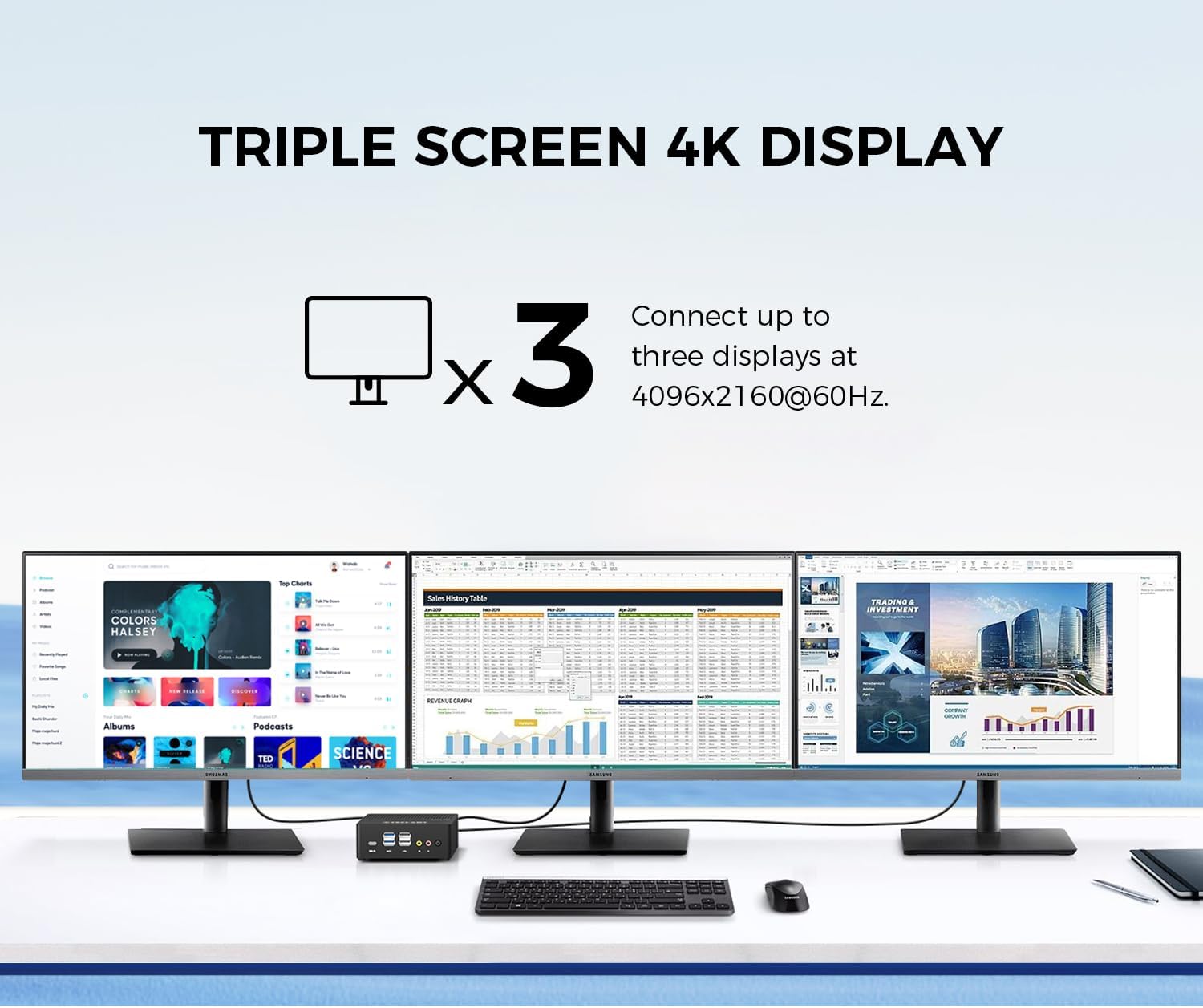
Image: Triple 4K monitor setup with the TECLAST N15 Mini PC.
5.3. പവർ മാനേജ്മെന്റ്
- ഷട്ട് ഡൗൺ: ആരംഭിക്കുക ബട്ടൺ ക്ലിക്കുചെയ്യുക, തുടർന്ന് പവർ > ഷട്ട് ഡൗൺ ചെയ്യുക.
- പുനരാരംഭിക്കുക: ആരംഭിക്കുക ബട്ടൺ ക്ലിക്കുചെയ്യുക, തുടർന്ന് പവർ > പുനരാരംഭിക്കുക.
- ഉറക്കം: ആരംഭിക്കുക ബട്ടൺ ക്ലിക്കുചെയ്യുക, തുടർന്ന് പവർ > സ്ലീപ്പ് ക്ലിക്കുചെയ്യുക.
- ഓട്ടോ പവർ ഓൺ: The device supports Auto Power On, RTC Wake Settings, and Wake On LAN, which can be configured in the BIOS settings.
6. പ്രകടനവും തണുപ്പിക്കലും
The TECLAST N15 is equipped with an Intel Celeron N5095 processor, offering a turbo frequency of up to 2.9 GHz. It features Intel UHD Graphics with 16 Execution Units (EU) and Quick Sync Video technology for efficient hardware video encoding and decoding.

Image: Key performance specifications of the TECLAST N15 Mini PC.
6.1. തണുപ്പിക്കൽ സംവിധാനം
The Mini PC incorporates a built-in fan cooling system with a nickel-plated heat pipe and a large heat dissipation area (over 16000mm²). This design ensures efficient heat transfer and silent operation, preventing overheating during multitasking.

Image: Internal cooling system and noise level illustration.
7. പരിപാലനം
- വൃത്തിയാക്കൽ: Use a soft, dry cloth to clean the exterior of the Mini PC. For vents, use compressed air to remove dust buildup. Do not use liquid cleaners directly on the device.
- സോഫ്റ്റ്വെയർ അപ്ഡേറ്റുകൾ: മികച്ച പ്രകടനവും സുരക്ഷയും ഉറപ്പാക്കാൻ വിൻഡോസ് അപ്ഡേറ്റുകളും ഡ്രൈവർ അപ്ഡേറ്റുകളും പതിവായി പരിശോധിച്ച് ഇൻസ്റ്റാൾ ചെയ്യുക.
- സ്റ്റോറേജ് മാനേജ്മെന്റ്: അനാവശ്യമായത് ഇടയ്ക്കിടെ വൃത്തിയാക്കുക files and applications to free up storage space and improve system responsiveness.
- പരിസ്ഥിതി വ്യവസ്ഥകൾ: Operate the Mini PC in a well-ventilated area, away from direct sunlight, excessive heat, and moisture.
8. പ്രശ്നപരിഹാരം
| പ്രശ്നം | സാധ്യമായ കാരണം | പരിഹാരം |
|---|---|---|
| ശക്തിയില്ല | പവർ അഡാപ്റ്റർ ബന്ധിപ്പിച്ചിട്ടില്ല, പവർ ഔട്ട്ലെറ്റിൽ പ്രശ്നമുണ്ട്. | പവർ അഡാപ്റ്റർ മിനി പിസിയിലേക്കും പ്രവർത്തിക്കുന്ന ഒരു പവർ ഔട്ട്ലെറ്റിലേക്കും സുരക്ഷിതമായി ബന്ധിപ്പിച്ചിട്ടുണ്ടെന്ന് ഉറപ്പാക്കുക. മറ്റൊരു ഔട്ട്ലെറ്റ് പരീക്ഷിക്കുക. |
| ഡിസ്പ്ലേ ഇല്ല | മോണിറ്റർ ബന്ധിപ്പിച്ചിട്ടില്ല, തെറ്റായ ഇൻപുട്ട് ഉറവിടം, കേബിൾ തകരാറിലായി. | Check HDMI/DP/Type-C cable connections. Ensure monitor is on and set to the correct input source. Try a different cable or monitor if possible. |
| ഇൻ്റർനെറ്റ് കണക്ഷനില്ല | Ethernet cable disconnected, Wi-Fi disabled, router issue. | For wired: Check Ethernet cable. For Wi-Fi: Ensure Wi-Fi is enabled in Windows settings and connected to your network. Restart your router/modem. |
| Peripherals not recognized | Loose connection, driver issue, incompatible device. | Reconnect the peripheral. Try a different USB port. Check Device Manager for driver issues. Ensure the peripheral is compatible with Windows 11. |
9 സ്പെസിഫിക്കേഷനുകൾ
| ഫീച്ചർ | വിശദാംശങ്ങൾ |
|---|---|
| പ്രോസസ്സർ | Intel Celeron N5095 (2.9 GHz Turbo Frequency) |
| റാം | 16GB DDR4 |
| സംഭരണം | 512GB PCIe x4 SSD |
| ഗ്രാഫിക്സ് | ഇന്റൽ യുഎച്ച്ഡി ഗ്രാഫിക്സ് (ഇന്റഗ്രേറ്റഡ്) |
| ഓപ്പറേറ്റിംഗ് സിസ്റ്റം | Windows 11 Pro (Pre-installed) |
| വീഡിയോ ഔട്ട്പുട്ട് | HDMI, DisplayPort, Full-Function Type-C (Supports Triple 4K @ 60Hz) |
| USB പോർട്ടുകൾ | 2x USB 3.0, 4x USB 2.0, 1x Full-Function Type-C |
| നെറ്റ്വർക്ക് | 2x 2.5Gbps RJ45 Ethernet, 802.11ac Wi-Fi (Dual-band) |
| ബ്ലൂടൂത്ത് | ബ്ലൂടൂത്ത് 4.2 |
| മറ്റ് തുറമുഖങ്ങൾ | COM Port, Micro SD Card Reader, Headphone Output, Microphone Input, Security Lock Slot |
| അളവുകൾ (LxWxH) | 4.5 x 1.6 x 4.5 ഇഞ്ച് (115 x 43 x 115 മിമി) |
| ഭാരം | 14.6 ഔൺസ് (ഏകദേശം 400 ഗ്രാം) |
| തണുപ്പിക്കൽ | Built-in fan cooling with nickel-plated heat pipe |
10. വാറൻ്റിയും പിന്തുണയും
The TECLAST N15 Mini PC comes with a 1-year product satisfaction warranty and lifetime technical support. For any questions or assistance, please contact TECLAST customer support.
You can find contact information and further resources on the official TECLAST webസൈറ്റ് അല്ലെങ്കിൽ നിങ്ങളുടെ വാങ്ങൽ പ്ലാറ്റ്ഫോം വഴി.
11. ഉൽപ്പന്ന വീഡിയോ പ്രദർശനം
ഒരു വിഷ്വൽ ഓവറിനായി ഔദ്യോഗിക ഉൽപ്പന്ന വീഡിയോ കാണുകview of the TECLAST N15 Mini PC's features and capabilities.
Video: Official demonstration of the TECLAST N15 Mini PC, highlighting its design, ports, and usage scenarios.