
1. ആമുഖം
Thank you for choosing the Docreate LCD 99 Gear Adjustable Handheld Spot Welder. This portable device is designed for efficient and precise spot welding of nickel-plated sheets, ideal for 18650 lithium battery assembly, cell phone repair, and electric car repair. Featuring an intuitive LCD display and both automatic and manual operating modes, it offers versatility and ease of use for both professional and amateur users.
2. സുരക്ഷാ നിർദ്ദേശങ്ങൾ
Please read and understand all safety instructions before operating the spot welder to prevent injury or damage to the device.
- Always wear appropriate personal protective equipment, including safety glasses, to protect your eyes from sparks.
- Ensure adequate ventilation in your workspace to disperse any fumes.
- Do not operate the device in wet conditions or near flammable materials.
- കുട്ടികൾക്കും വളർത്തുമൃഗങ്ങൾക്കും ലഭ്യമല്ലാത്തവിധം ഉപകരണം സൂക്ഷിക്കുക.
- Handle batteries with care. Do not short-circuit batteries or attempt to weld damaged batteries.
- Disconnect the device from power when not in use or during maintenance.
3. പാക്കേജ് ഉള്ളടക്കം
നിങ്ങളുടെ പാക്കേജിൽ എല്ലാ ഇനങ്ങളും ഉണ്ടെന്ന് ഉറപ്പാക്കുക:
- 1 x Docreate Handheld Spot Welder
- 1 x 2-meter Nickel Roll
- 1 x സാൻഡ്പേപ്പർ
- 1 x ടൈപ്പ്-സി ചാർജിംഗ് കേബിൾ
- 1 x Pen Cap
- 2 x Copper Pins (Welding Needles)

4. ഉൽപ്പന്നം കഴിഞ്ഞുview
The Docreate Spot Welder is a compact and powerful tool designed for precision welding tasks.
4.1 പ്രധാന സവിശേഷതകൾ
- പോർട്ടബിൾ ഡിസൈൻ: Lightweight and compact, ideal for both indoor and outdoor use.
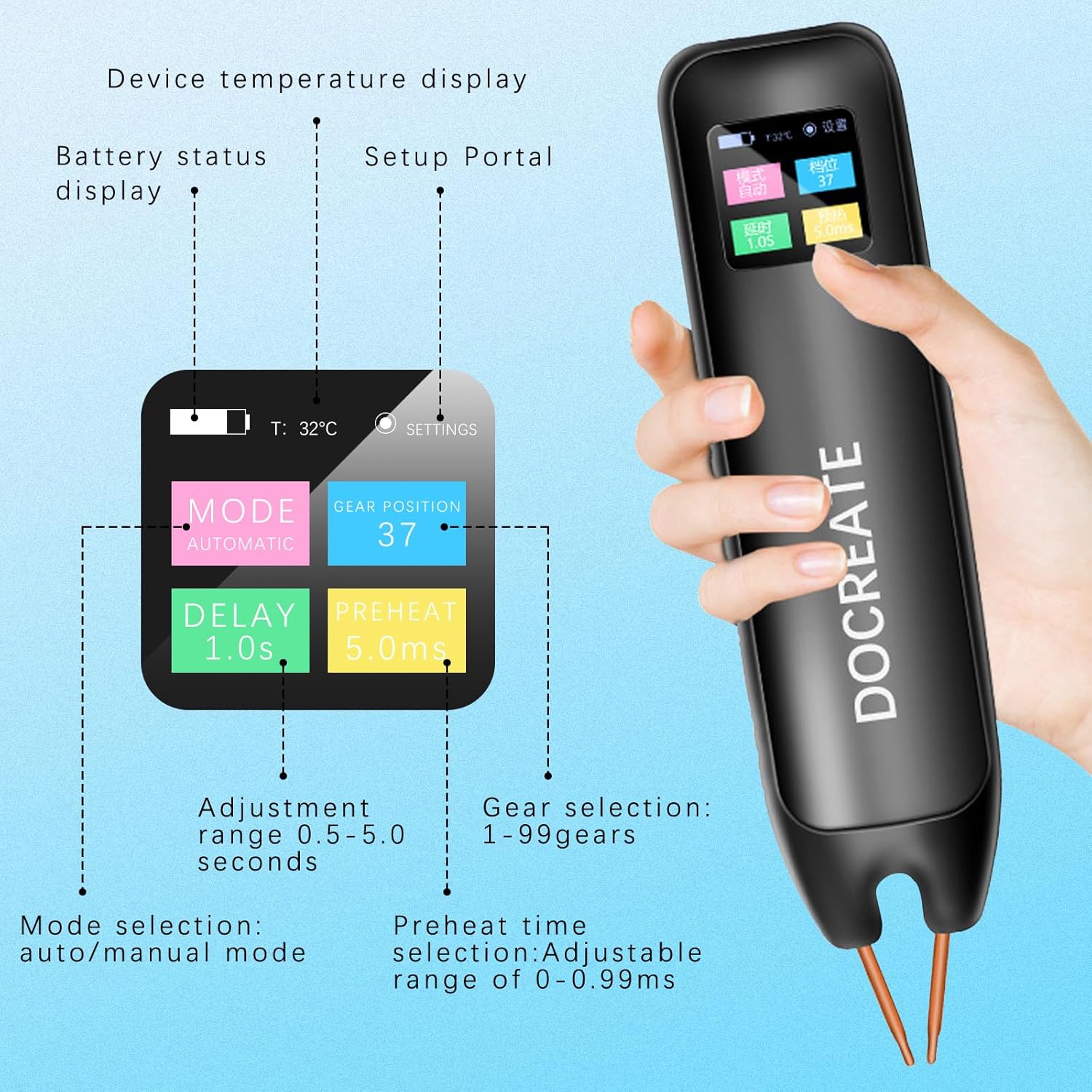
- LCD ഡിസ്പ്ലേ: Provides real-time information including temperature, mode, preheat time, trigger time, power level, and battery status.
- 99 ക്രമീകരിക്കാവുന്ന ഗിയറുകൾ: Allows for precise control over welding parameters to suit various materials and thicknesses.
- Dual Pulse Technology: Ensures strong and reliable welds.
- Auto/Manual Modes: Offers flexibility in operation.

5. സജ്ജീകരണം
5.1 ഉപകരണം ചാർജ് ചെയ്യുന്നു
Before first use, fully charge the spot welder using the provided Type-C charging cable. Connect the cable to the device's Type-C port and a compatible USB power adapter (not included).

5.2. പവർ ഓൺ/ഓഫ്
Press and hold the power button on the side of the device to turn it on or off. The LCD screen will illuminate upon power-on.
6. പ്രവർത്തന നിർദ്ദേശങ്ങൾ
The spot welder offers both automatic and manual modes for different welding preferences.
6.1. മോഡ് തിരഞ്ഞെടുക്കൽ
The device allows switching between Automatic and Manual modes. Use the controls on the device to navigate the LCD menu and select your desired mode.
6.2. ഓട്ടോമാറ്റിക് മോഡ്
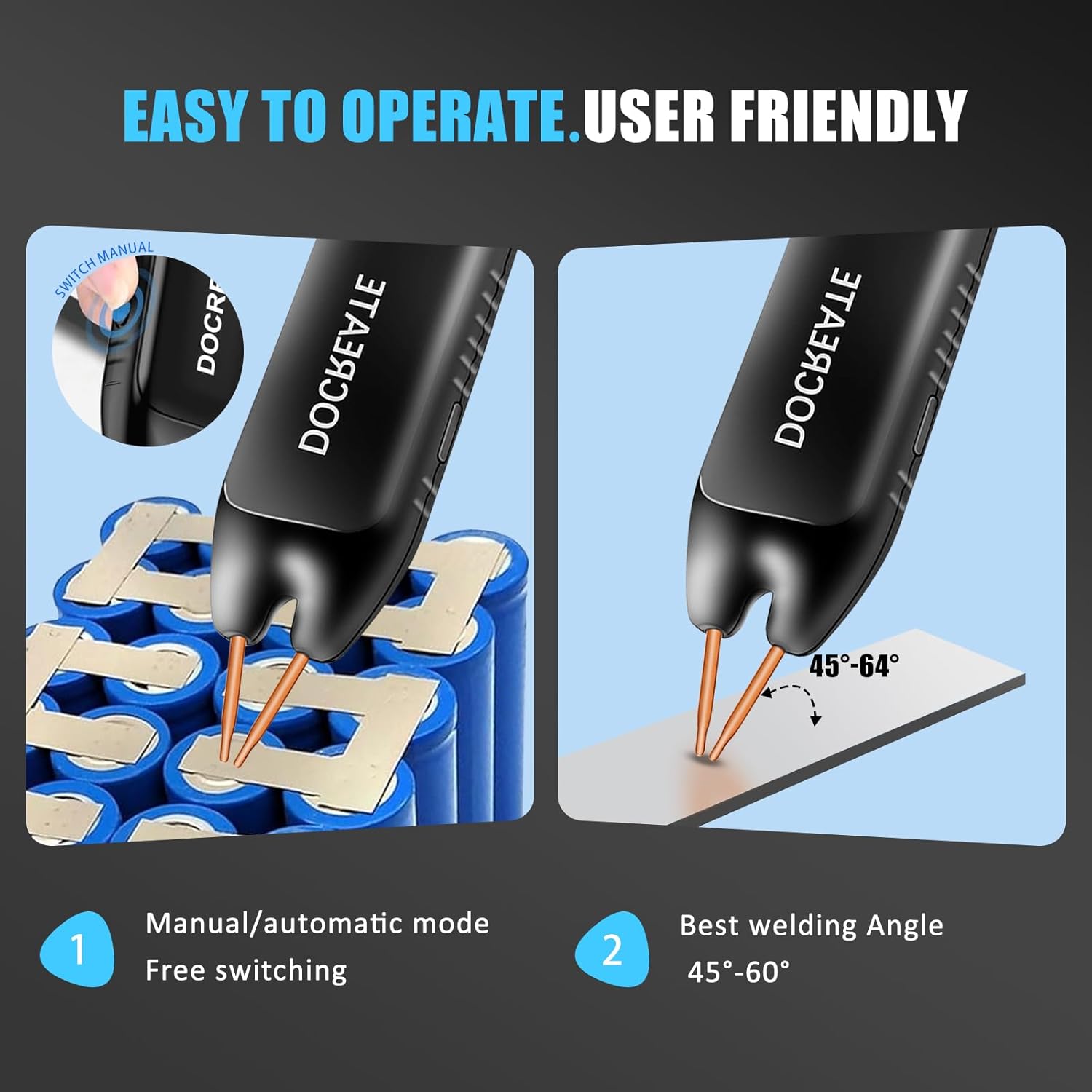
In Automatic Mode, simply place both welding pins firmly on the desired welding position. The device will automatically detect contact and initiate the weld after a set delay time. Ensure the welding pins are inclined at an angle of 45°-60° to the welding surface for optimal results.
6.3. മാനുവൽ മോഡ്
In Manual Mode, you have direct control over the welding trigger. Adjust parameters via the LCD display. Place both welding pins firmly on the desired welding position, ensuring a 45°-60° inclination. Then, press the welding button on the side of the device to initiate the weld.
6.4. Adjusting Welding Gears (Power Level)
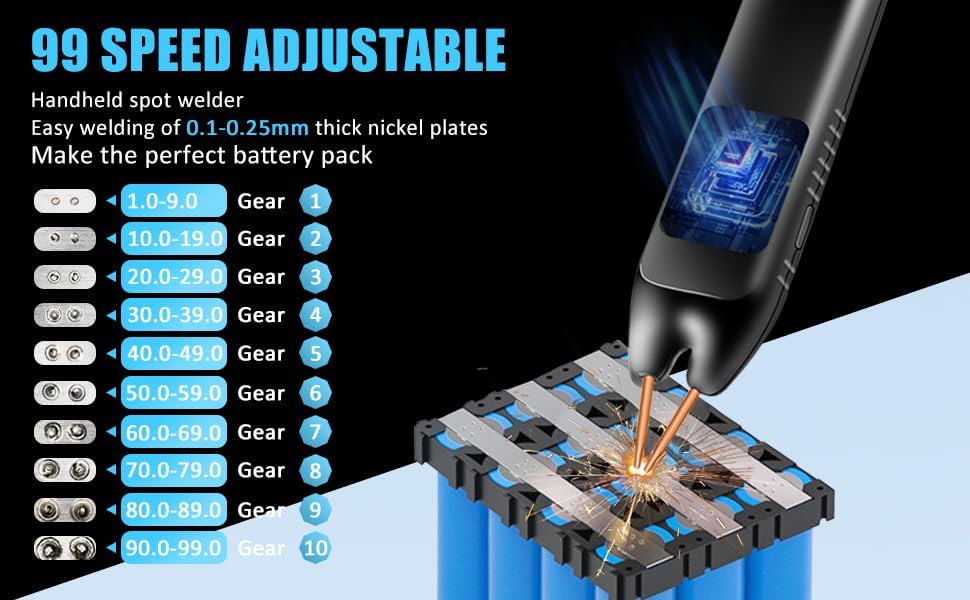
The spot welder features 99 adjustable gears to control the welding power. Higher gear numbers correspond to higher power. Adjust the gear setting via the LCD display to match the thickness of the nickel-plated sheets you are welding (0.1mm to 0.25mm).
7. പരിപാലനം
ശരിയായ അറ്റകുറ്റപ്പണി നിങ്ങളുടെ സ്പോട്ട് വെൽഡറുടെ ദീർഘായുസ്സും മികച്ച പ്രകടനവും ഉറപ്പാക്കുന്നു.
- വൃത്തിയാക്കൽ: Regularly wipe the device with a dry, soft cloth. Do not use abrasive cleaners or solvents.
- ഇലക്ട്രോഡ് പരിചരണം: The copper pins (electrodes) are replaceable. If they become worn or oxidized, gently sand them with the provided sandpaper or replace them to ensure good electrical contact.
- സംഭരണം: Store the spot welder in a cool, dry place away from direct sunlight and moisture.
- ബാറ്ററി: ദീർഘകാല സംഭരണത്തിനായി, ബാറ്ററിയുടെ ആയുസ്സ് നിലനിർത്താൻ ഭാഗികമായി (ഏകദേശം 50%) ചാർജ്ജ് ചെയ്തിട്ടുണ്ടെന്ന് ഉറപ്പാക്കുക.
8. പ്രശ്നപരിഹാരം
If you encounter issues with your spot welder, refer to the following common problems and solutions:
- ഉപകരണം ഓണാക്കുന്നില്ല: Ensure the battery is charged. Connect the Type-C charging cable and allow it to charge for some time before attempting to power on again.
- Weak or inconsistent welds:
- Check the battery level; a low battery can affect welding power.
- Increase the gear (power) setting.
- Ensure the welding pins are clean and have good contact with the nickel sheet and battery terminal. Sand the tips if necessary.
- Verify the welding angle (45°-60°) and apply firm, even pressure.
- അമിത ചൂടാക്കൽ: The device has an intelligent internal temperature detection system. If it overheats, it may temporarily shut down. Allow it to cool down before resuming operation.
- LCD display issues: If the display is not functioning correctly, try restarting the device. If the problem persists, contact customer support.
9 സ്പെസിഫിക്കേഷനുകൾ
| ഫീച്ചർ | സ്പെസിഫിക്കേഷൻ |
|---|---|
| ബ്രാൻഡ് | Docreate |
| മോഡൽ നമ്പർ | ഡോക്രിയേറ്റ്-757 |
| ഇനത്തിൻ്റെ ഭാരം | 9.9 ഔൺസ് |
| ഉൽപ്പന്ന അളവുകൾ | 7.72 x 1.62 x 1.62 ഇഞ്ച് |
| നിറം | Spot Welder, 99 Gears |
| പവർ ഉറവിടം | ബാറ്ററി പവർ |
| വാട്ട്tage | 4.2 മില്ലിവാട്ട് |
| വെൽഡിംഗ് കനം | 0.1-0.25mm (nickel-plated sheets) |
| ക്രമീകരിക്കാവുന്ന ഗിയറുകൾ | 99 |
10. വാറൻ്റിയും പിന്തുണയും
Docreate products are manufactured to the highest quality standards. For warranty information, technical support, or any inquiries regarding your spot welder, please contact Docreate customer service through the retailer's platform or the official Docreate website. Please have your model number (Docreate-757) and purchase details ready when contacting support.