
nubia Nubia Pad 3D
Nubia Pad 3D User Manual
Model: Nubia Pad 3D
ആമുഖം
This user manual provides comprehensive instructions for the safe and efficient operation of your Nubia Pad 3D. Please read this manual thoroughly before using the device and keep it for future reference.
The Nubia Pad 3D is an advanced tablet featuring a unique 12.4-inch 3D display, powerful processing capabilities, and high-resolution cameras, designed for an immersive visual experience.
പ്രധാനപ്പെട്ട സുരക്ഷാ വിവരങ്ങൾ
To prevent injury or damage to your device, observe the following precautions:
- ഉപകരണത്തെ തീവ്രമായ താപനിലയിലോ, നേരിട്ടുള്ള സൂര്യപ്രകാശത്തിലോ, ഉയർന്ന ആർദ്രതയിലോ തുറന്നുകാട്ടരുത്.
- ഉപകരണം താഴെയിടുകയോ ഗുരുതരമായ ആഘാതത്തിന് വിധേയമാക്കുകയോ ചെയ്യുന്നത് ഒഴിവാക്കുക.
- നിർമ്മാതാവ് അംഗീകരിച്ച ചാർജറുകളും അനുബന്ധ ഉപകരണങ്ങളും മാത്രം ഉപയോഗിക്കുക.
- ഉപകരണം സ്വയം വേർപെടുത്താനോ നന്നാക്കാനോ ശ്രമിക്കരുത്. യോഗ്യതയുള്ള സേവന ഉദ്യോഗസ്ഥരെ ബന്ധപ്പെടുക.
- ഉപകരണം വെള്ളത്തിൽ നിന്നും മറ്റ് ദ്രാവകങ്ങളിൽ നിന്നും അകറ്റി നിർത്തുക.
സജ്ജീകരണ ഗൈഡ്
1. അൺബോക്സിംഗും പ്രാരംഭ പരിശോധനയും
പാക്കേജിംഗിൽ നിന്ന് എല്ലാ ഘടകങ്ങളും ശ്രദ്ധാപൂർവ്വം നീക്കം ചെയ്യുക. താഴെ പട്ടികപ്പെടുത്തിയിരിക്കുന്ന എല്ലാ ഇനങ്ങളും ഉണ്ടെന്നും കേടുപാടുകൾ സംഭവിച്ചിട്ടില്ലെന്നും ഉറപ്പാക്കുക:
- Nubia Pad 3D Tablet
- USB-C ചാർജിംഗ് കേബിൾ
- പവർ അഡാപ്റ്റർ
- ദ്രുത ആരംഭ ഗൈഡ്

Figure 1: The Nubia Pad 3D tablet showcasing its immersive 3D display with an astronaut and floral scene.
2 ഉപകരണം ചാർജ് ചെയ്യുന്നു
Before first use, fully charge the Nubia Pad 3D. Connect the USB-C cable to the tablet's charging port and the other end to the power adapter. Plug the adapter into a wall outlet.
- ചാർജിംഗ് ഇൻഡിക്കേറ്റർ ലൈറ്റ് പ്രകാശിക്കും.
- സാധാരണയായി ഒരു പൂർണ്ണ ചാർജ് ഏകദേശം 2-3 മണിക്കൂർ എടുക്കും.
- The device features a 9070 mAh battery for extended use.

Figure 2: An illustration highlighting the 9070 mAh battery capacity of the Nubia Pad 3D, indicating its long endurance.
3. പ്രാരംഭ പവർ ഓണും സജ്ജീകരണ വിസാർഡും
Press and hold the power button (located on the side of the tablet) until the Nubia logo appears. Follow the on-screen instructions to complete the initial setup, including language selection, Wi-Fi connection, and account setup.
പ്രവർത്തന നിർദ്ദേശങ്ങൾ
1. ഇന്റർഫേസ് നാവിഗേറ്റ് ചെയ്യുന്നു
The Nubia Pad 3D runs on iOS (as per specifications). Use touch gestures to navigate:
- ടാപ്പ് ചെയ്യുക: ഒരു ഇനം തിരഞ്ഞെടുക്കുകയോ ഒരു ആപ്പ് തുറക്കുകയോ ചെയ്യുക.
- സ്വൈപ്പ്: പേജുകളിലൂടെയോ ലിസ്റ്റുകളിലൂടെയോ സ്ക്രോൾ ചെയ്യുക.
- പിഞ്ച്-ടു-സൂം: ചിത്രങ്ങൾ സൂം ഇൻ ചെയ്യുകയോ ഔട്ട് ചെയ്യുകയോ ചെയ്യുക, web പേജുകൾ.
2. Understanding the 3D Display
The Nubia Pad 3D features a 12.4-inch IPS display with 3D technology and a 120Hz refresh rate. It allows seamless switching between 2D and 3D modes.
To activate 3D mode, locate the dedicated 3D button or setting within the display options. For optimal 3D viewing, ensure you are positioned directly in front of the screen.
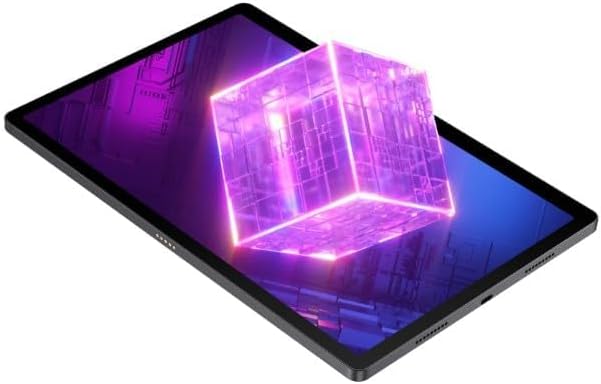
Figure 3: The Nubia Pad 3D screen displaying a vibrant 3D cube, illustrating its stereoscopic capabilities.
3. ക്യാമറ ഉപയോഗം
The tablet is equipped with a 16 MP rear camera and 8 MP front cameras. Open the Camera application to capture photos and videos.
- പിൻ ക്യാമറ: Ideal for high-resolution photos and scanning.
- മുൻ ക്യാമറകൾ: Suitable for video calls and selfies.

ചിത്രം 4: പിൻഭാഗം view of the Nubia Pad 3D, highlighting the dual camera setup and the "3D" branding near the camera module.
4. ഓഡിയോ സവിശേഷതകൾ
The Nubia Pad 3D features quad stereo speakers with Dolby Atmos technology, providing an enhanced audio experience for media consumption.

Figure 5: A diagram illustrating the placement of the quad stereo speakers on the Nubia Pad 3D, emphasizing Dolby Atmos technology for superior sound.
മെയിൻ്റനൻസ്
1. ഉപകരണം വൃത്തിയാക്കൽ
ടാബ്ലെറ്റിന്റെ സ്ക്രീനും ബോഡിയും വൃത്തിയാക്കാൻ മൃദുവായ, ലിന്റ് രഹിത തുണി ഉപയോഗിക്കുക. കഠിനമായ പാടുകൾക്ക്, ചെറുതായി ഡി.ampഇലക്ട്രോണിക് ഉപകരണങ്ങൾക്കായി രൂപകൽപ്പന ചെയ്ത ഒരു സ്ക്രീൻ ക്ലീനർ അല്ലെങ്കിൽ വെള്ളം ഉപയോഗിച്ചുള്ള തുണി. കഠിനമായ രാസവസ്തുക്കളോ ഉരച്ചിലുകളോ ഉള്ള വസ്തുക്കൾ ഉപയോഗിക്കുന്നത് ഒഴിവാക്കുക.
2. സോഫ്റ്റ്വെയർ അപ്ഡേറ്റുകൾ
Regularly check for and install software updates to ensure optimal performance, security, and access to new features. Navigate to Settings > General > Software Update to check for available updates.
3. ബാറ്ററി പരിചരണം
ബാറ്ററി ആയുസ്സ് വർദ്ധിപ്പിക്കാൻ:
- ബാറ്ററി ഇടയ്ക്കിടെ പൂർണ്ണമായും ഡിസ്ചാർജ് ചെയ്യുന്നത് ഒഴിവാക്കുക.
- പൂർണ്ണമായി ചാർജ് ചെയ്തതിനുശേഷം ഉപകരണം കൂടുതൽ നേരം ചാർജ് ചെയ്യാൻ അനുവദിക്കരുത്.
- Store the device in a cool, dry place when not in use for long periods.
ട്രബിൾഷൂട്ടിംഗ്
This section addresses common issues you might encounter with your Nubia Pad 3D.
| പ്രശ്നം | സാധ്യമായ കാരണം | പരിഹാരം |
|---|---|---|
| ഉപകരണം പവർ ഓണാക്കുന്നില്ല. | ബാറ്ററി കുറവാണ്; സോഫ്റ്റ്വെയർ തകരാറ്. | കുറഞ്ഞത് 30 മിനിറ്റെങ്കിലും ഉപകരണം ചാർജ് ചെയ്യുക. പവർ ബട്ടൺ 10-15 സെക്കൻഡ് അമർത്തിപ്പിടിച്ചുകൊണ്ട് ഒരു ഫോഴ്സ് റീസ്റ്റാർട്ട് നടത്തുക. |
| സ്ക്രീൻ പ്രതികരിക്കുന്നില്ല. | താൽക്കാലിക സോഫ്റ്റ്വെയർ തകരാർ. | ഉപകരണം പുനരാരംഭിക്കുക. സ്ക്രീൻ വൃത്തിയുള്ളതും വരണ്ടതുമാണെന്ന് ഉറപ്പാക്കുക. |
| 3D effect is not visible or distorted. | തെറ്റാണ് viewing angle; 3D mode not activated. | നിങ്ങളാണെന്ന് ഉറപ്പാക്കുക viewing the screen directly. Check display settings to confirm 3D mode is enabled. |
| ബാറ്ററി പെട്ടെന്ന് തീരുന്നു. | Too many apps running in background; high screen brightness. | Close unused apps. Reduce screen brightness. Disable unnecessary features like Bluetooth/Wi-Fi when not in use. |
പ്രശ്നം നിലനിൽക്കുകയാണെങ്കിൽ, ദയവായി ഉപഭോക്തൃ പിന്തുണയുമായി ബന്ധപ്പെടുക.
സ്പെസിഫിക്കേഷനുകൾ
Below are the key technical specifications for the Nubia Pad 3D:
- മോഡലിൻ്റെ പേര്: Nubia Pad 3D
- ഡിസ്പ്ലേ: 12.4 Inches, 3D IPS, 120Hz refresh rate
- പ്രോസസ്സർ: Snapdragon 888 (Note: Product specifications also list Intel Processor Brand, but Snapdragon 888 is mentioned in the product description.)
- റാം: 12 ജിബി
- സംഭരണം: 256 ജിബി
- ഓപ്പറേറ്റിംഗ് സിസ്റ്റം: iOS (Note: This is unusual for a Snapdragon device, but stated in provided data.)
- പിൻ ക്യാമറ: 16 എം.പി
- മുൻ ക്യാമറ: 8 എം.പി
- ബാറ്ററി: 9070 mAh (up to 20 hours battery life)
- ഓഡിയോ: Quad Stereo Speakers with Dolby Atmos
- കണക്റ്റിവിറ്റി: Cellular, 802.11g Wireless
- ഭാരം: 1.3 കിലോഗ്രാം
- അളവുകൾ: 31.5 x 22 x 4 സെ.മീ (പാക്കേജ് അളവുകൾ)
വാറൻ്റിയും പിന്തുണയും
For warranty information and customer support, please refer to the warranty card included with your product or visit the official Nubia webസൈറ്റ്. വാറന്റി ക്ലെയിമുകൾക്കായി നിങ്ങളുടെ വാങ്ങലിന്റെ തെളിവ് സൂക്ഷിക്കുക.
ഓൺലൈൻ പിന്തുണ: Visit the official Nubia Store on Amazon