
1. സജ്ജീകരണവും ബാറ്ററി ഇൻസ്റ്റാളേഷനും
This replacement remote control requires two (2) AA batteries for operation. Batteries are not included with the remote control.
- റിമോട്ട് കൺട്രോളിന്റെ പിൻഭാഗത്ത് ബാറ്ററി കമ്പാർട്ട്മെന്റ് കണ്ടെത്തുക.
- ബാറ്ററി കമ്പാർട്ട്മെന്റ് കവർ തുറക്കാൻ താഴേക്ക് സ്ലൈഡ് ചെയ്യുക അല്ലെങ്കിൽ ഒരു അമ്പടയാളം സൂചിപ്പിക്കുന്ന ദിശയിലേക്ക് സ്ലൈഡ് ചെയ്യുക.
- Insert two (2) AA batteries, ensuring the positive (+) and negative (-) terminals align correctly with the markings inside the compartment. Incorrect battery orientation can prevent the remote from functioning.
- സുരക്ഷിതമായി ക്ലിക്ക് ചെയ്യുന്നതുവരെ ബാറ്ററി കമ്പാർട്ട്മെന്റ് കവർ തിരികെ സ്ഥലത്തേക്ക് സ്ലൈഡ് ചെയ്യുക.

ചിത്രം 1: പിൻഭാഗം view of the remote control with the battery compartment open, illustrating the correct placement for two AA batteries.
After battery installation, the remote control is ready for use with your compatible Panasonic CD Stereo System.
2. അടിസ്ഥാന പ്രവർത്തനം
This remote control is designed to replicate the functions of the original remote for compatible Panasonic CD Stereo Systems. Point the remote control directly at the infrared receiver on your stereo system.
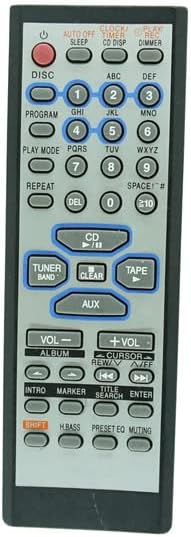
ചിത്രം 2: മുൻഭാഗം view of the replacement remote control, displaying its button layout.
പ്രധാന പ്രവർത്തനങ്ങൾ:
- പവർ ബട്ടൺ: Typically located at the top, used to turn the stereo system on or off.
- Disc/CD Controls: Buttons labeled 'DISC', 'CD', 'PLAY MODE', 'REPEAT', 'PROGRAM' control CD playback functions.
- വോളിയം നിയന്ത്രണങ്ങൾ: '+ VOL' and '- VOL' buttons adjust the audio output level.
- Tuner/Band: Used to switch between radio bands (AM/FM) and tune radio stations.
- ഓക്സ്: Selects the auxiliary input source.
- സംഖ്യാ കീപാഡ് (0-9): Used for direct track selection on CDs or radio station input.
- Navigation/Cursor: Buttons like 'CURSOR', 'ENTER' are used for menu navigation if supported by the stereo system.
കുറിപ്പ്: The functionality of certain buttons may vary depending on the specific Panasonic stereo system model. This replacement remote may not offer all functions present on the original remote control, or some functions may behave differently.
3. പരിചരണവും പരിപാലനവും
നിങ്ങളുടെ റിമോട്ട് കൺട്രോളിന്റെ ദീർഘായുസ്സും ശരിയായ പ്രവർത്തനവും ഉറപ്പാക്കാൻ, ഈ അറ്റകുറ്റപ്പണി മാർഗ്ഗനിർദ്ദേശങ്ങൾ പാലിക്കുക:
- വൃത്തിയാക്കൽ: Wipe the remote control periodically with a soft, dry cloth. For stubborn dirt, a slightly damp cloth can be used, but ensure no moisture enters the remote. Avoid using harsh chemicals or abrasive cleaners.
- ബാറ്ററി മാറ്റിസ്ഥാപിക്കൽ: Replace batteries when the remote's response becomes sluggish or it stops functioning. Always replace both batteries at the same time with new ones of the same type (AA). Do not mix old and new batteries, or different types of batteries.
- സംഭരണം: Store the remote control in a cool, dry place away from direct sunlight, extreme temperatures, and high humidity.
- കൈകാര്യം ചെയ്യൽ: Avoid dropping the remote control or subjecting it to strong impacts, as this can damage internal components.
4. പ്രശ്നപരിഹാരം
If you experience issues with your remote control, consider the following troubleshooting steps:
- റിമോട്ട് പ്രതികരിക്കുന്നില്ല:
- Check the batteries. Ensure they are inserted correctly with the correct polarity (+/-).
- ബാറ്ററികൾ പുതിയവ ഉപയോഗിച്ച് മാറ്റിസ്ഥാപിക്കുക.
- Ensure there is a clear line of sight between the remote control and the infrared receiver on your stereo system. Obstructions can block the signal.
- Verify that the stereo system is powered on.
- പരിമിതമായ പ്രവർത്തനം:
- This is a replacement remote. As stated in the product description, it may not work exactly as the original remote and some functions might not be supported or may behave differently.
- Ensure your stereo system model is listed as compatible. If your model number is not included in the compatibility list, the remote may not function correctly or at all.
- ഇടയ്ക്കിടെയുള്ള പ്രവർത്തനം:
- Weak batteries can cause intermittent operation. Replace them.
- Ensure the remote's infrared emitter (at the front tip) is clean and unobstructed.
If problems persist after following these steps, the remote control may not be fully compatible with your specific stereo system model or may have a defect.
5. ഉൽപ്പന്ന സവിശേഷതകൾ
| ബ്രാൻഡ് | ജനറിക് |
| നിർമ്മാതാവ് | ഈസിട്രി |
| മോഡൽ അനുയോജ്യത | Panasonic N2QAGB000002, N2QAGB000010, SA-AK44, SC-AK12, N2QAGB000004, SC-AK44, SA-AK33, SA-AK22, SA-AK12, SC-AK33, SC-AK22, SC-AK12, SC-AK22K, SC-AK42 CD Stereo Systems |
| കണക്റ്റിവിറ്റി ടെക്നോളജി | ഇൻഫ്രാറെഡ് (IR) |
| കൺട്രോളർ തരം | ബട്ടൺ നിയന്ത്രണം |
| ബാറ്ററികൾ ആവശ്യമാണ് | 2 x AA ബാറ്ററികൾ (ഉൾപ്പെടുത്തിയിട്ടില്ല) |
| മാതൃരാജ്യം | ചൈന |
| ASIN | B0CBMCBP5S |
6. വാറൻ്റി വിവരങ്ങൾ
Specific warranty details for this Generic replacement remote control are not provided in the product information. Please refer to the seller's return policy or contact the seller directly for any warranty-related inquiries.
7. ഉപഭോക്തൃ പിന്തുണ
For further assistance or questions regarding this product, please contact the seller directly through the platform where the purchase was made. Product support is provided by the seller, Easytry123.