
Yitouniu TH16
Yitouniu eWeLink WiFi Smart TH16 Switch User Manual
Model: TH16 (AYTU013)
1. ആമുഖം
The Yitouniu eWeLink WiFi Smart TH16 Switch is a versatile smart home device designed for remote and automatic control of electrical appliances. It integrates temperature and humidity monitoring capabilities, allowing devices to be turned on or off based on environmental conditions. This switch also features energy consumption monitoring and is compatible with popular voice assistants like Amazon Alexa and Google Home.
2 സുരക്ഷാ വിവരങ്ങൾ
- വൈദ്യുതാഘാതം തടയുന്നതിന് ഇൻസ്റ്റാളേഷനോ അറ്റകുറ്റപ്പണിക്കോ മുമ്പ് വൈദ്യുതി വിതരണം വിച്ഛേദിക്കപ്പെട്ടുവെന്ന് ഉറപ്പാക്കുക.
- This device operates on AC85-250V. Verify your electrical system compatibility.
- The maximum current supported is 16A. Do not exceed this rating to avoid damage or fire hazards.
- The AM2301 sensor is not waterproof. Avoid exposing it to water or high humidity environments.
- Installation should be performed by a qualified electrician if you are unfamiliar with electrical wiring.
- Operate the device only within the specified temperature and humidity ranges.
3. പാക്കേജ് ഉള്ളടക്കം
- 1 x TH16 Smart Switch
- 1 x AM2301 Temperature and Humidity Sensor
4. ഉൽപ്പന്നം കഴിഞ്ഞുview
The TH16 Smart Switch allows you to control connected devices and monitor environmental conditions. It features input and output terminals for wiring, a manual switch, and indicators for network status and RF pairing.

Image: Yitouniu TH16 Smart Switch connected to its AM2301 temperature and humidity sensor. The switch unit shows input/output terminals and control buttons.
The device is designed to integrate seamlessly into your smart home ecosystem, offering control via the eWeLink app and voice commands.

Image: The TH16 Smart Switch highlighting its compatibility with WiFi, Amazon Alexa, and Google Home, along with a smartphone displaying the eWeLink app interface.
5. സജ്ജീകരണം
5.1 വയറിംഗ് ഡയഗ്രം
Follow the wiring diagram carefully. Ensure all connections are secure and correct before applying power.
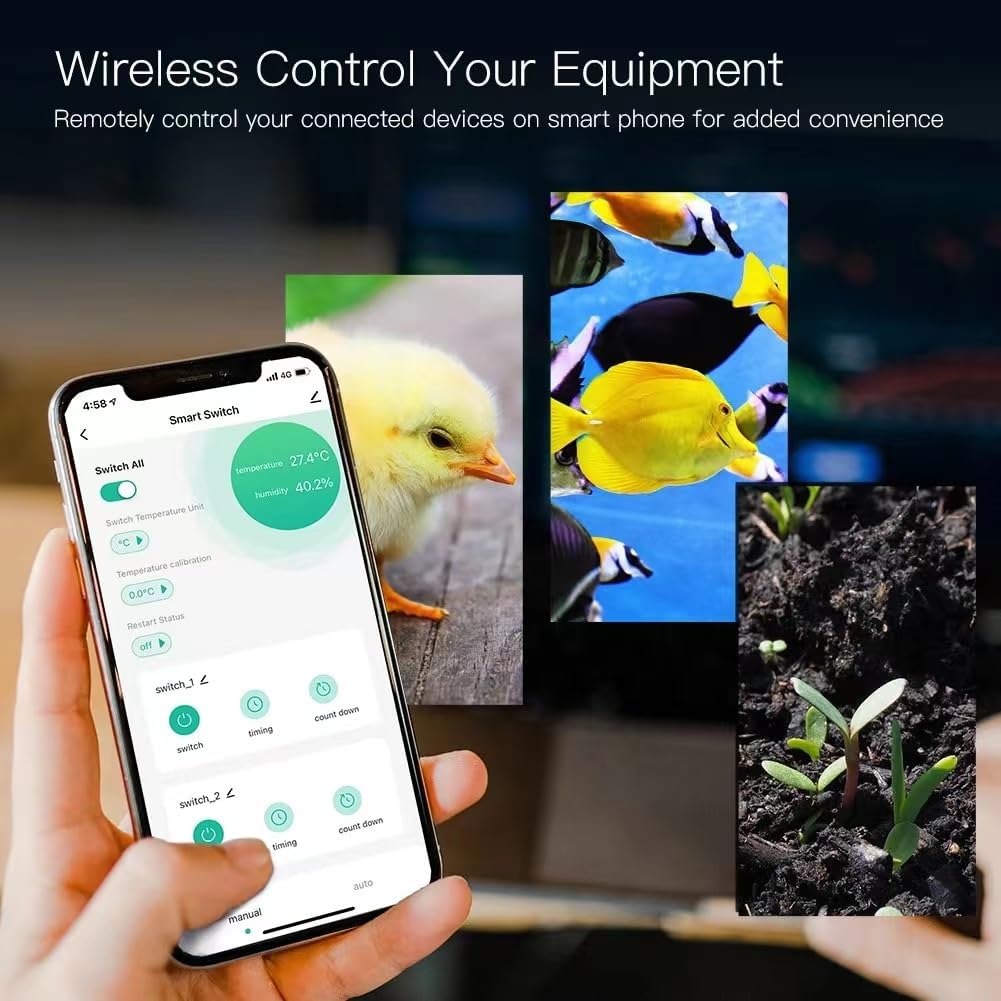
Image: Detailed wiring diagram for the TH16 Smart Switch. It shows input (L, N) and output (N, L) terminals connected to a power source and a light bulb, respectively. The sensor port is also visible.
- ഇൻപുട്ട്: Connect the live (L) and neutral (N) wires from your power source to the 'IN' terminals.
- ഔട്ട്പുട്ട്: Connect the live (L) and neutral (N) wires of the appliance you wish to control to the 'OUT' terminals.
- സെൻസർ: Plug the AM2301 sensor into the designated port on the switch.
5.2 അപ്ലിക്കേഷൻ ഇൻസ്റ്റാളേഷൻ
Download the eWeLink app from the App Store (iOS) or Google Play Store (Android). Register an account if you don't already have one.
5.3 Device Pairing (WiFi Connection)
- നിങ്ങളുടെ വൈഫൈ നെറ്റ്വർക്ക് 2.4GHz ആണെന്ന് ഉറപ്പാക്കുക. ഉപകരണം 5GHz വൈഫൈ പിന്തുണയ്ക്കുന്നില്ല.
- Power on the TH16 Smart Switch.
- ഒരു പുതിയ ഉപകരണം ചേർക്കാൻ eWeLink ആപ്പ് തുറന്ന് ഓൺ-സ്ക്രീൻ നിർദ്ദേശങ്ങൾ പാലിക്കുക.
- Put the device into pairing mode (usually by pressing and holding the pairing button until the LED indicator blinks rapidly).
- Enter your 2.4GHz WiFi network name and password in the app.
- Once connected, the device will appear in your eWeLink app.
6. പ്രവർത്തന നിർദ്ദേശങ്ങൾ
6.1 Remote ON/OFF Control
From the eWeLink app, you can remotely turn connected devices on or off from anywhere with an internet connection. The app provides real-time device status.
6.2 താപനില, ഈർപ്പം നിയന്ത്രണം
The TH16 switch, with the AM2301 sensor, allows for intelligent control based on environmental conditions.
- തത്സമയ നിരീക്ഷണം: View current temperature and humidity readings in the eWeLink app.
- യാന്ത്രിക മോഡ്: Set specific temperature and humidity ranges within the app. The switch will automatically turn connected devices on or off when these conditions are met.
- മാനുവൽ മോഡ്: Override automatic settings to manually control the device immediately.
- Smart Scene Trigger: Temperature and humidity values can be used as triggers for other eWeLink smart scenes, automating actions across multiple devices.
6.3 Timing Functions
Automate your devices with various timing options.

Image: The eWeLink app interface showing options for scheduling device operation, including repeat, once, and specific date/time settings. Various appliances like a humidifier, fish tank, kettle, and lamp are shown as examples of timed devices.
- Scheduled Timers: Set devices to turn on/off at specific times on chosen days.
- Countdown Timers: Set a countdown for the device to turn on or off after a specified duration.
- ലൂപ്പ് ടൈമറുകൾ: Configure devices to cycle on and off repeatedly for set intervals.
6.4 ശബ്ദ നിയന്ത്രണം
Integrate your TH16 Smart Switch with Amazon Alexa or Google Home for convenient voice control.

Image: A smart bulb, Amazon Echo, and Google Home device in a living room setting, with speech bubbles indicating voice commands like 'Alexa, turn on the lights.' This illustrates the voice control capability of the smart switch.
- Link your eWeLink account to your Amazon Alexa or Google Home app.
- Use voice commands such as "Alexa, turn on [device name]" or "Hey Google, set [device name] to auto mode."
6.5 ഊർജ്ജ ഉപഭോഗ നിരീക്ഷണം
The eWeLink app provides real-time monitoring of the energy consumption of connected devices, allowing you to track and manage power usage.
6.6 Share Control
Share control of your smart switch with family members through the eWeLink app.

Image: The eWeLink app interface demonstrating the 'Share Device' function, where a user can add family members (Dad, Mom) and assign specific permissions (Add, Modify, Delete, Enable/Disable) for controlling the smart switch.
- In the eWeLink app, navigate to the device settings and select 'Share Device'.
- Enter the eWeLink account of the person you wish to share with and set their permissions.
7. പരിപാലനം
- ഉണങ്ങിയതും മൃദുവായതുമായ തുണി ഉപയോഗിച്ച് ഉപകരണം വൃത്തിയാക്കുക. ലിക്വിഡ് ക്ലീനറുകളോ എയറോസോളുകളോ ഉപയോഗിക്കരുത്.
- Ensure the AM2301 sensor remains dry and free from dust for accurate readings.
- നേരിട്ട് സൂര്യപ്രകാശത്തിലോ ചൂട് സ്രോതസ്സുകൾക്ക് സമീപമോ ഉപകരണം സ്ഥാപിക്കുന്നത് ഒഴിവാക്കുക.
- ഒപ്റ്റിമൽ പ്രകടനവും സുരക്ഷയും ഉറപ്പാക്കാൻ eWeLink ആപ്പിൽ ഫേംവെയർ അപ്ഡേറ്റുകൾക്കായി പതിവായി പരിശോധിക്കുക.
8. പ്രശ്നപരിഹാരം
- ഉപകരണം വൈഫൈയിലേക്ക് കണക്റ്റ് ചെയ്യുന്നില്ല: Ensure your WiFi is 2.4GHz. Check WiFi password. Move the device closer to the router. Try resetting the device and re-pairing.
- ഉപകരണം ഓൺ/ഓഫ് ചെയ്യുന്നില്ല: Verify wiring connections. Check if the appliance itself is working. Ensure the switch has power.
- കൃത്യമല്ലാത്ത താപനില/ഈർപ്പനില റീഡിംഗുകൾ: Ensure the AM2301 sensor is clean and not obstructed. Avoid placing the sensor in areas with extreme drafts or direct heat/cold sources.
- ശബ്ദ നിയന്ത്രണം പ്രവർത്തിക്കുന്നില്ല: Confirm eWeLink account is linked correctly in Alexa/Google Home app. Check device name for clarity. Ensure internet connection is stable.
- ഉപകരണം പ്രതികരിക്കുന്നില്ല: Try power cycling the switch (turn off and on). If issues persist, perform a factory reset (refer to eWeLink app for specific instructions) and re-pair.
9 സ്പെസിഫിക്കേഷനുകൾ
| ഫീച്ചർ | സ്പെസിഫിക്കേഷൻ |
|---|---|
| മോഡൽ നമ്പർ | AYTU013 (TH16) |
| ഇൻപുട്ട് വോളിയംtage | AC85-250V |
| പരമാവധി കറന്റ് | 16എ |
| പരമാവധി പവർ | 3500W |
| വൈഫൈ സ്റ്റാൻഡേർഡ് | 2.4GHz b/g/n |
| പ്രവർത്തന താപനില | Up to 100℃ (1E+2 Degrees Celsius) |
| ഉൽപ്പന്ന അളവുകൾ | 5.91 x 4.72 x 1.57 ഇഞ്ച് (15 x 12 x 4 സെ.മീ) |
| ഇനത്തിൻ്റെ ഭാരം | 2.89 ഔൺസ് (82 ഗ്രാം) |
| മെറ്റീരിയൽ | പ്ലാസ്റ്റിക് |
| ഉൾപ്പെടുത്തിയ ഘടകങ്ങൾ | Relay housing, relay module, Temperature Humidity Sensor |
AM2301 Sensor Specifications:
- Type: Not Waterproof sensor
- Temperature Measuring Range: -20℃~+100℃
- Humidity Measuring Range: 5%RH-90%RH
- ഓപ്പറേറ്റിംഗ് വോളിയംtagഇ: 3.0-5.5V
- ഭാരം: 14 ഗ്രാം
- നീളം: 0.25 മീ
10. വാറൻ്റിയും പിന്തുണയും
For warranty information and technical support, please refer to the seller's policy or contact Yitouniu customer service through your purchase platform. Keep your proof of purchase for any warranty claims.
Ask a question about this manual
Ask about setup, troubleshooting, compatibility, parts, safety, or missing instructions. Manuals+ will review the question and use this page’s manual context to help answer it.