
ആമുഖം
Thank you for choosing the GEARSTONE Foldable Magnetic Exercise Bike. This manual provides essential information for the safe assembly, operation, and maintenance of your exercise bike. Please read this manual thoroughly before use and keep it for future reference.
പ്രധാനപ്പെട്ട സുരക്ഷാ വിവരങ്ങൾ
- ഏതെങ്കിലും വ്യായാമ പരിപാടി ആരംഭിക്കുന്നതിന് മുമ്പ് നിങ്ങളുടെ ഡോക്ടറെ സമീപിക്കുക.
- വ്യായാമം ചെയ്യുന്നതിനുമുമ്പ് എപ്പോഴും വാം അപ്പ് ചെയ്യുക, തുടർന്ന് തണുപ്പിക്കുക.
- ഓരോ ഉപയോഗത്തിനും മുമ്പ് എല്ലാ ബോൾട്ടുകളും നട്ടുകളും സുരക്ഷിതമായി മുറുക്കിയിട്ടുണ്ടെന്ന് ഉറപ്പാക്കുക.
- വ്യായാമ ബൈക്ക് പരന്നതും സ്ഥിരതയുള്ളതുമായ ഒരു പ്രതലത്തിൽ വയ്ക്കുക.
- ഉപയോഗ സമയത്ത് ഉപകരണങ്ങളിൽ നിന്ന് കുട്ടികളെയും വളർത്തുമൃഗങ്ങളെയും അകറ്റി നിർത്തുക.
- The maximum user weight capacity for this bike is 120 kg (264 lbs).
- നിങ്ങൾക്ക് ക്ഷീണം, തലകറക്കം, അല്ലെങ്കിൽ വേദന അനുഭവപ്പെടുകയാണെങ്കിൽ ഉടൻ വ്യായാമം നിർത്തുക.
- വ്യായാമത്തിന് അനുയോജ്യമായ വസ്ത്രങ്ങളും പാദരക്ഷകളും ധരിക്കുക.
പാക്കേജ് ഉള്ളടക്കം
Carefully unpack the box and ensure all parts are present. Refer to the diagram below for a visual representation of the components.

ചിത്രം 1: Package Contents. This image displays the various components and tools included with your exercise bike, such as the main frame, pedals, seat, backrest, and assembly tools.
പാക്കേജിൽ ഉൾപ്പെടണം:
- പ്രധാന ഫ്രെയിം അസംബ്ലി
- ഇടത്, വലത് പെഡലുകൾ
- Seat and Backrest
- Handlebar with LCD Monitor
- Stabilizer Bars (Front and Rear)
- Hardware Kit (bolts, nuts, washers)
- Assembly Tools (wrench, Allen key)
- ഉപയോക്തൃ മാനുവൽ
സജ്ജീകരണവും അസംബ്ലിയും
Follow these steps to assemble your GEARSTONE Foldable Magnetic Exercise Bike. It is recommended to have two people for assembly.
- സ്റ്റെബിലൈസർ ബാറുകൾ ഘടിപ്പിക്കുക: Secure the front and rear stabilizer bars to the main frame using the provided bolts and nuts. Ensure they are firmly tightened for stability.
- പെഡലുകൾ ഇൻസ്റ്റാൾ ചെയ്യുക: Identify the left (L) and right (R) pedals. The left pedal screws counter-clockwise, and the right pedal screws clockwise. Thread them into the crank arms and tighten securely.
- Mount Seat and Backrest: Insert the seat post into the main frame and adjust to your desired height. Secure it with the locking pin. Attach the backrest to the seat support.
- Attach Handlebar and Monitor: Connect the handlebar assembly to the main frame. Ensure all cables for the LCD monitor and pulse sensors are properly connected. Secure the handlebar with the designated bolts.
- അന്തിമ പരിശോധന: Before first use, double-check all connections and ensure all bolts and nuts are tightened.

ചിത്രം 2: Assembly Steps. This diagram illustrates the key stages of assembling the exercise bike, from attaching the base supports to installing the seat and pedals.
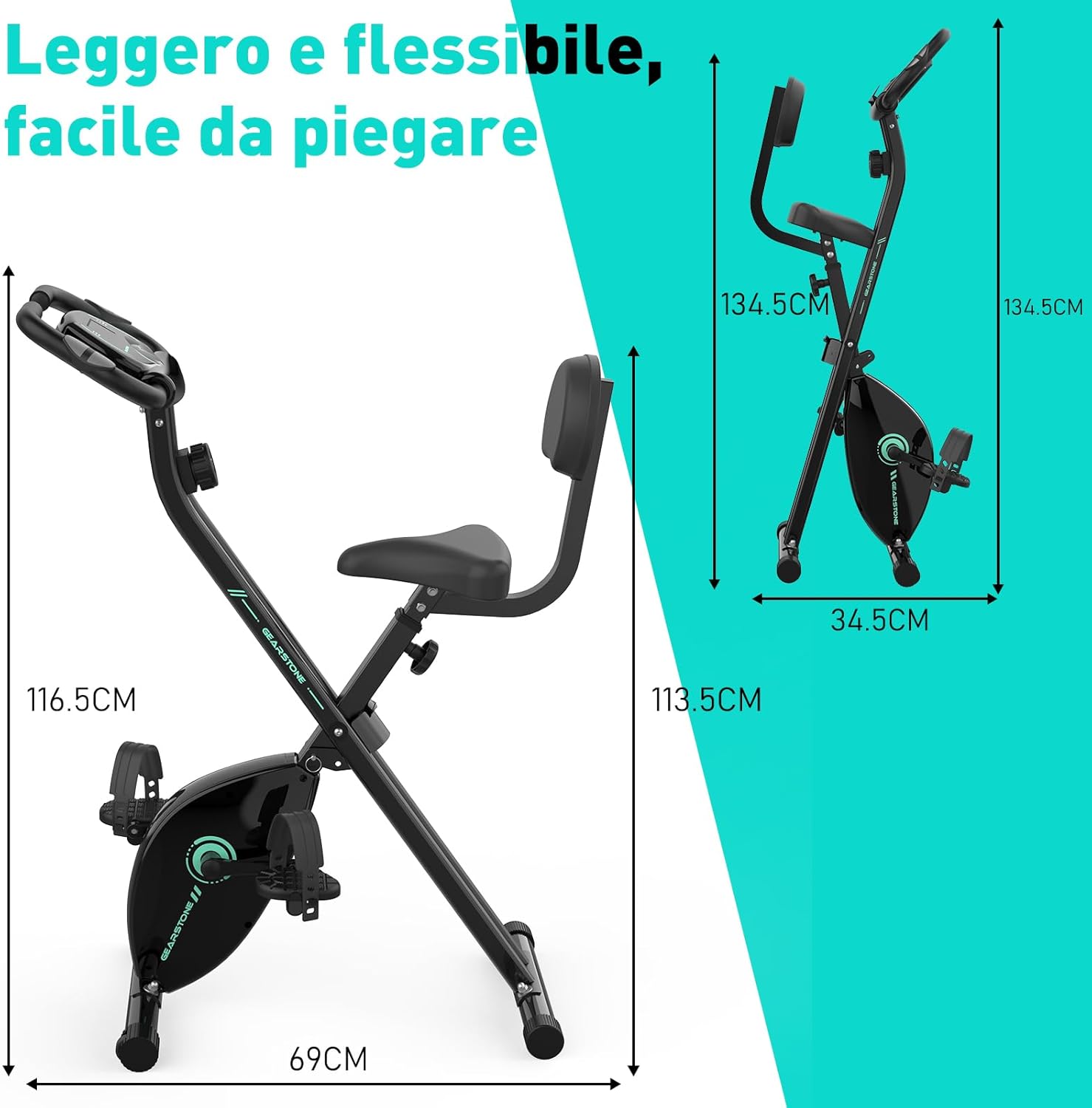
ചിത്രം 3: Assembled Bike Dimensions. This image shows the fully assembled exercise bike with its dimensions, highlighting its compact and foldable nature.
പ്രവർത്തന നിർദ്ദേശങ്ങൾ
സീറ്റ് ഉയരം ക്രമീകരിക്കുന്നു
The seat height can be adjusted to five different levels to accommodate various user heights. Loosen the adjustment knob located on the seat post, slide the seat to the desired height, and then tighten the knob securely. Ensure your knees have a slight bend at the bottom of the pedal stroke.

ചിത്രം 4: Seat and Resistance Adjustment. This image highlights the knob for adjusting magnetic resistance and the mechanism for adjusting seat height.
പ്രതിരോധം ക്രമീകരിക്കുന്നു
The bike features 8 levels of magnetic resistance. Turn the resistance knob, located below the LCD monitor, clockwise to increase resistance and counter-clockwise to decrease it. Start with a lower resistance and gradually increase as your fitness improves.
എൽസിഡി മോണിറ്റർ ഉപയോഗിക്കുന്നു
The LCD monitor displays key workout data. It is battery-powered. The monitor automatically turns on when you start pedaling or press a button.
- സ്കാൻ: Automatically cycles through all display functions every few seconds.
- സമയം: നിങ്ങളുടെ വ്യായാമത്തിന്റെ ദൈർഘ്യം പ്രദർശിപ്പിക്കുന്നു.
- വേഗത: നിങ്ങളുടെ നിലവിലെ സൈക്ലിംഗ് വേഗത കാണിക്കുന്നു.
- ദൂരം: Displays the distance covered during your current workout.
- കലോറികൾ: നിങ്ങളുടെ വ്യായാമ വേളയിൽ കത്തിച്ച കലോറികളുടെ എണ്ണം കണക്കാക്കുന്നു.
- ഓഡോമീറ്റർ (ODO): ആകെ സഞ്ചിത ദൂരം പ്രദർശിപ്പിക്കുന്നു.
- പൾസ്: Shows your heart rate when holding the pulse sensors on the handlebars.
To reset the monitor, press and hold the button for a few seconds, or remove and reinsert the batteries.

ചിത്രം 5: LCD Monitor Display. This image provides a detailed view of the LCD monitor and its various data display functions.

ചിത്രം 6: Resistance Control and Monitor Interaction. This image illustrates how to adjust the resistance level and interact with the LCD monitor's buttons.
ഫോൺ ഹോൾഡർ ഉപയോഗിക്കുന്നു
A phone holder is integrated into the LCD monitor panel. Place your smartphone or tablet securely in the holder to enjoy videos or music during your workout.
Folding the Bike for Storage
To fold the bike, loosen the main folding knob (usually located near the base of the frame). Carefully fold the frame inwards until it locks into its compact position. This design allows for easy storage and space-saving.
മെയിൻ്റനൻസ്
- വൃത്തിയാക്കൽ: പരസ്യം ഉപയോഗിച്ച് ബൈക്ക് തുടയ്ക്കുകamp ഓരോ ഉപയോഗത്തിനു ശേഷവും വിയർപ്പും പൊടിയും നീക്കം ചെയ്യാൻ തുണി ഉപയോഗിക്കുക. അബ്രാസീവ് ക്ലീനറുകൾ ഉപയോഗിക്കരുത്.
- പരിശോധന: എല്ലാ ബോൾട്ടുകൾ, നട്ടുകൾ, ചലിക്കുന്ന ഭാഗങ്ങൾ എന്നിവയുടെ ഇറുകിയതും തേയ്മാനവും പതിവായി പരിശോധിക്കുക. അയഞ്ഞ ഫാസ്റ്റനറുകൾ മുറുക്കുക.
- ലൂബ്രിക്കേഷൻ: The magnetic resistance system and belt drive are generally maintenance-free. Do not lubricate internal components unless specifically instructed by customer support.
- സംഭരണം: നേരിട്ടുള്ള സൂര്യപ്രകാശത്തിൽ നിന്നും കടുത്ത താപനിലയിൽ നിന്നും മാറി തണുത്തതും വരണ്ടതുമായ സ്ഥലത്ത് ബൈക്ക് സൂക്ഷിക്കുക.
- ബാറ്ററി മാറ്റിസ്ഥാപിക്കൽ: Replace the LCD monitor batteries when the display becomes dim or unresponsive.
ട്രബിൾഷൂട്ടിംഗ്
| പ്രശ്നം | സാധ്യമായ കാരണം | പരിഹാരം |
|---|---|---|
| എൽസിഡി മോണിറ്ററിൽ ഡിസ്പ്ലേ ഇല്ല | ബാറ്ററികൾ ഡെഡ് അല്ലെങ്കിൽ തെറ്റായി ഇൻസ്റ്റാൾ ചെയ്തു. | Replace batteries or ensure they are installed with correct polarity. |
| പൾസ് റീഡിംഗ് കൃത്യമല്ല | Hands not firmly on sensors; sensors are dirty. | Ensure firm contact with both pulse sensors. Clean sensors with a dry cloth. |
| ബൈക്ക് അസ്ഥിരമാണ് അല്ലെങ്കിൽ ആടുന്നു | അയഞ്ഞ ബോൾട്ടുകൾ; അസമമായ പ്രതലം. | Check and tighten all assembly bolts. Move the bike to a flat, level surface. |
| പ്രതിരോധം മാറുന്നില്ല | റെസിസ്റ്റൻസ് കേബിൾ വിച്ഛേദിക്കപ്പെട്ടു അല്ലെങ്കിൽ കേടായി. | Inspect the resistance cable connection. If damaged, contact customer support. |
| പ്രവർത്തന സമയത്ത് അസാധാരണമായ ശബ്ദം | Loose parts; friction from moving components. | Check all bolts and nuts for tightness. Ensure no foreign objects are caught in moving parts. If noise persists, contact customer support. |
സ്പെസിഫിക്കേഷനുകൾ
| ഫീച്ചർ | വിശദാംശങ്ങൾ |
|---|---|
| മോഡലിൻ്റെ പേര് | cyclette pieghevole |
| ബ്രാൻഡ് | ഗിയർസ്റ്റോൺ |
| പ്രതിരോധ സംവിധാനം | കാന്തിക |
| പ്രതിരോധ നിലകൾ | ക്രമീകരിക്കാവുന്ന 8 ലെവലുകൾ |
| ഡ്രൈവ് സിസ്റ്റം | ബെൽറ്റ് |
| പ്രധാന മെറ്റീരിയൽ | Steel, Metal, Foam/Leather |
| പരമാവധി ഭാരം ശേഷി | 120 കിലോഗ്രാം (264 പൗണ്ട്) |
| ഉൽപ്പന്ന അളവുകൾ (L x W x H) | 69 x 39 x 116.5 സെ.മീ (27.2 x 15.4 x 45.9 ഇഞ്ച്) |
| ഇനത്തിൻ്റെ ഭാരം | 15.6 കിലോഗ്രാം (34.4 പൗണ്ട്) |
| Power Source (Monitor) | ബാറ്ററി പവർ (ബാറ്ററികൾ ഉൾപ്പെടുത്തിയിട്ടില്ല) |
| പ്രത്യേക സവിശേഷതകൾ | Foldable design, LCD monitor, Pulse sensors, Phone holder, Adjustable seat (5 levels) |
വാറൻ്റിയും പിന്തുണയും
GEARSTONE provides a ഒരു വർഷത്തെ വാറൻ്റി for this product from the date of purchase. This warranty covers manufacturing defects and material faults under normal use.
If you encounter any issues with your exercise bike or have questions regarding its operation or maintenance, please do not hesitate to contact our customer support team. Provide your purchase details and a description of the issue for prompt assistance.
പിന്തുണയുമായി ബന്ധപ്പെടുക: നിങ്ങളുടെ വാങ്ങൽ ഡോക്യുമെന്റേഷൻ അല്ലെങ്കിൽ റീട്ടെയിലറുടെ website for the most up-to-date contact information (e.g., email address or support portal).
അധിക വിവരം
For more information about GEARSTONE products and fitness tips, visit our official webസൈറ്റ് അല്ലെങ്കിൽ സോഷ്യൽ മീഡിയ ചാനലുകൾ.