
ഡോറോ 8419
Doro 8200 4G Unlocked Smartphone User Manual
Model: 8419 | Brand: Doro
ആമുഖം
The Doro 8200 is a 4G unlocked smartphone designed with ease of use in mind, particularly for seniors. It combines modern smartphone functionalities with a simplified interface, large icons, and enhanced sound features to ensure a clear and intuitive user experience. This manual provides comprehensive instructions for setting up, operating, maintaining, and troubleshooting your Doro 8200 smartphone.

Figure 1: Doro 8200 smartphone in charging cradle.
സജ്ജമാക്കുക
1. ബോക്സിൽ എന്താണുള്ളത്?
Your Doro 8200 package includes the following items:
- ഡോറോ 8200 സ്മാർട്ട്ഫോൺ
- UK power adaptor
- USB C ചാർജിംഗ് കേബിൾ
- ചാർജ്ജിംഗ് തൊട്ടിൽ
- 1 ലിഥിയം അയൺ ബാറ്ററി (മുൻകൂട്ടി ഇൻസ്റ്റാൾ ചെയ്തതോ പ്രത്യേകം ഉൾപ്പെടുത്തിയതോ)
2. സിമ്മും മൈക്രോ എസ്ഡി കാർഡുകളും ചേർക്കൽ
The Doro 8200 supports Nano SIM cards and a Micro SD card of up to 128GB for expanded storage. Refer to the phone's manual for the exact location of the SIM/SD card tray, typically accessed via a small pin tool.
3. പ്രാരംഭ ചാർജിംഗും പവർ ഓണും
Before first use, fully charge your Doro 8200. Connect the USB C charging cable to the phone and the power adaptor, then plug into a wall socket. Alternatively, place the phone in the provided charging cradle. The phone will indicate charging status. Once charged, press and hold the power button to turn on the device.

Figure 2: Charging the Doro 8200 using the charging cradle.
ഉപകരണം പ്രവർത്തിപ്പിക്കുന്നു
1. യൂസർ ഇൻ്റർഫേസ്
The Doro 8200 offers a choice between a simplified Doro interface and the classic Android interface. The Doro interface features large, clear icons and an intuitive menu system for enhanced readability and ease of navigation.
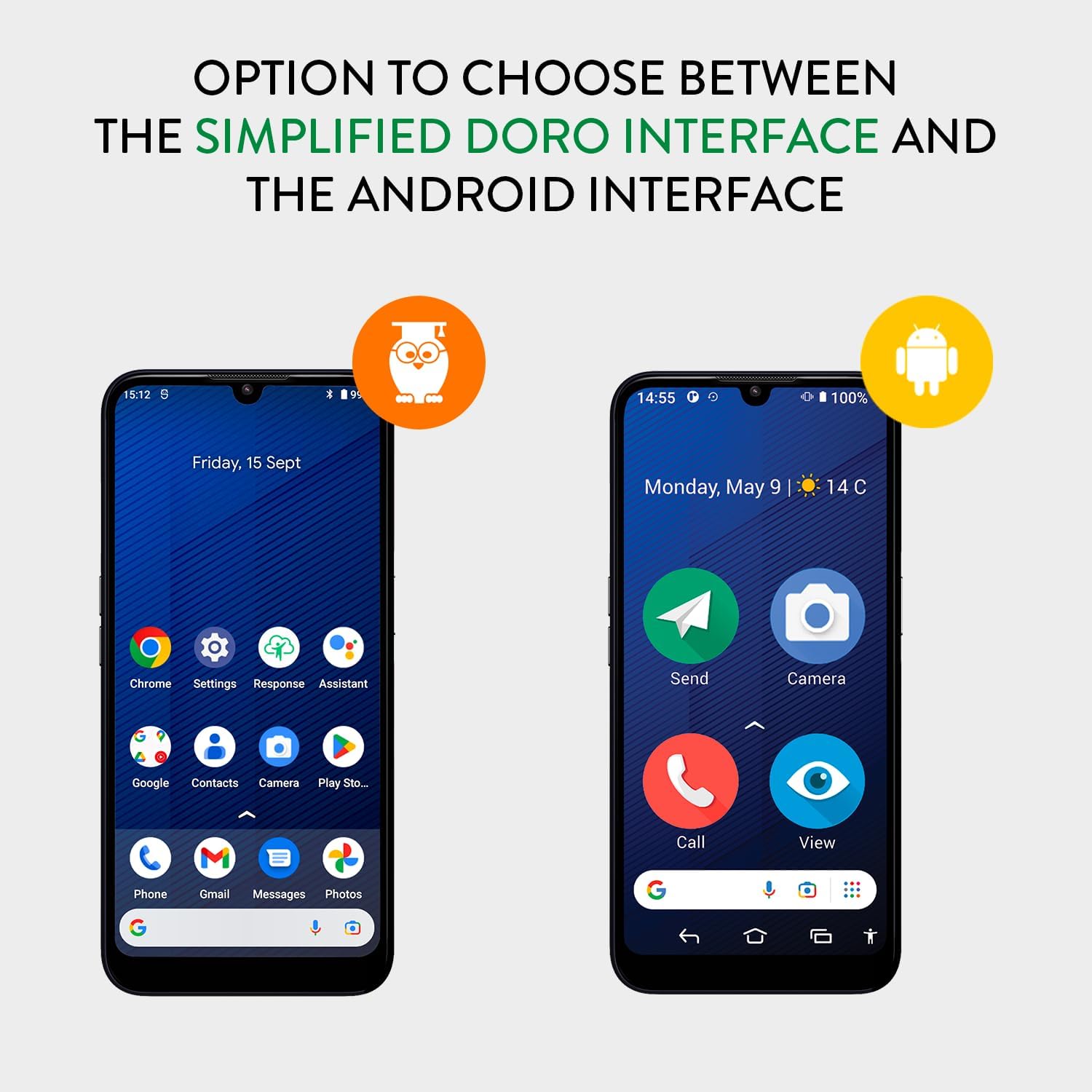
Figure 3: Option to choose between simplified Doro interface and standard Android interface.
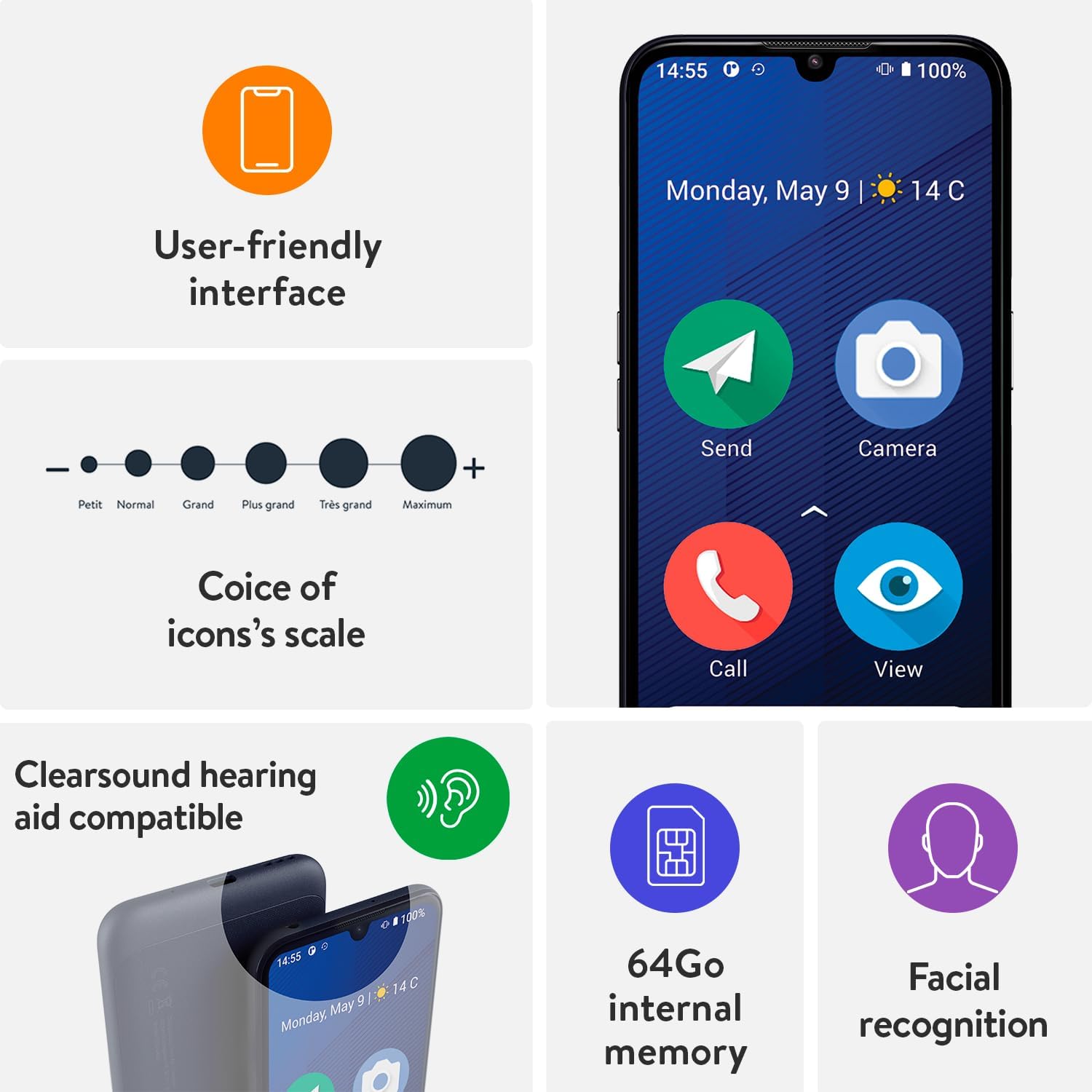
Figure 4: Key interface and accessibility features of the Doro 8200.
2. പ്രധാന സവിശേഷതകളും പ്രവർത്തനങ്ങളും
Assistance Button (Response by Doro)
The Doro 8200 features a dedicated Assistance Button on the back. When pressed, this button alerts all pre-set 'responders' in the Response by Doro app. It transmits the user's GPS location and can initiate a voice call with responders who accept the alert.
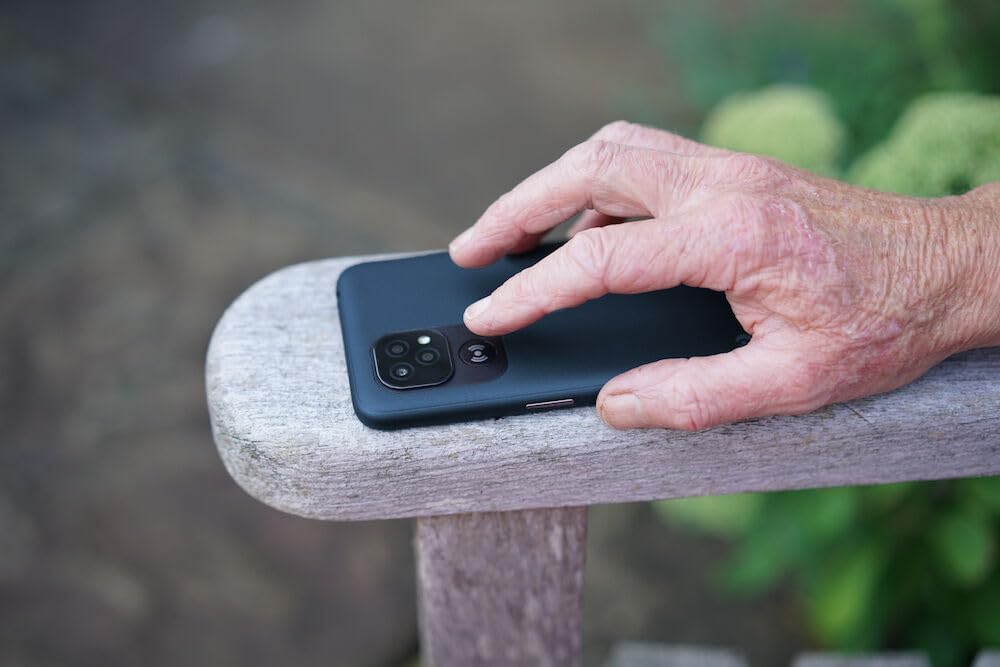
Figure 5: Location of the Assistance Button on the Doro 8200.

Figure 6: Key points of the Doro 8200, including the Assistance Button functionality.
ടീംViewer Remote Assistance
The pre-installed TeamViewer Quick Support app allows trusted contacts to provide remote assistance. This feature grants temporary, full access to your smartphone, enabling them to make modifications directly on your Doro 8200 from their own device.
Improved Sound (ClearSound & HAC)
Doro ClearSound technology ensures clear conversations even in noisy environments. The phone offers enhanced sound levels for ring signals and in-call volumes. It is also Hearing Aid Compatible (HAC) with a compatibility rating of M4/T3.
Triple Camera System
The Doro 8200 features a triple-camera design with a simplified camera menu. It includes a 16MP main lens, a 2MP portrait lens, a 2MP macro lens, and a 5MP front camera. The camera also supports QR code reading.
ജല പ്രതിരോധം (IP54)
This smartphone is resistant to water splashes and protected from limited dust ingress, classified as IP54.
മുഖം തിരിച്ചറിയൽ
You can configure the device to use face recognition for unlocking the phone and signing into compatible applications.
മറ്റ് സവിശേഷതകൾ
The Doro 8200 includes internet access, Bluetooth connectivity, a hands-free speakerphone, torch, calculator, calendar, compass, adjustable font and menu sizes, Wi-Fi access, Wi-Fi hotspot functionality, and NFC for contactless payments.

Figure 7: Using NFC for contactless payments with the Doro 8200.
3. Applications and Google Play Store
You can easily download and install any application from the Google Play Store. The phone comes with pre-installed Google Assistant on the homepage, along with essential Android and Google apps such as Gmail, Maps, and YouTube.
മെയിൻ്റനൻസ്
1. നിങ്ങളുടെ ഉപകരണം വൃത്തിയാക്കൽ
To clean your Doro 8200, use a soft, lint-free cloth. Avoid using abrasive cleaners, solvents, or aerosol sprays directly on the device. For stubborn marks, a slightly damp തുറസ്സുകളിൽ ഈർപ്പം കയറുന്നില്ലെന്ന് ഉറപ്പാക്കാൻ തുണി ഉപയോഗിക്കാം.
2. ബാറ്ററി പരിചരണം
To prolong battery life, avoid exposing the phone to extreme temperatures. Charge the battery regularly, but avoid leaving it fully charged or fully depleted for extended periods. Use only the provided UK power adaptor and USB C charging port.
3. സോഫ്റ്റ്വെയർ അപ്ഡേറ്റുകൾ
Ensure your device's software is kept up to date to benefit from the latest features, security enhancements, and bug fixes. Software updates are typically delivered over Wi-Fi. Check your phone's settings for available updates.
ട്രബിൾഷൂട്ടിംഗ്
നിങ്ങളുടെ Doro 8200-ൽ നിങ്ങൾ നേരിട്ടേക്കാവുന്ന സാധാരണ പ്രശ്നങ്ങൾക്കുള്ള പരിഹാരങ്ങൾ ഈ വിഭാഗം നൽകുന്നു.
| പ്രശ്നം | സാധ്യമായ കാരണം | പരിഹാരം |
|---|---|---|
| ഫോൺ ഓണാക്കുന്നില്ല | Low battery; software issue | Charge the phone for at least 30 minutes. If it still doesn't turn on, perform a forced restart (refer to device-specific instructions for button combination). |
| Cannot hear calls clearly | Volume too low; noisy environment; hearing aid compatibility settings | Increase call volume. Ensure ClearSound is enabled. If using a hearing aid, check HAC settings and positioning. |
| Apps not downloading/installing | No internet connection; insufficient storage; Google Play Store issue | Check Wi-Fi or mobile data connection. Clear cache/data for Google Play Store. Ensure sufficient memory storage (up to 128GB Micro SD supported). |
| Assistance button not working | Incorrect setup in Response by Doro app; no network connection | Verify responder contacts and settings in the Response by Doro app. Ensure the phone has a stable network connection. |
For further assistance, please refer to the official Doro support webസൈറ്റ് അല്ലെങ്കിൽ അവരുടെ ഉപഭോക്തൃ സേവനവുമായി ബന്ധപ്പെടുക.
സ്പെസിഫിക്കേഷനുകൾ
- മോഡൽ നമ്പർ: 8419
- ഓപ്പറേറ്റിംഗ് സിസ്റ്റം: ആൻഡ്രോയിഡ്
- റാം മെമ്മറി: 4 ജിബി
- മെമ്മറി സ്റ്റോറേജ് കപ്പാസിറ്റി: 128 GB (expandable with Micro SD up to 128GB)
- സ്ക്രീൻ വലിപ്പം: 6.1 ഇഞ്ച്
- റെസലൂഷൻ: 1560 x 720
- പുതുക്കൽ നിരക്ക്: 60 Hz
- പ്രധാന ക്യാമറ: 16എംപി
- മുൻ ക്യാമറ: 5എംപി
- ജല പ്രതിരോധം: IP54
- ബാറ്ററി: 1 ലിഥിയം അയോൺ (ഉൾപ്പെടുത്തിയിരിക്കുന്നു)
- ഉൽപ്പന്ന അളവുകൾ: 7.3 x 0.9 x 15.6 സെ.മീ; 170 ഗ്രാം
- വയർലെസ് കാരിയർ: അൺലോക്ക് ചെയ്തു
- ഭാഷ: ഇംഗ്ലീഷ്
- നിർമ്മാതാവ്: ഡോറോ
- ആദ്യം ലഭ്യമായ തീയതി: 18 ജൂലൈ 2023
വാറൻ്റിയും പിന്തുണയും
The Doro 8200 is manufactured by Doro. For information regarding warranty coverage, technical support, or service, please visit the official Doro website or contact their customer support channels. Details are typically provided with your purchase documentation.
Doro is dedicated to helping seniors live a better life by providing technology that promotes independence, security, and enjoyment.

Figure 8: Doro's commitment to senior independence through technology.
Ask a question about this manual
Ask about setup, troubleshooting, compatibility, parts, safety, or missing instructions. Manuals+ will review the question and use this page’s manual context to help answer it.