
1. ആമുഖം
Thank you for choosing the LOLARAN AL1000 Money Counter Machine. This manual provides essential information for the safe and efficient operation of your device. Please read it thoroughly before use and retain it for future reference.
The AL1000 is designed for high-speed banknote counting and advanced counterfeit detection, supporting both Dollar and Euro currencies. It features multiple detection methods and operational modes to streamline your cash handling processes.
2 സുരക്ഷാ വിവരങ്ങൾ
- മെഷീൻ സ്ഥിരതയുള്ളതും നിരപ്പായതുമായ പ്രതലത്തിൽ സ്ഥാപിച്ചിട്ടുണ്ടെന്ന് ഉറപ്പാക്കുക.
- ശരിയായ വോള്യം ഉള്ള ഒരു ഗ്രൗണ്ടഡ് പവർ ഔട്ട്ലെറ്റിലേക്ക് മെഷീൻ ബന്ധിപ്പിക്കുക.tage.
- നനഞ്ഞ കൈകൾ കൊണ്ടോ അല്ലെങ്കിൽ വെള്ളം കെട്ടിയിരിക്കുന്ന അവസ്ഥയിലോ മെഷീൻ പ്രവർത്തിപ്പിക്കരുത്.amp പരിസരങ്ങൾ.
- Keep fingers, hair, and loose clothing away from moving parts during operation.
- വൃത്തിയാക്കുന്നതിനോ അറ്റകുറ്റപ്പണികൾ നടത്തുന്നതിനോ മുമ്പ് പവർ കോർഡ് അൺപ്ലഗ് ചെയ്യുക.
- മെഷീൻ സ്വയം വേർപെടുത്താനോ നന്നാക്കാനോ ശ്രമിക്കരുത്. യോഗ്യതയുള്ള സേവന ഉദ്യോഗസ്ഥരെ ബന്ധപ്പെടുക.
- കുട്ടികൾക്ക് ലഭ്യമാകാതെ സൂക്ഷിക്കുക.
3. ഉൽപ്പന്നം കഴിഞ്ഞുview
The LOLARAN AL1000 is a robust money counter machine equipped with advanced features for accurate and secure cash processing.

Image: The LOLARAN AL1000 Money Counter Machine, showcasing its design with banknotes loaded for counting and an external display unit.
പ്രധാന സവിശേഷതകൾ:
- മൂല്യ എണ്ണൽ: Calculates the total sum of money. Requires manual denomination setting for multi-denomination batches.
- വിപുലമായ വ്യാജ കണ്ടെത്തൽ: Utilizes UV (Ultraviolet), MG (Magnetic), MT (Magnetic Thread), IR (Infrared), and DD (Dimension Detection) technologies. An alarm sounds and the display turns red upon detecting a counterfeit or broken banknote.
- 3.7" Bright LCD Display: Provides clear readability of counting data. Includes an external display for multi-angle viewing.
- ഉയർന്ന കാര്യക്ഷമത: Counts up to 1,000 notes per minute with a hopper capacity of 200 banknotes, minimizing paper jams.
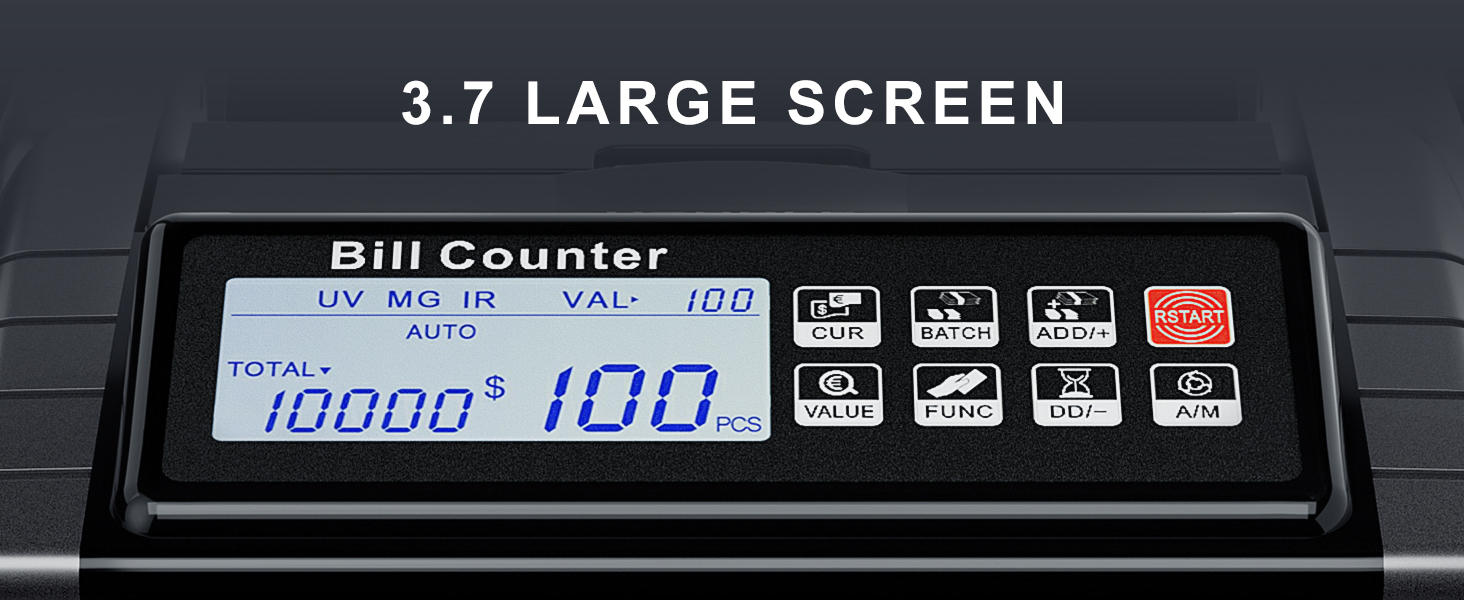
ചിത്രം: വിശദമായ ഒരു ചിത്രം view of the machine's 3.7-inch LCD screen, showing various operational indicators and counting results.
4. പാക്കേജ് ഉള്ളടക്കം
താഴെ ലിസ്റ്റ് ചെയ്തിരിക്കുന്ന എല്ലാ ഇനങ്ങളും നിങ്ങളുടെ പാക്കേജിൽ ഉൾപ്പെടുത്തിയിട്ടുണ്ടെന്ന് ദയവായി പരിശോധിക്കുക:

Image: All components included in the LOLARAN AL1000 Money Counter Machine package.
- 1 x LOLARAN AL1000 Money Counter Machine
- 1 x പവർ കോർഡ്
- 1 x ക്ലീനിംഗ് ബ്രഷ്
- 1 x External Display
- 1 x Spare Parts (e.g., fuse)
- 4 x Currency Straps
- 1 x ഇൻസ്ട്രക്ഷൻ മാനുവൽ
5. സജ്ജീകരണം
Follow these steps to set up your money counter machine:
- അൺപാക്ക്: പാക്കേജിംഗിൽ നിന്ന് എല്ലാ ഘടകങ്ങളും ശ്രദ്ധാപൂർവ്വം നീക്കം ചെയ്യുക.
- പ്ലേസ്മെൻ്റ്: Place the money counter on a flat, stable, and dry surface, ensuring adequate ventilation.
- പവർ കണക്ഷൻ: പവർ കോർഡ് മെഷീനിന്റെ പവർ ഇൻപുട്ടിലേക്കും തുടർന്ന് അനുയോജ്യമായ ഒരു ഇലക്ട്രിക്കൽ ഔട്ട്ലെറ്റിലേക്കും ബന്ധിപ്പിക്കുക.
- ബാഹ്യ ഡിസ്പ്ലേ (ഓപ്ഷണൽ): If desired, connect the external display cable to the designated port on the machine.
- പവർ ഓൺ: Press the power switch, usually located on the rear or side of the machine. The display should illuminate.
6. പ്രവർത്തന നിർദ്ദേശങ്ങൾ
The AL1000 offers various modes for efficient banknote counting and detection.

Image: The control panel of the money counter, highlighting various function buttons.
6.1. Basic Counting
- മെഷീൻ ഓണാക്കിയിട്ടുണ്ടെന്ന് ഉറപ്പാക്കുക.
- Place a stack of banknotes neatly into the hopper. Ensure they are aligned and not folded or crumpled.
- The machine will automatically start counting (if in Auto mode) or press the ആരംഭിക്കുക ബട്ടൺ.
- The count will be displayed on the LCD screen.
6.2. പ്രവർത്തന മോഡുകൾ
Use the function buttons on the control panel to select different modes:

Image: Visual representation of Value, Add, and Batch modes on the display.
- Value Mode: അമർത്തുക മൂല്യം button. Manually set the denomination of the banknotes being counted. The machine will then calculate the total monetary value. Note: The machine does not automatically recognize mixed denominations; the value must be set for each batch.
- മോഡ് ചേർക്കുക: അമർത്തുക ADD/+ button. This mode accumulates the count of multiple batches. Each new batch counted will be added to the previous total.
- ബാച്ച് മോഡ്: അമർത്തുക ബാച്ച് button. You can preset a desired number of banknotes (e.g., 100). The machine will stop counting once the preset number is reached.
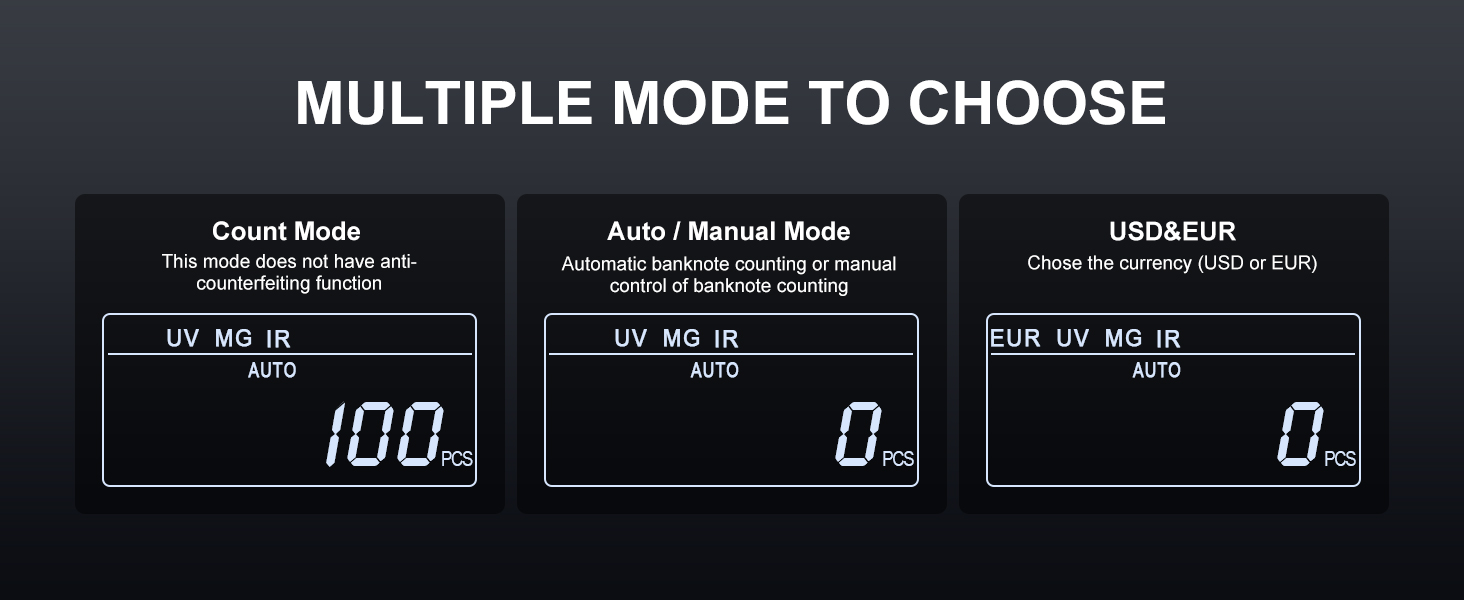
Image: Visual representation of Count, Auto/Manual, and Currency selection modes on the display.
- കൗണ്ട് മോഡ്: This is the basic counting mode, providing only the number of pieces. Anti-counterfeiting functions are typically active in this mode unless specified otherwise.
- സ്വയമേവ/മാനുവൽ മോഡ്: അമർത്തുക എ / എം button to switch between automatic banknote counting (starts when notes are placed) and manual counting (starts after pressing ആരംഭിക്കുക).
- കറൻസി തിരഞ്ഞെടുക്കൽ: അമർത്തുക CUR button to select between USD (United States Dollar) and EUR (Euro).
6.3. വ്യാജ കണ്ടെത്തൽ
The AL1000 employs multiple detection methods to identify suspicious banknotes:

Image: Illustration of the various counterfeit detection technologies used by the machine.
- UV (Ultraviolet): Detects security threads and fibers visible under UV light.
- MG (Magnetic): Checks for magnetic ink patterns present on genuine banknotes.
- MT (Magnetic Thread): Verifies the magnetic properties of the security thread.
- IR (Infrared): Identifies infrared ink patterns and properties.
- DD (Dimension Detection): Measures the width of banknotes to detect discrepancies.
If a suspicious banknote is detected, the machine will stop, the display will turn red, and an audible alarm will sound. Remove the suspicious note and press ആരംഭിക്കുക എണ്ണൽ പുനരാരംഭിക്കുന്നതിന്.

Image: Internal components of the money counter responsible for banknote handling and detection.
7. പരിപാലനം
Regular cleaning ensures optimal performance and longevity of your money counter.
- പവർ ഓഫ്: വൃത്തിയാക്കുന്നതിന് മുമ്പ് എല്ലായ്പ്പോഴും മെഷീൻ ഓഫ് ചെയ്ത് അൺപ്ലഗ് ചെയ്യുക.
- പൊടി നീക്കം: Use the provided cleaning brush to gently remove dust and paper residue from the hopper, stacker, and internal sensors.
- സെൻസർ ക്ലീനിംഗ്: Carefully clean the sensors (UV, MG, IR) with a soft, dry cloth or cotton swab. Avoid using abrasive materials or liquids.
- ബാഹ്യ ശുചീകരണം: Wipe the exterior of the machine with a soft, slightly damp തുണി. കഠിനമായ രാസവസ്തുക്കളോ ലായകങ്ങളോ ഉപയോഗിക്കരുത്.
- Regular Intervals: Clean the machine regularly, especially if used frequently or in dusty environments.
8. പ്രശ്നപരിഹാരം
നിങ്ങളുടെ AL1000-ൽ പ്രശ്നങ്ങൾ നേരിടുകയാണെങ്കിൽ, ഇനിപ്പറയുന്ന പൊതുവായ പ്രശ്നങ്ങളും പരിഹാരങ്ങളും പരിശോധിക്കുക:
| പ്രശ്നം | സാധ്യമായ കാരണം | പരിഹാരം |
|---|---|---|
| മെഷീൻ പവർ ഓണാക്കുന്നില്ല | Power cord not connected; Power switch off; Blown fuse | Check power cord connection; Ensure power switch is ON; Replace fuse (refer to spare parts) |
| Banknotes jam frequently | Banknotes are crumpled/folded; Hopper overloaded; Dust/debris in path | Straighten banknotes; Do not overload hopper; Clean banknote path and sensors with brush |
| കൃത്യമല്ലാത്ത കണക്കെടുപ്പ് | Sensors are dirty; Banknotes are not aligned properly | Clean all sensors; Ensure banknotes are neatly stacked and aligned in the hopper |
| Counterfeit detection alarm sounds frequently on genuine notes | Sensors are dirty; Banknotes are worn or damaged | Clean detection sensors; Try counting the notes again or with a different orientation. If issue persists, contact support. |
| ഡിസ്പ്ലേ ഒരു പിശക് കോഡ് കാണിക്കുന്നു | Specific internal error | Refer to the full instruction manual for specific error code meanings, or power cycle the machine. If the error persists, contact support. |
9 സ്പെസിഫിക്കേഷനുകൾ
| ഫീച്ചർ | വിശദാംശങ്ങൾ |
|---|---|
| മോഡൽ നമ്പർ | LX-AL1000 |
| എണ്ണൽ വേഗത | Up to 1,000 notes/min |
| ഹോപ്പർ കപ്പാസിറ്റി | 200 ബാങ്ക് നോട്ടുകൾ |
| വ്യാജ കണ്ടെത്തൽ | UV, MG, MT, IR, DD |
| പ്രദർശിപ്പിക്കുക | 3.7" LCD, External Display included |
| പിന്തുണയ്ക്കുന്ന കറൻസികൾ | ഡോളർ, യൂറോ |
| ഇനത്തിൻ്റെ ഭാരം | 10.43 പൗണ്ട് |
| പാക്കേജ് അളവുകൾ | 13.19 x 11.69 x 7.44 ഇഞ്ച് |
| മെറ്റീരിയൽ തരം | അലോയ് സ്റ്റീൽ |
| നിർമ്മാതാവ് | ലോലരൻ |
10. വാറൻ്റിയും പിന്തുണയും
LOLARAN provides lifetime service support for the AL1000 Money Counter Machine. If you have any questions, require technical assistance, or need to report an issue, please contact our customer support team.
For assistance, please refer to the contact information provided with your purchase or visit the official LOLARAN webസൈറ്റ്.