
Wouxun KG UVD1P
Wouxun KG-UVD1P FM Transceiver User Manual
1. ആമുഖം
This manual provides detailed instructions for the safe and effective operation of your Wouxun KG-UVD1P FM Transceiver. Please read this manual thoroughly before using the device to ensure proper functionality and to prevent damage.
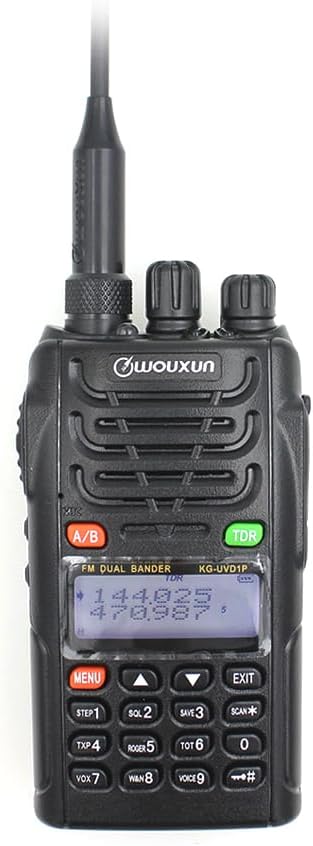
ചിത്ര വിവരണം: ഒരു മുന്നണി view of the Wouxun KG-UVD1P FM Transceiver, showcasing അതിന്റെ കറുപ്പ് casing, antenna, LCD display, keypad, and control knobs. The display shows frequency information.
2. പാക്കേജ് ഉള്ളടക്കം
താഴെ ലിസ്റ്റ് ചെയ്തിരിക്കുന്ന എല്ലാ ഇനങ്ങളും നിങ്ങളുടെ പാക്കേജിൽ ഉൾപ്പെടുത്തിയിട്ടുണ്ടെന്ന് ഉറപ്പാക്കുക:
- റേഡിയോ ബോഡി
- ബാറ്ററി
- ആൻ്റിന
- ബെൽറ്റ് ക്ലിപ്പ്
- Charger (Desktop Charger and Power Adaptor)
- ഉപയോക്തൃ മാനുവൽ
- ഹാൻഡ് സ്ട്രാപ്പ്
- കാർ ചാർജർ കേബിൾ

ചിത്ര വിവരണം: ഒരു ഓവർഹെഡ് view displaying all components included in the standard Wouxun KG-UVD1P package. Items are numbered and include the radio, battery, antenna, belt clip, desktop charger, power adaptor, hand strap, and car charger cable.
3. ഉൽപ്പന്നം കഴിഞ്ഞുview
3.1. റേഡിയോ ഘടകങ്ങൾ
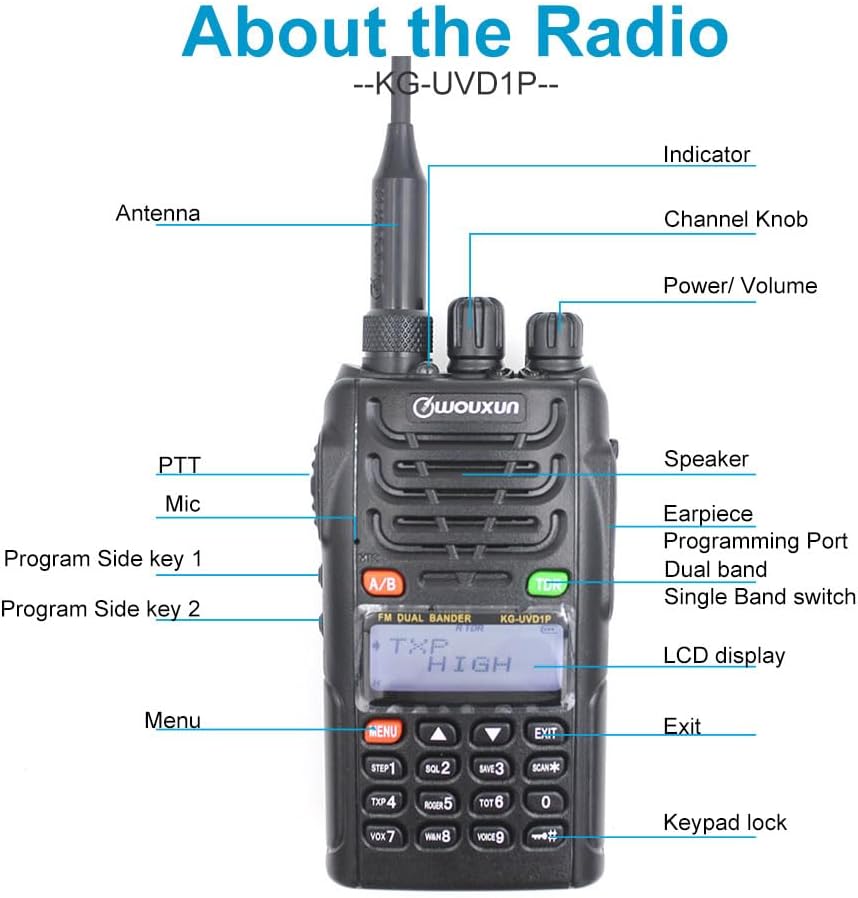
ചിത്ര വിവരണം: A detailed diagram of the Wouxun KG-UVD1P radio with various parts labeled, including the antenna, indicator light, channel knob, power/volume knob, speaker, earpiece, programming port, dual band switch, LCD display, PTT button, microphone, program side keys, Menu button, Exit button, and keypad lock.
- ആൻ്റിന: റേഡിയോ സിഗ്നലുകൾ കൈമാറുന്നതിനും സ്വീകരിക്കുന്നതിനും.
- സൂചകം: LED light indicating transmission (red) or reception (green).
- ചാനൽ നോബ്: Used to select channels or adjust settings.
- ശക്തി/വോളിയം: റേഡിയോ ഓൺ/ഓഫ് ചെയ്യുന്നതിനും വോളിയം ക്രമീകരിക്കുന്നതിനും കറങ്ങുന്നു.
- സ്പീക്കർ: ഔട്ട്പുട്ട് ഓഡിയോ.
- Earpiece/Programming Port: Connects accessories or programming cable.
- Dual Band Switch (A/B): Toggles between VHF and UHF bands or display modes.
- LCD ഡിസ്പ്ലേ: Shows frequency, channel, and status information.
- പിടിടി (പുഷ്-ടു-ടോക്ക്): ട്രാൻസ്മിറ്റ് ചെയ്യാൻ അമർത്തിപ്പിടിക്കുക.
- മൈക്ക്: വോയ്സ് ഇൻപുട്ടിനുള്ള മൈക്രോഫോൺ.
- Program Side Keys: ഇഷ്ടാനുസൃതമാക്കാവുന്ന ഫംഗ്ഷൻ ബട്ടണുകൾ.
- കീപാഡ്: For entering frequencies, channels, and accessing menu functions.
3.2. ഭൗതിക അളവുകൾ

ചിത്ര വിവരണം: ഒന്നിലധികം views of the Wouxun KG-UVD1P radio, including front, left side, right side, and back, illustrating its compact design and the placement of the belt clip and battery pack.
4. സജ്ജീകരണം
4.1. ബാറ്ററി ഇൻസ്റ്റാളേഷൻ
- റേഡിയോയുടെ പിൻഭാഗത്തുള്ള ഗ്രൂവുകളുമായി ബാറ്ററി പായ്ക്ക് വിന്യസിക്കുക.
- ബാറ്ററി പായ്ക്ക് അതിന്റെ സ്ഥാനത്ത് ക്ലിക്ക് ആകുന്നതുവരെ മുകളിലേക്ക് സ്ലൈഡ് ചെയ്യുക.
- നീക്കം ചെയ്യാൻ, ബാറ്ററി റിലീസ് ലാച്ച് (ഉണ്ടെങ്കിൽ) അമർത്തി ബാറ്ററി താഴേക്ക് സ്ലൈഡ് ചെയ്യുക.
4.2. ആന്റിന അറ്റാച്ച്മെന്റ്
- റേഡിയോയുടെ മുകളിലുള്ള കണക്ടറിലേക്ക് ആന്റിന ഘടികാരദിശയിൽ സ്ക്രൂ ചെയ്ത് വിരൽ കൊണ്ട് മുറുക്കുന്നത് വരെ വയ്ക്കുക.
- അമിതമായി മുറുക്കരുത്.
4.3 ബാറ്ററി ചാർജ് ചെയ്യുന്നു

ചിത്ര വിവരണം: The Wouxun smart charger in use, showing the radio docked for charging and a separate battery pack being charged simultaneously. The image highlights the 7.4V 1700mAh Lithium-ion battery.
- Connect the power adaptor to the desktop charger and plug it into a power outlet.
- Place the radio with the battery installed, or the battery alone, into the charging slot.
- ചാർജർ ഇൻഡിക്കേറ്റർ ലൈറ്റ് സാധാരണയായി ചാർജ് ചെയ്യുമ്പോൾ ചുവപ്പ് നിറത്തിൽ കാണിക്കുകയും പൂർണ്ണമായി ചാർജ് ചെയ്യുമ്പോൾ പച്ചയായി മാറുകയും ചെയ്യും.
- ഒരു പൂർണ്ണ ചാർജ് സാധാരണയായി നിരവധി മണിക്കൂറുകൾ എടുക്കും.
5. പ്രവർത്തന നിർദ്ദേശങ്ങൾ
5.1. പവർ ഓൺ/ഓഫ്, വോളിയം നിയന്ത്രണം
- പവർ ഓൺ: ഒരു ക്ലിക്ക് കേൾക്കുകയും ഡിസ്പ്ലേ പ്രകാശിക്കുകയും ചെയ്യുന്നതുവരെ പവർ/വോളിയം നോബ് ഘടികാരദിശയിൽ തിരിക്കുക.
- പവർ ഓഫ്: ഒരു ക്ലിക്ക് കേൾക്കുകയും ഡിസ്പ്ലേ ഓഫാകുകയും ചെയ്യുന്നതുവരെ പവർ/വോളിയം നോബ് എതിർ ഘടികാരദിശയിൽ തിരിക്കുക.
- വോളിയം ക്രമീകരണം: Rotate the Power/Volume knob to increase (clockwise) or decrease (counter-clockwise) the audio output.
5.2. ചാനലും ഫ്രീക്വൻസി തിരഞ്ഞെടുക്കലും
- ഫ്രീക്വൻസി മോഡ്: കീപാഡ് ഉപയോഗിച്ച് നേരിട്ട് ഫ്രീക്വൻസികൾ നൽകുക.
- ചാനൽ മോഡ്: Use the Channel knob or keypad to select pre-programmed channels.
- Multi-step Frequency: Supports 5K/6.25K/10K/12.5K/25K/50K/100K steps for precise frequency tuning.
5.3. Transmit and Receive (PTT)
- To transmit, press and hold the PTT button on the side of the radio. Speak clearly into the microphone.
- സ്വീകരിക്കാൻ PTT ബട്ടൺ റിലീസ് ചെയ്യുക.
- The indicator light will be red during transmission and green during reception.
5.4. Dual Band, Dual Frequency, Dual Display, and Dual Standby
- The radio supports simultaneous monitoring of two different frequencies (VHF&UHF, UHF&UHF, or VHF&VHF).
- Use the A/B button to switch between the primary and secondary display frequencies.
- The radio will automatically switch to the active frequency when a signal is detected.
5.5. VOX Transmission
- VOX (Voice Operated Transmit) allows hands-free transmission.
- Activate VOX through the menu. The radio will transmit automatically when it detects your voice.
- Adjust VOX sensitivity in the menu to prevent accidental transmissions or missed voice activation.
5.6. Digital FM Radio
- The radio includes a digital FM radio function.
- Access the FM radio through the menu. It supports automatic tuning and storing of radio frequencies.
5.7. മറ്റ് പ്രവർത്തനങ്ങൾ
- High/Low Power Selection: Adjust transmit power via the menu for battery conservation or extended range.
- Wide/Narrow Bandwidth: Select 25KHz (wide) or 12.5KHz (narrow) bandwidth based on channel requirements.
- ചാനലിന്റെ പേര് എഡിറ്റ്: എളുപ്പത്തിൽ തിരിച്ചറിയുന്നതിനായി ചാനൽ പേരുകൾ ഇഷ്ടാനുസൃതമാക്കുക.
- D.C.S/CTCSS: Utilize 105 groups of D.C.S (Digital Coded Squelch) and 50 groups of CTCSS (Continuous Tone-Coded Squelch) for selective calling.
- സ്റ്റോപ്പ് വാച്ച് ഫംഗ്ഷൻ: Integrated stopwatch utility.
- കുറഞ്ഞ വോള്യംtage Voice Prompt: Alerts the user when the battery level is low.
- തിരക്കേറിയ ചാനൽ ലോക്കൗട്ട് (BCL): ഇതിനകം തന്നെ കൈവശപ്പെടുത്തിയിരിക്കുന്ന ചാനലിലൂടെയുള്ള സംപ്രേക്ഷണം തടയുന്നു.
- Transmit Over Timer (TOT): Limits continuous transmission time to prevent channel hogging and overheating.
- കീബോർഡ് ലോക്ക്: Prevents accidental key presses (Auto/Manual options).
- Multiple Scan Modes: Scan channels or frequencies for activity.
- Wire Clone Function: Allows copying settings from one radio to another using a cloning cable.
- Bright Flashlight Illumination: Built-in LED flashlight for convenience.
- SOS പ്രവർത്തനം: ഒരു അടിയന്തര സിഗ്നൽ സജീവമാക്കുന്നു.
- 1750Hz ടോൺ: Used for repeater access.
- DTMF Encoding Function: For sending Dual-Tone Multi-Frequency signals.
- English Voice Guide: Provides audible prompts for menu navigation and settings.
6. പരിപാലനം
6.1. വൃത്തിയാക്കൽ
- റേഡിയോയുടെ പ്രതലം മൃദുവായ, ഡി-ക്ലിപ്പ് ഉപയോഗിച്ച് വൃത്തിയാക്കുക.amp തുണി.
- കഠിനമായ രാസവസ്തുക്കളോ ഉരച്ചിലുകൾ ഉപയോഗിക്കരുത്.
- വൃത്തിയാക്കുന്നതിനുമുമ്പ് റേഡിയോ ഓഫ് ചെയ്തിട്ടുണ്ടെന്നും ബാറ്ററി നീക്കം ചെയ്തിട്ടുണ്ടെന്നും ഉറപ്പാക്കുക.
6.2. ബാറ്ററി പരിചരണം
- ബാറ്ററി അമിതമായി ചാർജ് ചെയ്യുന്നതോ പൂർണ്ണമായും ഡിസ്ചാർജ് ചെയ്യുന്നതോ ഒഴിവാക്കുക.
- ഉപയോഗത്തിലില്ലാത്തപ്പോൾ തണുത്തതും ഉണങ്ങിയതുമായ സ്ഥലത്ത് ബാറ്ററികൾ സൂക്ഷിക്കുക.
- ദീർഘനേരം സൂക്ഷിക്കുകയാണെങ്കിൽ, ബാറ്ററി ഏകദേശം 50% ശേഷിയിലേക്ക് ചാർജ് ചെയ്യുക.
6.3. സംഭരണം
- വരണ്ടതും പൊടിയില്ലാത്തതുമായ അന്തരീക്ഷത്തിൽ റേഡിയോ സൂക്ഷിക്കുക.
- Keep away from direct sunlight and extreme temperatures.
- Remove the battery if the radio will not be used for an extended period.
7. പ്രശ്നപരിഹാരം
| പ്രശ്നം | സാധ്യമായ കാരണം | പരിഹാരം |
|---|---|---|
| റേഡിയോ പവർ ഓൺ ചെയ്യുന്നില്ല | Battery discharged or improperly installed | Charge the battery; ensure battery is correctly seated. |
| കൈമാറാനോ സ്വീകരിക്കാനോ കഴിയില്ല | Incorrect frequency/channel; antenna not attached; low battery; Busy Channel Lockout active | Verify frequency/channel; attach antenna securely; charge battery; disable BCL. |
| മോശം ഓഡിയോ നിലവാരം | Weak signal; incorrect squelch level; antenna issue | Move to an area with better signal; adjust squelch; check antenna connection. |
| കീപാഡ് പ്രതികരിക്കുന്നില്ല | കീപാഡ് ലോക്ക് സജീവമാണ് | Unlock the keypad (refer to operating instructions). |
8 സ്പെസിഫിക്കേഷനുകൾ
| ഫീച്ചർ | വിശദാംശങ്ങൾ |
|---|---|
| മോഡൽ നമ്പർ | KG UVD1P |
| ഫ്രീക്വൻസി റേഞ്ച് | 30-300 MHz |
| ചാനലുകളുടെ എണ്ണം | 40 |
| ബാറ്ററി തരം | 1700mAh Lithium-ion (1 A battery required, included) |
| വാല്യംtage | 1.2 വോൾട്ട് (DC) |
| ജല പ്രതിരോധ നില | വാട്ടർപ്രൂഫ് |
| ഇനത്തിൻ്റെ ഭാരം | 1.65 പൗണ്ട് |
| പാക്കേജ് അളവുകൾ | 10.12 x 9.53 x 4.53 ഇഞ്ച് |
| നിർമ്മാതാവ് | WOUXUN |
| യു.പി.സി | 781912417284 |
| അനുയോജ്യമായ ഉപകരണങ്ങൾ | Two-way radios with compatible frequencies and bandwidths, external antennas |
9. വാറൻ്റിയും പിന്തുണയും
9.1. വാറൻ്റി വിവരങ്ങൾ
The Wouxun KG-UVD1P FM Transceiver comes with a 1 വർഷത്തെ വാറൻ്റി വാങ്ങിയ തീയതി മുതൽ. സാധാരണ ഉപയോഗത്തിലുള്ള നിർമ്മാണ വൈകല്യങ്ങൾ ഈ വാറന്റി ഉൾക്കൊള്ളുന്നു. വാറന്റി ക്ലെയിമുകൾക്കായി നിങ്ങളുടെ വാങ്ങിയതിന്റെ തെളിവ് സൂക്ഷിക്കുക.
9.2. ഉപഭോക്തൃ പിന്തുണ
For technical assistance, troubleshooting beyond this manual, or warranty inquiries, please contact your authorized Wouxun dealer or visit the official Wouxun webപിന്തുണാ ഉറവിടങ്ങൾക്കായുള്ള സൈറ്റ്.
Ask a question about this manual
Ask about setup, troubleshooting, compatibility, parts, safety, or missing instructions. Manuals+ will review the question and use this page’s manual context to help answer it.