
ആമുഖം
This manual provides essential information for the safe and efficient use of your SANSUI JSW50GSUHD 50-inch 4K Ultra HD Smart Google LED TV. Please read these instructions thoroughly before operating the television and retain them for future reference.

ചിത്രം: മുൻഭാഗം view of the SANSUI JSW50GSUHD 50-inch 4K Ultra HD Smart Google LED TV.
സുരക്ഷാ വിവരങ്ങൾ
Always follow basic safety precautions when using this television to reduce the risk of fire, electric shock, and injury. Keep the TV away from water and moisture. Do not block ventilation openings. Use only attachments/accessories specified by the manufacturer. Refer all servicing to qualified service personnel.
ബോക്സിൽ എന്താണുള്ളത്
പെട്ടി ശ്രദ്ധാപൂർവ്വം അൺപാക്ക് ചെയ്ത് എല്ലാ ഇനങ്ങളും ഉണ്ടെന്ന് ഉറപ്പാക്കുക:
- 1 x SANSUI JSW50GSUHD 50-inch TV
- 1 x റിമോട്ട് കൺട്രോൾ
- 1 pair x AAA Batteries (for remote)
- 1 set x Base Stand
- 2 pairs x Screws (for stand)
- 1 set x Wall Mounting Kit (if included)
- 1 x യൂസർ മാനുവലും വാറൻ്റി കാർഡും
- 1 x പവർ കേബിൾ
- 1 x Mini AV cable
സജ്ജമാക്കുക
1 ടിവി പ്ലേസ്മെൻ്റ്
Place the TV on a stable, flat surface using the provided base stand, or mount it on a wall using a compatible VESA 100 x 100 mm wall mount (sold separately). Ensure adequate ventilation around the TV.

Image: The SANSUI JSW50GSUHD TV placed on a media console with its stand.
2. ബാഹ്യ ഉപകരണങ്ങൾ ബന്ധിപ്പിക്കുന്നു
Your SANSUI TV offers various connectivity options:
- HDMI പോർട്ടുകൾ (3): ബ്ലൂ-റേ പ്ലെയറുകൾ, ഗെയിമിംഗ് കൺസോളുകൾ, സെറ്റ്-ടോപ്പ് ബോക്സുകൾ മുതലായവ ബന്ധിപ്പിക്കുക.
- USB പോർട്ടുകൾ (2): മീഡിയ പ്ലേബാക്കിനായി USB ഡ്രൈവുകൾ ബന്ധിപ്പിക്കുക.
- AV (Mini) Port: കമ്പോസിറ്റ് വീഡിയോയും സ്റ്റീരിയോ ഓഡിയോയും ഉപയോഗിക്കുന്ന പഴയ ഉപകരണങ്ങൾക്ക്.
- ഇഥർനെറ്റ് (LAN) പോർട്ട്: വയർഡ് ഇന്റർനെറ്റ് കണക്ഷന് വേണ്ടി.
- Antenna/RF Input: ഒരു ആന്റിന അല്ലെങ്കിൽ കേബിൾ ടിവി ബന്ധിപ്പിക്കുന്നതിന്.
- ഒപ്റ്റിക്കൽ ഓഡിയോ ഔട്ട്പുട്ട്: ബാഹ്യ ഓഡിയോ സിസ്റ്റങ്ങളുമായി ബന്ധിപ്പിക്കുന്നതിന്.
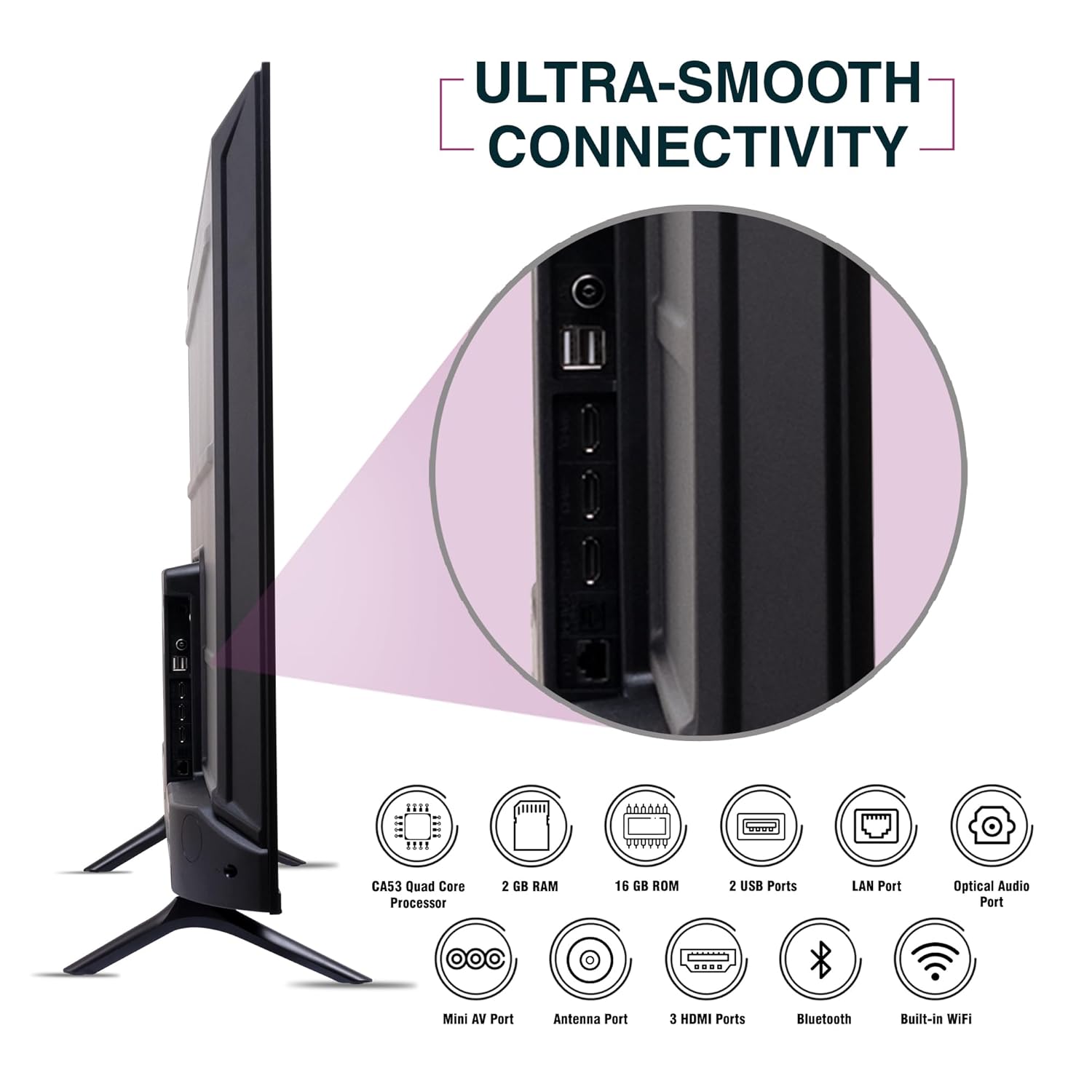
ചിത്രം: വശം view of the SANSUI JSW50GSUHD TV highlighting the various input and output ports.
3. പവർ കണക്ഷൻ
Connect the power cable to the TV's power input and then to a wall outlet. The TV supports 100-240 VAC, 50-60 Hz.
4. റിമോട്ട് കൺട്രോൾ സജ്ജീകരണം
രണ്ട് AAA ബാറ്ററികൾ റിമോട്ട് കൺട്രോളിലേക്ക് തിരുകുക, ശരിയായ പോളാരിറ്റി ഉറപ്പാക്കുക.
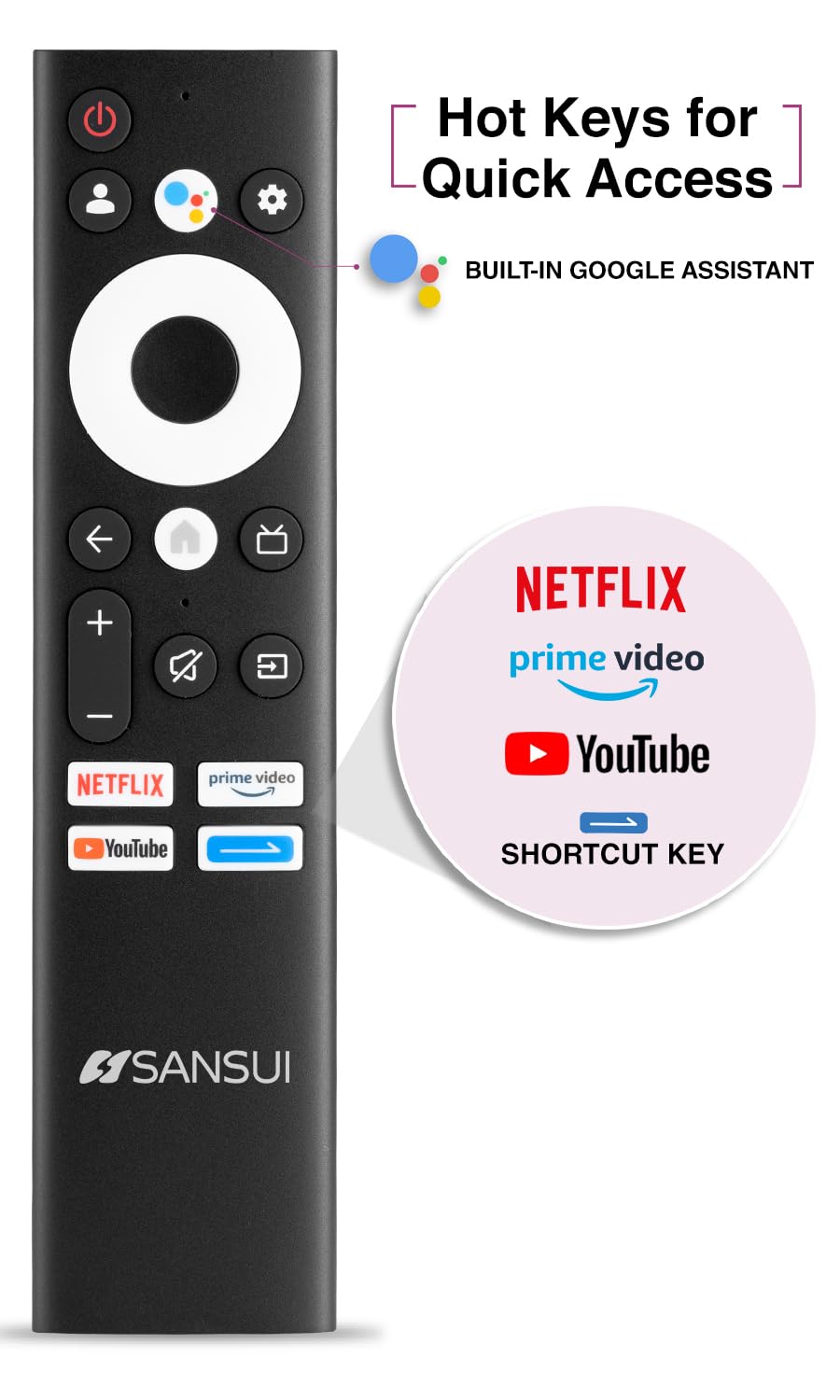
Image: The SANSUI JSW50GSUHD remote control, showing button layout and hot keys.
5. Initial Setup (Google TV)
Upon first power-on, the TV will guide you through the initial setup process. This includes selecting your language, connecting to Wi-Fi, signing in with your Google account, and configuring Google TV settings. Follow the on-screen prompts.
നിങ്ങളുടെ ടിവി പ്രവർത്തിപ്പിക്കുന്നു
1. അടിസ്ഥാന പ്രവർത്തനങ്ങൾ
- ശക്തി: ടിവി ഓണാക്കാനോ ഓഫാക്കാനോ റിമോട്ടിലെ പവർ ബട്ടൺ അമർത്തുക.
- വോളിയം: ഓഡിയോ ലെവലുകൾ ക്രമീകരിക്കാൻ വോളിയം കൂട്ടുക/താഴ്ത്തുക ബട്ടണുകൾ ഉപയോഗിക്കുക.
- ഇൻപുട്ട് ഉറവിടം: Press the Source button to select between HDMI, AV, TV, and other inputs.
- നാവിഗേഷൻ: മെനുകൾ നാവിഗേറ്റ് ചെയ്യാൻ ഡയറക്ഷണൽ പാഡും ശരി ബട്ടണും ഉപയോഗിക്കുക.
2. സ്മാർട്ട് ടിവി സവിശേഷതകൾ (ഗൂഗിൾ ടിവി)
Your TV runs on Google TV, providing access to a wide range of streaming services and smart features.
- Google അസിസ്റ്റൻ്റ്: Use the dedicated button on your remote for voice commands to search for content, control smart home devices, and get information.
- അന്തർനിർമ്മിത Chromecast: നിങ്ങളുടെ അനുയോജ്യമായ സ്മാർട്ട്ഫോൺ, ടാബ്ലെറ്റ് അല്ലെങ്കിൽ കമ്പ്യൂട്ടർ എന്നിവയിൽ നിന്ന് നേരിട്ട് നിങ്ങളുടെ ടിവിയിലേക്ക് ഉള്ളടക്കം കാസ്റ്റുചെയ്യുക.
- അപ്ലിക്കേഷനുകൾ: Access popular streaming apps like Netflix, Prime Video, Disney+ Hotstar, and YouTube directly from the Google TV interface. Download more apps from the Google Play Store.
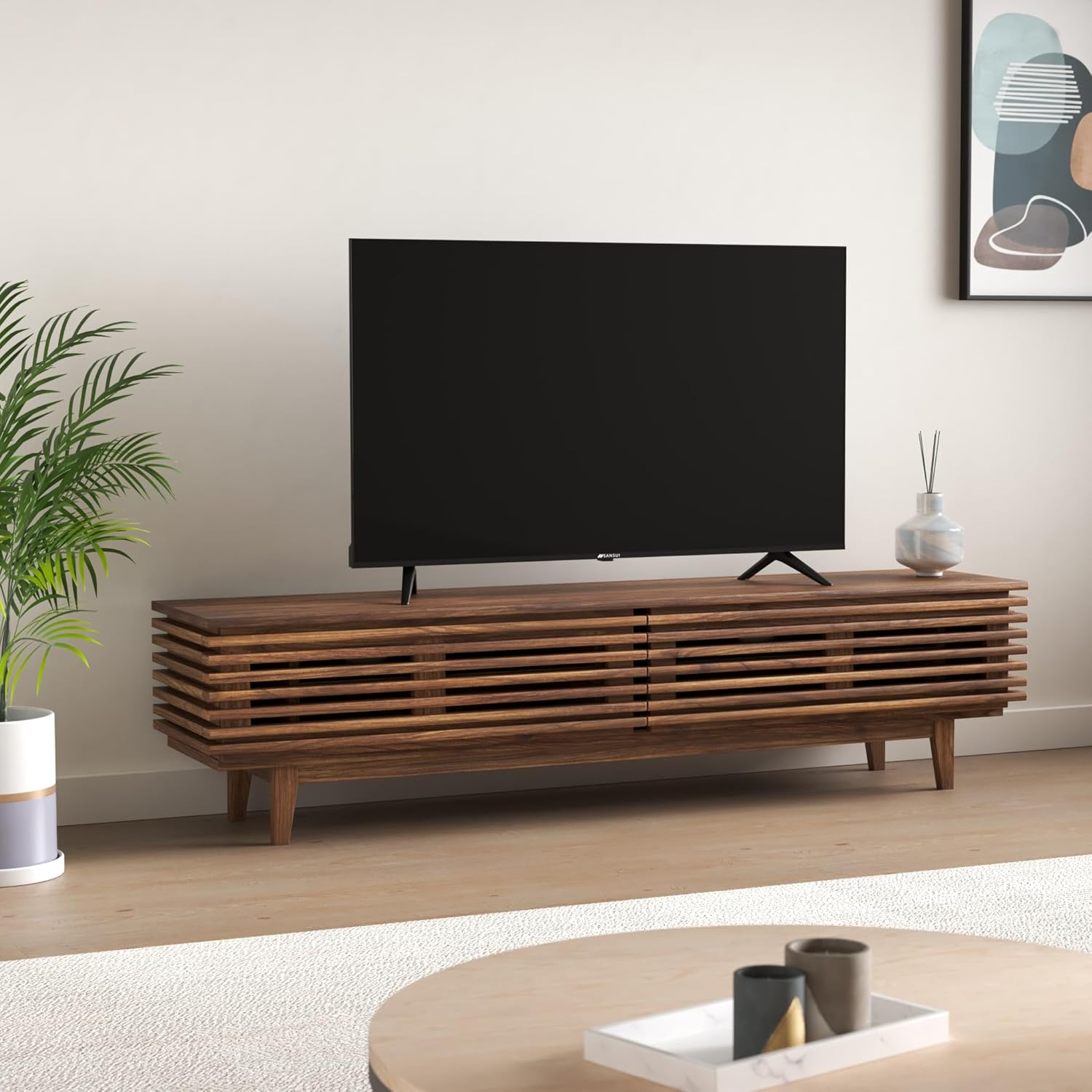
Image: The Google TV home screen displaying various streaming applications and content suggestions.
3. Display and Audio Enhancements
- 4K അൾട്രാ HD: 3840x2160 റെസല്യൂഷനിൽ അതിശയിപ്പിക്കുന്ന വ്യക്തതയും വിശദാംശങ്ങളും ആസ്വദിക്കൂ.
- HDR10: Experience enhanced contrast and a wider range of colors with HDR10 content.
- Zen Panel: The A+ Zen panel dynamically enhances visual content with uniform light dispersal for improved picture quality.
- ബെസൽ ഇല്ലാത്ത ഡിസൈൻ: ഒരു ഇമ്മേഴ്സീവ് വീഡിയോയ്ക്കായി സ്ക്രീൻ സ്പെയ്സ് പരമാവധിയാക്കുന്നു viewഅനുഭവം.
- Dolby Audio & DTS Studio Sound: Delivers rich, clear, and immersive audio with 20W output.

ചിത്രം: ക്ലോസ്-അപ്പ് view of the SANSUI JSW50GSUHD TV showcasing its bezel-less design with a vibrant nature scene.

Image: An illustration demonstrating the advanced light dispersal technology of the Zen Panel for enhanced hues.
മെയിൻ്റനൻസ്
1. വൃത്തിയാക്കൽ
സ്ക്രീൻ വൃത്തിയാക്കാൻ, മൃദുവായ, ലിന്റ് രഹിത തുണി ഉപയോഗിച്ച് സൌമ്യമായി തുടയ്ക്കുക. കഠിനമായ പാടുകൾക്ക്, ചെറുതായി dampen the cloth with water or a screen cleaner specifically designed for TVs. Do not spray liquid directly onto the screen. Clean the TV body with a soft, dry cloth.
2. സോഫ്റ്റ്വെയർ അപ്ഡേറ്റുകൾ
നിങ്ങളുടെ Google TV-ക്ക് ഓട്ടോമാറ്റിക് സോഫ്റ്റ്വെയർ അപ്ഡേറ്റുകൾ ലഭിച്ചേക്കാം. പ്രകടനം മെച്ചപ്പെടുത്താനും പുതിയ സവിശേഷതകൾ ചേർക്കാനും കഴിയുന്ന ഈ അപ്ഡേറ്റുകൾ ലഭിക്കുന്നതിന് നിങ്ങളുടെ ടിവി ഇന്റർനെറ്റുമായി കണക്റ്റ് ചെയ്തിട്ടുണ്ടെന്ന് ഉറപ്പാക്കുക.
ട്രബിൾഷൂട്ടിംഗ്
നിങ്ങളുടെ ടിവിയിൽ പ്രശ്നങ്ങൾ നേരിടുകയാണെങ്കിൽ, ഇനിപ്പറയുന്ന പൊതുവായ പരിഹാരങ്ങൾ പരിശോധിക്കുക:
| പ്രശ്നം | സാധ്യമായ പരിഹാരം |
|---|---|
| പവർ ഇല്ല | പവർ കേബിൾ ടിവിയുമായും വാൾ ഔട്ട്ലെറ്റുമായും സുരക്ഷിതമായി ബന്ധിപ്പിച്ചിട്ടുണ്ടോയെന്ന് പരിശോധിക്കുക. ഔട്ട്ലെറ്റ് പ്രവർത്തനക്ഷമമാണെന്ന് ഉറപ്പാക്കുക. |
| ചിത്രം/ശബ്ദം ഇല്ല | Verify the correct input source is selected. Check cable connections to external devices. Try a different HDMI port. |
| റിമോട്ട് കൺട്രോൾ പ്രവർത്തിക്കുന്നില്ല | Check and replace batteries. Ensure no obstructions between the remote and the TV's IR sensor. |
| Wi-Fi കണക്ഷൻ പ്രശ്നങ്ങൾ | Restart your router and modem. Reconnect the TV to the Wi-Fi network in the settings. Ensure the TV is within range of your router. |
| ചിത്ര ഗുണനിലവാര പ്രശ്നങ്ങൾ | ടിവി മെനുവിൽ ചിത്ര ക്രമീകരണങ്ങൾ (തെളിച്ചം, ദൃശ്യതീവ്രത, നിറം) ക്രമീകരിക്കുക. ഉള്ളടക്ക ഉറവിടം ഉയർന്ന നിലവാരമുള്ളതാണെന്ന് ഉറപ്പാക്കുക. |
If problems persist, perform a factory reset via the TV settings menu (Settings > System > About > Reset). Note that a factory reset will erase all personal data and settings.
സ്പെസിഫിക്കേഷനുകൾ
Detailed technical specifications for the SANSUI JSW50GSUHD TV:
- സ്ക്രീൻ വലിപ്പം: 127 Centimetres (50 Inches)
- പ്രദർശന സാങ്കേതികവിദ്യ: എൽഇഡി
- റെസലൂഷൻ: 4K അൾട്രാ എച്ച്ഡി (3840x2160)
- പുതുക്കൽ നിരക്ക്: 60 Hz
- പ്രത്യേക സവിശേഷതകൾ: Bezel-Less Design, Browser, Chromecast, Parental Controls, Sleep Timer, Google TV, Google Assistant, Voice Search Smart Remote
- കണക്റ്റിവിറ്റി: 3 HDMI ports, 2 USB ports, 1 AV (mini), Bluetooth, Wi-Fi, Ethernet (LAN), Optical Audio
- ഓഡിയോ ഔട്ട്പുട്ട്: 20W with Dolby Audio and DTS Studio Sound
- പ്രോസസ്സർ: CA53 Quad core Processor
- മെമ്മറി: RAM 2GB, ROM 16GB (FLASH)
- ഓപ്പറേറ്റിംഗ് സിസ്റ്റം: Google TV
- ഉൽപ്പന്ന അളവുകൾ (D x W x H): 9D x 111W x 71.7H സെന്റീമീറ്ററുകൾ
- ഇനത്തിൻ്റെ ഭാരം: 9300 ഗ്രാം
- വൈദ്യുതി ഉപഭോഗം: 130 വാട്ട്സ്
- VESA മൗണ്ട് സ്റ്റാൻഡേർഡ്: 100 x 100 മി.മീ
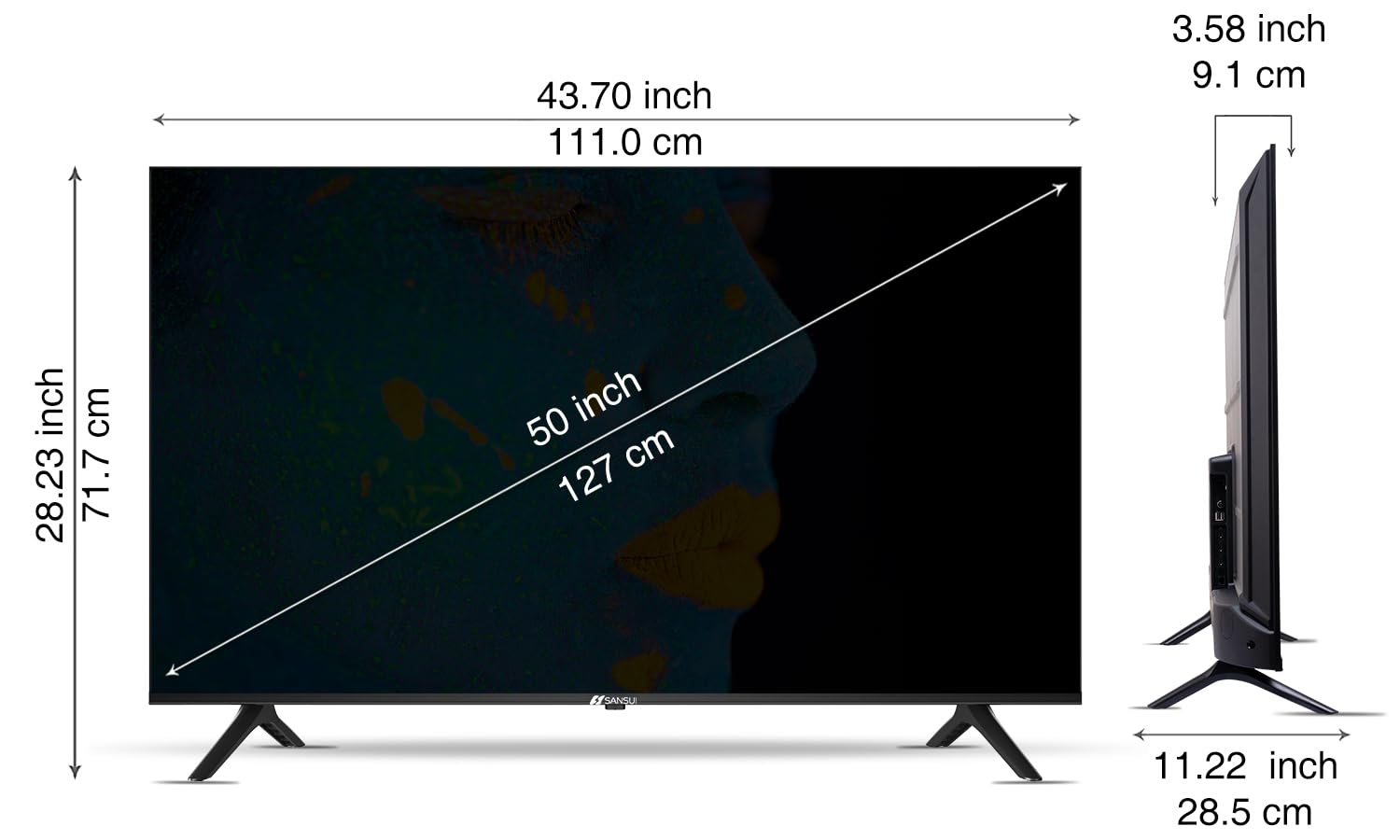
Image: Diagram illustrating the dimensions of the SANSUI JSW50GSUHD 50-inch TV.
വാറൻ്റിയും പിന്തുണയും
Your SANSUI JSW50GSUHD TV comes with a 1-year comprehensive warranty, plus an additional 1-year warranty on the panel, provided by the brand from the date of purchase.
For warranty support or any technical assistance, please contact SANSUI customer care:
- ടോൾ ഫ്രീ നമ്പർ: 1800 419 3777
- ഇമെയിൽ: sansuicare@jainaindia.com
Manufacturer: PG Electroplast Limited
Importer: Jaina India Pvt Ltd.