
Gibbon Mounts FDS111C
Gibbon Mounts Mobile Standing Desk (Model FDS111C) - Instruction Manual
Model: FDS111C | Brand: Gibbon Mounts
1. ഉൽപ്പന്നം കഴിഞ്ഞുview
The Gibbon Mounts Mobile Standing Desk is a versatile and adjustable workstation designed for various environments, including home, office, and medical settings. It features pneumatic height adjustment, hidden casters for easy mobility, and a spacious, waterproof tabletop.
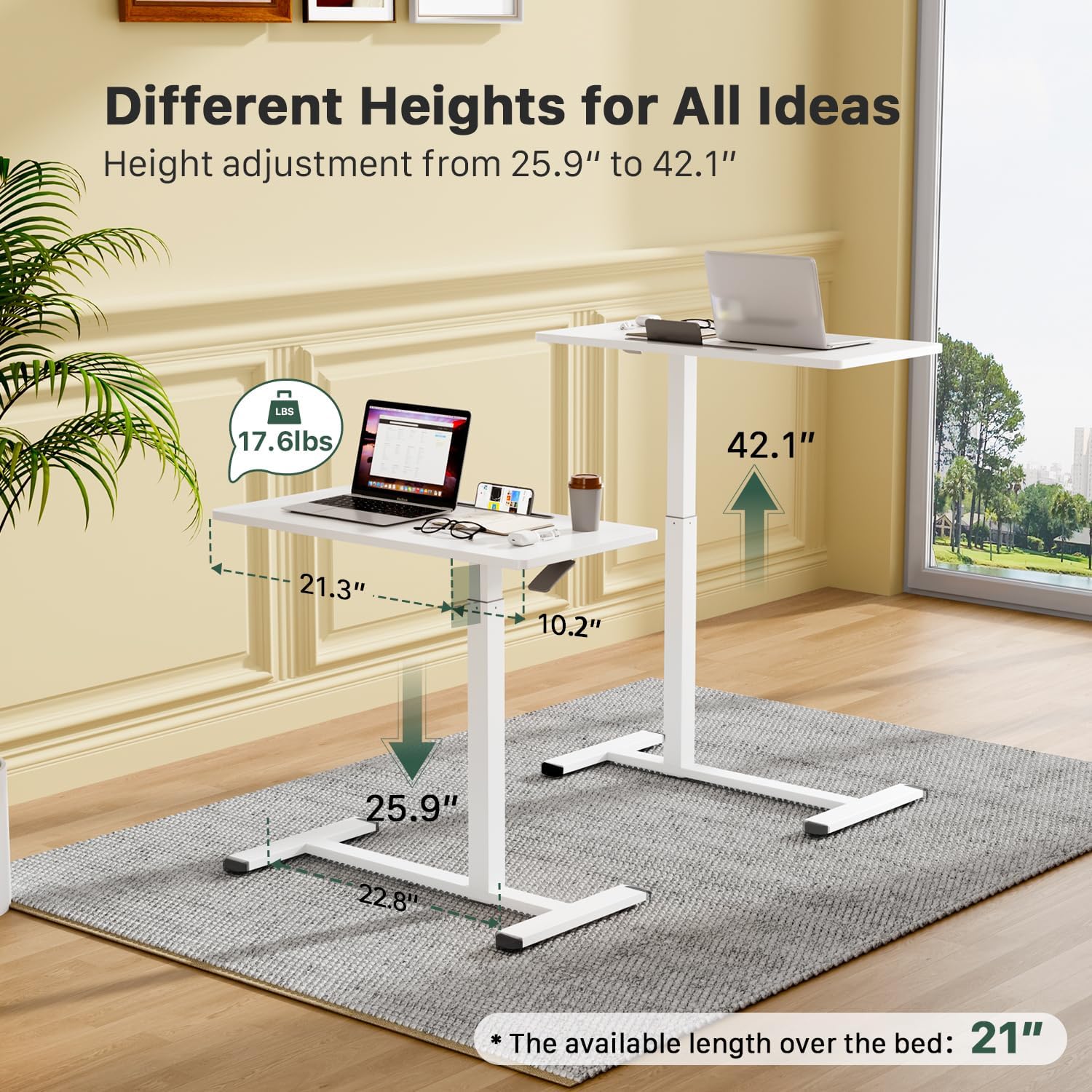
Image: The desk demonstrating its adjustable height range, suitable for both sitting and standing positions.
2 പ്രധാന സവിശേഷതകൾ
- Easy Height Adjustment: Features a built-in gas spring for smooth transitions between sitting (25.9") and standing (42.1") positions.
- Hidden Casters for Mobility: Equipped with 4 hidden wheels for effortless movement across various floor types. The low-profile base (1.2" minimum height) allows it to tuck under furniture.
- Portable Workstation: Offers a 31.5" W x 15.7" D surface, ideal for laptops, tablets, external keyboards, and other work essentials.
- മൾട്ടിഫങ്ഷണൽ ഡിസൈൻ: Suitable for use in offices, schools, hospitals, conference rooms, or as a bedside/couch table.
- Waterproof Tabletop: The surface is designed to be waterproof for easy cleaning and durability.
- Integrated Slot: A convenient slot is included for holding tablets or smartphones.
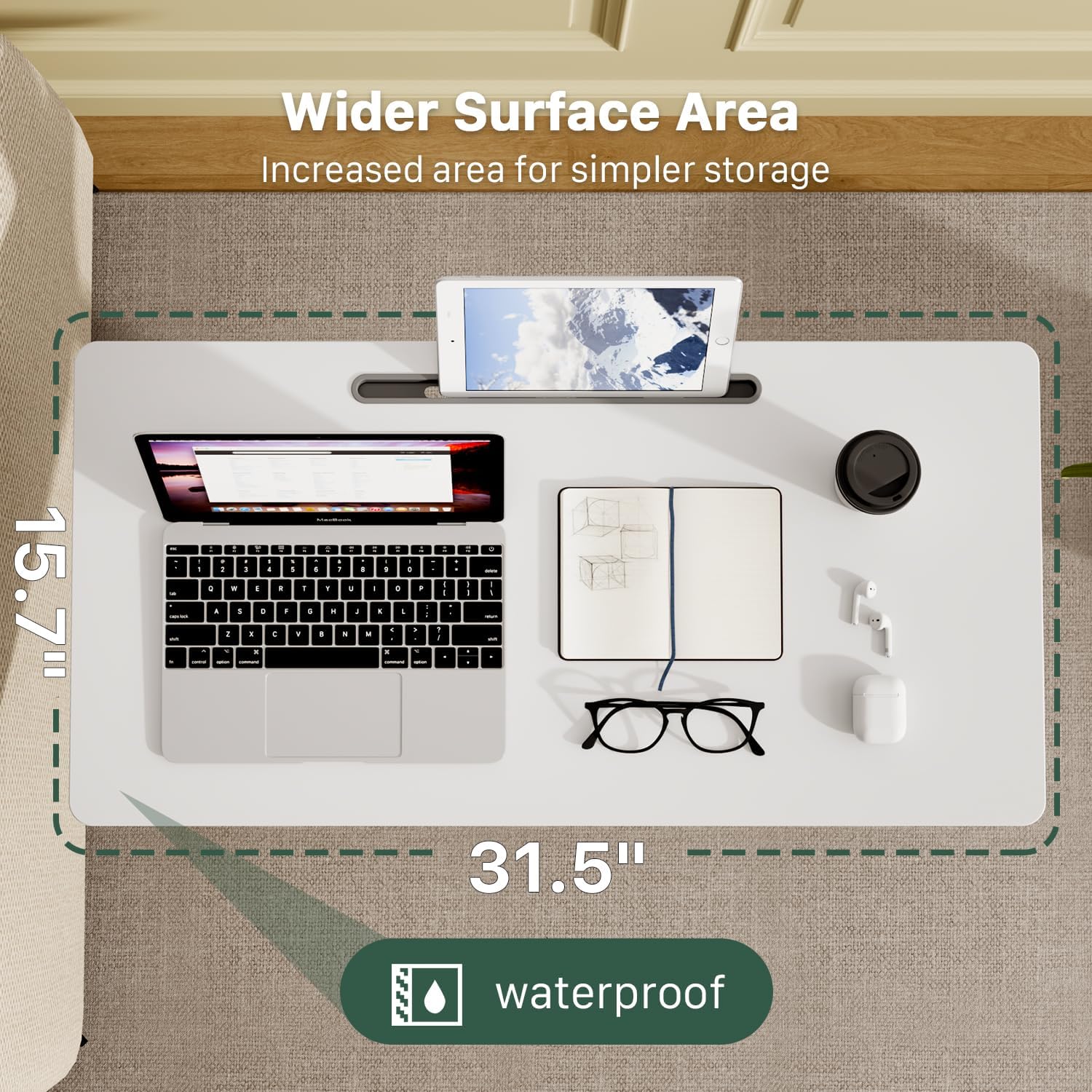
ചിത്രം: വിശദമായത് view of the gas spring lifting mechanism and the integrated cell phone slot.
3. സജ്ജീകരണവും അസംബ്ലിയും
The Gibbon Mounts Mobile Standing Desk is designed for straightforward assembly. All necessary hardware and detailed step-by-step instructions are included.
അസംബ്ലി ഘട്ടങ്ങൾ:
- Step 1: Prepare the Column: Before installing the column to the connecting part, pull the plastic cover upward. Do not rotate the plastic cover.
- Step 2: Fix the Column to the Desktop: Securely attach the main column to the underside of the desktop using the provided screws.
- Step 3: Fix the Base to the Column: Attach the base supports to the bottom of the column using the remaining screws.

Image: Visual guide for the 3-step assembly process.
4. പ്രവർത്തന നിർദ്ദേശങ്ങൾ
ഉയരം ക്രമീകരിക്കൽ:
The desk features a pneumatic gas spring for smooth height adjustments. The height can be adjusted from 25.9 inches to 42.1 inches.
- To Raise the Desk: Squeeze the handle located under the desktop and gently pull the desktop upwards to the desired height.
- To Lower the Desk: Squeeze the handle and apply downward pressure on the desktop until it reaches the desired lower height.

Image: Instructions for raising and lowering the desk.
മൊബിലിറ്റി:
The desk is equipped with hidden casters for easy movement. The low-profile base allows it to slide under most furniture with a minimum clearance of 1.2 inches.
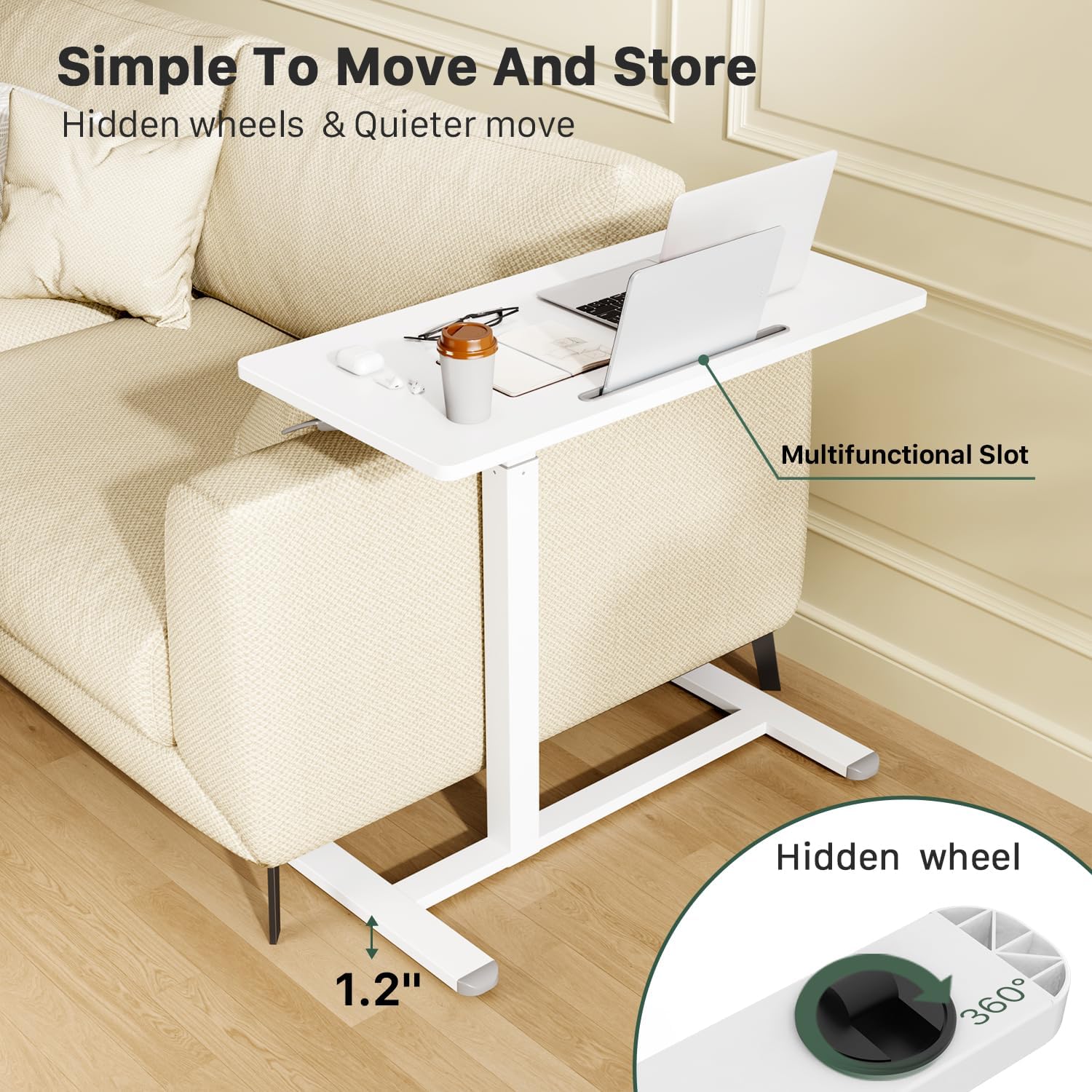
Image: The desk's hidden wheels and low-profile base for easy movement and placement under furniture.
For optimal movement, ensure the path is clear of obstructions. The wheels are designed for smooth gliding on various surfaces.
5. പരിപാലനം
To ensure the longevity and optimal performance of your Gibbon Mounts Mobile Standing Desk, follow these simple maintenance guidelines:
- വൃത്തിയാക്കൽ: പരസ്യം ഉപയോഗിച്ച് ഡെസ്ക്ടോപ്പും ഫ്രെയിമും തുടയ്ക്കുകamp തുണി. ഫിനിഷിനെ തകരാറിലാക്കുന്ന കഠിനമായ രാസവസ്തുക്കൾ ഒഴിവാക്കുക.
- സ്ഥിരത പരിശോധന: എല്ലാ സ്ക്രൂകളും കണക്ഷനുകളും ഇറുകിയതാണെന്ന് ഉറപ്പാക്കാൻ ഇടയ്ക്കിടെ പരിശോധിക്കുക. ആവശ്യമെങ്കിൽ വീണ്ടും മുറുക്കുക.
- കാസ്റ്റർ കെയർ: Keep the hidden casters free of debris to maintain smooth movement.
- ഭാരം ശേഷി: Do not exceed the maximum weight capacity of 17.6 pounds (8 kg) to prevent damage and ensure stability.
6. പ്രശ്നപരിഹാരം
If you encounter any issues with your mobile standing desk, refer to the following common troubleshooting tips:
- Desk Not Adjusting Height Smoothly:
- Ensure the height adjustment handle is fully squeezed.
- Check for any obstructions around the gas spring mechanism.
- Verify that the desk is not overloaded beyond its weight capacity.
- Difficulty Moving the Desk:
- Inspect the hidden casters for any trapped debris (e.g., hair, lint) and clean them if necessary.
- Ensure the floor surface is suitable for rolling.
- Desk Feels Unstable:
- എല്ലാ അസംബ്ലി സ്ക്രൂകളും പരിശോധിച്ച് അവ അയഞ്ഞിട്ടുണ്ടെങ്കിൽ മുറുക്കുക.
- മേശ പരന്നതും നിരപ്പായതുമായ പ്രതലത്തിലാണ് സ്ഥാപിച്ചിരിക്കുന്നതെന്ന് ഉറപ്പാക്കുക.
- പരമാവധി ഭാരം ശേഷി കവിയരുത്.
If the issue persists, please contact Gibbon Mounts customer support for further assistance.
7 സ്പെസിഫിക്കേഷനുകൾ
| ഫീച്ചർ | വിശദാംശങ്ങൾ |
|---|---|
| മോഡൽ നമ്പർ | FDS111C |
| ബ്രാൻഡ് | ഗിബ്ബൺ മൗണ്ട്സ് |
| ഉൽപ്പന്ന അളവുകൾ (D x W x H) | 15.7"D x 31.5"W x 25.9"H (Min) to 42.1"H (Max) |
| നിറം | വെള്ള |
| മെറ്റീരിയൽ തരം | അലോയ് സ്റ്റീൽ, എഞ്ചിനീയേർഡ് വുഡ് |
| ലിഫ്റ്റിംഗ് മെക്കാനിസം | Pneumatic Gas Spring |
| പരമാവധി ഭാരം ശുപാർശ | 17.6 പൗണ്ട് (8 കി.ഗ്രാം) |
| പ്രത്യേക സവിശേഷതകൾ | Adjustable Height, C table design, Hidden Wheels, Multifunctional Slot |
| അസംബ്ലി ആവശ്യമാണ് | അതെ (ഉപകരണങ്ങൾ ഉൾപ്പെടുത്തിയിരിക്കുന്നു) |
8. വാറൻ്റിയും പിന്തുണയും
This Gibbon Mounts Mobile Standing Desk comes with a പരിമിത വാറൻ്റി. For specific warranty details and to register your product, please refer to the documentation included in your package or visit the official Gibbon Mounts webസൈറ്റ്.
For customer support, technical assistance, or to inquire about replacement parts, please contact Gibbon Mounts directly. You can often find contact information on the manufacturer's webസൈറ്റ് അല്ലെങ്കിൽ ഉൽപ്പന്നം വാങ്ങിയ റീട്ടെയിലർ വഴി.
നിർമ്മാതാവ്: GIBBON MOUNTS
ഓൺലൈൻ സ്റ്റോർ: Visit the Gibbon Mounts Store on Amazon
9. ഉൽപ്പന്ന വീഡിയോകൾ
Gibbon Mounts Bedside Mobile Standing Desk
Video: An official product video from Gibbon Joy demonstrating the mobile standing desk's features and use as a bedside table.
Simple & Modern, Medium-sized standing desk
Video: A video by Aimee Mielke showcasing the desk's simple design and functionality as a standing desk.
Ask a question about this manual
Ask about setup, troubleshooting, compatibility, parts, safety, or missing instructions. Manuals+ will review the question and use this page’s manual context to help answer it.