
1. ആമുഖം
Thank you for choosing the Crivit Auriol Radio-Controlled Projection Alarm Clock. This device combines a precise radio-controlled clock with a clear LCD display, dual alarms, and a convenient projection feature. This manual will guide you through the setup, operation, and maintenance of your new alarm clock.

ഫ്രണ്ട് view of the alarm clock displaying time, date, and temperature.
2. സുരക്ഷാ നിർദ്ദേശങ്ങൾ
- ഉപയോഗിക്കുന്നതിന് മുമ്പ് എല്ലാ നിർദ്ദേശങ്ങളും ശ്രദ്ധാപൂർവ്വം വായിച്ച് ഭാവി റഫറൻസിനായി സൂക്ഷിക്കുക.
- ഉപകരണത്തെ തീവ്രമായ താപനിലയിലോ, നേരിട്ടുള്ള സൂര്യപ്രകാശത്തിലോ, ഉയർന്ന ആർദ്രതയിലോ തുറന്നുകാട്ടരുത്.
- ശക്തമായ ആഘാതങ്ങൾക്ക് ഉപകരണം ഇടുകയോ ഇടുകയോ ചെയ്യുന്നത് ഒഴിവാക്കുക.
- ഉപകരണം സ്വയം വേർപെടുത്താനോ നന്നാക്കാനോ ശ്രമിക്കരുത്. യോഗ്യതയുള്ള സേവന ഉദ്യോഗസ്ഥരെ ബന്ധപ്പെടുക.
- ബാറ്ററികൾ കുട്ടികൾക്ക് ലഭ്യമാകാതെ സൂക്ഷിക്കുക. ഉപയോഗിച്ച ബാറ്ററികൾ പ്രാദേശിക നിയന്ത്രണങ്ങൾ അനുസരിച്ച് നശിപ്പിക്കുക.
- Use only the provided AC adapter or one with identical specifications.
3. പാക്കേജ് ഉള്ളടക്കം
പാക്കേജിൽ ഇനിപ്പറയുന്ന ഇനങ്ങൾ ഉണ്ടോ എന്ന് പരിശോധിക്കുക:
- Crivit Auriol Radio-Controlled Projection Alarm Clock (Model 373928)
- എസി പവർ അഡാപ്റ്റർ
- ബാറ്ററികൾ (മുൻകൂട്ടി ഇൻസ്റ്റാൾ ചെയ്തതോ വേറിട്ടതോ)
- ഉപയോക്തൃ മാനുവൽ (ഈ പ്രമാണം)

Included AC power adapter.
4. ഉൽപ്പന്ന സവിശേഷതകൾ
- Radio-Controlled Time: Automatic time synchronization for precise timekeeping.
- പ്രൊജക്ഷൻ പ്രവർത്തനം: Projects time, alarm times, or ambient temperature onto a wall or ceiling.
- Pivoting Projection Arm: Adjustable projection angle with easy focus adjustment.
- LCD ഡിസ്പ്ലേ: Clear screen showing time, day, month, week number/day of the week, and indoor temperature.
- ഇരട്ട അലാറങ്ങൾ: Two independent alarm settings with snooze function.
- ടച്ച് സെൻസർ: Activates short-term projection and screen backlight.
- പവർ ഓപ്ഷനുകൾ: Operates via AC adapter or batteries.
- USB-A ചാർജിംഗ് പോർട്ട്: Convenient 5V, 800mA output for charging external devices.
- ക്രമീകരിക്കാവുന്ന തെളിച്ചം: Customizable display brightness.
5. ഘടക ഐഡന്റിഫിക്കേഷൻ
ഫ്രണ്ട് View:
ഫ്രണ്ട് view with LCD display.
- LCD ഡിസ്പ്ലേ: Shows time, date, temperature, alarm status, and radio control signal.
- ടച്ച് സെൻസർ ഏരിയ: Located above the display, for temporary backlight and projection.
- Projection Indicator: Icon indicating projection is active.
- അലാറം സൂചകങ്ങൾ: Icons for Alarm 1 and Alarm 2.
- റൊട്ടേഷൻ ബട്ടൺ: Adjusts projection orientation.
വശം View (Projection Arm):
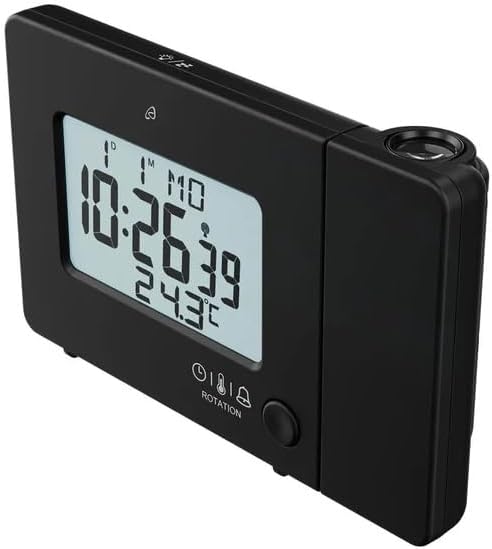
വശം view with projection arm extended.
- പ്രൊജക്ഷൻ ആം: Pivots to direct the projection.
- ഫോക്കസ് വീൽ: പ്രൊജക്റ്റ് ചെയ്ത ചിത്രത്തിന്റെ വ്യക്തത ക്രമീകരിക്കുന്നു.
- പ്രൊജക്ഷൻ ലെൻസ്: Emits the time/temperature display.
പിൻഭാഗം View:

പിൻഭാഗം view with control buttons and ports.
- -/WEEK Button: Decreases values, sets week display.
- +/ZONE Button: Increases values, sets time zone.
- °C/°F ബട്ടൺ: Toggles temperature unit.
- LANG Button: Selects display language for day of the week.
- 12/24 ബട്ടൺ: Toggles 12/24 hour format.
- മോഡ് ബട്ടൺ: Cycles through settings modes (Time, Alarm 1, Alarm 2).
- SET ബട്ടൺ: Enters setting mode for current display.
- റീസെറ്റ് ബട്ടൺ: Resets the device to factory defaults (use a pointed object).
- ബാറ്ററി കമ്പാർട്ട്മെൻ്റ്: For backup batteries.
- തുറമുഖത്ത് ഡിസി: എസി പവർ അഡാപ്റ്റർ ബന്ധിപ്പിക്കുന്നതിന്.
- USB-A ഔട്ട്പുട്ട് പോർട്ട്: ബാഹ്യ ഉപകരണങ്ങൾ ചാർജ് ചെയ്യുന്നതിന്.
6. സജ്ജീകരണം
6.1. പവർ ചെയ്യുന്നു
The alarm clock can be powered by either the included AC adapter or batteries for backup.
- ബാറ്ററി ഇൻസ്റ്റാളേഷൻ: Open the battery compartment on the rear of the unit. Insert the included batteries, observing the correct polarity (+/-). Batteries primarily serve as backup in case of power outage.
- എസി അഡാപ്റ്റർ കണക്ഷൻ: Connect the small plug of the AC adapter into the DC IN port on the back of the alarm clock. Plug the AC adapter into a standard wall outlet. The display will light up.
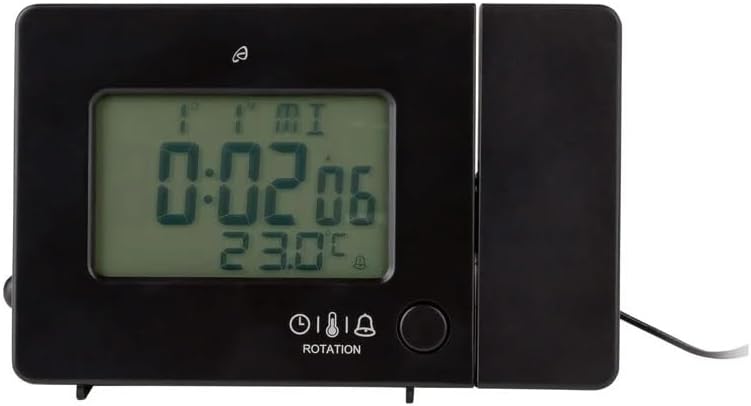
Alarm clock connected to power.
6.2. Initial Setup and Radio Control Synchronization
Upon first power-up or after a reset, the clock will automatically attempt to synchronize with the radio-controlled time signal (DCF77). This process can take several minutes to an hour, depending on your location and signal strength. During synchronization, a radio tower icon will flash on the display.
- മികച്ച സിഗ്നൽ സ്വീകരണത്തിനായി ക്ലോക്ക് ഒരു ജനാലയ്ക്ക് സമീപം വയ്ക്കുക.
- തടസ്സമുണ്ടാക്കാൻ സാധ്യതയുള്ള ഇലക്ട്രോണിക് ഉപകരണങ്ങൾക്ക് സമീപം വയ്ക്കുന്നത് ഒഴിവാക്കുക.
- Once synchronized, the radio tower icon will appear solid on the display.
If the radio signal is not received, you may need to set the time manually (see Section 7.1).
6.3. Basic Settings (if not automatically set or for adjustment)
അമർത്തുക സെറ്റ് button to enter setting mode. Use the -/WEEK ഒപ്പം +/ZONE buttons to adjust values, and സെറ്റ് സ്ഥിരീകരിക്കാനും അടുത്ത ക്രമീകരണത്തിലേക്ക് നീങ്ങാനും.
- സമയ മേഖല: Adjust if you are not in the standard time zone for the radio signal.
- 12/24 മണിക്കൂർ ഫോർമാറ്റ്: അമർത്തുക 12/24 button to toggle between 12-hour (with AM/PM) and 24-hour formats.
- താപനില യൂണിറ്റ്: അമർത്തുക ° C/° F സെൽഷ്യസിനും ഫാരൻഹീറ്റിനും ഇടയിൽ മാറാനുള്ള ബട്ടൺ.
- പ്രദർശന ഭാഷ: അമർത്തുക LANG button to select the language for the day of the week display (5 languages available).
7. പ്രവർത്തന നിർദ്ദേശങ്ങൾ
7.1. സമയം സ്വമേധയാ സജ്ജീകരിക്കുന്നു
If the radio-controlled time signal is weak or unavailable, you can set the time manually:
- അമർത്തിപ്പിടിക്കുക സെറ്റ് മണിക്കൂർ അക്കങ്ങൾ മിന്നുന്നത് വരെ ബട്ടൺ അമർത്തുക.
- ഉപയോഗിക്കുക -/WEEK ഒപ്പം +/ZONE മണിക്കൂർ ക്രമീകരിക്കാനുള്ള ബട്ടണുകൾ.
- അമർത്തുക സെറ്റ് to confirm and move to minutes, then year, month, and day.
- അമർത്തുക സെറ്റ് again to exit manual time setting.
7.2. അലാറങ്ങൾ സജ്ജീകരിക്കൽ (അലാറം 1 ഉം അലാറം 2 ഉം)
ക്ലോക്കിൽ രണ്ട് സ്വതന്ത്ര അലാറങ്ങളുണ്ട്.
- അമർത്തുക മോഡ് button once to display Alarm 1 time, or twice for Alarm 2 time. The corresponding alarm icon (e.g., A1) will flash.
- അലാറം സമയം പ്രദർശിപ്പിക്കുമ്പോൾ, അമർത്തിപ്പിടിക്കുക സെറ്റ് മണിക്കൂർ അക്കങ്ങൾ മിന്നുന്നത് വരെ ബട്ടൺ അമർത്തുക.
- ഉപയോഗിക്കുക -/WEEK ഒപ്പം +/ZONE മണിക്കൂർ ക്രമീകരിക്കാനുള്ള ബട്ടണുകൾ.
- അമർത്തുക സെറ്റ് to confirm and move to minutes. Adjust minutes using -/WEEK ഒപ്പം +/ZONE.
- അമർത്തുക സെറ്റ് again to confirm and exit alarm setting.
- ഒരു അലാറം സജീവമാക്കാനോ നിർജ്ജീവമാക്കാനോ, അമർത്തുക മോഡ് button to display the desired alarm, then press the +/ZONE button. The alarm icon (bell) will appear/disappear on the display.
7.3. സ്നൂസ് ഫംഗ്ഷൻ
When an alarm sounds, touch the ടച്ച് സെൻസർ ഏരിയ അല്ലെങ്കിൽ അമർത്തുക സ്നൂസ് / ലൈറ്റ് button (if available, otherwise use the touch sensor) to activate the snooze function. The alarm will pause for approximately 5 minutes and then sound again. To stop the alarm completely, press any other button.
7.4. Projection Function
The alarm clock can project the time, alarm times, or ambient temperature onto a wall or ceiling.
- പ്രൊജക്ഷൻ സജീവമാക്കുക: The projection is continuously active when powered by the AC adapter. If running on batteries, touch the ടച്ച് സെൻസർ ഏരിയ for short-term projection.
- പ്രൊജക്ഷൻ ആംഗിൾ ക്രമീകരിക്കുക: Pivot the projection arm to direct the image to your desired location.
- ഫോക്കസ് ക്രമീകരിക്കുക: ഉപയോഗിക്കുക ഫോക്കസ് വീൽ on the projection arm to sharpen the projected image.
- Change Projected Content: അമർത്തുക മോഡ് button repeatedly to cycle through projecting Time, Alarm 1, Alarm 2, or Temperature.
- പ്രൊജക്ഷൻ തിരിക്കുക: അമർത്തുക റൊട്ടേഷൻ button to rotate the projected image by 90-degree increments (4 orientations available).

Time projected onto a surface.
7.5. ബാക്ക്ലൈറ്റ് പ്രദർശിപ്പിക്കുക
When powered by the AC adapter, the display backlight is continuously on. When running on batteries, touch the ടച്ച് സെൻസർ ഏരിയ to activate the backlight for a few seconds.
7.6. USB Charging Output
The USB-A port on the back of the unit provides a 5V, 800mA output for charging small electronic devices like smartphones or tablets. Connect your device's USB charging cable to this port.
8. പരിപാലനം
- വൃത്തിയാക്കൽ: മൃദുവായതും ഉണങ്ങിയതുമായ തുണി ഉപയോഗിച്ച് ഉപകരണം തുടയ്ക്കുക. അബ്രസീവ് ക്ലീനറുകളോ ലായകങ്ങളോ ഉപയോഗിക്കരുത്.
- ബാറ്ററി മാറ്റിസ്ഥാപിക്കൽ: If using batteries for backup, replace them annually or when the display becomes dim during power outages. Ensure correct polarity.
- സംഭരണം: ഉപകരണം ദീർഘനേരം സൂക്ഷിക്കുകയാണെങ്കിൽ, ചോർച്ച തടയാൻ ബാറ്ററികൾ നീക്കം ചെയ്യുക.
9. പ്രശ്നപരിഹാരം
| പ്രശ്നം | സാധ്യമായ കാരണം | പരിഹാരം |
|---|---|---|
| ഡിസ്പ്ലേ ശൂന്യമോ മങ്ങിയതോ ആണ്. | No power, dead batteries, or AC adapter not connected. | Ensure AC adapter is securely connected. Replace batteries if using for backup. |
| Radio-controlled time not synchronizing. | Weak signal, interference, or incorrect time zone. | Move the clock to a window or open area. Avoid electronic devices. Manually set time if necessary. Check time zone setting. |
| പ്രൊജക്ഷൻ മങ്ങിയതാണ്. | ഫോക്കസ് ക്രമീകരിച്ചിട്ടില്ല. | ക്രമീകരിക്കുക ഫോക്കസ് വീൽ on the projection arm. |
| അലാറം മുഴങ്ങുന്നില്ല. | അലാറം സജീവമാക്കിയിട്ടില്ല അല്ലെങ്കിൽ തെറ്റായി സജ്ജീകരിച്ചിട്ടില്ല. | Ensure the alarm icon is visible on the display. Recheck alarm time settings. |
| യുഎസ്ബി ചാർജിംഗ് പ്രവർത്തിക്കുന്നില്ല. | Device not properly connected, or device requires more power than 800mA. | Ensure the USB cable is securely connected. Check if your device's charging requirements exceed 5V/800mA. |
10 സ്പെസിഫിക്കേഷനുകൾ

ഉൽപ്പന്ന അളവുകൾ.
- മോഡൽ നമ്പർ: 373928
- അളവുകൾ (L x W x H): 15 x 3.81 x 9.5 cm (approx. 15l x 9.5H centimeters)
- മെറ്റീരിയൽ: പ്ലാസ്റ്റിക്
- ഡിസ്പ്ലേ തരം: ഡിജിറ്റൽ എൽസിഡി
- ഊർജ്ജ സ്രോതസ്സ്: AC Adapter (included) or Batteries (included)
- USB ഔട്ട്പുട്ട്: 5V, 800mA
- പ്രത്യേക സവിശേഷതകൾ: Adjustable brightness, Snooze, Projection, Radio-controlled time
- ചലന തരം: ക്വാർട്സ്
- മൗണ്ടിംഗ് തരം: ടേബിൾടോപ്പ്
- ഇൻഡോർ/doട്ട്ഡോർ ഉപയോഗം: ഇൻഡോർ
11. വാറൻ്റിയും പിന്തുണയും
This Crivit Auriol Projection Alarm Clock comes with a standard manufacturer's warranty. Please refer to the warranty card included in your package or contact your retailer for specific warranty terms and conditions.
For technical support or inquiries, please contact the customer service department of your retailer or the Crivit support line as indicated on the product packaging or official webസൈറ്റ്.