
TEYES CC3 2K
TEYES CC3 2K Car Radio Multimedia System
User Instruction Manual for Nissan Qashqai 1 J10 (2006-2013)
Model: CC3 2K | Brand: TEYES
1. ആമുഖം
This manual provides detailed instructions for the installation, operation, maintenance, and troubleshooting of your TEYES CC3 2K Car Radio Multimedia System. Designed specifically for the Nissan Qashqai 1 J10 models from 2006 to 2013, this head unit offers advanced navigation, multimedia playback, and smart connectivity features to enhance your driving experience. Please read this manual thoroughly before installation and use to ensure proper functionality and safety.

Image: TEYES CC3 2K Car Radio Multimedia System with its dedicated dashboard frame.
2. പാക്കേജ് ഉള്ളടക്കം
Verify that all items listed below are included in your package. If any items are missing or damaged, please contact TEYES customer support.

Image: All components included in the TEYES CC3 2K package.
- 1* Head unit (TEYES CC3 2K)
- 1* USB കേബിൾ
- 1* GPS antenna
- 1* AUX cable
- 1* 4G WiFi antenna
- 1* E-book (digital instruction manual)
- 1* Frame (OEM Panel for Nissan Qashqai 1 J10)
- 1* പവർ കേബിൾ
- 1* AHD 1080p rear camera
- Audio & Video harness + RCA cables
- സ്ക്രൂകളും സ്ക്രൂഡ്രൈവറും
- ക്ലീനിംഗ് തുണി
- വയറിംഗ് ഡയഗ്രം
3. സജ്ജീകരണവും ഇൻസ്റ്റാളേഷനും
Installation of the TEYES CC3 2K unit requires careful attention to wiring and vehicle-specific procedures. It is recommended that installation be performed by a qualified professional.
3.1 പ്രീ-ഇൻസ്റ്റലേഷൻ പരിശോധനകൾ
- Ensure your vehicle is a Nissan Qashqai 1 J10 (2006-2013).
- ഏതെങ്കിലും വൈദ്യുത ജോലി ആരംഭിക്കുന്നതിന് മുമ്പ് വാഹനത്തിന്റെ ബാറ്ററി വിച്ഛേദിക്കുക.
- Review the included wiring diagram thoroughly.
3.2 ഇൻസ്റ്റലേഷൻ ഘട്ടങ്ങൾ
- യഥാർത്ഥ കാർ റേഡിയോയും ഡാഷ്ബോർഡ് ട്രിമ്മും ശ്രദ്ധാപൂർവ്വം നീക്കം ചെയ്യുക.
- Install the provided OEM panel into your vehicle's dashboard opening. This panel is designed to seamlessly integrate the new head unit.
- Connect the main power harness from the TEYES CC3 2K unit to your vehicle's wiring. Ensure all connections are secure.
- Connect the GPS antenna, 4G WiFi antenna, USB cables, AUX cable, and the AHD rear camera to their respective ports on the head unit.
- Carefully slide the TEYES CC3 2K head unit into the OEM panel opening until it clicks into place.
- വാഹനത്തിന്റെ ബാറ്ററി വീണ്ടും ബന്ധിപ്പിക്കുക.
- Power on the unit and perform initial setup as prompted on the screen.
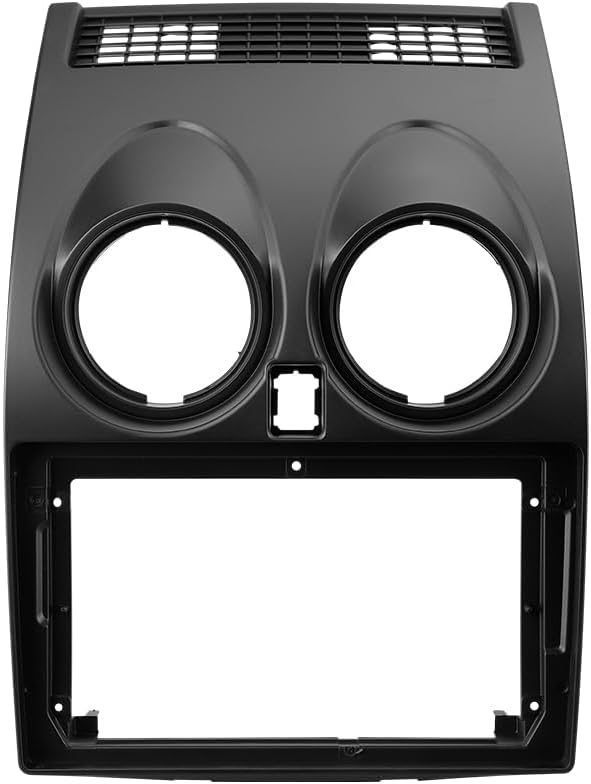
Image: Dedicated OEM Panel for Nissan Qashqai 1 J10.

Image: Visual comparison of the dashboard before and after installation, highlighting integrated features like steering wheel controls and USB ports.
4. പ്രവർത്തന നിർദ്ദേശങ്ങൾ
The TEYES CC3 2K system runs on Android, offering a user-friendly interface and a wide range of features.
4.1 ഡിസ്പ്ലേയും ഇന്റർഫേസും
The unit features a 2K In-cell Display with advanced touch screen technology, providing vivid colors and accurate touch response.
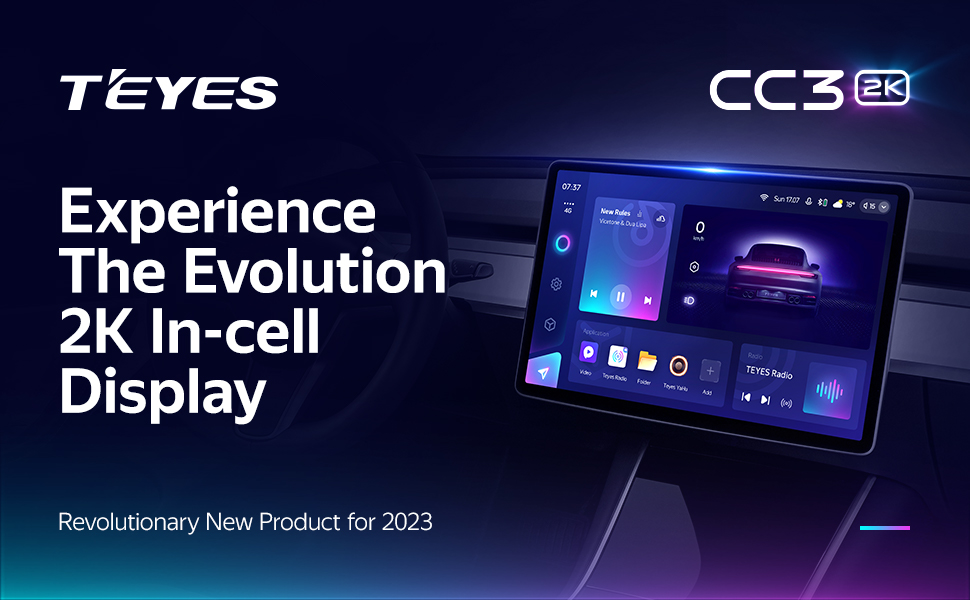
Image: The TEYES CC3 2K's 2K In-cell Display showcasing its vibrant interface.
4.2 കണക്റ്റിവിറ്റി
- വയർലെസ് കാർപ്ലേയും ആൻഡ്രോയിഡ് ഓട്ടോയും: Connect your smartphone wirelessly for seamless integration of navigation, music, and communication apps.
- ബ്ലൂടൂത്ത്: Pair your phone for hands-free calling and audio streaming via the upgraded QCC3031QFN Qualcomm Bluetooth module.
- USB: Utilize the three USB outputs for data transfer, media playback, and charging devices.
- 4G Internet & WiFi: Stay connected on the go with built-in 4G support and WiFi hotspot capabilities.

Image: Three USB output cables provided for data transfer and connectivity.
4.3 ഓഡിയോ സവിശേഷതകൾ
Experience superior sound quality with advanced audio processing capabilities.
- Dual DSP: Equipped with 2*DSP ADAU1701 + ROHM32107 for enhanced audio processing.
- Optical and Coaxial Digital Audio Output: For high-fidelity audio connections to external ampലൈഫയറുകൾ അല്ലെങ്കിൽ ശബ്ദ സംവിധാനങ്ങൾ.
- 27-Segment EQ: Fine-tune your audio with a comprehensive 27-segment equalizer.
- Sound Filtering: Utilize sound filtering options to optimize audio output.

Image: Digital Sound Processor (DSP) interface for audio customization.

Image: Settings for optical and coaxial digital audio output.
Image: The 27-Segment Equalizer interface for precise sound adjustment.
Image: Sound filtering settings to refine audio output.
4.4 Navigation and Multimedia
- GPS നാവിഗേഷൻ: Built-in GPS with support for various navigation applications.
- റേഡിയോ: Enjoy local radio stations with premium reception and RDS support.
- വീഡിയോ പ്ലെയർ: Play various video formats directly on the 2K display.
- TEYES Vision & Yahu: Explore creative 3D software applications developed by TEYES.
- സ്പ്ലിറ്റ് സ്ക്രീൻ മോഡ്: Utilize the Freestyle Combination Split Screen Mode to run two applications simultaneously, such as navigation and music.

Image: The Premium Local Radio interface displaying available stations.
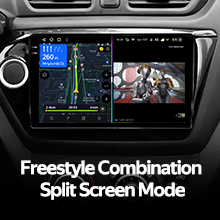
Image: Split screen mode displaying navigation on one side and video playback on the other.
4.5 Vehicle Integration
- സ്റ്റിയറിംഗ് വീൽ നിയന്ത്രണം: The unit supports integration with your vehicle's existing steering wheel controls for convenient operation.
- പിൻഭാഗം View ക്യാമറ: തൽസമയം viewing of your vehicle's rear view is supported, along with video recording capabilities for added safety.

Image: Steering wheel controls for integrated system operation.
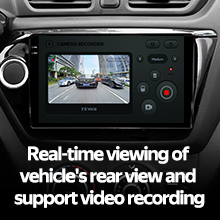
Image: Real-time display from the rear view camera on the head unit screen.
5. പരിപാലനം
Proper maintenance ensures the longevity and optimal performance of your TEYES CC3 2K system.
- വൃത്തിയാക്കൽ: Use the provided cleaning cloth or a soft, lint-free cloth to gently wipe the screen and unit exterior. Do not use abrasive cleaners or solvents.
- സോഫ്റ്റ്വെയർ അപ്ഡേറ്റുകൾ: Periodically check for and install software updates to ensure the system has the latest features and bug fixes. Updates can typically be found via the system settings or TEYES official webസൈറ്റ്.
- പരിസ്ഥിതി വ്യവസ്ഥകൾ: യൂണിറ്റിന് തീവ്രമായ താപനില, ദീർഘനേരം നേരിട്ടുള്ള സൂര്യപ്രകാശം, അല്ലെങ്കിൽ അമിതമായ ഈർപ്പം എന്നിവ ഏൽക്കുന്നത് ഒഴിവാക്കുക.
6. പ്രശ്നപരിഹാരം
If you encounter issues with your TEYES CC3 2K system, refer to the following common problems and solutions.
| പ്രശ്നം | സാധ്യമായ കാരണം | പരിഹാരം |
|---|---|---|
| യൂണിറ്റ് പവർ ഓണാക്കുന്നില്ല. | അയഞ്ഞ വൈദ്യുതി കണക്ഷൻ, ഫ്യൂസ് പൊട്ടി, വാഹന ബാറ്ററി പ്രശ്നം. | പവർ കേബിൾ കണക്ഷനുകൾ പരിശോധിക്കുക. വാഹന ഫ്യൂസുകൾ പരിശോധിക്കുക. വാഹന ബാറ്ററി ചാർജ്ജ് ചെയ്തിട്ടുണ്ടെന്ന് ഉറപ്പാക്കുക. |
| ശബ്ദ ഔട്ട്പുട്ട് ഇല്ല. | ശബ്ദം വളരെ കുറവാണ്, ഓഡിയോ ഉറവിടം തെറ്റാണ്, സ്പീക്കർ വയറിംഗ് പ്രശ്നം. | ശബ്ദം കൂട്ടുക. ശരിയായ ഓഡിയോ ഉറവിടം തിരഞ്ഞെടുക്കുക. സ്പീക്കർ കണക്ഷനുകൾ പരിശോധിക്കുക. |
| GPS സിഗ്നൽ നഷ്ടപ്പെട്ടു അല്ലെങ്കിൽ കൃത്യമല്ല. | GPS antenna obstructed or disconnected, poor satellite reception. | ജിപിഎസ് ആന്റിന ശരിയായി ബന്ധിപ്പിച്ചിട്ടുണ്ടെന്നും വ്യക്തമായ ഒരു കണക്ഷൻ ഉണ്ടെന്നും ഉറപ്പാക്കുക. view ആകാശത്തിന്റെ. വാഹനം ഒരു തുറസ്സായ സ്ഥലത്തേക്ക് നീക്കുക. |
| ബ്ലൂടൂത്ത് കണക്ഷൻ പ്രശ്നങ്ങൾ. | ഉപകരണം ജോടിയാക്കൽ മോഡിലല്ല, തടസ്സം, തെറ്റായ ജോടിയാക്കൽ പ്രക്രിയ. | Ensure both devices are in pairing mode. Delete previous pairings and re-pair. Reduce interference. |
| ടച്ച്സ്ക്രീൻ പ്രതികരിക്കുന്നില്ല. | സിസ്റ്റം ഫ്രീസ്, താൽക്കാലിക സോഫ്റ്റ്വെയർ തകരാർ. | Restart the unit (refer to manual for specific restart procedure, usually a small reset button or holding power button). |
If the problem persists after attempting these solutions, please contact TEYES customer support.
7 സ്പെസിഫിക്കേഷനുകൾ
Key technical specifications for the TEYES CC3 2K Car Radio Multimedia System.
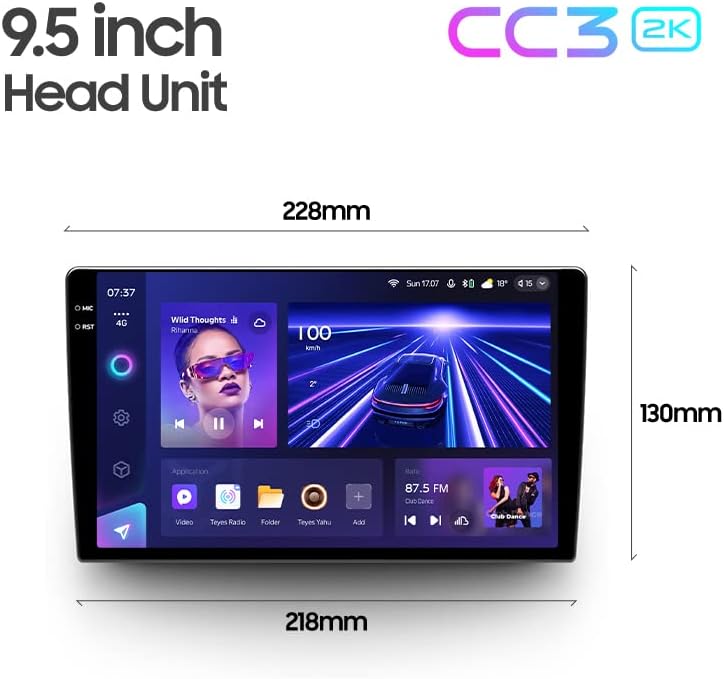
Image: Dimensions of the TEYES CC3 2K Head Unit.
| ഫീച്ചർ | സ്പെസിഫിക്കേഷൻ |
|---|---|
| ഇനം മോഡൽ നമ്പർ | CC3 2K |
| ഡിസ്പ്ലേ വലിപ്പം | 9.5 ഇഞ്ച് |
| ഓപ്പറേറ്റിംഗ് സിസ്റ്റം | ആൻഡ്രോയിഡ് |
| മെമ്മറി സ്റ്റോറേജ് കപ്പാസിറ്റി | 6 ജിബി റാം, 128 ജിബി റോം |
| പ്രോസസ്സർ | 8 cores 2.0GHz |
| കണക്റ്റിവിറ്റി ടെക്നോളജി | Bluetooth, USB, WIFI, Hotspot |
| പ്രത്യേക സവിശേഷതകൾ | Bluetooth, Touchscreen, Wireless CarPlay, Android Auto, DSP, Optical/Coaxial Digital Audio Output, Rear View ക്യാമറ പിന്തുണ |
| ഓഡിയോ put ട്ട്പുട്ട് മോഡ് | സ്റ്റീരിയോ |
| മാപ്പ് തരം | North America (pre-installed, other maps may be downloadable) |
| നിർമ്മാതാവ് | Shenzhen TEYES High tech Co., Ltd. |
8. വാറൻ്റി വിവരങ്ങൾ
The TEYES CC3 2K Car Radio Multimedia System comes with a 1 വർഷത്തെ വാറൻ്റി from the date of purchase. This warranty covers manufacturing defects and malfunctions under normal use. Please retain your proof of purchase for warranty claims. The warranty does not cover damage caused by improper installation, misuse, accidents, unauthorized repairs, or normal wear and tear.
9. പിന്തുണ
For technical assistance, troubleshooting beyond this manual, or warranty inquiries, please contact TEYES customer support. You can typically find contact information on the official TEYES webസൈറ്റ് അല്ലെങ്കിൽ നിങ്ങൾ ഉൽപ്പന്നം വാങ്ങിയ റീട്ടെയിലർ വഴി.
നിർമ്മാതാവ്: Shenzhen TEYES High tech Co., Ltd.
ബ്രാൻഡ്: ടൈകൾ
ഈ മാനുവലിൽ ഉൾച്ചേർക്കുന്നതിനായി നൽകിയിരിക്കുന്ന ഡാറ്റയിൽ ഔദ്യോഗിക ഉൽപ്പന്ന വീഡിയോകളൊന്നും കണ്ടെത്തിയില്ല.
Ask a question about this manual
Ask about setup, troubleshooting, compatibility, parts, safety, or missing instructions. Manuals+ will review the question and use this page’s manual context to help answer it.