
ആമുഖം
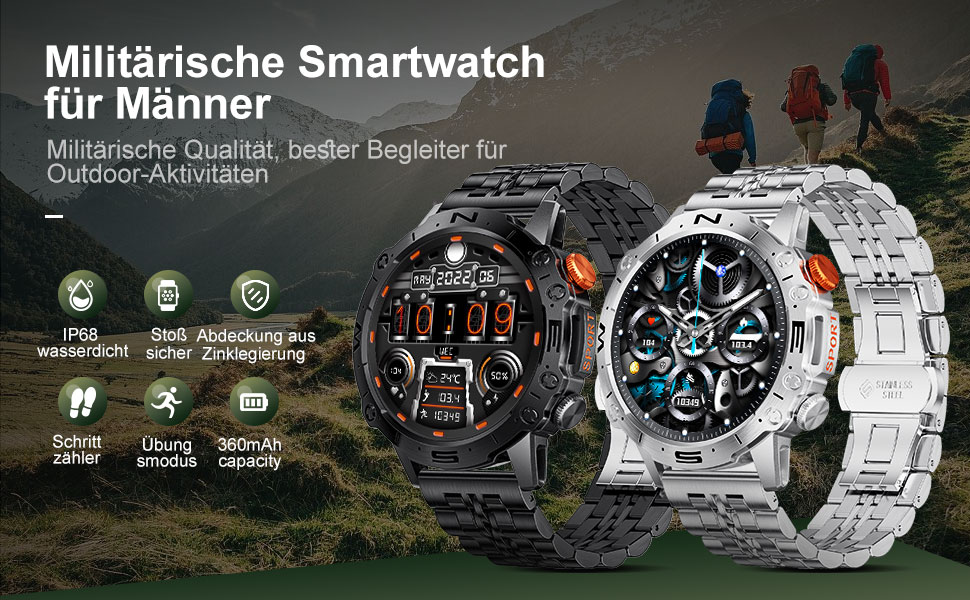
This manual provides detailed instructions for the setup, operation, and maintenance of your LIGE ST19-A Smartwatch. Designed for durability and functionality, this smartwatch features a 1.43-inch AMOLED touchscreen, Bluetooth calling, comprehensive health monitoring, and multiple sports modes. Please read this manual carefully to ensure proper use and to maximize your device's potential.
1. സജ്ജീകരണം
1.1 സ്മാർട്ട് വാച്ച് ചാർജ് ചെയ്യുന്നു
Before first use, fully charge your LIGE ST19-A Smartwatch. Use the provided magnetic charging cable.
- Connect the magnetic end of the charging cable to the charging contacts on the back of the smartwatch.
- Connect the USB end of the cable to a standard USB power adapter (5V/1A recommended) or a computer's USB port.
- The watch display will indicate charging status. A full charge typically takes 2-3 hours.
- Once fully charged, the watch offers approximately 3-7 days of working time and up to 30 days of standby time.
1.2 ആപ്പ് ഇൻസ്റ്റാളേഷനും ഉപകരണ ജോടിയാക്കലും
നിങ്ങളുടെ സ്മാർട്ട് വാച്ചിന്റെ പൂർണ്ണ പ്രവർത്തനം അൺലോക്ക് ചെയ്യുന്നതിന്, നിങ്ങളുടെ സ്മാർട്ട്ഫോണിൽ കമ്പാനിയൻ ആപ്ലിക്കേഷൻ ഇൻസ്റ്റാൾ ചെയ്യുകയും ഉപകരണങ്ങൾ ജോടിയാക്കുകയും വേണം.
- ബ്ലൂടൂത്ത് പ്രവർത്തനക്ഷമമാക്കുക: On your smartphone, go to settings and ensure Bluetooth is turned on.
- ആപ്പ് ഡൗൺലോഡ് ചെയ്യുക: Scan the QR code provided in the watch's packaging or search for "FitCloudPro" in your smartphone's app store (Google Play Store for Android, Apple App Store for iOS). Alternatively, you can visit ഈ ലിങ്ക് for download options.
- ഇൻസ്റ്റാൾ ചെയ്ത് തുറക്കുക: Install the "FitCloudPro" app and open it.
- ഉപകരണം ചേർക്കുക: In the app, navigate to the "Device" or "Add Device" section. The app will search for available devices. Select "ST19-A" from the list to initiate pairing.
- ജോടിയാക്കൽ സ്ഥിരീകരിക്കുക: Follow the on-screen prompts on both your phone and smartwatch to confirm the pairing request.
- അറിയിപ്പുകൾ പ്രവർത്തനക്ഷമമാക്കുക: Grant the necessary permissions for the app to display notifications from your phone on the smartwatch.
- ബ്ലൂടൂത്ത് കോൾ പ്രവർത്തനം: After successful connection, you can enable or disable the call function on the watch. If the connection is successful, you can add/answer calls and play music.

2. പ്രവർത്തന നിർദ്ദേശങ്ങൾ
2.1 അടിസ്ഥാന നാവിഗേഷൻ
- ടച്ച് സ്ക്രീൻ: മെനുകളിലൂടെയും സവിശേഷതകളിലൂടെയും നാവിഗേറ്റ് ചെയ്യാൻ ഇടത്തോട്ടോ വലത്തോട്ടോ മുകളിലേക്കോ താഴേക്കോ സ്വൈപ്പ് ചെയ്യുക. തിരഞ്ഞെടുക്കാൻ ടാപ്പ് ചെയ്യുക.
- സൈഡ് ബട്ടണുകൾ: The smartwatch features physical buttons for quick access to functions or to return to the home screen. Refer to the watch's interface for specific button assignments.
2.2 ബ്ലൂടൂത്ത് കോളിംഗ്
Once paired with your smartphone, you can make and receive calls directly from your smartwatch.
- കോളുകൾ ചെയ്യുന്നു: Access the dialer on your watch or select a contact from your synced phonebook.
- കോളുകൾ സ്വീകരിക്കുന്നു: When a call comes in, the watch will display the caller ID. You can answer or decline the call directly from your wrist.
- The watch includes a microphone and speaker for hands-free communication.

2.3 സ്മാർട്ട് അറിയിപ്പുകൾ
Receive instant notifications for incoming calls, text messages, and alerts from various social media applications directly on your wrist.
- Ensure notification permissions are granted in the "FitCloudPro" app for desired applications.
- Supported apps include Line, Messenger, Facebook, Twitter, Kakao Talk, Skype, and WhatsApp.

2.4 ആരോഗ്യ ട്രാക്കിംഗ്
The smartwatch provides 24-hour real-time monitoring of various health metrics.
- ഹൃദയമിടിപ്പ് നിരീക്ഷണം: Tracks your heart rate continuously throughout the day.
- രക്തസമ്മർദ്ദം അളക്കൽ: രക്തസമ്മർദ്ദ വായനകൾ നൽകുന്നു.
- രക്തത്തിലെ ഓക്സിജൻ (SpO2) നിരീക്ഷണം: നിങ്ങളുടെ രക്തത്തിലെ ഓക്സിജൻ സാച്ചുറേഷൻ അളവ് അളക്കുന്നു.
- ഉറക്ക നിരീക്ഷണം: ഗാഢനിദ്ര, ലഘുനിദ്ര, ഉണരുന്ന സമയങ്ങൾ എന്നിവയുൾപ്പെടെ നിങ്ങളുടെ ഉറക്ക പാറ്റേണുകൾ വിശകലനം ചെയ്യുന്നു.
- റിട്ടയർമീറ്റർ: Counts your daily steps, distance, and estimated calorie burn.
- ശ്വസന പരിശീലനം: സമ്മർദ്ദം നിയന്ത്രിക്കാൻ സഹായിക്കുന്ന ഗൈഡഡ് ശ്വസന വ്യായാമങ്ങൾ.
Note: Health data provided by this device is for reference only and should not be used for medical diagnosis or treatment. Consult a medical professional for health concerns.

2.5 സ്പോർട്സ് മോഡുകൾ
The smartwatch supports over 100 sports modes to track your workout data accurately.
- Select your desired sport mode from the watch's menu to begin tracking.
- The watch records data such as duration, distance, calories burned, and heart rate during your activity.
- Examples of supported activities include walking, running, cycling, swimming, and various gym exercises.

2.6 അധിക സവിശേഷതകൾ
- കാലാവസ്ഥാ പ്രദർശനം: Get real-time weather updates directly on your watch face.
- സംഗീത നിയന്ത്രണം: Control music playback on your smartphone (play, pause, skip tracks) from your wrist.
- എപ്പോഴും പ്രദർശനത്തിൽ (AOD): The 1.43-inch AMOLED screen supports an Always On Display feature, providing continuous time visibility.
- AI വോയ്സ് അസിസ്റ്റന്റ്: Interact with your smartwatch using voice commands for various tasks.


3. പരിപാലനം
- വൃത്തിയാക്കൽ: മൃദുവായതും ഉണങ്ങിയതുമായ തുണി ഉപയോഗിച്ച് വാച്ച് സ്ക്രീനും സ്ട്രാപ്പും പതിവായി തുടയ്ക്കുക. ആവശ്യമെങ്കിൽ, അല്പം ഡി-ക്ലിപ്പർ ഉപയോഗിക്കുക.amp തുണി ഉപയോഗിച്ച് നന്നായി ഉണക്കുക. കഠിനമായ രാസവസ്തുക്കളോ ഉരച്ചിലുകളോ ഉള്ള വസ്തുക്കൾ ഒഴിവാക്കുക.
- ജല പ്രതിരോധം: The LIGE ST19-A Smartwatch is IP68 rated, meaning it is resistant to dust and can withstand immersion in water up to 1.5 meters for 30 minutes. It is suitable for daily use, hand washing, and rain exposure. However, it is not recommended for hot showers, saunas, or diving, as steam and hot water can compromise the seals.
- ബാറ്ററി കെയർ: ബാറ്ററി ലൈഫ് വർദ്ധിപ്പിക്കാൻ, വാച്ച് ഇടയ്ക്കിടെ പൂർണ്ണമായും ഡിസ്ചാർജ് ചെയ്യുന്നത് ഒഴിവാക്കുക. ബാറ്ററി ലെവൽ കുറവായിരിക്കുമ്പോൾ അത് ചാർജ് ചെയ്യുക. ദീർഘനേരം ഉപയോഗിക്കാത്തപ്പോൾ വാച്ച് തണുത്തതും വരണ്ടതുമായ സ്ഥലത്ത് സൂക്ഷിക്കുക.
- തീവ്രമായ താപനില ഒഴിവാക്കുക: Do not expose the watch to extreme hot or cold temperatures, as this can damage the battery and internal components.
4. പ്രശ്നപരിഹാരം
| പ്രശ്നം | സാധ്യമായ പരിഹാരം |
|---|---|
| വാച്ച് ഓണാകുന്നില്ല. | വാച്ച് പൂർണ്ണമായും ചാർജ് ചെയ്തിട്ടുണ്ടെന്ന് ഉറപ്പാക്കുക. കുറഞ്ഞത് 30 മിനിറ്റെങ്കിലും ചാർജറുമായി ബന്ധിപ്പിക്കുക. |
| സ്മാർട്ട്ഫോണുമായി ജോടിയാക്കാൻ കഴിയില്ല |
|
| അറിയിപ്പുകളൊന്നും ലഭിച്ചില്ല. |
|
| കൃത്യമല്ലാത്ത ആരോഗ്യ ഡാറ്റ |
|
| ചെറിയ ബാറ്ററി ലൈഫ് |
|
5 സ്പെസിഫിക്കേഷനുകൾ
| ഫീച്ചർ | വിശദാംശങ്ങൾ |
|---|---|
| മോഡലിൻ്റെ പേര് | ST19-A |
| ബ്രാൻഡ് | ലൈഗ് |
| സ്ക്രീൻ വലിപ്പം | 1.43 ഇഞ്ച് |
| ഡിസ്പ്ലേ തരം | AMOLED ടച്ച്സ്ക്രീൻ |
| കണക്റ്റിവിറ്റി ടെക്നോളജി | ബ്ലൂടൂത്ത് |
| ബാറ്ററി ശേഷി | 360 mAh (ലിഥിയം-അയോൺ) |
| Typical Usage Time | 3-7 ദിവസം |
| സ്റ്റാൻഡ്ബൈ സമയം | ഏകദേശം. 30 ദിവസം |
| ജല പ്രതിരോധം | IP68 (Dustproof, Water resistant up to 1.5m for 30 min) |
| പ്രത്യേക സവിശേഷതകൾ | Voice Call, Music Player, Heart Rate Monitor, Activity Tracker, Blood Pressure Monitor, Blood Oxygen Monitor, Sleep Monitor, GPS (integrated) |
| അനുയോജ്യത | ആൻഡ്രോയിഡ്, ഐഒഎസ് |
| ഭാരം | 290 ഗ്രാം |
6. വാറൻ്റിയും പിന്തുണയും
LIGE prioritizes customer satisfaction. Your LIGE ST19-A Smartwatch comes with the following support:
- 30 ദിവസത്തെ റീഫണ്ട്: If any issues arise during use, you are eligible for a refund within 30 days of purchase.
- 2 വർഷത്തെ അറ്റകുറ്റപ്പണി സേവനം: A 2-year repair service is provided after the sale for manufacturing defects.
- For any problems or inquiries, please contact LIGE customer support. Your satisfaction is important to us.