
1. ആമുഖം
Thank you for choosing BUGANI Open Ear Headphones, Model MH22109. These headphones are designed to provide a comfortable, open-ear listening experience with advanced Bluetooth 5.3 technology, immersive stereo sound, and clear call functionality. This manual will guide you through the setup, operation, and maintenance of your new headphones.
2 സുരക്ഷാ വിവരങ്ങൾ
- Do not expose the headphones or charging case to extreme temperatures, direct sunlight, or fire.
- കേൾവിക്ക് കേടുപാടുകൾ സംഭവിക്കാതിരിക്കാൻ, അമിതമായി ഉയർന്ന ശബ്ദത്തിൽ ഹെഡ്ഫോണുകൾ ദീർഘനേരം ഉപയോഗിക്കുന്നത് ഒഴിവാക്കുക.
- Keep the device away from water and liquids, although it is IPX5 rated for sweat and light splashes, it is not designed for submersion.
- ഉപകരണം ഡിസ്അസംബ്ലിംഗ് ചെയ്യാനോ പരിഷ്ക്കരിക്കാനോ ശ്രമിക്കരുത്. ഇത് വാറന്റി അസാധുവാക്കും.
- ചാർജ് ചെയ്യുന്നതിന് നൽകിയിരിക്കുന്ന ചാർജിംഗ് കേബിളോ സാക്ഷ്യപ്പെടുത്തിയ ടൈപ്പ്-സി കേബിളോ മാത്രം ഉപയോഗിക്കുക.
- പ്രത്യേകിച്ച് ഗതാഗതത്തിലോ അപകടകരമായ സാഹചര്യങ്ങളിലോ തുറന്ന ചെവിയുള്ള ഹെഡ്ഫോണുകൾ ഉപയോഗിക്കുമ്പോൾ ചുറ്റുപാടുകളെക്കുറിച്ച് ബോധവാനായിരിക്കുക.
3. പാക്കേജ് ഉള്ളടക്കം
The BUGANI Open Ear Headphones package includes the following items:
- BUGANI Open Ear Headphones (Left and Right)
- ചാർജിംഗ് കേസ്
- യുഎസ്ബി ടൈപ്പ്-സി ചാർജിംഗ് കേബിൾ (വ്യക്തമായി പട്ടികപ്പെടുത്തിയിട്ടില്ല, പക്ഷേ സ്റ്റാൻഡേർഡ്)
- ഉപയോക്തൃ മാനുവൽ (ഈ പ്രമാണം)

Image: The BUGANI Open Ear Headphones and their transparent charging case.
4. ഉൽപ്പന്നം കഴിഞ്ഞുview
The BUGANI Open Ear Headphones feature a unique design that rests gently on your ears without entering the ear canal, providing comfort and situational awareness. The charging case protects the earbuds and provides extended battery life.

Image: A woman wearing the BUGANI Open Ear Headphones, illustrating the open-ear design and comfortable fit.

Image: A man relaxing and listening to music with the headphones, highlighting the immersive stereo sound.
5. സജ്ജീകരണം
5.1 ഹെഡ്ഫോണുകളും കേസും ചാർജ് ചെയ്യുന്നു
ആദ്യ ഉപയോഗത്തിന് മുമ്പ്, ഹെഡ്ഫോണുകളും ചാർജിംഗ് കേസും പൂർണ്ണമായും ചാർജ് ചെയ്യുക.
- ഇയർബഡുകൾ ചാർജിംഗ് കേസിൽ വയ്ക്കുക. അവ ശരിയായി സ്ഥാപിച്ചിട്ടുണ്ടെന്ന് ഉറപ്പാക്കുക.
- Connect the Type-C charging cable to the charging port on the case and plug the other end into a USB power adapter (not included) or a computer's USB port.
- The LED indicator on the charging case will show the charging status. A full charge for the case typically takes 1-2 hours.
- The earbuds provide up to 6 hours of playtime on a single charge, and the charging case extends total playtime to approximately 30 hours.

Image: The charging case with earbuds, displaying the battery level, next to a smartphone playing music, illustrating the 30-hour playtime.
5.2 ബ്ലൂടൂത്ത് ജോടിയാക്കൽ
The headphones feature one-step auto-pairing for convenience.
- ചാർജിംഗ് കേസ് തുറക്കുക. ഇയർബഡുകൾ സ്വയമേവ ഓണാകുകയും ജോടിയാക്കൽ മോഡിലേക്ക് പ്രവേശിക്കുകയും ചെയ്യും.
- നിങ്ങളുടെ ഉപകരണത്തിൽ (സ്മാർട്ട്ഫോൺ, ടാബ്ലെറ്റ്, കമ്പ്യൂട്ടർ), ബ്ലൂടൂത്ത് പ്രവർത്തനക്ഷമമാക്കുക.
- ഇതിനായി തിരയുക available Bluetooth devices and select "BUGANI OpenFit" from the list.
- Once connected, you will hear an audible confirmation, and the device will show "Connected".
- ഉപകരണത്തിൽ ബ്ലൂടൂത്ത് പ്രവർത്തനക്ഷമമാക്കിയിട്ടുണ്ടെങ്കിൽ, കേസിൽ നിന്ന് പുറത്തെടുക്കുമ്പോൾ ഹെഡ്ഫോണുകൾ അവസാനം ജോടിയാക്കിയ ഉപകരണവുമായി യാന്ത്രികമായി വീണ്ടും കണക്റ്റുചെയ്യും.

Image: A smartphone screen displaying the Bluetooth settings, with "BUGANI OpenFit" listed as a connected device, demonstrating the one-step auto-pairing process.
6. പ്രവർത്തന നിർദ്ദേശങ്ങൾ
6.1 ഹെഡ്ഫോണുകൾ ധരിക്കൽ
The open-ear design ensures a secure and comfortable fit without blocking your ear canal.
- ഇടത് (L) ഉം വലത് (R) ഉം ഇയർബഡുകൾ തിരിച്ചറിയുക.
- Gently hook the earbud over your ear, ensuring the speaker portion is positioned near your ear canal without entering it.
- Adjust for a snug and comfortable fit.
6.2 സ്മാർട്ട് ടച്ച് നിയന്ത്രണങ്ങൾ
The headphones feature touch-sensitive areas for controlling various functions:
| ആക്ഷൻ | ഇയർബഡ് | ഫംഗ്ഷൻ |
|---|---|---|
| x1 ടാപ്പുചെയ്യുക | R/L | സംഗീതം പ്ലേ ചെയ്യുക/താൽക്കാലികമായി നിർത്തുക, കോളിന് മറുപടി നൽകുക |
| x2 ടാപ്പുചെയ്യുക | R | വോളിയം കൂട്ടുക |
| x2 ടാപ്പുചെയ്യുക | L | വോളിയം ഡൗൺ |
| x3 ടാപ്പുചെയ്യുക | R | അടുത്ത ട്രാക്ക് |
| x3 ടാപ്പുചെയ്യുക | L | മുമ്പത്തെ ട്രാക്ക് |
| അമർത്തിപ്പിടിക്കുക (2സെ) | R/L | കോൾ അവസാനിപ്പിക്കുക, കോൾ നിരസിക്കുക |
| അമർത്തിപ്പിടിക്കുക (2സെ) | L | വോയ്സ് അസിസ്റ്റൻ്റ് സജീവമാക്കുക |
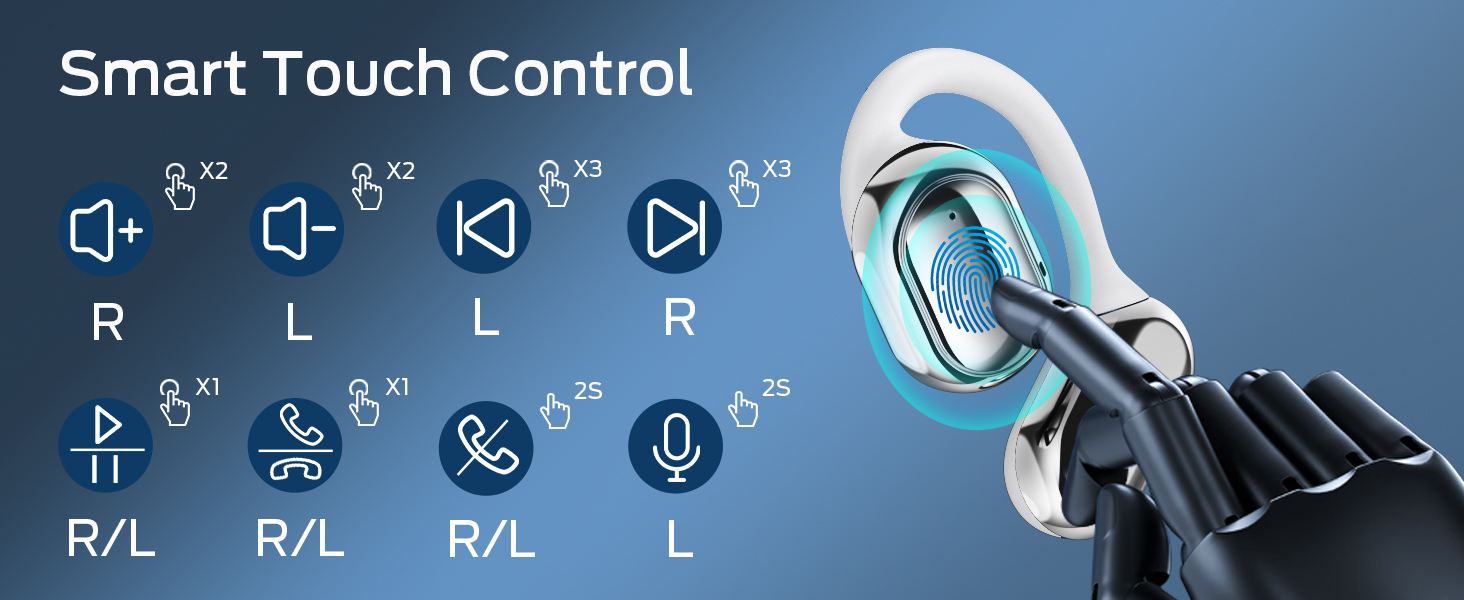
Image: A visual guide to the smart touch controls on the BUGANI Open Ear Headphones, detailing single, double, triple taps, and long presses for various functions.
6.3 കോളുകൾ ചെയ്യലും സ്വീകരിക്കലും
The built-in dual microphones with environmental noise reduction technology ensure clear calls.
- മറുപടി കോൾ: ഒന്നുകിൽ ഇയർബഡിൽ ഒരിക്കൽ ടാപ്പ് ചെയ്യുക.
- കോൾ അവസാനിപ്പിക്കുക: ഏതെങ്കിലും ഇയർബഡിൽ 2 സെക്കൻഡ് അമർത്തിപ്പിടിക്കുക.
- കോൾ നിരസിക്കുക: ഏതെങ്കിലും ഇയർബഡിൽ 2 സെക്കൻഡ് അമർത്തിപ്പിടിക്കുക.

Image: A man using the BUGANI Open Ear Headphones to make a phone call, emphasizing the clear call feature.
7. പരിപാലനം
7.1 വൃത്തിയാക്കൽ
- ഇയർബഡുകളും ചാർജിംഗ് കെയ്സും മൃദുവായതും ഉണങ്ങിയതും ലിന്റ് രഹിതവുമായ തുണി ഉപയോഗിച്ച് തുടയ്ക്കുക.
- അബ്രാസീവ് ക്ലീനറുകൾ, ആൽക്കഹോൾ, കെമിക്കൽ ലായകങ്ങൾ എന്നിവ ഉപയോഗിക്കരുത്.
- ചാർജിംഗ് കോൺടാക്റ്റുകൾ വൃത്തിയുള്ളതും വരണ്ടതുമാണെന്ന് ഉറപ്പാക്കുക.
7.2 സംഭരണം
- ഹെഡ്ഫോണുകൾ ഉപയോഗിക്കാത്തപ്പോൾ ചാർജിംഗ് കേസിൽ സൂക്ഷിക്കുക, അതുവഴി അവയെ സംരക്ഷിക്കാനും ചാർജ്ജ് ആയി നിലനിർത്താനും കഴിയും.
- Store in a cool, dry place, away from extreme temperatures.
7.3 ജല പ്രതിരോധം (IPX5)
The headphones are rated IPX5, meaning they are protected against low-pressure water jets from any direction. This makes them suitable for sports and running, protecting against sweat and light rain. They are not designed for swimming or submersion in water.
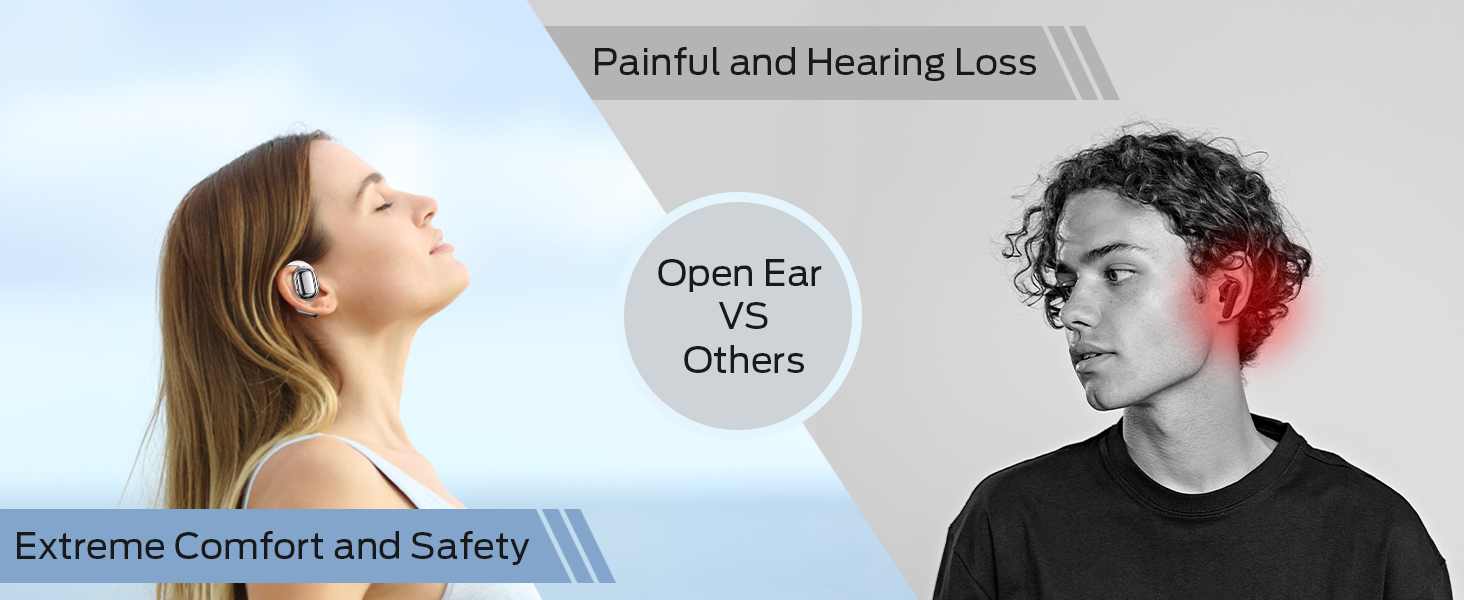
Image: A man running with water splashing on him, demonstrating the IPX5 waterproof feature of the headphones, suitable for active use.
8. പ്രശ്നപരിഹാരം
If you encounter issues with your BUGANI Open Ear Headphones, please refer to the following common solutions:
- ശബ്ദമില്ല: ഹെഡ്ഫോണുകൾ ചാർജ് ചെയ്തിട്ടുണ്ടെന്നും ശരിയായി ജോടിയാക്കിയിട്ടുണ്ടെന്നും ഹെഡ്ഫോണുകളിലെയും നിങ്ങളുടെ ഉപകരണത്തിലെയും ശബ്ദം കൂട്ടിയിട്ടുണ്ടെന്നും ഉറപ്പാക്കുക.
- ജോടിയാക്കൽ പ്രശ്നങ്ങൾ: Turn off Bluetooth on your device, then turn it back on. Place the earbuds back in the case, close it, then open it again to re-enter pairing mode. Try pairing again.
- ഇടവിട്ടുള്ള കണക്ഷൻ: Ensure you are within the Bluetooth range (up to 10 meters) and there are no significant obstacles between the headphones and your device. Avoid strong electromagnetic interference.
- ഇയർബഡുകൾ ചാർജ് ചെയ്യുന്നില്ല: Check that the charging cable is securely connected and the charging contacts on the earbuds and case are clean. Ensure the charging case itself has power.
- ഒരു ഇയർബഡ് പ്രവർത്തിക്കുന്നില്ല: Try placing both earbuds back in the case, closing it, and then taking them out again to reset the connection. If the issue persists, try re-pairing.
9 സ്പെസിഫിക്കേഷനുകൾ
| ഫീച്ചർ | സ്പെസിഫിക്കേഷൻ |
|---|---|
| മോഡലിൻ്റെ പേര് | BUGANI OpenFit |
| മോഡൽ നമ്പർ | MH22109 |
| കണക്റ്റിവിറ്റി ടെക്നോളജി | വയർലെസ് (ബ്ലൂടൂത്ത്) |
| ബ്ലൂടൂത്ത് പതിപ്പ് | 5.3 |
| ബ്ലൂടൂത്ത് ശ്രേണി | 10 മീറ്റർ |
| ചെവി പ്ലേസ്മെൻ്റ് | തുറന്ന ചെവി |
| ഡ്രൈവർ വലിപ്പം | 16mm (Dual Large Driver) |
| ബാറ്ററി ലൈഫ് (സിംഗിൾ ചാർജ്) | 6 മണിക്കൂർ വരെ |
| ആകെ പ്ലേടൈം (ചാർജിംഗ് കേസിനൊപ്പം) | 30 മണിക്കൂർ വരെ |
| ചാർജിംഗ് പോർട്ട് | ടൈപ്പ്-സി |
| വാട്ടർ റെസിസ്റ്റൻസ് റേറ്റിംഗ് | IPX5 |
| മൈക്രോഫോണുകൾ | Built-in Dual Microphones with Environmental Noise Reduction |
| അനുയോജ്യമായ ഉപകരണങ്ങൾ | ബ്ലൂടൂത്ത് പ്രാപ്തമാക്കിയ ഉപകരണങ്ങൾ (സ്മാർട്ട്ഫോണുകൾ, കമ്പ്യൂട്ടറുകൾ, ടിവികൾ) |
| മെറ്റീരിയൽ | പ്ലാസ്റ്റിക് |
| ഇനത്തിൻ്റെ ഭാരം | 6.4 ഔൺസ് |
10. വാറൻ്റിയും പിന്തുണയും
BUGANI products are designed for reliability and performance. For warranty information, please refer to the warranty card included with your purchase or visit the official BUGANI website. If you require technical support or have questions not covered in this manual, please contact BUGANI customer service through their official channels.
You can often find support contact information on the BUGANI brand store page: BUGANI Store on Amazon