
1. ഉൽപ്പന്നം കഴിഞ്ഞുview
The TECLAST T40Air is a high-performance tablet designed for various tasks, from entertainment to productivity. It features a 10.4-inch display, 16GB RAM, 256GB ROM, and runs on Android 13, powered by an octa-core processor. Its lightweight design and robust battery ensure portability and extended usage.

ചിത്രം 1.1: മുന്നിലും പിന്നിലും view of the TECLAST T40Air Tablet, showcasing its sleek design and dual rear cameras.
വീഡിയോ 1.1: ഒരു ഉദ്യോഗസ്ഥൻview of the TECLAST T40Air Android Tablet, highlighting its key features and design.
2. പ്രാരംഭ സജ്ജീകരണം
2.1 Unboxing and First Use
Carefully remove the tablet and all accessories from the packaging. Inspect the device for any physical damage. Before first use, it is recommended to fully charge the tablet.
2.2 ടാബ്ലെറ്റ് ചാർജ് ചെയ്യുന്നു
Connect the provided USB-C cable to the tablet's charging port and the other end to the 18W PD fast charging adapter. Plug the adapter into a power outlet. The battery indicator on the screen will show the charging status. A full charge typically takes approximately 2-3 hours.
2.3 പവർ ഓൺ/ഓഫ്
- പവർ ഓണാക്കാൻ: Press and hold the Power button located on the side of the tablet until the TECLAST logo appears on the screen.
- പവർ ഓഫ് ചെയ്യാൻ: Press and hold the Power button until a power menu appears. Select 'Power off' and confirm.
- പുനരാരംഭിക്കാൻ: From the power menu, select 'Restart'.
2.4 പ്രാരംഭ കോൺഫിഗറേഷൻ
ആദ്യമായി പവർ-ഓൺ ചെയ്യുമ്പോൾ, ടാബ്ലെറ്റ് പ്രാരംഭ സജ്ജീകരണ പ്രക്രിയയിലൂടെ നിങ്ങളെ നയിക്കും:
- ഭാഷ തിരഞ്ഞെടുക്കൽ: നിങ്ങൾ തിരഞ്ഞെടുത്ത ഭാഷ തിരഞ്ഞെടുക്കുക.
- Wi-Fi കണക്ഷൻ: നിങ്ങളുടെ വൈഫൈ നെറ്റ്വർക്ക് തിരഞ്ഞെടുത്ത് ഇന്റർനെറ്റിലേക്ക് കണക്റ്റുചെയ്യാൻ പാസ്വേഡ് നൽകുക.
- Google അക്കൗണ്ട്: Sign in with your Google account or create a new one. This is essential for downloading apps from the Google Play Store and syncing data.
- തീയതിയും സമയവും: ശരിയായ തീയതിയും സമയവും സജ്ജമാക്കുക, അല്ലെങ്കിൽ നെറ്റ്വർക്കിന് അത് യാന്ത്രികമായി സജ്ജമാക്കാൻ അനുവദിക്കുക.
- സുരക്ഷ: Set up a screen lock (PIN, pattern, password, or Face Unlock).
2.5 SIM Card Installation (Optional)
The T40Air supports 4G LTE connectivity. To install a SIM card:
- ടാബ്ലെറ്റിന്റെ വശത്ത് സിം കാർഡ് ട്രേ കണ്ടെത്തുക.
- ട്രേ തുറക്കാൻ നൽകിയിരിക്കുന്ന സിം എജക്റ്റർ ഉപകരണം ഉപയോഗിക്കുക.
- Place the Nano-SIM card(s) into the designated slots, ensuring correct orientation.
- ട്രേ അതിന്റെ സ്ഥാനത്ത് ക്ലിക്കു ചെയ്യുന്നത് വരെ ടാബ്ലെറ്റിലേക്ക് പതുക്കെ തിരികെ തള്ളുക.

Image 2.1: The TECLAST T40Air Tablet highlighting its 4G LTE support and SIM card tray location.
3. പ്രവർത്തന നിർദ്ദേശങ്ങൾ
3.1 ആൻഡ്രോയിഡ് 13 നാവിഗേറ്റ് ചെയ്യുന്നു
The TECLAST T40Air runs on Android 13, offering an intuitive user experience. Use touch gestures to navigate:
- ടാപ്പ് ചെയ്യുക: ഒരു ഇനം തിരഞ്ഞെടുക്കുക.
- സ്വൈപ്പ്: സ്ക്രീനുകളിലൂടെയോ ലിസ്റ്റുകളിലൂടെയോ സ്ക്രോൾ ചെയ്യുക.
- പിഞ്ച്-ടു-സൂം: ചിത്രങ്ങൾ സൂം ഇൻ ചെയ്യുകയോ ഔട്ട് ചെയ്യുകയോ ചെയ്യുക, web പേജുകൾ.
- ദീർഘനേരം അമർത്തുക: സന്ദർഭോചിത മെനുകൾ ആക്സസ് ചെയ്യുക അല്ലെങ്കിൽ ഐക്കണുകൾ നീക്കുക.
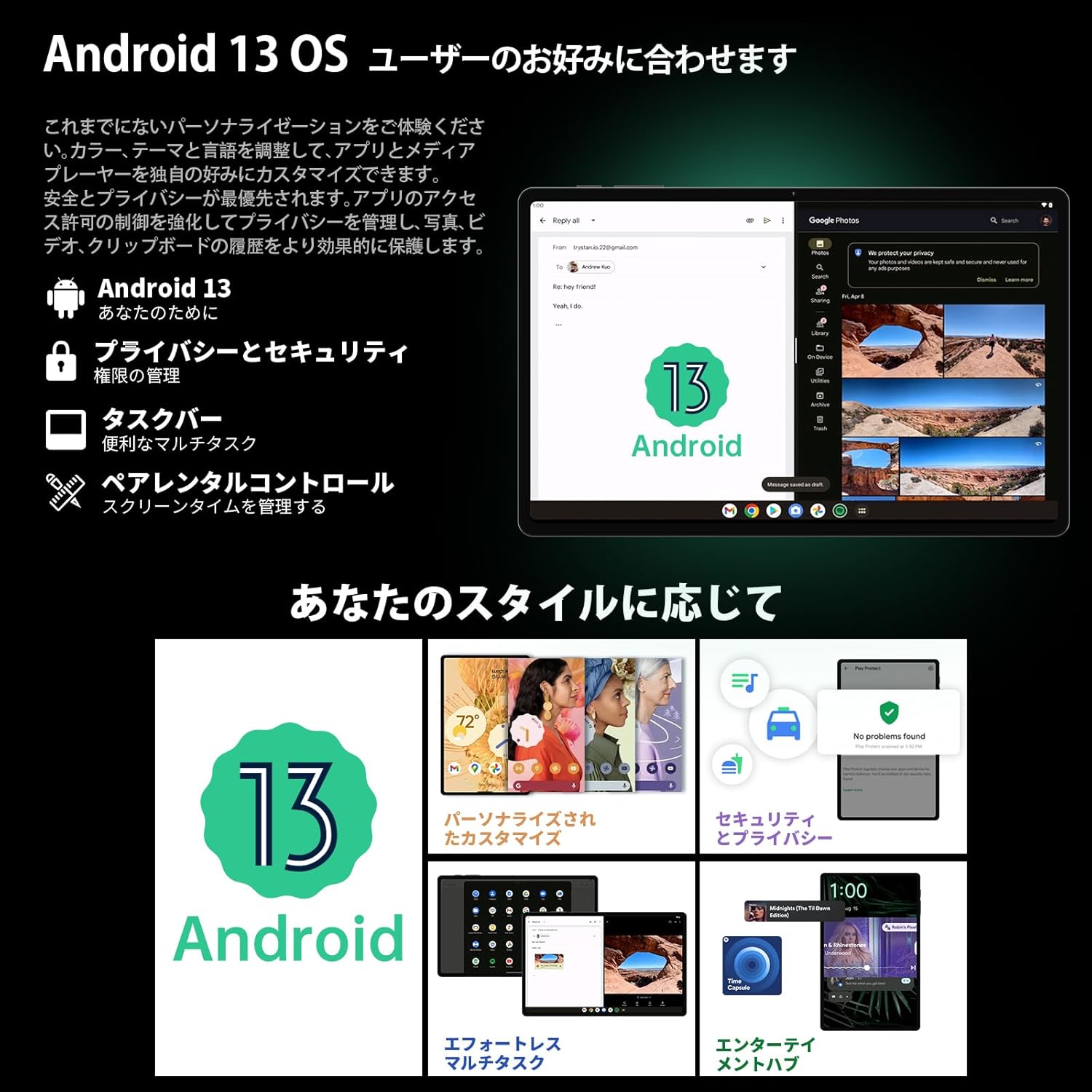
Image 3.1: The Android 13 interface on the TECLAST T40Air Tablet, showing personalization and security features.
3.2 ഡിസ്പ്ലേ സവിശേഷതകൾ
The 10.4-inch 2K FHD IPS display provides vibrant colors and sharp details. It features:
- TDDI Fully Laminated: Enhances touch responsiveness and visual clarity.
- നേത്ര സംരക്ഷണ മോഡ്: കണ്ണിന്റെ ആയാസം തടയുന്നതിന് നീല വെളിച്ചം കുറയ്ക്കുന്നു.
- വായനാ രീതി: Optimizes the screen for comfortable reading.
- Dark Mode & Dim Mode: Adjusts screen brightness and color for different lighting conditions.

Image 3.2: Visual representation of the TECLAST T40Air Tablet's display features, including eye protection and reading modes.
3.3 ക്യാമറ ഉപയോഗം
The tablet is equipped with a 13MP rear dual camera and an 8MP front camera.
- ഫോട്ടോ എടുക്കുന്നു: ക്യാമറ ആപ്പ് തുറന്ന് നിങ്ങളുടെ ഷോട്ട് ഫ്രെയിം ചെയ്യുക, ഷട്ടർ ബട്ടൺ ടാപ്പ് ചെയ്യുക.
- വീഡിയോകൾ റെക്കോർഡുചെയ്യുന്നു: ക്യാമറ ആപ്പിൽ വീഡിയോ മോഡിലേക്ക് മാറി റെക്കോർഡ് ബട്ടൺ ടാപ്പ് ചെയ്യുക.
- മുൻ ക്യാമറ: Use for video calls and selfies.

Image 3.3: The TECLAST T40Air Tablet showcasing its camera capabilities and 3.5mm headphone jack.
3.4 ഓഡിയോയും കണക്റ്റിവിറ്റിയും
- SWEET 4 Speakers: Enjoy immersive audio with the tablet's quad-speaker system and Smart K Digital Ampജീവൻ.
- 3.5 എംഎം ഹെഡ്ഫോൺ ജാക്ക്: Connect your wired headphones for private listening.
- വൈഫൈ: Supports 2.4GHz and 5GHz dual-band Wi-Fi (802.11ac) for stable and fast internet.
- ബ്ലൂടൂത്ത് 5.0: Connect wireless accessories like headphones, keyboards, and mice.
- VoLTE: Enables high-quality voice calls over 4G LTE networks.
3.5 ഫേസ് അൺലോക്ക്
The tablet supports Face Unlock for convenient and secure access. Set it up in the Security settings. Ensure good lighting conditions for optimal performance.
4. പരിപാലനം
4.1 ടാബ്ലെറ്റ് വൃത്തിയാക്കൽ
നിങ്ങളുടെ ടാബ്ലെറ്റ് വൃത്തിയാക്കാൻ, മൃദുവായ, ലിന്റ് രഹിത തുണി ഉപയോഗിക്കുക. കഠിനമായ പാടുകൾക്ക്, ചെറുതായി dampതുണിയിൽ വെള്ളം അല്ലെങ്കിൽ സ്ക്രീൻ ക്ലീനർ ഉപയോഗിക്കുക. കഠിനമായ രാസവസ്തുക്കൾ, ഉരച്ചിലുകൾ ഉള്ള വസ്തുക്കൾ അല്ലെങ്കിൽ അമിതമായ ഈർപ്പം എന്നിവ ഉപയോഗിക്കുന്നത് ഒഴിവാക്കുക.
4.2 ബാറ്ററി കെയർ
- ടാബ്ലെറ്റ് കടുത്ത താപനിലയിൽ ഏൽപ്പിക്കുന്നത് ഒഴിവാക്കുക.
- ബാറ്ററി ഇടയ്ക്കിടെ പൂർണ്ണമായും തീർന്നുപോകാൻ അനുവദിക്കരുത്.
- Use the original charger or a certified 18W PD charger for optimal charging.
4.3 സോഫ്റ്റ്വെയർ അപ്ഡേറ്റുകൾ
നിങ്ങളുടെ ടാബ്ലെറ്റിൽ ഏറ്റവും പുതിയ സവിശേഷതകൾ, സുരക്ഷാ പാച്ചുകൾ, പ്രകടന മെച്ചപ്പെടുത്തലുകൾ എന്നിവ ഉറപ്പാക്കാൻ സോഫ്റ്റ്വെയർ അപ്ഡേറ്റുകൾ പതിവായി പരിശോധിച്ച് ഇൻസ്റ്റാൾ ചെയ്യുക. പോകുക ക്രമീകരണങ്ങൾ > സിസ്റ്റം > സിസ്റ്റം അപ്ഡേറ്റ്.
4.4 സ്റ്റോറേജ് മാനേജ്മെൻ്റ്
The tablet comes with 256GB of internal storage, expandable via microSD card up to 1TB. Regularly manage your storage by:
- അനാവശ്യമായി ഇല്ലാതാക്കുന്നു fileകളും ആപ്പുകളും.
- Moving large fileഒരു മൈക്രോ എസ്ഡി കാർഡിലേക്ക് എസ്.
- Utilizing cloud storage services.

Image 4.1: The TECLAST T40Air Tablet highlighting its 16GB RAM, 256GB ROM, and support for microSD card expansion.
5. പ്രശ്നപരിഹാരം
This section addresses common issues you might encounter with your TECLAST T40Air Tablet.
5.1 ഉപകരണം ഓണാക്കുന്നില്ല
- ബാറ്ററി ആവശ്യത്തിന് ചാർജ്ജ് ചെയ്തിട്ടുണ്ടെന്ന് ഉറപ്പാക്കുക. ചാർജർ കണക്റ്റ് ചെയ്ത് പവർ ഓൺ ചെയ്യാൻ ശ്രമിക്കുന്നതിന് മുമ്പ് കുറച്ച് മിനിറ്റ് കാത്തിരിക്കുക.
- പുനരാരംഭിക്കാൻ നിർബന്ധിക്കുന്നതിന് പവർ ബട്ടൺ കുറഞ്ഞത് 10-15 സെക്കൻഡ് അമർത്തിപ്പിടിക്കുക.
5.2 വൈഫൈ കണക്ഷൻ പ്രശ്നങ്ങൾ
- Check if Wi-Fi is enabled in ക്രമീകരണങ്ങൾ > നെറ്റ്വർക്കും ഇന്റർനെറ്റും > വൈ-ഫൈ.
- നിങ്ങൾ ശരിയായ വൈഫൈ പാസ്വേഡ് നൽകിയിട്ടുണ്ടെന്ന് ഉറപ്പാക്കുക.
- നിങ്ങളുടെ വൈഫൈ റൂട്ടറും ടാബ്ലെറ്റും പുനരാരംഭിക്കുക.
- പ്രശ്നം ഒറ്റപ്പെടുത്താൻ മറ്റൊരു വൈഫൈ നെറ്റ്വർക്കിലേക്ക് കണക്റ്റ് ചെയ്യാൻ ശ്രമിക്കുക.
5.3 മന്ദഗതിയിലുള്ള പ്രകടനം
- ഉപയോഗിക്കാത്ത പശ്ചാത്തല ആപ്ലിക്കേഷനുകൾ അടയ്ക്കുക.
- Clear cache data for apps that are running slowly (ക്രമീകരണങ്ങൾ > ആപ്പുകൾ > [ആപ്പ് നാമം] > സംഭരണവും കാഷെയും > കാഷെ മായ്ക്കുക).
- നിങ്ങൾക്ക് സൗജന്യമായി മതിയായ സംഭരണ സ്ഥലം ഉണ്ടെന്ന് ഉറപ്പാക്കുക.
- ടാബ്ലെറ്റ് പുനരാരംഭിക്കുക.
5.4 സ്ക്രീൻ പ്രതികരിക്കുന്നില്ല
- പവർ ബട്ടൺ അമർത്തിപ്പിടിച്ചുകൊണ്ട് ടാബ്ലെറ്റ് പുനരാരംഭിക്കുക.
- സ്ക്രീൻ വൃത്തിയുള്ളതും ഈർപ്പമോ അവശിഷ്ടങ്ങളോ ഇല്ലാത്തതുമാണെന്ന് ഉറപ്പാക്കുക.
5.5 ഫാക്ടറി റീസെറ്റ് (അവസാന ആശ്രയം)
If issues persist, you may consider performing a factory reset. മുന്നറിയിപ്പ്: ഇത് നിങ്ങളുടെ ടാബ്ലെറ്റിലെ എല്ലാ ഡാറ്റയും മായ്ക്കും. തുടരുന്നതിന് മുമ്പ് പ്രധാനപ്പെട്ട ഡാറ്റയുടെ ബാക്കപ്പ് എടുക്കുക.
പോകുക ക്രമീകരണങ്ങൾ > സിസ്റ്റം > റീസെറ്റ് ഓപ്ഷനുകൾ > എല്ലാ ഡാറ്റയും മായ്ക്കുക (ഫാക്ടറി റീസെറ്റ്) കൂടാതെ സ്ക്രീനിലെ നിർദ്ദേശങ്ങൾ പാലിക്കുക.
6 സ്പെസിഫിക്കേഷനുകൾ
Below are the technical specifications for the TECLAST T40Air Tablet:
| ഫീച്ചർ | സ്പെസിഫിക്കേഷൻ |
|---|---|
| മോഡൽ നമ്പർ | T40Air |
| ഡിസ്പ്ലേ വലിപ്പം | 10.4 ഇഞ്ച് |
| സ്ക്രീൻ റെസല്യൂഷൻ | 1920 x 1080 pixels (2K FHD IPS) |
| റാം | 16 ജിബി |
| ഫ്ലാഷ് മെമ്മറി വലുപ്പം (റോം) | 256 ജിബി |
| പ്രോസസ്സർ ബ്രാൻഡ് | Rockchip or Unisoc (Octa-core) |
| ഓപ്പറേറ്റിംഗ് സിസ്റ്റം | ആൻഡ്രോയിഡ് 13 |
| വയർലെസ് തരം | 5 GHz Radio Frequency, 802.11a/b/g/n/ac |
| ബ്ലൂടൂത്ത് | ബ്ലൂടൂത്ത് 5.0 |
| ശരാശരി ബാറ്ററി ലൈഫ് | 5 മണിക്കൂർ (7200mAh) |
| ഇനത്തിൻ്റെ ഭാരം | 1.01 പൗണ്ട് (ഏകദേശം 460 ഗ്രാം) |
| ഉൽപ്പന്ന അളവുകൾ | 9.6 x 6.1 x 0.3 ഇഞ്ച് |
| പ്രത്യേക ഫീച്ചർ | ഭാരം കുറഞ്ഞ |
7. വാറൻ്റിയും പിന്തുണയും
7.1 ഉൽപ്പന്ന വാറന്റി
The TECLAST T40Air Tablet comes with a standard manufacturer's warranty. Please refer to the warranty card included in your product packaging for specific terms, conditions, and duration. Keep your proof of purchase for warranty claims.
7.2 ഉപഭോക്തൃ പിന്തുണ
If you encounter any issues not covered in this manual or require further assistance, please contact TECLAST customer support. You can typically find contact information on the official TECLAST webസൈറ്റ് അല്ലെങ്കിൽ നിങ്ങളുടെ റീട്ടെയിലറുടെ പിന്തുണാ ചാനലുകൾ വഴി.
- Visit the official TECLAST webപതിവുചോദ്യങ്ങൾക്കും പിന്തുണാ ഉറവിടങ്ങൾക്കുമുള്ള സൈറ്റ്.
- Contact the seller or retailer for product-specific support and return policies.