
awei T86
awei T86 ENC Noise Canceling Earbuds User Manual
മോഡൽ: T86
ആമുഖം
Welcome to the user manual for your awei T86 ENC Noise Canceling Earbuds. This guide provides detailed instructions on how to set up, operate, maintain, and troubleshoot your earbuds to ensure optimal performance and longevity. Please read this manual carefully before using the product.
ഉൽപ്പന്നം കഴിഞ്ഞുview
The awei T86 earbuds are designed to deliver a high-fidelity audio experience with advanced Environmental Noise Cancellation (ENC) technology. They feature a digital display charging case for convenience and extended battery life.

ചിത്രം 1: awei T86 Earbuds and Charging Case. This image shows the black awei T86 earbuds resting in their transparent charging case, which features a digital battery display showing "100".

ചിത്രം 2: awei T86 Earbuds in various colors. This image displays the awei T86 earbuds and their charging cases in multiple colors (blue, white, orange) on a colorful, layered background, highlighting the "Jelly Bean Style" and "Classy Melodies and Colors".
സ്പെസിഫിക്കേഷനുകൾ
| ഫീച്ചർ | വിശദാംശങ്ങൾ |
|---|---|
| Bluetooth Scheme | Jieli AD6976D8, V5.3 |
| സംസാര സമയം | 7 മണിക്കൂർ |
| കളിക്കുന്ന സമയം | 6 മണിക്കൂർ |
| ചാർജിംഗ് സമയം | 1.5 മണിക്കൂർ |
| ഇയർബഡ്സ് ബാറ്ററി കപ്പാസിറ്റി | 35mAh * 2 (with protective IC) |
| ചാർജിംഗ് കെയ്സ് ബാറ്ററി കപ്പാസിറ്റി | 300mAh (with protective plate) |
| കൊമ്പ് വലിപ്പം | φ13mm/32Ω |
| അളവുകൾ | 61.3 * 47.5 * 25mm (Charging Case) |
| ENC Depth (4 mics for voice call) | > -40 ദി ബി |
| വാട്ടർപ്രൂഫ് റേറ്റിംഗ് | IPX6 |
ശ്രദ്ധിക്കുക: മുൻകൂർ അറിയിപ്പ് കൂടാതെ സ്പെസിഫിക്കേഷനുകൾ മാറ്റത്തിന് വിധേയമാണ്.
സജ്ജീകരണ ഗൈഡ്
1. പ്രാരംഭ ചാർജിംഗ്
Before first use, fully charge the earbuds and the charging case. The digital display on the case will indicate the battery level.
- രണ്ട് ഇയർബഡുകളും ചാർജിംഗ് കേസിൽ വയ്ക്കുക.
- അനുയോജ്യമായ ഒരു ചാർജിംഗ് കേബിൾ ഉപയോഗിച്ച് ചാർജിംഗ് കേസ് ഒരു USB പവർ സ്രോതസ്സുമായി ബന്ധിപ്പിക്കുക.
- The display will show charging progress. A full charge typically takes about 1.5 hours.
2. ഒരു ഉപകരണവുമായി ജോടിയാക്കൽ
The awei T86 earbuds use Bluetooth 5.3 for a stable and efficient connection.
- ഇയർബഡുകൾ ചാർജിംഗ് കെയ്സിലാണെന്നും കെയ്സിന് പവർ ഉണ്ടെന്നും ഉറപ്പാക്കുക.
- Open the charging case lid. The earbuds will automatically enter pairing mode (indicated by flashing lights on the earbuds, if applicable, or a voice prompt).
- നിങ്ങളുടെ ഉപകരണത്തിൽ (സ്മാർട്ട്ഫോൺ, ടാബ്ലെറ്റ്, കമ്പ്യൂട്ടർ), ബ്ലൂടൂത്ത് ക്രമീകരണങ്ങളിലേക്ക് പോയി ബ്ലൂടൂത്ത് ഓണാക്കുക.
- ഇതിനായി തിരയുക available devices. You should see "awei T86" in the list.
- Select "awei T86" to connect. Once connected, a voice prompt will confirm the successful pairing.
Note: If pairing fails, place the earbuds back in the case, close the lid, wait a few seconds, and then repeat the steps.

ചിത്രം 3: Bluetooth 5.3 connection. This image illustrates the Bluetooth 5.3 technology, showing an earbud with internal components and a "5.3" display, emphasizing smooth, anti-electromagnetic interference, and low power consumption connectivity.
പ്രവർത്തന നിർദ്ദേശങ്ങൾ
ടച്ച് നിയന്ത്രണങ്ങൾ
The awei T86 earbuds feature intuitive touch controls for various functions:
| ആക്ഷൻ | ഫംഗ്ഷൻ |
|---|---|
| ഒറ്റ ടാപ്പ് (ഇടത്/വലത് ഇയർബഡ്) | സംഗീതം പ്ലേ ചെയ്യുക/താൽക്കാലികമായി നിർത്തുക, കോൾ സ്വീകരിക്കുക/അവസാനിപ്പിക്കുക |
| ഡബിൾ ടാപ്പ് (വലത് ഇയർബഡ്) | അടുത്ത ട്രാക്ക് |
| ഡബിൾ ടാപ്പ് (ഇടത് ഇയർബഡ്) | മുമ്പത്തെ ട്രാക്ക് |
| ട്രിപ്പിൾ ടാപ്പ് (ഇടത്/വലത് ഇയർബഡ്) | വോയ്സ് അസിസ്റ്റൻ്റ് സജീവമാക്കുക |
| Long Press (2 seconds, Left/Right Earbud) | കോൾ നിരസിക്കുക |
| Long Press (3 seconds, Left/Right Earbud) | Toggle ENC/Transparency Mode (if applicable) |
പരിസ്ഥിതി ശബ്ദം റദ്ദാക്കൽ (ENC)
The awei T86 earbuds are equipped with ENC technology, utilizing four microphones to accurately pick up your voice and reduce ambient noise during calls, ensuring clear communication.

ചിത്രം 4: ENC Voice Call for HD Speaking & Listening. This image shows a person wearing the awei T86 earbuds in a public setting, illustrating how the ENC technology helps pick up voice and reduce ambient noise for clear communication.
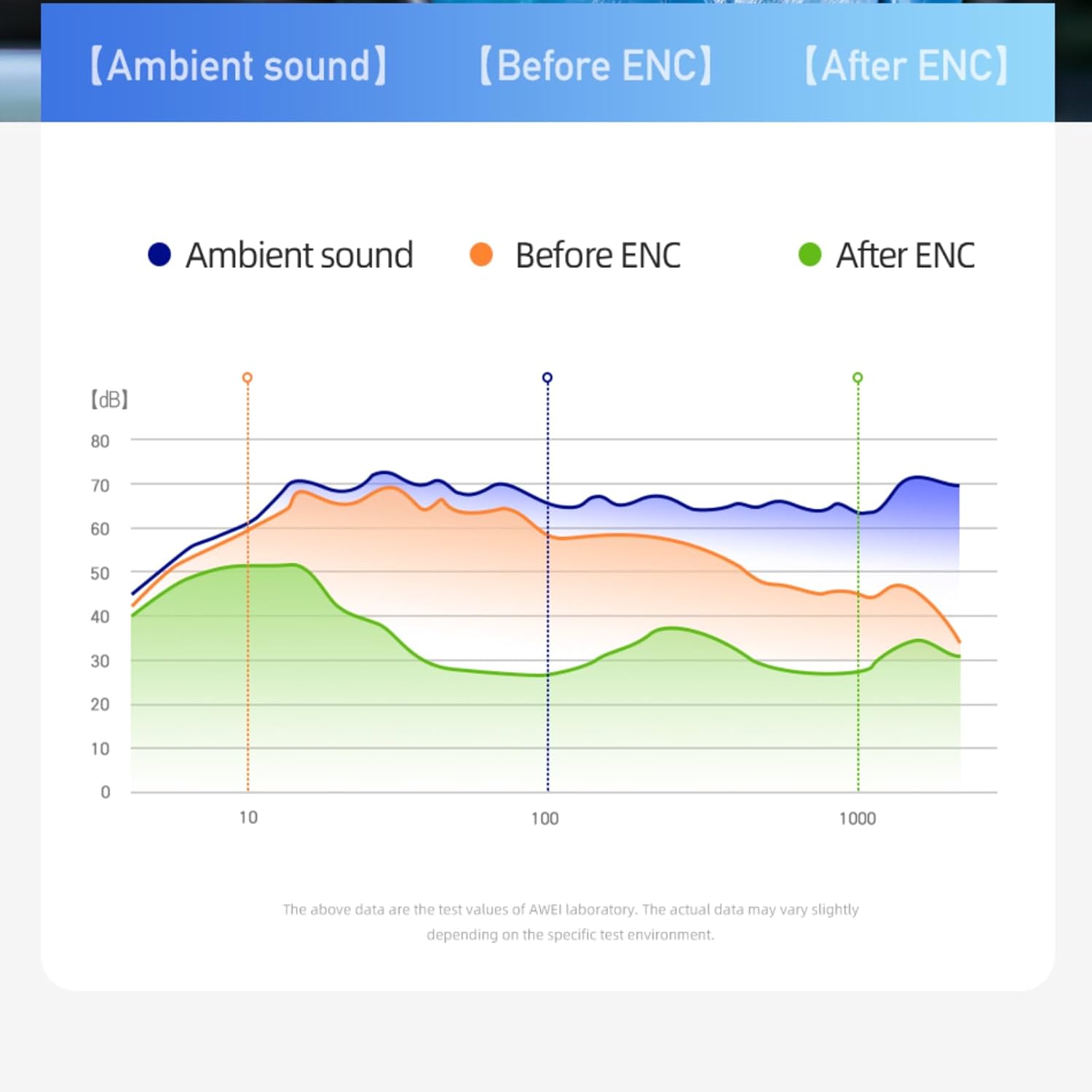
ചിത്രം 5: ENC Noise Reduction Graph. This graph visually represents the effectiveness of ENC, comparing ambient sound levels ("Ambient sound"), sound before ENC ("Before ENC"), and sound after ENC ("After ENC") across different frequencies, showing significant noise reduction.
പരിപാലനവും പരിചരണവും
Proper maintenance ensures the longevity and optimal performance of your awei T86 earbuds.
- വൃത്തിയാക്കൽ: ഇയർബഡുകളും ചാർജിംഗ് കെയ്സും മൃദുവായതും ഉണങ്ങിയതും ലിന്റ് രഹിതവുമായ തുണി ഉപയോഗിച്ച് പതിവായി വൃത്തിയാക്കുക. അബ്രാസീവ് ക്ലീനറുകളോ ലായകങ്ങളോ ഉപയോഗിക്കരുത്.
- ജല പ്രതിരോധം: The earbuds have an IPX6 waterproof rating, meaning they are resistant to strong jets of water. However, they are not designed for submersion. Avoid exposing them to excessive moisture or liquids.
- സംഭരണം: ഉപയോഗത്തിലില്ലാത്തപ്പോൾ, ഇയർബഡുകൾ ചാർജിംഗ് കേസിൽ സൂക്ഷിക്കുക, അതുവഴി അവയെ സംരക്ഷിക്കുകയും ചാർജ്ജ് ചെയ്ത് നിലനിർത്തുകയും ചെയ്യുക. നേരിട്ടുള്ള സൂര്യപ്രകാശത്തിൽ നിന്നും ഉയർന്ന താപനിലയിൽ നിന്നും അകന്ന് തണുത്തതും വരണ്ടതുമായ സ്ഥലത്ത് സൂക്ഷിക്കുക.
- ബാറ്ററി കെയർ: ബാറ്ററി ലൈഫ് നിലനിർത്താൻ, ഇയർബഡുകൾ പൂർണ്ണമായും ഡിസ്ചാർജ് ചെയ്യുന്നതും കേസ് ഇടയ്ക്കിടെ ചാർജ് ചെയ്യുന്നതും ഒഴിവാക്കുക. തുടർച്ചയായ ഉപയോഗത്തിലല്ലെങ്കിൽ പോലും അവ പതിവായി ചാർജ് ചെയ്യുക.
ട്രബിൾഷൂട്ടിംഗ്
If you encounter issues with your awei T86 earbuds, refer to the following common problems and solutions:
| പ്രശ്നം | സാധ്യമായ പരിഹാരം |
|---|---|
| ഇയർബഡുകൾ ജോടിയാക്കുന്നില്ല |
|
| ഒരു ഇയർബഡിൽ നിന്ന് ശബ്ദമില്ല |
|
| കുറഞ്ഞ ശബ്ദം അല്ലെങ്കിൽ മോശം ശബ്ദ നിലവാരം |
|
| ചാർജിംഗ് കേസ് ചാർജുചെയ്യുന്നില്ല |
|
പ്രശ്നം നിലനിൽക്കുകയാണെങ്കിൽ, ദയവായി ഉപഭോക്തൃ പിന്തുണയുമായി ബന്ധപ്പെടുക.
വാറൻ്റിയും പിന്തുണയും
Your awei T86 earbuds come with a manufacturer's warranty. Please refer to the warranty card included in your product packaging for specific terms and conditions.
For technical support, warranty claims, or further assistance, please contact awei customer service through their official webനിങ്ങൾ ഉൽപ്പന്നം വാങ്ങിയ സൈറ്റ് അല്ലെങ്കിൽ റീട്ടെയിലർ.
ഓൺലൈൻ ഉറവിടങ്ങൾ:
- Official awei Webസൈറ്റ്: www.awei.com (കുറിപ്പ്: ഇതൊരു പ്ലെയ്സ്ഹോൾഡറാണ് URL, ശരിക്ക് യഥാർത്ഥ ഉൽപ്പന്ന ഡോക്യുമെന്റേഷൻ പരിശോധിക്കുക. URL.)
Note: The product information provided in this manual is for reference only. Due to continuous product improvement, the actual product may differ slightly.
Ask a question about this manual
Ask about setup, troubleshooting, compatibility, parts, safety, or missing instructions. Manuals+ will review the question and use this page’s manual context to help answer it.